Corrupted Snipping Tool in Win7 Home Premium 64bit

JannM

New member
Local time
10:02 AM
Messages
6
hi everyone,
a few days ago i started having problems with the snipping tool. every time i click on it to capture something it freezes up the whole computer, and the only way i can fix it is to hit the shut off button until the computer shuts down. trying to do it from the start menu freezes up too, and so does the task manager. i can click on the buttons in the pop-up task manager, but nothing happens.

i'm not very computer savvy so have no idea how to fix this. i use this tool many times a day and am lost without it. can someone explain to me [in simple, plain detailed English please, remember, i'm very tech challenged when it comes to computers :confused:] how to fix this? the more details the better. since it seems to be part of the system i don't want to try anything before asking about it for fear of really messing my computer up. sigh

thanks so much,
JannM
 

My Computer My Computer

At a glance

Windows 7 Home Premium 64bit
OS
Windows 7 Home Premium 64bit
Please install Microsoft Security Essentials (link in my signature) and remove any other anti-virus programs which you may have installed, and perform a full scan with the anti-virus program I just mentioned, it is free and produced by Microsoft.

Please post back your results.

Hope this helps,

Harry
 

My Computer My Computer

Computer type
Laptop
Please install Microsoft Security Essentials (link in my signature) and remove any other anti-virus programs which you may have installed, and perform a full scan with the anti-virus program I just mentioned, it is free and produced by Microsoft.

Please post back your results.

Hope this helps,

Harry

thanks, harry. i do have MSE installed already. i had a computer tech remove Norton [which the husband insisted on having against my every objection] and install MSE at the same time, but i noticed today that not all of Norton was removed. so on top of everything else, i'll have to do that ASAP also. after i do that, i'll run the full scan [the last one took over 8 hours LOL] and see what happens. thanks for the suggestion!!!!!

JannM
 

My Computer My Computer

At a glance

Windows 7 Home Premium 64bit
OS
Windows 7 Home Premium 64bit

My Computer My Computer

At a glance

Windows 7 Home Premium 64bit
OS
Windows 7 Home Premium 64bit
hi everyone,
a few days ago i started having problems with the snipping tool. every time i click on it to capture something it freezes up the whole computer, and the only way i can fix it is to hit the shut off button until the computer shuts down. trying to do it from the start menu freezes up too, and so does the task manager. i can click on the buttons in the pop-up task manager, but nothing happens.

i'm not very computer savvy so have no idea how to fix this. i use this tool many times a day and am lost without it. can someone explain to me [in simple, plain detailed English please, remember, i'm very tech challenged when it comes to computers :confused:] how to fix this? the more details the better. since it seems to be part of the system i don't want to try anything before asking about it for fear of really messing my computer up. sigh

thanks so much,
JannM

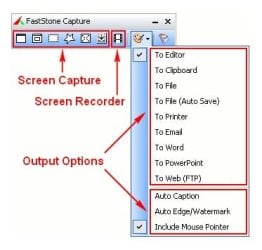
I've been using Fscapture for years - simple, free and works great.
AnswersThatWork's Graphics downloads
 

Attachments

  • FS PIC.jpg
    FS PIC.jpg
    19.9 KB · Views: 10

My Computer My Computer

At a glance

Windows 7 Professional X64Core i7 (2nd gen) i7-2600K / 3.40GHzDDR3 2400MHz (OC) 16gbIntel(R) HD Graphics 3000, -1988 Mb
Computer type
PC/Desktop
Computer Manufacturer/Model Number
Self-Built
OS
Windows 7 Professional X64
CPU
Core i7 (2nd gen) i7-2600K / 3.40GHz
Motherboard
ASUS P8Z77-V Intel 7 Series Motherboard
Memory
DDR3 2400MHz (OC) 16gb
Graphics Card(s)
Intel(R) HD Graphics 3000, -1988 Mb
Sound Card
8 ChannelsAudio Chipset Realtek ALC892
Monitor(s) Displays
LG 29UM65 Black 29"
Screen Resolution
2560 x 1080
Hard Drives
840 EVO 250 GB SSD ;2tb (2);Seagate;1tb Seagate; 750 gb Seagate; wd ext (2) 750 gb,WD 2tb X 2;WD 3TB Black
PSU
750 watt
Case
Thermaltake RX -1
Cooling
2120mm Fans Included 1Other Fan Ports 5x 200mm Fan Ports
Keyboard
Microsoft Digital Media Pro
Mouse
Microsoft Wireless 6000
Internet Speed
U-verse 18 mbps
Antivirus
MSE
Browser
Firefox, Chrome and my favorite: Pale Moon
Other Info
HdHomerun Dual Tuner.
SRS Audio Lab,
Pioneer BDR 208-DBK
PS3-What a difference in my Surround Sound Receiver!
HP 4540s - My new Toy.
Epson R280 Printer- To personalize my Dvds.
Canon MP 560 - For scanning.
Norton is garbage. IMO
 

My Computer My Computer

At a glance

Windows 10 Pro x64Intel Core i7 6700KGSkill TridentZ RGB 16GB 3600 16-16-16-36EVGA GTX 980 Ti SC x2
Computer type
PC/Desktop
Computer Manufacturer/Model Number
Skylake Special #666
OS
Windows 10 Pro x64
CPU
Intel Core i7 6700K
Motherboard
Asus Sabertooth Z170 Mark 1
Memory
GSkill TridentZ RGB 16GB 3600 16-16-16-36
Graphics Card(s)
EVGA GTX 980 Ti SC x2
Sound Card
Realtek High Definition
Monitor(s) Displays
AOC G2460PG
Screen Resolution
1920 x 1080 144Hz
Hard Drives
Samsung 860 Pro 256GB, Seagate Barracuda 4TB x2
PSU
EVGA 1000 P2, EVGA White Custom Braided Cables
Case
Corsair Vengeance C70 Gunmetal Black
Cooling
Corsair H100i v2, Corsair ML120 x2, Thermal Grizzly Kryonaut
Keyboard
Logitech G910 Orion Spectrum
Mouse
Logitech G700s
Internet Speed
Verizon Fios Quantum Gateway 75/75
Antivirus
Windows Defender, Malwarebytes Free 3.8.3
Browser
Chrome
Other Info
Corsair SP120 x4, LG Blu-ray Drive, Durabrand HT-395 100 Watt Dolby Digital Amp, Corsair H2100 Wireless 7.1 Headset
If the problem persists after installing and running a full scan with the recommended A/V above, try running
SFC -SCANNOW Command to check the integrity of all of your System files.
Here are other general Troubleshooting Steps for Windows 7

ran the sfc scannow and it said it repaired some problems but i can't access the logs. the pop-up says, simply enough, access denied. i can tell you that it didn't fix the problem.

thanks so much for all of your help, it's greatly appreciated. i made careful notes of how i did what so i can revisit it if necessary.

have a great weekend,
JannM
 

My Computer My Computer

At a glance

Windows 7 Home Premium 64bit
OS
Windows 7 Home Premium 64bit
Norton is garbage. IMO

well it's certainly a hog. my computer is running much faster since it's been removed. LOL
 

My Computer My Computer

At a glance

Windows 7 Home Premium 64bit
OS
Windows 7 Home Premium 64bit
Please install Microsoft Security Essentials (link in my signature) and remove any other anti-virus programs which you may have installed, and perform a full scan with the anti-virus program I just mentioned, it is free and produced by Microsoft.

Please post back your results.

Hope this helps,

Harry

ran the scan yesterday, took 9+ hours because i forgot to turn off screensaver LOL but my computer is completely clean, not a bad guy in sight! thanks for the suggestion!!

JannM
 

My Computer My Computer

At a glance

Windows 7 Home Premium 64bit
OS
Windows 7 Home Premium 64bit
If the problem persists after installing and running a full scan with the recommended A/V above, try running
SFC -SCANNOW Command to check the integrity of all of your System files.
Here are other general Troubleshooting Steps for Windows 7

ran the sfc scannow and it said it repaired some problems but i can't access the logs. the pop-up says, simply enough, access denied. i can tell you that it didn't fix the problem.

thanks so much for all of your help, it's greatly appreciated. i made careful notes of how i did what so i can revisit it if necessary.

have a great weekend,
JannM

Run SFC -SCANNOW Command SFC -SCANNOW Run in Command Prompt at Boot, more than once it if finds bad files until it finds no more.

If unfixable files cause performance probs it may require a Repair Install
 
Back
Top