Solved Corsair 800D Question

Andreas W

New member
Power User
Local time
9:33 PM
Messages
309
Location
Malmö, Sweden
Hi all

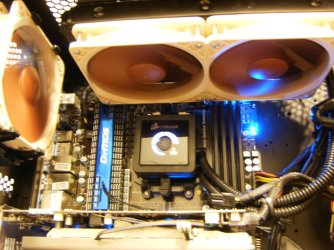
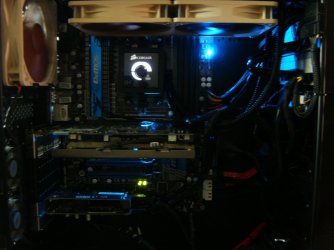
My question regards the top place that is suppose to contain fans, it got 3 places for fans but what size of fans? and I have used upp all the fan power slots on my motherboard and would like to connect the fans to my PSU instead but not quite sure what the cable is called I have looked around and I think its something like this in the link but I want others suggestion so I dont buy the wrong cable. Newegg.com - APEVIA Power 4 PIN Adapter TO 3 PIN Fan Adapter Model CVT43 (used newegg to get rid of language problems I live in Sweden)
 

My Computer

Computer type
PC/Desktop
OS
Windows 7 Home Premium x64
CPU
Intel Core i7 860 (Lynnfield)
Motherboard
Asus P7P55D (LGA1156)
Memory
Corsair Vengeance 9,9,9,24 1600Mhz 1.50v 2x4G
Graphics Card(s)
Asus nVidia 560 GTX
Sound Card
Asus Xonar DG
Monitor(s) Displays
Acer P235H & NEC E201W
Screen Resolution
1920x1080 & 900x1600
Hard Drives
2
PSU
Corsair 650 Modular
Case
Corsair 800D
Cooling
Corsair H80 with Noctua fans
Keyboard
Ducky Shine
Mouse
tT Theron
Internet Speed
100/100
Browser
IE10

My Computer

Computer Manufacturer/Model Number
Custom Build
OS
Windows 7 Ultimate x64/Windows 8 Consumer Preview x64/Ubuntu 11.04
CPU
Intel Pentium Dual Core E6700 3.2GHz
Motherboard
ASUS P5G41T-M LX
Memory
Strontium 8192MB DDR3 1333Mhz
Graphics Card(s)
msi GeForce N560GTX-M2D1GD5 1GB
Sound Card
Realtek HD Audio
Monitor(s) Displays
CHIMEI CMV 221D 22"
Screen Resolution
1680x1050
Hard Drives
Seagate Barracuda LP Green 3.5'' 2TB Internal HDD 5900RPM + WD Elements Desktop 1TB External HDD 7200RPM
PSU
SHAW Viper-1500w Gaming PSU
Case
Black eMaxx ATX Mini Tower Case
Keyboard
Microsoft Wireless Keyboard 1000
Mouse
Microsoft Wireless Optical Mouse 2000
Internet Speed
100GB @ 4.76Mbps
Hmm, its either 140 or 120 fans, but could I measure it somehow?
 

My Computer

Computer type
PC/Desktop
OS
Windows 7 Home Premium x64
CPU
Intel Core i7 860 (Lynnfield)
Motherboard
Asus P7P55D (LGA1156)
Memory
Corsair Vengeance 9,9,9,24 1600Mhz 1.50v 2x4G
Graphics Card(s)
Asus nVidia 560 GTX
Sound Card
Asus Xonar DG
Monitor(s) Displays
Acer P235H & NEC E201W
Screen Resolution
1920x1080 & 900x1600
Hard Drives
2
PSU
Corsair 650 Modular
Case
Corsair 800D
Cooling
Corsair H80 with Noctua fans
Keyboard
Ducky Shine
Mouse
tT Theron
Internet Speed
100/100
Browser
IE10
No, I'm quite sure it's only 120mm. And what do you mean by measuring? Do you already have the Corsair 800D case or are you considering buying it?
 

My Computer

Computer Manufacturer/Model Number
Custom Build
OS
Windows 7 Ultimate x64/Windows 8 Consumer Preview x64/Ubuntu 11.04
CPU
Intel Pentium Dual Core E6700 3.2GHz
Motherboard
ASUS P5G41T-M LX
Memory
Strontium 8192MB DDR3 1333Mhz
Graphics Card(s)
msi GeForce N560GTX-M2D1GD5 1GB
Sound Card
Realtek HD Audio
Monitor(s) Displays
CHIMEI CMV 221D 22"
Screen Resolution
1680x1050
Hard Drives
Seagate Barracuda LP Green 3.5'' 2TB Internal HDD 5900RPM + WD Elements Desktop 1TB External HDD 7200RPM
PSU
SHAW Viper-1500w Gaming PSU
Case
Black eMaxx ATX Mini Tower Case
Keyboard
Microsoft Wireless Keyboard 1000
Mouse
Microsoft Wireless Optical Mouse 2000
Internet Speed
100GB @ 4.76Mbps
Quote from Corsair 800D features:
"Three 140mm fans included, with the ability to add four more 120mm fans"

Those are 120mm x 3 on top and I would consider premium quiet fans like Noctua's
Yes that is the correct cable for the fans and I would connect them to the PSU before using the mobo connections, it's cleaner looking and keeps un-needed power from flowing through mobo. Another reason to use Noctua's as they are provided with speed resistors but I've found even wide open they are dead silent.

HPIM1455.JPG

HPIM1463.JPG
 

My Computer

Computer type
PC/Desktop
Computer Manufacturer/Model Number
A blend of brains, brawn and dumb luck.
OS
Windows 7 Ultimate 64
CPU
i7 3770k OC'd 4.6 @ 1.17v, also FX 8120 & i5 miniITX
Motherboard
MSI P67A-GD80 b3
Memory
32 gb G.Skill Sniper DDR3 10-12-12-31 @ 2133
Graphics Card(s)
XFX Radeon 7870 2GB DDR5
Sound Card
Sound Blaster Z Series Card
Monitor(s) Displays
(2) LG LED 23" 1920 x 1080 2ms Monitors via mini d-port
Screen Resolution
1680 X 1050 p
Hard Drives
Samsung 256 gb 830 SSD sata III
(1) 1 tb WD Black
(2) 1 tb Hitachi deskmates/sata II
(2) 1 tb WD green/sata II
(2) 3 tb Seagate Barracuda
(1) 120 gb OCZ Vertex SS
(1) Drobo 5N w/5 Seagate 3tb
PSU
EVGA modular 1000G2 80% gold rating & APC 1200 RS
Case
CoolerMaster Storm Styker
Cooling
7 case fans 140mm & 120mm, NZXT Kraken X60
Keyboard
(2) Logitech Illuminated Keyboards (1) usb (1) wireless
Mouse
Logitech G700 & T-BC21 - nano nx for the laptop
Internet Speed
Basic 120mbps down
Antivirus
Trend Micro Titanium Max Security & Malwarebytes Premium
Browser
Chrome and IE 10
Other Info
5 Noctua case fans + 3 Noctua in p/p on NZXT cooler
Integrated hot swap drive bays for 2.5" Drives
(2) Lite-on dvd/cd/Blu Ray optical 22X
Integrated fan controller and led on/off
HP Officejet Pro 8630 all-n-one
Hot-swappable 3.5" hard drive bay
Netgear Nighthawk router
Asus USB 3 & sata 6 PCIe card
Vantec IDE to sata adptr./Ultra sata adptr
Lenovo L420 i5 lappy with m sata
Drobo 5N advanced NAS
Ya thanks for answering, and notcuas are the ones I want even thou the color is wrong, and planing to put all cables behind the mobo connected my psu but should I do it even with the cpu? I use a noctua heatsink, and would 1 psu cable be enough considering that connector I linked can be built on or should I do like 3x fans then do a new cable to add the other 3 fans I got already inside?
 

My Computer

Computer type
PC/Desktop
OS
Windows 7 Home Premium x64
CPU
Intel Core i7 860 (Lynnfield)
Motherboard
Asus P7P55D (LGA1156)
Memory
Corsair Vengeance 9,9,9,24 1600Mhz 1.50v 2x4G
Graphics Card(s)
Asus nVidia 560 GTX
Sound Card
Asus Xonar DG
Monitor(s) Displays
Acer P235H & NEC E201W
Screen Resolution
1920x1080 & 900x1600
Hard Drives
2
PSU
Corsair 650 Modular
Case
Corsair 800D
Cooling
Corsair H80 with Noctua fans
Keyboard
Ducky Shine
Mouse
tT Theron
Internet Speed
100/100
Browser
IE10
I'm sure you could daisy chain up to 4 fans off one psu connection. I have kept mine to 2-3 fans per psu connection and run them wide open except for the two stock Corsair fans acting as puller fans on the other side of my H100 radiator. This is done to slow them down and quiet them down as they are crazy loud. Regarding the air cooler connection unless you have a 4 pin to two three pin jumper you'll need to run them off the psu as well and why not as the cooler you can run then better and there will be zero noise!. Then you can also investigate the Corsair link as well..........?
Corsair Link Cooling Kit - Corsair Link Kits - Corsair Link
 

My Computer

Computer type
PC/Desktop
Computer Manufacturer/Model Number
A blend of brains, brawn and dumb luck.
OS
Windows 7 Ultimate 64
CPU
i7 3770k OC'd 4.6 @ 1.17v, also FX 8120 & i5 miniITX
Motherboard
MSI P67A-GD80 b3
Memory
32 gb G.Skill Sniper DDR3 10-12-12-31 @ 2133
Graphics Card(s)
XFX Radeon 7870 2GB DDR5
Sound Card
Sound Blaster Z Series Card
Monitor(s) Displays
(2) LG LED 23" 1920 x 1080 2ms Monitors via mini d-port
Screen Resolution
1680 X 1050 p
Hard Drives
Samsung 256 gb 830 SSD sata III
(1) 1 tb WD Black
(2) 1 tb Hitachi deskmates/sata II
(2) 1 tb WD green/sata II
(2) 3 tb Seagate Barracuda
(1) 120 gb OCZ Vertex SS
(1) Drobo 5N w/5 Seagate 3tb
PSU
EVGA modular 1000G2 80% gold rating & APC 1200 RS
Case
CoolerMaster Storm Styker
Cooling
7 case fans 140mm & 120mm, NZXT Kraken X60
Keyboard
(2) Logitech Illuminated Keyboards (1) usb (1) wireless
Mouse
Logitech G700 & T-BC21 - nano nx for the laptop
Internet Speed
Basic 120mbps down
Antivirus
Trend Micro Titanium Max Security & Malwarebytes Premium
Browser
Chrome and IE 10
Other Info
5 Noctua case fans + 3 Noctua in p/p on NZXT cooler
Integrated hot swap drive bays for 2.5" Drives
(2) Lite-on dvd/cd/Blu Ray optical 22X
Integrated fan controller and led on/off
HP Officejet Pro 8630 all-n-one
Hot-swappable 3.5" hard drive bay
Netgear Nighthawk router
Asus USB 3 & sata 6 PCIe card
Vantec IDE to sata adptr./Ultra sata adptr
Lenovo L420 i5 lappy with m sata
Drobo 5N advanced NAS
Ah, right. Noctua's are a good choice once you get over the colour. For some reason, they insist on making all of their fans hideous shades of brown. Anyway, 1 PSU connector should be fine for the three fans if you use that connector of yours.
 

My Computer

Computer Manufacturer/Model Number
Custom Build
OS
Windows 7 Ultimate x64/Windows 8 Consumer Preview x64/Ubuntu 11.04
CPU
Intel Pentium Dual Core E6700 3.2GHz
Motherboard
ASUS P5G41T-M LX
Memory
Strontium 8192MB DDR3 1333Mhz
Graphics Card(s)
msi GeForce N560GTX-M2D1GD5 1GB
Sound Card
Realtek HD Audio
Monitor(s) Displays
CHIMEI CMV 221D 22"
Screen Resolution
1680x1050
Hard Drives
Seagate Barracuda LP Green 3.5'' 2TB Internal HDD 5900RPM + WD Elements Desktop 1TB External HDD 7200RPM
PSU
SHAW Viper-1500w Gaming PSU
Case
Black eMaxx ATX Mini Tower Case
Keyboard
Microsoft Wireless Keyboard 1000
Mouse
Microsoft Wireless Optical Mouse 2000
Internet Speed
100GB @ 4.76Mbps
Yes the Noc's are an acquired taste? I even called them and asked if they would reconsider as I felt that if they offered a basic black model they would sell even better. Oh......it was like I had just told him he was adopted ! The tone of the whole conversation turned and even though I'm sure they must get 10's of calls a week if not a day it was as if he'd heard this for the first time. It must be that beige and brown resonate less than black???lol
 

My Computer

Computer type
PC/Desktop
Computer Manufacturer/Model Number
A blend of brains, brawn and dumb luck.
OS
Windows 7 Ultimate 64
CPU
i7 3770k OC'd 4.6 @ 1.17v, also FX 8120 & i5 miniITX
Motherboard
MSI P67A-GD80 b3
Memory
32 gb G.Skill Sniper DDR3 10-12-12-31 @ 2133
Graphics Card(s)
XFX Radeon 7870 2GB DDR5
Sound Card
Sound Blaster Z Series Card
Monitor(s) Displays
(2) LG LED 23" 1920 x 1080 2ms Monitors via mini d-port
Screen Resolution
1680 X 1050 p
Hard Drives
Samsung 256 gb 830 SSD sata III
(1) 1 tb WD Black
(2) 1 tb Hitachi deskmates/sata II
(2) 1 tb WD green/sata II
(2) 3 tb Seagate Barracuda
(1) 120 gb OCZ Vertex SS
(1) Drobo 5N w/5 Seagate 3tb
PSU
EVGA modular 1000G2 80% gold rating & APC 1200 RS
Case
CoolerMaster Storm Styker
Cooling
7 case fans 140mm & 120mm, NZXT Kraken X60
Keyboard
(2) Logitech Illuminated Keyboards (1) usb (1) wireless
Mouse
Logitech G700 & T-BC21 - nano nx for the laptop
Internet Speed
Basic 120mbps down
Antivirus
Trend Micro Titanium Max Security & Malwarebytes Premium
Browser
Chrome and IE 10
Other Info
5 Noctua case fans + 3 Noctua in p/p on NZXT cooler
Integrated hot swap drive bays for 2.5" Drives
(2) Lite-on dvd/cd/Blu Ray optical 22X
Integrated fan controller and led on/off
HP Officejet Pro 8630 all-n-one
Hot-swappable 3.5" hard drive bay
Netgear Nighthawk router
Asus USB 3 & sata 6 PCIe card
Vantec IDE to sata adptr./Ultra sata adptr
Lenovo L420 i5 lappy with m sata
Drobo 5N advanced NAS
Alright thanks for all the info and now I can get a bit less cables sticking around since the ones to the noctua fans are rather long so atm they go a bit every in the chassi. So this is the last question before I get into action on fixing this. If I connect every fan to the PSU I wont get any reads from the sensors right indicating how warm the CPU is or that dont matter?
 

My Computer

Computer type
PC/Desktop
OS
Windows 7 Home Premium x64
CPU
Intel Core i7 860 (Lynnfield)
Motherboard
Asus P7P55D (LGA1156)
Memory
Corsair Vengeance 9,9,9,24 1600Mhz 1.50v 2x4G
Graphics Card(s)
Asus nVidia 560 GTX
Sound Card
Asus Xonar DG
Monitor(s) Displays
Acer P235H & NEC E201W
Screen Resolution
1920x1080 & 900x1600
Hard Drives
2
PSU
Corsair 650 Modular
Case
Corsair 800D
Cooling
Corsair H80 with Noctua fans
Keyboard
Ducky Shine
Mouse
tT Theron
Internet Speed
100/100
Browser
IE10
No the fans are only able to be controlled by the mobo if they are both connected to the single 4 pin post near the cpu. I've found that with premium coolers with quiet fan or fans then it's best to run them wide open all the time. You may add a fan controller or a 4 pin to 3 pin splitter and run the cooler fans off the CPU fan post.
Cables To Go 4-Inch 3-Pin Fan Y-Cable Internal Power Connector 27391 at TigerDirect
Even this is a 3 pin to 3 pin and it won't allow the fans to be controlled buy the mobo, only a 4 pin to 4 pin will and even then there isn't any temp. sensors involved.
 

My Computer

Computer type
PC/Desktop
Computer Manufacturer/Model Number
A blend of brains, brawn and dumb luck.
OS
Windows 7 Ultimate 64
CPU
i7 3770k OC'd 4.6 @ 1.17v, also FX 8120 & i5 miniITX
Motherboard
MSI P67A-GD80 b3
Memory
32 gb G.Skill Sniper DDR3 10-12-12-31 @ 2133
Graphics Card(s)
XFX Radeon 7870 2GB DDR5
Sound Card
Sound Blaster Z Series Card
Monitor(s) Displays
(2) LG LED 23" 1920 x 1080 2ms Monitors via mini d-port
Screen Resolution
1680 X 1050 p
Hard Drives
Samsung 256 gb 830 SSD sata III
(1) 1 tb WD Black
(2) 1 tb Hitachi deskmates/sata II
(2) 1 tb WD green/sata II
(2) 3 tb Seagate Barracuda
(1) 120 gb OCZ Vertex SS
(1) Drobo 5N w/5 Seagate 3tb
PSU
EVGA modular 1000G2 80% gold rating & APC 1200 RS
Case
CoolerMaster Storm Styker
Cooling
7 case fans 140mm & 120mm, NZXT Kraken X60
Keyboard
(2) Logitech Illuminated Keyboards (1) usb (1) wireless
Mouse
Logitech G700 & T-BC21 - nano nx for the laptop
Internet Speed
Basic 120mbps down
Antivirus
Trend Micro Titanium Max Security & Malwarebytes Premium
Browser
Chrome and IE 10
Other Info
5 Noctua case fans + 3 Noctua in p/p on NZXT cooler
Integrated hot swap drive bays for 2.5" Drives
(2) Lite-on dvd/cd/Blu Ray optical 22X
Integrated fan controller and led on/off
HP Officejet Pro 8630 all-n-one
Hot-swappable 3.5" hard drive bay
Netgear Nighthawk router
Asus USB 3 & sata 6 PCIe card
Vantec IDE to sata adptr./Ultra sata adptr
Lenovo L420 i5 lappy with m sata
Drobo 5N advanced NAS
I dont really care if they are running on full or half speed, but I would like to see how hot the CPU is so I guess I leave the CPU fans intact like I got them now and just try to figure out if I can do something better with them, my next trouble is to actualy find this adapter, I live in Sweden and I belive we lack a lot of small computer things like this. The link is the closest I have found Komplett.se - Akasa AK-CB001 Multi-fan Adapter but im not that happy about the 2 speed reduction ones since I want them to run on full power because I got a very small room, but I guess it wont matter that much if im planing on having 7 fans in the box taking up every spot.
 

My Computer

Computer type
PC/Desktop
OS
Windows 7 Home Premium x64
CPU
Intel Core i7 860 (Lynnfield)
Motherboard
Asus P7P55D (LGA1156)
Memory
Corsair Vengeance 9,9,9,24 1600Mhz 1.50v 2x4G
Graphics Card(s)
Asus nVidia 560 GTX
Sound Card
Asus Xonar DG
Monitor(s) Displays
Acer P235H & NEC E201W
Screen Resolution
1920x1080 & 900x1600
Hard Drives
2
PSU
Corsair 650 Modular
Case
Corsair 800D
Cooling
Corsair H80 with Noctua fans
Keyboard
Ducky Shine
Mouse
tT Theron
Internet Speed
100/100
Browser
IE10
CPU temp is totally separate from the PWM / CPU fan header. All the header does will control fan speed to match CPU temp if you engage that feature in the bios.
 

My Computer

Computer type
PC/Desktop
Computer Manufacturer/Model Number
A blend of brains, brawn and dumb luck.
OS
Windows 7 Ultimate 64
CPU
i7 3770k OC'd 4.6 @ 1.17v, also FX 8120 & i5 miniITX
Motherboard
MSI P67A-GD80 b3
Memory
32 gb G.Skill Sniper DDR3 10-12-12-31 @ 2133
Graphics Card(s)
XFX Radeon 7870 2GB DDR5
Sound Card
Sound Blaster Z Series Card
Monitor(s) Displays
(2) LG LED 23" 1920 x 1080 2ms Monitors via mini d-port
Screen Resolution
1680 X 1050 p
Hard Drives
Samsung 256 gb 830 SSD sata III
(1) 1 tb WD Black
(2) 1 tb Hitachi deskmates/sata II
(2) 1 tb WD green/sata II
(2) 3 tb Seagate Barracuda
(1) 120 gb OCZ Vertex SS
(1) Drobo 5N w/5 Seagate 3tb
PSU
EVGA modular 1000G2 80% gold rating & APC 1200 RS
Case
CoolerMaster Storm Styker
Cooling
7 case fans 140mm & 120mm, NZXT Kraken X60
Keyboard
(2) Logitech Illuminated Keyboards (1) usb (1) wireless
Mouse
Logitech G700 & T-BC21 - nano nx for the laptop
Internet Speed
Basic 120mbps down
Antivirus
Trend Micro Titanium Max Security & Malwarebytes Premium
Browser
Chrome and IE 10
Other Info
5 Noctua case fans + 3 Noctua in p/p on NZXT cooler
Integrated hot swap drive bays for 2.5" Drives
(2) Lite-on dvd/cd/Blu Ray optical 22X
Integrated fan controller and led on/off
HP Officejet Pro 8630 all-n-one
Hot-swappable 3.5" hard drive bay
Netgear Nighthawk router
Asus USB 3 & sata 6 PCIe card
Vantec IDE to sata adptr./Ultra sata adptr
Lenovo L420 i5 lappy with m sata
Drobo 5N advanced NAS
Oh thats great news because the cables to the cpu connector is a mess right now
 

My Computer

Computer type
PC/Desktop
OS
Windows 7 Home Premium x64
CPU
Intel Core i7 860 (Lynnfield)
Motherboard
Asus P7P55D (LGA1156)
Memory
Corsair Vengeance 9,9,9,24 1600Mhz 1.50v 2x4G
Graphics Card(s)
Asus nVidia 560 GTX
Sound Card
Asus Xonar DG
Monitor(s) Displays
Acer P235H & NEC E201W
Screen Resolution
1920x1080 & 900x1600
Hard Drives
2
PSU
Corsair 650 Modular
Case
Corsair 800D
Cooling
Corsair H80 with Noctua fans
Keyboard
Ducky Shine
Mouse
tT Theron
Internet Speed
100/100
Browser
IE10
Im back again, I got my connectors and I got a slight problem, well I wanted to run all the 4 fans I have on 1 of these connector, but my 2 140mm noctua fans did not wanted to start on 5 volt connector, and I need to have 1 of the smaller fan that is on my noctua heatpipe connected to the cpu pin, if I dont have that I will get a CPU fan error notice when I start the computer and it dont want to continue booting. My question is if its possible to disable this so it boot anyway so I can get rid of the long fan cable that is now connected to my cpu pin
 

My Computer

Computer type
PC/Desktop
OS
Windows 7 Home Premium x64
CPU
Intel Core i7 860 (Lynnfield)
Motherboard
Asus P7P55D (LGA1156)
Memory
Corsair Vengeance 9,9,9,24 1600Mhz 1.50v 2x4G
Graphics Card(s)
Asus nVidia 560 GTX
Sound Card
Asus Xonar DG
Monitor(s) Displays
Acer P235H & NEC E201W
Screen Resolution
1920x1080 & 900x1600
Hard Drives
2
PSU
Corsair 650 Modular
Case
Corsair 800D
Cooling
Corsair H80 with Noctua fans
Keyboard
Ducky Shine
Mouse
tT Theron
Internet Speed
100/100
Browser
IE10
Yes in your bios should be a area regarding the cpu fan and heat warning and disable this as you know your fans are spinning off 12v psu power and the CPU is running max cool all the time !
 

My Computer

Computer type
PC/Desktop
Computer Manufacturer/Model Number
A blend of brains, brawn and dumb luck.
OS
Windows 7 Ultimate 64
CPU
i7 3770k OC'd 4.6 @ 1.17v, also FX 8120 & i5 miniITX
Motherboard
MSI P67A-GD80 b3
Memory
32 gb G.Skill Sniper DDR3 10-12-12-31 @ 2133
Graphics Card(s)
XFX Radeon 7870 2GB DDR5
Sound Card
Sound Blaster Z Series Card
Monitor(s) Displays
(2) LG LED 23" 1920 x 1080 2ms Monitors via mini d-port
Screen Resolution
1680 X 1050 p
Hard Drives
Samsung 256 gb 830 SSD sata III
(1) 1 tb WD Black
(2) 1 tb Hitachi deskmates/sata II
(2) 1 tb WD green/sata II
(2) 3 tb Seagate Barracuda
(1) 120 gb OCZ Vertex SS
(1) Drobo 5N w/5 Seagate 3tb
PSU
EVGA modular 1000G2 80% gold rating & APC 1200 RS
Case
CoolerMaster Storm Styker
Cooling
7 case fans 140mm & 120mm, NZXT Kraken X60
Keyboard
(2) Logitech Illuminated Keyboards (1) usb (1) wireless
Mouse
Logitech G700 & T-BC21 - nano nx for the laptop
Internet Speed
Basic 120mbps down
Antivirus
Trend Micro Titanium Max Security & Malwarebytes Premium
Browser
Chrome and IE 10
Other Info
5 Noctua case fans + 3 Noctua in p/p on NZXT cooler
Integrated hot swap drive bays for 2.5" Drives
(2) Lite-on dvd/cd/Blu Ray optical 22X
Integrated fan controller and led on/off
HP Officejet Pro 8630 all-n-one
Hot-swappable 3.5" hard drive bay
Netgear Nighthawk router
Asus USB 3 & sata 6 PCIe card
Vantec IDE to sata adptr./Ultra sata adptr
Lenovo L420 i5 lappy with m sata
Drobo 5N advanced NAS
Ok, and thanks for coming back to me, I will see if I can find this option its probably easy to find but since I am actualy looking for it I will most likely miss it
 

My Computer

Computer type
PC/Desktop
OS
Windows 7 Home Premium x64
CPU
Intel Core i7 860 (Lynnfield)
Motherboard
Asus P7P55D (LGA1156)
Memory
Corsair Vengeance 9,9,9,24 1600Mhz 1.50v 2x4G
Graphics Card(s)
Asus nVidia 560 GTX
Sound Card
Asus Xonar DG
Monitor(s) Displays
Acer P235H & NEC E201W
Screen Resolution
1920x1080 & 900x1600
Hard Drives
2
PSU
Corsair 650 Modular
Case
Corsair 800D
Cooling
Corsair H80 with Noctua fans
Keyboard
Ducky Shine
Mouse
tT Theron
Internet Speed
100/100
Browser
IE10
I'm thinking about getting a 800D myself and have been looking around the Corsair H100 fits perfectly where the top fans would go and has excellent reviews. I'm unsure if you'd be interested and I'm a bit considered about the cooling in this case myself - as it's my first build - but the H100 seems like nice way to go. :)
 

My Computer

OS
Windows 7 x64
I got the H80 with push/pull and my idle temps are around 35. with my i7 860 @ 3.77, max temps are around 60-67 I think so I bet your H100 would give even better temps
 

My Computer

Computer type
PC/Desktop
OS
Windows 7 Home Premium x64
CPU
Intel Core i7 860 (Lynnfield)
Motherboard
Asus P7P55D (LGA1156)
Memory
Corsair Vengeance 9,9,9,24 1600Mhz 1.50v 2x4G
Graphics Card(s)
Asus nVidia 560 GTX
Sound Card
Asus Xonar DG
Monitor(s) Displays
Acer P235H & NEC E201W
Screen Resolution
1920x1080 & 900x1600
Hard Drives
2
PSU
Corsair 650 Modular
Case
Corsair 800D
Cooling
Corsair H80 with Noctua fans
Keyboard
Ducky Shine
Mouse
tT Theron
Internet Speed
100/100
Browser
IE10
Back
Top