

- Local time
- 1:23 AM
- Messages
- 679
So I finally went away and upgraded my hardware from FM1 to FM2, the performance is great as stock. However, since I got an unlocked chip, I want to overclock it.
Before this I wanted to stress the CPU to be sure it would be stable in it's stock core with it's turbo functions and such.
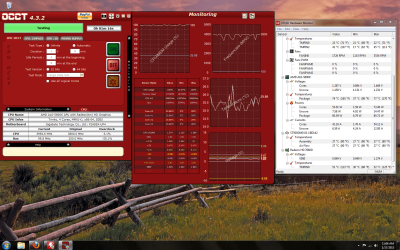
However, there is something funny. I use OCCT for tests. It was reporting that the CPU temperature was 0C unless there is load.
HWMonitor which supposedly reads from the motherboard directly (and OCCT doesn't?) says that on -idle- the CPU sits around 35 which seems okay and accurate, but if I select another window it randomly jumps to to 46 or 57 whereas OCCT only jumps up to 6C.
So I begin the stress test. OCCT is reporting temperatures of 30 Celsius under load, but HWMonitor reports that the temperatures are 77C? That's too close to what the CPU maximum temperature is registered at by the software, Max temperature should be 80, however in comparison to my older APU I would prefer to keep it under 65. With realistic readings of course.
The heatsink is as warm as the case, and the air being pushed away by the heatsink fan is colder than the air expelled from the PSU.
Would this mean my sensors are shot? And do you believe it would be a good reason to either replace the motherboard OR CPU?
Screenshot of test and temperature readings.
EDIT: While looking at the motherboard temperatures, there is a reading that fluctuates around 43-45 which would seem more adequate to the CPU, could it also be that monitoring programs still don't offer support for this chip? Or Could it be reading the chipset which is included within the CPU?
Before this I wanted to stress the CPU to be sure it would be stable in it's stock core with it's turbo functions and such.
However, there is something funny. I use OCCT for tests. It was reporting that the CPU temperature was 0C unless there is load.
HWMonitor which supposedly reads from the motherboard directly (and OCCT doesn't?) says that on -idle- the CPU sits around 35 which seems okay and accurate, but if I select another window it randomly jumps to to 46 or 57 whereas OCCT only jumps up to 6C.
So I begin the stress test. OCCT is reporting temperatures of 30 Celsius under load, but HWMonitor reports that the temperatures are 77C? That's too close to what the CPU maximum temperature is registered at by the software, Max temperature should be 80, however in comparison to my older APU I would prefer to keep it under 65. With realistic readings of course.
The heatsink is as warm as the case, and the air being pushed away by the heatsink fan is colder than the air expelled from the PSU.
Would this mean my sensors are shot? And do you believe it would be a good reason to either replace the motherboard OR CPU?
Screenshot of test and temperature readings.
EDIT: While looking at the motherboard temperatures, there is a reading that fluctuates around 43-45 which would seem more adequate to the CPU, could it also be that monitoring programs still don't offer support for this chip? Or Could it be reading the chipset which is included within the CPU?
Attachments
My Computer
At a glance
Windows 7 professional X64AMD A10-5800K OC@ 4.4Ghz.8GB Kingston HyperX Blu 1333mhzXFX HD7870 2GB Core Edition
- Computer type
- PC/Desktop
- OS
- Windows 7 professional X64
- CPU
- AMD A10-5800K OC@ 4.4Ghz.
- Motherboard
- Gigabyte F2A85X-UP4
- Memory
- 8GB Kingston HyperX Blu 1333mhz
- Graphics Card(s)
- XFX HD7870 2GB Core Edition
- Monitor(s) Displays
- Acer AL2216W
- Screen Resolution
- 1680x1050
- Hard Drives
- Seagate Barracuda 500gb 7200rpm
Seagate Barracuda 1.5TB 7200rpm
- PSU
- Cooler Master Silent Pro M 850W
- Case
- Thermaltake Commander MS-I
- Cooling
- Cooler Master N520
- Mouse
- Logitech M504
- Internet Speed
- 10Mbps


