Could pressing power button(Hard shutdown) damage laptop in this scena

James202

New member
Local time
11:11 PM
Messages
13
Basically when I went on and click troubleshoot "Display Aero desktop Effects" my laptop displayed the blue screen of death(BSOD) and the laptop turned off itself, so I had to press the power button to turn it on.

I had found out the problem which caused it which was the anti-virus software activating when the troubleshoot was scanning the laptop so I disabled it for a short time and it finally worked when I clicked "Display Aero Desktop Effects",

My question is:Could pressing the power button on when the laptop has just switched off damage the laptop in terms of components/hardware/software? (Not sure if this is called a cold-boot or hard boot) or Pressing the power button (Hard shutdown) damage the laptop? I'm a bit worried
 

My Computer My Computer

At a glance

Windows 7 Professionali7 2670QM8GBNvidia GT 555
Computer type
Laptop
Computer Manufacturer/Model Number
DELL
OS
Windows 7 Professional
CPU
i7 2670QM
Memory
8GB
Graphics Card(s)
Nvidia GT 555
Hard Drives
Hitachi 500GB 2.5 7200RPM
Antivirus
Avast
Hi James202, welcome to 7F! :)

From the way you describe the shutdown there should be no problems. Your laptop shut itself off to protect itself.

Problems arise when Windows isn't allowed to "tidy up" after a session, but in your case it sounds like your laptop did, only it did it without all the bells and whistles (silently).

Two scans to try and give you peace of mind would be: http://www.sevenforums.com/tutorials/433-disk-check.html

And: http://www.sevenforums.com/tutorials/1538-sfc-scannow-command-system-file-checker.html

If your SFC scan shows problems and repairs them or not, run it again after a reboot. You may have to do this up to three times until the scan tells you it could find no errors.

Please post back with the results.
 
Last edited:

My Computer My Computer

At a glance

Originally Win 7 Hm Prem x64 Ver 6.1.7600 Bui...Intel i3 530 2.93GHz, 2933MHz 2 Cores 4 Logic...6GB of 1,333MHz DDR3 SDRAM32MB Intel Graphics Media Accelerator HD IGChip
Computer type
PC/Desktop
Computer Manufacturer/Model Number
Gateway DX4831-01e (Mid-Tower Desktop)
OS
Originally Win 7 Hm Prem x64 Ver 6.1.7600 Build 7601-SP1 | Upgraded to Windows 10 December 14, 2019
CPU
Intel i3 530 2.93GHz, 2933MHz 2 Cores 4 Logical Processors
Motherboard
Gateway H57M01 133 megahertz
Memory
6GB of 1,333MHz DDR3 SDRAM
Graphics Card(s)
32MB Intel Graphics Media Accelerator HD IGChip
Sound Card
Realtek High Definition Audio
Monitor(s) Displays
Gateway HX2000 20inch TFT active matrix TN
Screen Resolution
1600 x 900 x 59 hertz
Hard Drives
WDC WD10EADS-00M2B0 [HDD] (1000.20 GB) -- drive 0,
HL-DT-ST DVDRAM GH41N [CD-ROM dr]
Four card readers, and Four USB 2.0
PSU
300watts.
Case
Mid-Tower Desktop
Cooling
Stock from Gateway
Keyboard
Natural Ergonomic Keyboard 4000, see Other Info
Mouse
Orig. Gateway wore out now using Insignia USB wired optical
Internet Speed
Vz FIOS 10ms png 57.64Mbps down 65.53Mbps up Speedtest.org
Antivirus
Zamana Anti-logger with Anti-malware, MSE, Windows Firewall,
Browser
IE11.0.9600.19399-Upd ver11.0.135, Firefox 68.0.1 x64
Other Info
System Specs by Belarc.

BIOS: American Megatrends Inc. P01-A0 11/17/2009

Replaced the MS 'Natural' Standard PS/2 Enhanced 101-102 Keyboard with a new Natural Ergonomic Keyboard 4000 on August 1st 2014.

Canon Pixma MG3222 Printer.

Updated to IE11 on 12102015 | Fios Quantum Router g1100

Additional AV: SpywareBlaster, manual Mbam, SAS
Afaik only pressing power button to power it off could theoretically give issues, and even then we are talking of corruption or software errors, hardware is perfectly fine either way. I did mistreat quite a few Windows 7 PCs by even pulling the wall socket and they did fine when rebooted and checked. With XP it was far far worse.

There is no thing as "hard boot". After a BSOD the computer turns off automatically, and pressing the power button when the computer is powered off is just "power on the computer".
 

My Computer My Computer

At a glance

Win 7 Pro 64-bit 7601AMD Phenom 9650 QuadCore, revision DR-B35 GB yes I run 2x 2GB and 1x 1GB, different b...NVIDIA GeForce 9800 GT 512 Mb, unknown manufa...
Computer type
PC/Desktop
Computer Manufacturer/Model Number
custom built
OS
Win 7 Pro 64-bit 7601
CPU
AMD Phenom 9650 QuadCore, revision DR-B3
Motherboard
ASUS M4A78
Memory
5 GB yes I run 2x 2GB and 1x 1GB, different brand, spank me.
Graphics Card(s)
NVIDIA GeForce 9800 GT 512 Mb, unknown manufacturer.
Sound Card
Crappy Realtek Integrated Audio
Monitor(s) Displays
Fujitsu Siemens P19-3P
Screen Resolution
1280 x 1024 x 32 bits @ 60 Hz Oh yeah, 4:3 rocks!
Hard Drives
(1) MAXTOR S TM3320613AS SATA Disk Device (2) STM35004 18AS SATA Disk Device (3) TOSHIBA USB 2.5"-HDD
PSU
whatever, around 450w
Case
Scavenged from old company PC, 10+ years old
Cooling
CPU fan, GPU fan, case fan, nothing fancy
Keyboard
Microsoft, PS/2, white.
Mouse
Optical, logitec.
Internet Speed
effective max speeds: 70-ish kB/s down 30-ish kB/s up
Antivirus
Avira, free edition.
Browser
Firefox with FXChrome to make it look like Google Chrome :P
Other Info
Was discarded by previous owner due to "horrible performance".
Was running Win Xp from a IDE drive. Yeah. Was a pain.
SATA II drive and Win7 and it zips away! Yay!
If I may expand on the recent answers:

Afaik only pressing power button to power it off could theoretically give issues, and even then we are talking of corruption or software errors, hardware is perfectly fine either way. I did mistreat quite a few Windows 7 PCs by even pulling the wall socket and they did fine when rebooted and checked. With XP it was far far worse.
7 is more bulletproof than earlier versions of Windows.

With earlier versions, I remember you had to run a Disk Check first otherwise the SFC scan refused to run, and it would tell you, you had to run the Disk Check first.

There is no thing as "hard boot". After a BSOD the computer turns off automatically, and pressing the power button when the computer is powered off is just "power on the computer".
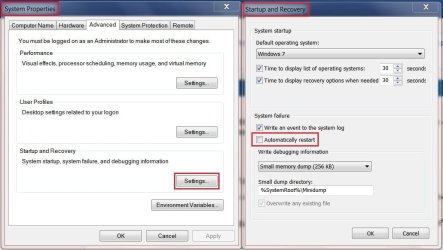
There are situations where the machine will or will not automatically restart after a BSOD, to ensure that it does not or maybe you do want it to try and restart:

  • Go to Control Panel\All Control Panel Items\System and click on Advanced system settings in the left panel.
  • Make sure you are on the Advanced Tab >Click on Settings in Startup and recovery.
  • Uncheck Automatic Restart >Click OK.
  • If it is already unchecked and you want a restart check the restart option >Click OK.
  • Then Apply, then OK to backout of those windows.
  • Close Control Panel.
sf9.jpg


Finally, a hard boot is the same as cold boot: What is cold boot? - Webopedia
 

My Computer My Computer

At a glance

Originally Win 7 Hm Prem x64 Ver 6.1.7600 Bui...Intel i3 530 2.93GHz, 2933MHz 2 Cores 4 Logic...6GB of 1,333MHz DDR3 SDRAM32MB Intel Graphics Media Accelerator HD IGChip
Computer type
PC/Desktop
Computer Manufacturer/Model Number
Gateway DX4831-01e (Mid-Tower Desktop)
OS
Originally Win 7 Hm Prem x64 Ver 6.1.7600 Build 7601-SP1 | Upgraded to Windows 10 December 14, 2019
CPU
Intel i3 530 2.93GHz, 2933MHz 2 Cores 4 Logical Processors
Motherboard
Gateway H57M01 133 megahertz
Memory
6GB of 1,333MHz DDR3 SDRAM
Graphics Card(s)
32MB Intel Graphics Media Accelerator HD IGChip
Sound Card
Realtek High Definition Audio
Monitor(s) Displays
Gateway HX2000 20inch TFT active matrix TN
Screen Resolution
1600 x 900 x 59 hertz
Hard Drives
WDC WD10EADS-00M2B0 [HDD] (1000.20 GB) -- drive 0,
HL-DT-ST DVDRAM GH41N [CD-ROM dr]
Four card readers, and Four USB 2.0
PSU
300watts.
Case
Mid-Tower Desktop
Cooling
Stock from Gateway
Keyboard
Natural Ergonomic Keyboard 4000, see Other Info
Mouse
Orig. Gateway wore out now using Insignia USB wired optical
Internet Speed
Vz FIOS 10ms png 57.64Mbps down 65.53Mbps up Speedtest.org
Antivirus
Zamana Anti-logger with Anti-malware, MSE, Windows Firewall,
Browser
IE11.0.9600.19399-Upd ver11.0.135, Firefox 68.0.1 x64
Other Info
System Specs by Belarc.

BIOS: American Megatrends Inc. P01-A0 11/17/2009

Replaced the MS 'Natural' Standard PS/2 Enhanced 101-102 Keyboard with a new Natural Ergonomic Keyboard 4000 on August 1st 2014.

Canon Pixma MG3222 Printer.

Updated to IE11 on 12102015 | Fios Quantum Router g1100

Additional AV: SpywareBlaster, manual Mbam, SAS
In any case if you still have the Dell preinstalled Win7 that is a corrupt install to begin with which no tech enthusiast would even consider running. You'll avoid problems and enjoy the native performance of Win7 by doing a Clean Reinstall - Factory OEM Windows 7.

Read the Special Note for Dell owners at the end as you'll want to test hardware diagnostics to keep that partition, but delete all others during Custom reinstall.
http://www.sevenforums.com/tutorials/219487-clean-reinstall-factory-oem-windows-7-a.html#post1839164
 
Back
Top