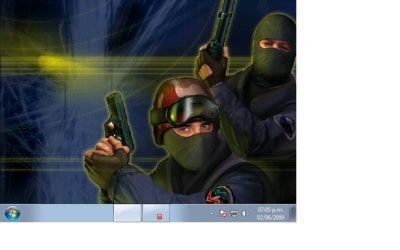
counter strike 1.6

lagging99

New member
Local time
12:43 AM
Messages
4
It loads up to the starting screen but all I see is the 2 guys in masks and no buttons.

When I move the mouse to left side I can hear the click that I'm on a button but can't get past there.

The windows task bar for some reason is displayed at bottom but can't click anything on it.
 

My Computer

OS
7
Mine runs fine with 7RC x32
 

My Computer

OS
Windows XP SP3(x32) / Windows 7 7100 (x32)
I've got probems typing in the console. Everithind else is OK. I'm using Windows 7 Build 7127 amd64 on Fujitsu-Siemens PI 2550.
 

My Computer

OS
Debian ETCH
I've not tried CS 1.6 but I will.. it looks fine in steam. I have Win 7 7100 64
 

My Computer

OS
Windows 7 Ultimate Edition x64
CPU
Q9650 E0 @ 4.0 GHz 1.304v
Motherboard
eVGA 750i FTW!
Memory
2x2GB Corsair Dominator PC2-8500C5D 1100 Mhz 5-5-5-15
Graphics Card(s)
eVGA/Gigabyte GTX 480's SLI
Sound Card
X-Fi XtremeGamer
Monitor(s) Displays
Dell U2410 24" IPS Panel (Beautiful)
Screen Resolution
1900 x 1200 & 1680 x 1050
Hard Drives
WD Caviar Black 640GB AALS x2 (Raid0) + Seagate Pro 500GB External x2
PSU
Enermax Revolution 85+ 1050w PSU
Case
Cooler Master HAF 932 H20
Cooling
Apogee GTZ, Feser 360, D5 Vario, Scythe GT 1850's
Keyboard
Logitech G11
Mouse
Logitech MX-518 / G9
Internet Speed
Fast!
Other Info
Nikon D40 DSLR 18-105mm VR - Nikon 35mm f/1.8 & 55-200mm VR
Bose Companion 3 - 16GB Patriot Xporter USB - ATH AD900's & UR Triple.Fi 10 Custom Phones w/ 32GB iPod Touch 3rd Gen -
Google Nexus One (Phone Rocks!) w/ Kingston 16GB MicroSDHC Class 10 running Amon RA1.7 and Cyan 5.06.1
i got the same problem on windows 7 rc x64 bit
I need a solution Plz
 

My Computer

OS
Windows 7
CPU
Intel core2 Duo E8500
Motherboard
Gigabyte
Memory
4gb ddr2 800 Xms2 Corsair
Graphics Card(s)
Ati Radeon HD4870 512mb
Monitor(s) Displays
Lg 19 inches
Screen Resolution
1440*900
Hard Drives
500 gb Sata
PSU
Agiler 700Watts
Case
Generic
Mouse
Logitech G5
Internet Speed
2mb
Can somebody help me to fix this problem?
 

Attachments

  • 59334516.jpg
    59334516.jpg
    37 KB · Views: 7,706

My Computer

OS
Windows 7
CPU
Intel core2 Duo E8500
Motherboard
Gigabyte
Memory
4gb ddr2 800 Xms2 Corsair
Graphics Card(s)
Ati Radeon HD4870 512mb
Monitor(s) Displays
Lg 19 inches
Screen Resolution
1440*900
Hard Drives
500 gb Sata
PSU
Agiler 700Watts
Case
Generic
Mouse
Logitech G5
Internet Speed
2mb
The only solution i know is:

Install RivaTuner ( I use a Nvidia card dunno if it works with ATI)

Go to OpenGL Settings under Driver Settings in the Main Rivatuner window.
Under the Back / depth buffering tab, change the Back buffer flipping mode from "Auto select" to "Block transfer".

Start CS again and see if it works for you guys!

Hope this helps! :D
 
I got a HD4870-512mb ATI LOL .... Somebody help me plz
 

My Computer

OS
Windows 7
CPU
Intel core2 Duo E8500
Motherboard
Gigabyte
Memory
4gb ddr2 800 Xms2 Corsair
Graphics Card(s)
Ati Radeon HD4870 512mb
Monitor(s) Displays
Lg 19 inches
Screen Resolution
1440*900
Hard Drives
500 gb Sata
PSU
Agiler 700Watts
Case
Generic
Mouse
Logitech G5
Internet Speed
2mb
Just TRY it! Why should it not work with ATI too? :confused:

The RivaTuner was built for Nvidia cards that's why. It wont work on ATI.

As for the issue it looks like a video or setup issue.
1.) download the newest ATI drivers from their web site. Uninstall the current drivers you have goto the device manager and delete the card reboot The machine and then run the install for the newest drivers. Test it.
2.) uninstall CS1.6 then run defrag
3.) install the game again not using the auto run find the setup.exe and right click it and set it as "Run as Administrator" then install.
4.) run defrag again. then test.
5.) if it still does it then set to run as administrator and try again.

Let me know if it works for you.
Also was this a clean install or an upgrade?
 

My Computer

Computer Manufacturer/Model Number
Custom Build
OS
Windows 7 Ultimate x64 SP1
CPU
AMD Phenom II 1090 3.2 six core
Motherboard
MSI 890FXA-GD65
Memory
16 gig DDR3
Graphics Card(s)
MSI R6950 2gig
Sound Card
on board
Monitor(s) Displays
Acer 23inch led
Screen Resolution
1900x1080 widescreen
Hard Drives
Seagate 1tb SATA6
2x 1tb HITACHI Deskstar
PSU
CORSAIR Enthusiast Series TX750 V2 750W
Case
CoolMaster HAF 922
Cooling
Box AMD Heatsink/Fan
Internet Speed
Cable 12Mbps/3Mbps
It was a clean Install and I install counter strike by steam..! let me try following those steps and i let you know

Ps: I'm sorry if my English is to primitive, I'm from venezuela :p
 

My Computer

OS
Windows 7
CPU
Intel core2 Duo E8500
Motherboard
Gigabyte
Memory
4gb ddr2 800 Xms2 Corsair
Graphics Card(s)
Ati Radeon HD4870 512mb
Monitor(s) Displays
Lg 19 inches
Screen Resolution
1440*900
Hard Drives
500 gb Sata
PSU
Agiler 700Watts
Case
Generic
Mouse
Logitech G5
Internet Speed
2mb
OpenGL support is dodgy and you will get issues running 1.6 :(

If you need to restore video and performance settings to their default values:

1. Right-click on the game title under the My games tab in Steam and select Properties.
2. Under the General tab click the Set launch options... button.
3. Enter the launch options you wish to apply (be sure to separate each code with a space) and click OK.
4. Close the game's Properties window and launch the game.

Use -autoconfig to reset all configuration for that game to default, you can also use -w 800 600 to set a specific resolution ;)

Just beware that if you use -autoconfig option to reset your config to default that your new settings will not be loaded until you remove the -autoconfig switch ;)


Hope it helps

Steven
 
Right now I and unistalling the old drivers for my VGA and Installing the windows7 drivers from the oficcial ATI website... I try to do what are you saying Dmex when the problem start to appear but it doesn't get fix...

Somebody told me about the TAHOME font but i check on my computer and i have that font so :S

Let's wait until i finish all this process and let u know guys thxs for the support
 

My Computer

OS
Windows 7
CPU
Intel core2 Duo E8500
Motherboard
Gigabyte
Memory
4gb ddr2 800 Xms2 Corsair
Graphics Card(s)
Ati Radeon HD4870 512mb
Monitor(s) Displays
Lg 19 inches
Screen Resolution
1440*900
Hard Drives
500 gb Sata
PSU
Agiler 700Watts
Case
Generic
Mouse
Logitech G5
Internet Speed
2mb
The RivaTuner was built for Nvidia cards that's why. It wont work on ATI.

As for the issue it looks like a video or setup issue.
1.) download the newest ATI drivers from their web site. Uninstall the current drivers you have goto the device manager and delete the card reboot The machine and then run the install for the newest drivers. Test it.
2.) uninstall CS1.6 then run defrag
3.) install the game again not using the auto run find the setup.exe and right click it and set it as "Run as Administrator" then install.
4.) run defrag again. then test.
5.) if it still does it then set to run as administrator and try again.

Let me know if it works for you.
Also was this a clean install or an upgrade?


Excelent, now i can play cs :D thxs Panita :D
 

My Computer

OS
Windows 7
CPU
Intel core2 Duo E8500
Motherboard
Gigabyte
Memory
4gb ddr2 800 Xms2 Corsair
Graphics Card(s)
Ati Radeon HD4870 512mb
Monitor(s) Displays
Lg 19 inches
Screen Resolution
1440*900
Hard Drives
500 gb Sata
PSU
Agiler 700Watts
Case
Generic
Mouse
Logitech G5
Internet Speed
2mb
Defrag, Ill remember that one. How strange :shock:

I'm starting to see a pattern where the older game installers just toss the files anywhere on the drive making the drive search all over to files creating a timeout/freeze issue. Where Windows thinks there is a problem cause it hasn't responded in a timely manner. Anytime you install a game its a good idea to run the defrag especially if the game was made before Vista was out.
(I remember reading somewhere not to defrag if you have a SSD so you might want to do a search before you do if you have a SSD drive)
 

My Computer

Computer Manufacturer/Model Number
Custom Build
OS
Windows 7 Ultimate x64 SP1
CPU
AMD Phenom II 1090 3.2 six core
Motherboard
MSI 890FXA-GD65
Memory
16 gig DDR3
Graphics Card(s)
MSI R6950 2gig
Sound Card
on board
Monitor(s) Displays
Acer 23inch led
Screen Resolution
1900x1080 widescreen
Hard Drives
Seagate 1tb SATA6
2x 1tb HITACHI Deskstar
PSU
CORSAIR Enthusiast Series TX750 V2 750W
Case
CoolMaster HAF 922
Cooling
Box AMD Heatsink/Fan
Internet Speed
Cable 12Mbps/3Mbps
I did not Defrag LOL i just install new drivers for my VGA xD
 

My Computer

OS
Windows 7
CPU
Intel core2 Duo E8500
Motherboard
Gigabyte
Memory
4gb ddr2 800 Xms2 Corsair
Graphics Card(s)
Ati Radeon HD4870 512mb
Monitor(s) Displays
Lg 19 inches
Screen Resolution
1440*900
Hard Drives
500 gb Sata
PSU
Agiler 700Watts
Case
Generic
Mouse
Logitech G5
Internet Speed
2mb
What else? Since when defragmenting stops graphic issues? :sarc:
 
Game not working for me
Error message " Available memory less than 15MB!!! - 5294432"

OS : Windows 7 RC1 (Build 7100) - 64 Bit
intel C2D 2.4Ghz, 4GB RAM, ATI Raedon 4570HD 512MB DDR3 Graphics

All latest drivers installed..
Dxdiag says - DirectX 11 with 2295 total graphics memory in display tab
 

My Computer

Computer Manufacturer/Model Number
Dell Studio 1555
OS
Windows 7
CPU
Intel® Core™ 2 Duo Processor P8600
Motherboard
Intel PM45
Memory
4GB (2X2GB) DDR2 SDRAM Memory
Graphics Card(s)
512MB ATI Mobility Radeon HD 4570
Sound Card
IDT High Definition Audio
Monitor(s) Displays
15.6” 720p WLED
Screen Resolution
1366X768 Display
Hard Drives
320GB SATA Hard Drive
Keyboard
Dell Keyboard with Touchpad (English)
Mouse
Dell Bluetooth Travel Mouse
Internet Speed
Dn 400 Kbps, Up 100 Kbps
Back
Top