couple of questions about WMP12

skandalouz

New member
Local time
10:37 PM
Messages
25
Hi,
I've just started with win7, so I'm still kinda used to XP/WMP10. Couple of things i hope still work but haven't figured out yet:
One thing that bothers me most is that I cant delete files directly from the now playing list. It only lets me remove it from the list. I know it can be done from the library, but is this my only option?
Second, when i remove files from the now playing list, the playing stops altogether, any options on this?
Third and last, when I shut down WMP12 and later reopen, my last played list is gone. Is there some way to get this back without having to save all the time?
Thanks in advance,
Skandalouz
 

My Computer My Computer

At a glance

Windows 7 Ultimate x64Intel i5-2500 @ 3.33GHz (stock)Corsair 2x4GBGigabyte GV-N560OC-1GI
OS
Windows 7 Ultimate x64
CPU
Intel i5-2500 @ 3.33GHz (stock)
Motherboard
MSI P67a-GD65 (B3)
Memory
Corsair 2x4GB
Graphics Card(s)
Gigabyte GV-N560OC-1GI
Monitor(s) Displays
Iiyama ProLite E2410HDS
Screen Resolution
1920*1080
Hard Drives
WD15EARS
WD10EARS
WD10EADS
WD5002AALX
PSU
Zalman ZM-600HP
Case
CM 690II Advanced
Keyboard
Logitech Cordless Desktop Optical
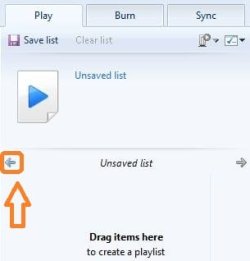
If you had an unsaved playlist in WMP and closed it, after reopening WMP look in the playlist, there will be a blue left arrow. Click it and your last unsaved playlist will appear. Sometimes it will automatically start playing from the last position, sometimes not, depends on what you were doing just before you closed WMP.

Capture.JPG

Deleting files from the playlist does not remove them from the library, to do that you need to go to Organize -> Manage libraries -> Music, then find the folder which you want to remove; highlight it and simply click Remove.

If you do remove a folder from the WMP library you won't be able to see it in the Music Library feature of Windows 7.

If you simply delete the files from inside the Library itself, , instead of using Organize libraries, chances are that the next time you start WMP, and after it automatically updates your music library, those files will appear again.

If you're trying to remove a file that is currently playing from the playlist, of course the playback will stop.
 

My Computer My Computer

At a glance

Windows 7 Home Premium x64Intel Core i5 2500K8GB DDR3nVidia GeForce GTX650 Ti BOOST
Computer type
Laptop
Computer Manufacturer/Model Number
Custom
OS
Windows 7 Home Premium x64
CPU
Intel Core i5 2500K
Motherboard
MSI MS-7750
Memory
8GB DDR3
Graphics Card(s)
nVidia GeForce GTX650 Ti BOOST
Sound Card
Realtek
Monitor(s) Displays
21' Philips
Screen Resolution
Full HD
Hard Drives
1TB
PSU
500W
Hi,
thanks for your reply.
The first thing works, thanks for that. The second.. I'm not sure I'f you understand me correctly. When I click remove file from list in the Now playing list, I would like the file to be deleted entirely from my hard drive, like was possible in WMP10. I know it can be done by deleting files in the library, but I would like it to be done from the playing list.
When I remove the playing file from the playlist it shouldn't stop, it should go on with the next file, also like in WMP10.
Regards,
Skandalouz
 

My Computer My Computer

At a glance

Windows 7 Ultimate x64Intel i5-2500 @ 3.33GHz (stock)Corsair 2x4GBGigabyte GV-N560OC-1GI
OS
Windows 7 Ultimate x64
CPU
Intel i5-2500 @ 3.33GHz (stock)
Motherboard
MSI P67a-GD65 (B3)
Memory
Corsair 2x4GB
Graphics Card(s)
Gigabyte GV-N560OC-1GI
Monitor(s) Displays
Iiyama ProLite E2410HDS
Screen Resolution
1920*1080
Hard Drives
WD15EARS
WD10EARS
WD10EADS
WD5002AALX
PSU
Zalman ZM-600HP
Case
CM 690II Advanced
Keyboard
Logitech Cordless Desktop Optical
Okay, thanks for clarifying.

First off, glad I already helped ;)

Second, I don't think you can actually delete a file from the hard drive using the playlist in WMP. If people could do that they'd end up with an empty HDD sooner or later XD
Besides, I don't really see a reason for doing that when you can delete it from the library... A second option is to find the entry in the playlist, right click it and select "Open file location". An explorer window with the folder in which the file is located will be opened and the file itself will already be highlighted, so you can also delete it from there right away.
Again, I may be misunderstanding. By "Now playing list", do you mean the playlist in the library view (not the library itself but the one in the screenshot, where it says "Drag items here to create a playlist") or the list in the new "now playing" window? Don't think there's any difference, but, oh well...

And finally, third, I don't think that there is a workaround (that I know of) which will enable this so called "automatic advancing", so perhaps you're just stuck with that one extra click.

Still, WMP12 is in my personal opinion much better than previous versions. It may be a bit different and you'll need some time to get used to it, but all in all, it completely stands up to my needs and expectations. There is always room for improvement, and yes, I did expect more new features in this version (like more ripping options, new visualizations, a better EQ etc.) but better this than nothing.
 

My Computer My Computer

At a glance

Windows 7 Home Premium x64Intel Core i5 2500K8GB DDR3nVidia GeForce GTX650 Ti BOOST
Computer type
Laptop
Computer Manufacturer/Model Number
Custom
OS
Windows 7 Home Premium x64
CPU
Intel Core i5 2500K
Motherboard
MSI MS-7750
Memory
8GB DDR3
Graphics Card(s)
nVidia GeForce GTX650 Ti BOOST
Sound Card
Realtek
Monitor(s) Displays
21' Philips
Screen Resolution
Full HD
Hard Drives
1TB
PSU
500W
Hi,
I guess both now playing lists are the same, anyhow I guess I'll have to stick to deleting files through the library and that extra click :)
regards

p.s. can't find how to close this thread. read something about "flag" icon and upper right hand corner... But if a moderator can close this for me.
 

My Computer My Computer

At a glance

Windows 7 Ultimate x64Intel i5-2500 @ 3.33GHz (stock)Corsair 2x4GBGigabyte GV-N560OC-1GI
OS
Windows 7 Ultimate x64
CPU
Intel i5-2500 @ 3.33GHz (stock)
Motherboard
MSI P67a-GD65 (B3)
Memory
Corsair 2x4GB
Graphics Card(s)
Gigabyte GV-N560OC-1GI
Monitor(s) Displays
Iiyama ProLite E2410HDS
Screen Resolution
1920*1080
Hard Drives
WD15EARS
WD10EARS
WD10EADS
WD5002AALX
PSU
Zalman ZM-600HP
Case
CM 690II Advanced
Keyboard
Logitech Cordless Desktop Optical
the flag icon is located on the top right corner of each of your posts:
report.gif ;)
 

My Computer My Computer

At a glance

Windows 7 Home Premium x64Intel Core i5 2500K8GB DDR3nVidia GeForce GTX650 Ti BOOST
Computer type
Laptop
Computer Manufacturer/Model Number
Custom
OS
Windows 7 Home Premium x64
CPU
Intel Core i5 2500K
Motherboard
MSI MS-7750
Memory
8GB DDR3
Graphics Card(s)
nVidia GeForce GTX650 Ti BOOST
Sound Card
Realtek
Monitor(s) Displays
21' Philips
Screen Resolution
Full HD
Hard Drives
1TB
PSU
500W
ah I thought that was only to report bad behaviour.
Was looking for an actual flag:)
 

My Computer My Computer

At a glance

Windows 7 Ultimate x64Intel i5-2500 @ 3.33GHz (stock)Corsair 2x4GBGigabyte GV-N560OC-1GI
OS
Windows 7 Ultimate x64
CPU
Intel i5-2500 @ 3.33GHz (stock)
Motherboard
MSI P67a-GD65 (B3)
Memory
Corsair 2x4GB
Graphics Card(s)
Gigabyte GV-N560OC-1GI
Monitor(s) Displays
Iiyama ProLite E2410HDS
Screen Resolution
1920*1080
Hard Drives
WD15EARS
WD10EARS
WD10EADS
WD5002AALX
PSU
Zalman ZM-600HP
Case
CM 690II Advanced
Keyboard
Logitech Cordless Desktop Optical
No, not just for inappropriate behaviour. You can also use it when you wish to bring a post/thread to a Staff Member's attention for any reason, including marking as Solved.
Forum Rules said:
If you feel a post violates any of these rules, or you need to bring it to the attention of a moderator (move threads/close/split/mark solved), please use the report post button to notify the moderators.
 

My Computer My Computer

At a glance

Windows 8.1 Pro RTM x64Intel Core-i5-3570K 4-core @ 3.4GHz (Ivy Brid...4 x 4GB DDR3-1600 Corsair Vengeance CMZ8GX3M2...MSI GeForce GTX770 Gaming OC 2GB
Computer type
PC/Desktop
Computer Manufacturer/Model Number
Dwarf Dwf/11/2012 r09/2013
OS
Windows 8.1 Pro RTM x64
CPU
Intel Core-i5-3570K 4-core @ 3.4GHz (Ivy Bridge) (OC 4.4GHz)
Motherboard
ASRock Z77 Extreme4-M
Memory
4 x 4GB DDR3-1600 Corsair Vengeance CMZ8GX3M2A1600C9B (16GB)
Graphics Card(s)
MSI GeForce GTX770 Gaming OC 2GB
Sound Card
Realtek High Definition on board solution (ALC 898)
Monitor(s) Displays
ViewSonic VA1912w Widescreen (VGA)
Screen Resolution
1440x900
Hard Drives
OCZ Agility 3 SSD 120GB SATA III x2 (RAID 0)
Samsung HD501LJ 500GB SATA II x2
Hitachi HDS721010CLA332 1TB SATA II
Iomega 1.5TB Ext USB 2.0
WD 2.0TB Ext USB 3.0
PSU
XFX Pro Series 850W Semi-Modular
Case
Gigabyte IF233
Cooling
1 x 120mm Front Inlet 1 x 120mm Rear Exhaust
Keyboard
Microsoft Comfort Curve Keyboard 3000 (USB)
Mouse
Microsoft Comfort Mouse 3000 for Business (USB)
Internet Speed
NetGear DG834Gv3 ADSL Modem/Router (Ethernet) ~4.0 Mb/s (O2)
Antivirus
Avast! 8.0.1497
Browser
IE 11
Other Info
Optical Drive: HL-DT-ST BD-RE BH10LS30 SATA Bluray
Lexmark S305 Printer/Scanner/Copier (USB)
WEI Score: 8.1/8.1/8.5/8.5/8.25
Asus Eee PC 1011PX Netbook (Windows 7 x86 Starter)
Back
Top