CPU at 90% average/system interrupts

stevestrib

New member
Local time
7:27 PM
Messages
3
The title says it all. I have a MSI R4830 graphics card that runs fine with XP. Windows 7 runs good without the card (Dual boot system). Windows 7 seems to not like the graphics card and system interrupts in the resource monitor using up the processor. System interrupts manages the deferred proceedure calls and interupt service routines. There are some sites about eliminating recieve livelock in an interrupt-driven kernal http://citeseerx.ist.psu.edu/viewdoc/summary?doi=10.1.1.36.6579
but these sites are a little technical for me. If there is anyone that can translate the tech talk to something more understandable I sure would like to hear from you!
One more bit of info- I did download the drivers at the top of this forum with no positive result.
 
Last edited:

My Computer

Computer Manufacturer/Model Number
Compaq Presario sr1610nx
OS
Windows 7
CPU
x86 Family 15 model 55 stepping 2AuthenticAMD 2387 Mhz
Motherboard
MSI RS482M2/RX482M2 (MS-7093)
Memory
4 GB
Graphics Card(s)
ATI Radeon HD 4800 series
Sound Card
Not using
Monitor(s) Displays
Envision
Screen Resolution
1280x1024
Hard Drives
Samsung HD501LJ
PSU
Turbolink 500W ATX ver. 2.03
Case
Compaq Presario sr1610nx
Cooling
Standard
Keyboard
PS/2
Mouse
PS/2
Internet Speed
Comcast Broadband
Other Info
Netgear Router
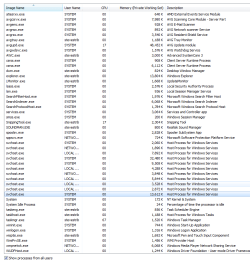
Hi, can you post a picture from your Task manager showing all the processes that are running please, And also fill in your System Specs.
 

My Computer

Computer Manufacturer/Model Number
Self Build 64bit
OS
Vista Ult64, Win7600
CPU
Intel Core 2 Quad Q6600 @ 2400 MHz 64bit OS
Motherboard
Asus P5E3 Deluxe WiFi @p 64 bit OS
Memory
4096 MB DDR3-SDRAM
Graphics Card(s)
ATI Radeon HD 3870 Series x2 Crossfired
Sound Card
Realtek on board
Monitor(s) Displays
Samsung SyncMaster - 23 inches
Screen Resolution
1680x1050 pixels at 60 Hz in True Colors
Hard Drives
Hitachi (250 GB)/Samsung 750 GB. /Barracuda 160 GB.
My Book 1 TB external..
PSU
Cooler Master 1000w
Case
Cooler Master Cosmos 1000.
Cooling
Fans and fresh air,
Keyboard
Wireless
Mouse
Wireless
Internet Speed
Never fast enough
Other Info
I use a Magnum.
I will get the system specs finished in a few more (very slow computer).
 

Attachments

  • processes.PNG
    processes.PNG
    29.1 KB · Views: 5,013

My Computer

Computer Manufacturer/Model Number
Compaq Presario sr1610nx
OS
Windows 7
CPU
x86 Family 15 model 55 stepping 2AuthenticAMD 2387 Mhz
Motherboard
MSI RS482M2/RX482M2 (MS-7093)
Memory
4 GB
Graphics Card(s)
ATI Radeon HD 4800 series
Sound Card
Not using
Monitor(s) Displays
Envision
Screen Resolution
1280x1024
Hard Drives
Samsung HD501LJ
PSU
Turbolink 500W ATX ver. 2.03
Case
Compaq Presario sr1610nx
Cooling
Standard
Keyboard
PS/2
Mouse
PS/2
Internet Speed
Comcast Broadband
Other Info
Netgear Router
I was having a similar issue that I discovered happened when I plugged in a wired network connection. The network I'm plugging into isn't even connected to the network and I've connected to it before in the past, this is new for me. The processes running are very few, less then 15 total, that is including AVG running.
 

My Computer

Computer Manufacturer/Model Number
Custom
OS
Windows 7 7600
CPU
Intel Core i7 920 Nehalem 2.66GHz
Motherboard
Asus Rampage II Extreme
Memory
12 GB
Graphics Card(s)
SLI GTX 280
Sound Card
SupremeFX X-Fi
Monitor(s) Displays
Viewsonic Something
Screen Resolution
1440x900
Hard Drives
300 Western Digital Raptor
PSU
Antec Signature SG-850 850W
Case
Antec Skeleton Black
Cooling
Stock
I had an issue where my system would lock-up for a split second every 5 seconds or so. This was due to the excessive amount of USB devices I had plugged in, maybe an IRQ usage issue. Anywho, I eliminated some device I don't use and the issue is gone!
 

My Computer

OS
Win 7 Ultimate x64
CPU
Athlon x2 6000 3.1ghz
Motherboard
MSI
Memory
4gb DDR2 800
Graphics Card(s)
ATI Radeon 4870
Sound Card
Lexicon recording Interface USB 2.0, 2 KRK RP5" monitors
Monitor(s) Displays
32" Samsung HDTV via HDMI
Same issue. All 4 CPUs over 90% 5-10 minutes after booting.
What did I do that caused this as it was FLYING days ago?
Installed Windows MOE Live Mesh.
Upgraded nVidia drivers.
Removed HP Laserjet P1009 (no driver for Win 7 64).
For 5 days it was aggravating to have to wait minutes for the PC.
Solved it.
I removed the MS MOE program.
Remembered that the nVidia Control Panel allows you to adjust Video Image Settings under Video, last option for me.
I selected nVidia to do it.
Rebooted and CPUs back to normal.

Hope this helps someone.
 

My Computer

OS
Win 7 Ultimate 64
CPU
AMD Phenom II 64 940
Memory
8 GB
Monitor(s) Displays
Envision 19
Similar problem - checked resource monitor to see system interrupts were eating 85% - 100% of CPU when idle (sounded like a vacuum cleaner...). Anyway, did the nVidia drive update - no luck.

I went to HP's site to download drivers - typed in my model # (a6720f) and downloaded the Realtek driver update from 10/2009 - and that solved it.

I also went to realtek's site, and they have an update from 11/2009, but this one didn't solve it - I hope this helps someone else as well.
 

My Computer

Computer Manufacturer/Model Number
HP a6720f
OS
Windows 7 home premium
CPU
AMD Phenom X4 9550 Quad core
Memory
6GB
Graphics Card(s)
nVidia GeForce 9100
Sound Card
Realtek High definition audio
Monitor(s) Displays
ViewSonic 19"
Hard Drives
640GB WD 5400 RPM
750GB WD Green 5400 RPM
AVG is the worst bsod causer and poor performance causer on Windows. Uninstall that and do not just disable because that will not help. Now see how great your Windows is. :D
 

My Computer

OS
Windows 7
AVG is the worst bsod causer and poor performance causer on Windows. Uninstall that and do not just disable because that will not help. Now see how great your Windows is. :D

I agree. If you want a good free Anti-Virus get Avira AntiVir Personal.
 

My Computer

Computer Manufacturer/Model Number
Compaq
OS
Windows 7 Ultimate 32-Bit (x86)
CPU
Intel Pentium Dual Core T3400
Motherboard
Wistron 3612
Memory
3GB DDR2
Graphics Card(s)
nVidia 9200M GE and Mobile Intel 4 Series Express Chipset
Sound Card
Conexant High Defininition SmartAudio 221
Screen Resolution
1366x768
Hard Drives
SAMSUNG HM251JI ATA 250GB
Internet Speed
160KBps
Get rid of Advanced System Care and other performance improving junk. Then kill AVG and use Microsoft Security Essentials. Otherwise a clean install without excess software will fix this.
 

My Computer

Computer Manufacturer/Model Number
Sony Vaio Z46GDU
OS
Windows 7 Ultimate x86-64
CPU
[email protected] 1066MHz FSB
Motherboard
Sony branded
Memory
6GB DDR3 1066MHz
Graphics Card(s)
9300M GS 256MB Dedicated (Speed) + Intel4500MHD (Stamina)
Sound Card
Realtek HD Audio
Monitor(s) Displays
13.1' WXGA
Screen Resolution
1600x900
Hard Drives
320GB 7200RPM w/ 16MB cache
Internet Speed
1MB/s
"Otherwise a clean install without excess software will fix this."

No it won't. People have tried everything including clean installs (as have I) and the problem inevitably comes back. A little search will show you that a massive number of people running nForce3 or nForce4 AMD chipsets are having this same problem. It always has the same symptoms (interrupts are overwhelming one of the CPU cores) and has nothing to do with applications that might or might not be running. Issues with applications are secondary as a result of an overwhelmed system.

Microsoft dropped the ball on this one big time. They knew about these issues during the beta testing stage and did nothing to fix the problem. Or was it on purpose they're screwing AMD for a second time -- first time was the deliberate delay in x64 software and OS drivers so that Intel could catch up. I guess their new CEO is no Steve Jobs, because they're knowingly ignoring serious defects in their product.

I guess they really don't need a few hundred thousand customers who will show them the finger and take up a Mac or move to a Linux solution. If they think I'm going to shell another $1000 to buy new hardware they are sorely mistaken.
 

My Computer

OS
Windows 7 Ultimate
CPU
2x Opteron 290 (socket 940)
Motherboard
Asus K8N-DL Dual Opteron
Memory
Corsair CMX512RE-3200LL
Graphics Card(s)
GTX8800
Sound Card
mobo
Hard Drives
Intel X25-E SLC SSD
I can't seem to get my problem solved i flased the bios using the insyde bios flash i installled all the drivers from hp website for graphics video audio network etc etc n it still aint working fine. My system keeps gettin slower after 35 mins or so.
I have an hp pavillion dv6 1245-dx core 2 duo 2.1 with 3 gb RAM and the graphics card is from realtek
 

My Computer

Computer Manufacturer/Model Number
Hp Pavilion dv6 1245 dx
OS
windows 7 32 bit
CPU
2.1 core 2 duo
Memory
3 Gb RAM
Graphics Card(s)
none
Hard Drives
320 gb
no it doesn't It doesnt have nething to do with excess software or AVG
 

My Computer

Computer Manufacturer/Model Number
Hp Pavilion dv6 1245 dx
OS
windows 7 32 bit
CPU
2.1 core 2 duo
Memory
3 Gb RAM
Graphics Card(s)
none
Hard Drives
320 gb
then try using this program: Tune-up 2010
it has an option for making Process Prioraty Low to prevent unwanted programs from taking much CPU usage, use it, you can download a free 30 days trail. if your problem is still not fixed then i think your OS should be reinstalled for a clean copy.
you can get the program from: TuneUp Utilities 2010 - Download
 

My Computer

OS
Windows 7 Ultimate x64
CPU
Core 2 Quad Q6600 2.40 GHz, 8 MB L2 Cach
Motherboard
MSI P35
Memory
4 GB DDR2
Graphics Card(s)
1GB MSI nvidia 8600 GeForce
Sound Card
Realtech
Monitor(s) Displays
Samsung 19 inch LCD
Hard Drives
500 GB SATA
Internet Speed
DSL 512Kbps :( VERY SLOW :(
I instaleed a fesh copy 3 times n these tune up utilities dun work either i am looking for smthing more stable :s
 

My Computer

Computer Manufacturer/Model Number
Hp Pavilion dv6 1245 dx
OS
windows 7 32 bit
CPU
2.1 core 2 duo
Memory
3 Gb RAM
Graphics Card(s)
none
Hard Drives
320 gb
It's usually drivers causing this so, updating everything is good idea and what I've noted about HP laptops is that they are not very compatible with windows 7, they've got so many devices on them that aren't just supported really, and causes all kinds of problems.
 

My Computer

OS
Windows 7 Professional x64
CPU
E6420 (temporary)
Motherboard
G43 Twins-FullHD (temporary)
Memory
DDR2 2x1gb (temporary)
Graphics Card(s)
Evga GTX 480 Superclocked+
Sound Card
Creative X-FI Extreme Audio Pci-E
Monitor(s) Displays
2x24" Samsung SyncMaster 2494HS
Screen Resolution
1920x1080
Hard Drives
2xSamsung 500GB
Samsung F3 1 TB
PSU
OCZ GameXstream 850w
Case
Cooler Master HAF X
Keyboard
Logitech Illuminated
Mouse
Logitech MX518
Internet Speed
40/2
then it's either like what Nikkeli said or your copy of windows is damaged, have you tried another OS? just to be sure from where the problem is.
 

My Computer

OS
Windows 7 Ultimate x64
CPU
Core 2 Quad Q6600 2.40 GHz, 8 MB L2 Cach
Motherboard
MSI P35
Memory
4 GB DDR2
Graphics Card(s)
1GB MSI nvidia 8600 GeForce
Sound Card
Realtech
Monitor(s) Displays
Samsung 19 inch LCD
Hard Drives
500 GB SATA
Internet Speed
DSL 512Kbps :( VERY SLOW :(
I went to hp centre n turns out the problem was due to overheating n not due to driver incompatibility
Gawsh u ppl r such geeks it was a simple thing n u made it sound like such a problem out of yr technicalities and nerdiness huh!
 

My Computer

Computer Manufacturer/Model Number
Hp Pavilion dv6 1245 dx
OS
windows 7 32 bit
CPU
2.1 core 2 duo
Memory
3 Gb RAM
Graphics Card(s)
none
Hard Drives
320 gb
from what i am finding it is the nforce chipset causing this issue there are no processes running extra on my PC but i still get bursts of overwhelming CPU usage on both CPUs. has anyone found a fix for the nforce chipset issues?
 

My Computer

OS
windows 7 x64
CPU
AMDx2 64
Motherboard
ASUS with Nvidia Chipset
Memory
4gb
Graphics Card(s)
Gefore 6400 512mb ram
Sound Card
onbaord
Monitor(s) Displays
19 inch widescreen
Hard Drives
sata
I went to hp centre n turns out the problem was due to overheating n not due to driver incompatibility
Gawsh u ppl r such geeks it was a simple thing n u made it sound like such a problem out of yr technicalities and nerdiness huh!
Well you should have looked at ur hardware temps before asking other questions, Too obv imo :huh:
 

My Computer

Computer type
PC/Desktop
OS
Windows 7 Professional (64x)
CPU
Intel Core i7 5930K @ 3.5GHz 15MB
Motherboard
MSI X99S Gaming 7
Memory
Kingston 16GB (4x4GB) DDR4 2133MHz CL13 XMP
Graphics Card(s)
EVGA Titan X SuperClocked 12GB
Sound Card
Intergrated
Monitor(s) Displays
Samsung SyncMaster SA300 Surround (3 monitors)
Screen Resolution
5760x1080
Hard Drives
120GB (OS SSD), 250GB (SSD Game Drive), 2TB (HDD Game Drive)
PSU
Fractual Design 1000W 80+ Certified
Case
Fractal Design Define XL R2 Black
Cooling
NZXT Kraken X61 (Top Mounted), 4x120mm (3xFront&1Bottom)
Keyboard
Razer Blackwidow Ultimate Stealth Edition
Mouse
Razer Mamba & Razer Vespula MouseMat
Internet Speed
ComHem 100/50
Browser
Mozilla Firefox, Google Chrome
Back
Top