CPU fan issues

Kulvin

New member
Local time
11:30 AM
Messages
29
Hello,

I have issues with my CPU fan.
When i turn on my CPU, it shows correctly "Windows Loading" then gets NO SIGNAL on screen and my CPU fan starts to spin fast. Then, I click on the reset button on my CPU to start back again my CPU, it shows to "Start Windows Normally" then it works fine but when using the PC for 30 minutes to 1 hour, the CPU fan starts to spin fast for like 2 - 5 seconds then run normal then spins fast in like every 10 minutes.

PC Specs:
Dell Optiplex 380 - MT Tower
400W Power Supply (Cooler Master)
Intel Core 2 Quad Q9650 @ 3.00Ghz
2 * 4GB RAM 1333MHz DDR3 (Low Density)
Nvidia GeForce GT 1030

Already clean up the dust inside the CPU and the CPU fan and has also applied new thermal paste.

Please help...
 

My Computer

Computer type
PC/Desktop
Computer Manufacturer/Model Number
Dell Optiplex 380
OS
Mauritius
CPU
Intel(R) Core(TM)2 Duo CPU E7500 @ 2.93GHz (32 bit)
Motherboard
Dell 0HN7XN
Memory
2 GB
Graphics Card(s)
Intel(R) G41 Express Chipset
Hard Drives
HDD 466GB
Antivirus
Microsoft Security Essentials
Browser
Google Chrome
I would say you have two problems.
As your computer is quite old, the CPU heat sink can be clogged with dust. Remove the case side panel and look the heat sink. If it's dirty, see if you can remove only the fan, leaving on the heat sink on the MB / CPU. If you can't remove only the fan, you will have to remove the heat sink and fan. Clean the heat sink with a paint brush and a vacuum cleaner. If you remove only the fan,you don't need to clean the old thermal paste and apply new. If you remove the heat sink and fan you will have to clean and apply new thermal paste. Be very careful with the fan blades. The blades axle is very delicate.

The fan speed up and down is normal. During heavy operation (as on startup) the CPU generates more heat and the fan speeds up. On idle, the fan speeds down.

The no start is another problem not related to the fan operation.
Once you're running windows, schedule a disk check.
Open a CMD window as admin and type:
chkdsk c: /f
It will say that the disk is in use and ask if you want to schedule to next start. =Yes.
Reboot.
Pay attention on the results, specially bad clusters, bad sectors or bad blocks.

Back to Windows, do a System File check.
Open a CMD window as admin and type:
sfc /scannow

Report
 
Last edited:

My Computers

System One System Two

  • Computer type
    PC/Desktop
    Computer Manufacturer/Model Number
    custom build
    OS
    Windows 7 HP 64
    CPU
    i5 6600K - 800MHz to 4200MHz
    Motherboard
    GA-Z170-HD3P
    Memory
    4+4G GSkill DDR4 3000
    Graphics Card(s)
    IG - Intel 530
    Monitor(s) Displays
    Samsung 226BW
    Screen Resolution
    1680x1050
    Hard Drives
    (1) -1 SM951 – 128GB M.2 AHCI PCIe SSD drive for Windows 7 and Lubuntu
    (2) -1 WD SATA 3 - 1T for Data
    (3) -1 WD SATA 3 - 1T for backup
    PSU
    Thermaltake 450W TR2 gold
    Keyboard
    Old and good Chicony mechanical keyboard
    Mouse
    Logitech mX performance - 9 buttons (had to disable some)
    Internet Speed
    500Mb/s
    Browser
    Firefox 64
    Other Info
    TinyWall firewall
  • Computer type
    Laptop
    System Manufacturer/Model Number
    Asus Q550LF
    OS
    Windows 7 Pro
    CPU
    i7-4500U 800MHz to 3.0GHz
    Motherboard
    Asus Q550LF
    Memory
    (4+4)G DDR3 1600
    Graphics Card(s)
    IG intel 4400 + NVIDIA GeForce GT 745M
    Sound Card
    Realtek
    Monitor(s) Displays
    LG Display LP156WF4-SPH1
    Screen Resolution
    1920 x 1080
    Hard Drives
    BX500 120G SSD for Windows and programs +
    1T HDD for data
    Internet Speed
    500 Mb/s
    Browser
    Firefox
    Other Info
    TinyWall firewall
Megahertz07

I already cleaned the heat sink with paint brush/vacuum cleaner and applied new thermal paste.

Report for no start problem that you asked to perform says "Windows Resource Protection did not find any integrity violations."
 

My Computer

Computer type
PC/Desktop
Computer Manufacturer/Model Number
Dell Optiplex 380
OS
Mauritius
CPU
Intel(R) Core(TM)2 Duo CPU E7500 @ 2.93GHz (32 bit)
Motherboard
Dell 0HN7XN
Memory
2 GB
Graphics Card(s)
Intel(R) G41 Express Chipset
Hard Drives
HDD 466GB
Antivirus
Microsoft Security Essentials
Browser
Google Chrome
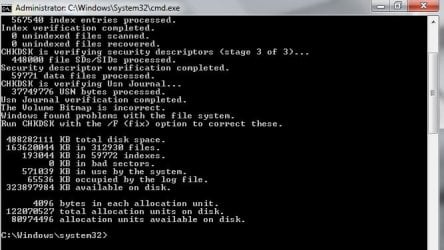
What about check disk?
 

My Computers

System One System Two

  • Computer type
    PC/Desktop
    Computer Manufacturer/Model Number
    custom build
    OS
    Windows 7 HP 64
    CPU
    i5 6600K - 800MHz to 4200MHz
    Motherboard
    GA-Z170-HD3P
    Memory
    4+4G GSkill DDR4 3000
    Graphics Card(s)
    IG - Intel 530
    Monitor(s) Displays
    Samsung 226BW
    Screen Resolution
    1680x1050
    Hard Drives
    (1) -1 SM951 – 128GB M.2 AHCI PCIe SSD drive for Windows 7 and Lubuntu
    (2) -1 WD SATA 3 - 1T for Data
    (3) -1 WD SATA 3 - 1T for backup
    PSU
    Thermaltake 450W TR2 gold
    Keyboard
    Old and good Chicony mechanical keyboard
    Mouse
    Logitech mX performance - 9 buttons (had to disable some)
    Internet Speed
    500Mb/s
    Browser
    Firefox 64
    Other Info
    TinyWall firewall
  • Computer type
    Laptop
    System Manufacturer/Model Number
    Asus Q550LF
    OS
    Windows 7 Pro
    CPU
    i7-4500U 800MHz to 3.0GHz
    Motherboard
    Asus Q550LF
    Memory
    (4+4)G DDR3 1600
    Graphics Card(s)
    IG intel 4400 + NVIDIA GeForce GT 745M
    Sound Card
    Realtek
    Monitor(s) Displays
    LG Display LP156WF4-SPH1
    Screen Resolution
    1920 x 1080
    Hard Drives
    BX500 120G SSD for Windows and programs +
    1T HDD for data
    Internet Speed
    500 Mb/s
    Browser
    Firefox
    Other Info
    TinyWall firewall

Attachments

  • Untitled.jpg
    Untitled.jpg
    83.2 KB · Views: 38

My Computer

Computer type
PC/Desktop
Computer Manufacturer/Model Number
Dell Optiplex 380
OS
Mauritius
CPU
Intel(R) Core(TM)2 Duo CPU E7500 @ 2.93GHz (32 bit)
Motherboard
Dell 0HN7XN
Memory
2 GB
Graphics Card(s)
Intel(R) G41 Express Chipset
Hard Drives
HDD 466GB
Antivirus
Microsoft Security Essentials
Browser
Google Chrome
It found problems on the disk. You must run it with the /f
Open a CMD window as admin and type:
chkdsk c: /f
It will say that the disk is in use and ask if you want to schedule to next start. =Yes.
Reboot.
 

My Computers

System One System Two

  • Computer type
    PC/Desktop
    Computer Manufacturer/Model Number
    custom build
    OS
    Windows 7 HP 64
    CPU
    i5 6600K - 800MHz to 4200MHz
    Motherboard
    GA-Z170-HD3P
    Memory
    4+4G GSkill DDR4 3000
    Graphics Card(s)
    IG - Intel 530
    Monitor(s) Displays
    Samsung 226BW
    Screen Resolution
    1680x1050
    Hard Drives
    (1) -1 SM951 – 128GB M.2 AHCI PCIe SSD drive for Windows 7 and Lubuntu
    (2) -1 WD SATA 3 - 1T for Data
    (3) -1 WD SATA 3 - 1T for backup
    PSU
    Thermaltake 450W TR2 gold
    Keyboard
    Old and good Chicony mechanical keyboard
    Mouse
    Logitech mX performance - 9 buttons (had to disable some)
    Internet Speed
    500Mb/s
    Browser
    Firefox 64
    Other Info
    TinyWall firewall
  • Computer type
    Laptop
    System Manufacturer/Model Number
    Asus Q550LF
    OS
    Windows 7 Pro
    CPU
    i7-4500U 800MHz to 3.0GHz
    Motherboard
    Asus Q550LF
    Memory
    (4+4)G DDR3 1600
    Graphics Card(s)
    IG intel 4400 + NVIDIA GeForce GT 745M
    Sound Card
    Realtek
    Monitor(s) Displays
    LG Display LP156WF4-SPH1
    Screen Resolution
    1920 x 1080
    Hard Drives
    BX500 120G SSD for Windows and programs +
    1T HDD for data
    Internet Speed
    500 Mb/s
    Browser
    Firefox
    Other Info
    TinyWall firewall
It is currently performing "CHKDSK is verifying file data" after I restart my PC.

What is the next step to do?
 

My Computer

Computer type
PC/Desktop
Computer Manufacturer/Model Number
Dell Optiplex 380
OS
Mauritius
CPU
Intel(R) Core(TM)2 Duo CPU E7500 @ 2.93GHz (32 bit)
Motherboard
Dell 0HN7XN
Memory
2 GB
Graphics Card(s)
Intel(R) G41 Express Chipset
Hard Drives
HDD 466GB
Antivirus
Microsoft Security Essentials
Browser
Google Chrome
During POST enter BIOS. Is the clock with the right date and time?
 

My Computers

System One System Two

  • Computer type
    PC/Desktop
    Computer Manufacturer/Model Number
    custom build
    OS
    Windows 7 HP 64
    CPU
    i5 6600K - 800MHz to 4200MHz
    Motherboard
    GA-Z170-HD3P
    Memory
    4+4G GSkill DDR4 3000
    Graphics Card(s)
    IG - Intel 530
    Monitor(s) Displays
    Samsung 226BW
    Screen Resolution
    1680x1050
    Hard Drives
    (1) -1 SM951 – 128GB M.2 AHCI PCIe SSD drive for Windows 7 and Lubuntu
    (2) -1 WD SATA 3 - 1T for Data
    (3) -1 WD SATA 3 - 1T for backup
    PSU
    Thermaltake 450W TR2 gold
    Keyboard
    Old and good Chicony mechanical keyboard
    Mouse
    Logitech mX performance - 9 buttons (had to disable some)
    Internet Speed
    500Mb/s
    Browser
    Firefox 64
    Other Info
    TinyWall firewall
  • Computer type
    Laptop
    System Manufacturer/Model Number
    Asus Q550LF
    OS
    Windows 7 Pro
    CPU
    i7-4500U 800MHz to 3.0GHz
    Motherboard
    Asus Q550LF
    Memory
    (4+4)G DDR3 1600
    Graphics Card(s)
    IG intel 4400 + NVIDIA GeForce GT 745M
    Sound Card
    Realtek
    Monitor(s) Displays
    LG Display LP156WF4-SPH1
    Screen Resolution
    1920 x 1080
    Hard Drives
    BX500 120G SSD for Windows and programs +
    1T HDD for data
    Internet Speed
    500 Mb/s
    Browser
    Firefox
    Other Info
    TinyWall firewall
1) How much thermal paste did you put on it? You don't put very much because if you put on too much it won't work.
2) Did you actually take the fan off of the heat sink? If so did you note which way the fan was blowing? Some blow air towards the heat sink and others blow air away from it. If it's possible that you put the fan on the wrong way you might try reversing it.
 

My Computers

System One System Two

townsbg

I did put the required thermal paste (all over the processor) and yes i did take off the fan from the heat sink and put it back correctly where it was blowing air towards the heat sink.
 

My Computer

Computer type
PC/Desktop
Computer Manufacturer/Model Number
Dell Optiplex 380
OS
Mauritius
CPU
Intel(R) Core(TM)2 Duo CPU E7500 @ 2.93GHz (32 bit)
Motherboard
Dell 0HN7XN
Memory
2 GB
Graphics Card(s)
Intel(R) G41 Express Chipset
Hard Drives
HDD 466GB
Antivirus
Microsoft Security Essentials
Browser
Google Chrome
Megahertz07 thanks for your help

I did the check disk /f yesterday and no errors were found or it was fix already don't know but this morning when i turn on my PC, it went fine no signal issue was fix.
 

My Computer

Computer type
PC/Desktop
Computer Manufacturer/Model Number
Dell Optiplex 380
OS
Mauritius
CPU
Intel(R) Core(TM)2 Duo CPU E7500 @ 2.93GHz (32 bit)
Motherboard
Dell 0HN7XN
Memory
2 GB
Graphics Card(s)
Intel(R) G41 Express Chipset
Hard Drives
HDD 466GB
Antivirus
Microsoft Security Essentials
Browser
Google Chrome
concerning the fan issue, it's probably my CPU is quite old and the CPU case is lacking fans (proper cooling system) since it has only a CPU fan in front which is not maybe providing the required air inflow.

I try to add more fans in front and at the back of my CPU to give it a proper air circulating in my CPU.

Thanks all for your help.
 

My Computer

Computer type
PC/Desktop
Computer Manufacturer/Model Number
Dell Optiplex 380
OS
Mauritius
CPU
Intel(R) Core(TM)2 Duo CPU E7500 @ 2.93GHz (32 bit)
Motherboard
Dell 0HN7XN
Memory
2 GB
Graphics Card(s)
Intel(R) G41 Express Chipset
Hard Drives
HDD 466GB
Antivirus
Microsoft Security Essentials
Browser
Google Chrome
The power supply has a fan that blows air to the outside.
If you don't have a "hot rod" computer you don't need extra fans.

Install a hardware monitor. https://openhardwaremonitor.org/files/openhardwaremonitor-v0.8.0-beta.zip
Extract the OpenHardwareMonitor folder to C:\Program Files (x86) and run OpenHardwareMonitor.exe. Under options set to Run on windows startup.
402593d1517403227-matching-new-ram-monitor.jpg
 

My Computers

System One System Two

  • Computer type
    PC/Desktop
    Computer Manufacturer/Model Number
    custom build
    OS
    Windows 7 HP 64
    CPU
    i5 6600K - 800MHz to 4200MHz
    Motherboard
    GA-Z170-HD3P
    Memory
    4+4G GSkill DDR4 3000
    Graphics Card(s)
    IG - Intel 530
    Monitor(s) Displays
    Samsung 226BW
    Screen Resolution
    1680x1050
    Hard Drives
    (1) -1 SM951 – 128GB M.2 AHCI PCIe SSD drive for Windows 7 and Lubuntu
    (2) -1 WD SATA 3 - 1T for Data
    (3) -1 WD SATA 3 - 1T for backup
    PSU
    Thermaltake 450W TR2 gold
    Keyboard
    Old and good Chicony mechanical keyboard
    Mouse
    Logitech mX performance - 9 buttons (had to disable some)
    Internet Speed
    500Mb/s
    Browser
    Firefox 64
    Other Info
    TinyWall firewall
  • Computer type
    Laptop
    System Manufacturer/Model Number
    Asus Q550LF
    OS
    Windows 7 Pro
    CPU
    i7-4500U 800MHz to 3.0GHz
    Motherboard
    Asus Q550LF
    Memory
    (4+4)G DDR3 1600
    Graphics Card(s)
    IG intel 4400 + NVIDIA GeForce GT 745M
    Sound Card
    Realtek
    Monitor(s) Displays
    LG Display LP156WF4-SPH1
    Screen Resolution
    1920 x 1080
    Hard Drives
    BX500 120G SSD for Windows and programs +
    1T HDD for data
    Internet Speed
    500 Mb/s
    Browser
    Firefox
    Other Info
    TinyWall firewall
Megahertz07

what does this hardware monitor works?
 

Attachments

  • Untitled.jpg
    Untitled.jpg
    117.2 KB · Views: 21

My Computer

Computer type
PC/Desktop
Computer Manufacturer/Model Number
Dell Optiplex 380
OS
Mauritius
CPU
Intel(R) Core(TM)2 Duo CPU E7500 @ 2.93GHz (32 bit)
Motherboard
Dell 0HN7XN
Memory
2 GB
Graphics Card(s)
Intel(R) G41 Express Chipset
Hard Drives
HDD 466GB
Antivirus
Microsoft Security Essentials
Browser
Google Chrome
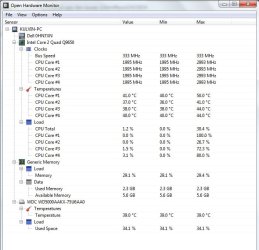
Did you noticed the 28 in red near the clock? It's the CPU temp.
Attached is my configuration file. Rename it OpenHardwareMonitor.config and replace the one on C:\Program Files (x86)\OpenHardwareMonitor folder and you will have it almost as showed in post #13. (your MB don't have fan sensors or chipset temp sensor)

OpenHardwareMonitor register the max temperatures. You must begin to worry if the CPU goes above 70ºC.
Above 80ºC something is wrong and you must take action.
 

Attachments

Last edited:

My Computers

System One System Two

  • Computer type
    PC/Desktop
    Computer Manufacturer/Model Number
    custom build
    OS
    Windows 7 HP 64
    CPU
    i5 6600K - 800MHz to 4200MHz
    Motherboard
    GA-Z170-HD3P
    Memory
    4+4G GSkill DDR4 3000
    Graphics Card(s)
    IG - Intel 530
    Monitor(s) Displays
    Samsung 226BW
    Screen Resolution
    1680x1050
    Hard Drives
    (1) -1 SM951 – 128GB M.2 AHCI PCIe SSD drive for Windows 7 and Lubuntu
    (2) -1 WD SATA 3 - 1T for Data
    (3) -1 WD SATA 3 - 1T for backup
    PSU
    Thermaltake 450W TR2 gold
    Keyboard
    Old and good Chicony mechanical keyboard
    Mouse
    Logitech mX performance - 9 buttons (had to disable some)
    Internet Speed
    500Mb/s
    Browser
    Firefox 64
    Other Info
    TinyWall firewall
  • Computer type
    Laptop
    System Manufacturer/Model Number
    Asus Q550LF
    OS
    Windows 7 Pro
    CPU
    i7-4500U 800MHz to 3.0GHz
    Motherboard
    Asus Q550LF
    Memory
    (4+4)G DDR3 1600
    Graphics Card(s)
    IG intel 4400 + NVIDIA GeForce GT 745M
    Sound Card
    Realtek
    Monitor(s) Displays
    LG Display LP156WF4-SPH1
    Screen Resolution
    1920 x 1080
    Hard Drives
    BX500 120G SSD for Windows and programs +
    1T HDD for data
    Internet Speed
    500 Mb/s
    Browser
    Firefox
    Other Info
    TinyWall firewall
Megahertz07

done :) did what you said - renamed and replaced. Thanks
 

Attachments

  • Untitled.jpg
    Untitled.jpg
    133.5 KB · Views: 20

My Computer

Computer type
PC/Desktop
Computer Manufacturer/Model Number
Dell Optiplex 380
OS
Mauritius
CPU
Intel(R) Core(TM)2 Duo CPU E7500 @ 2.93GHz (32 bit)
Motherboard
Dell 0HN7XN
Memory
2 GB
Graphics Card(s)
Intel(R) G41 Express Chipset
Hard Drives
HDD 466GB
Antivirus
Microsoft Security Essentials
Browser
Google Chrome
still trouble with the CPU fan, it is spinning fast for 1 second (like the start of an engine) then goes back to normal then spins fast for 1 second again then back to normal even i'm not using any programs
 

My Computer

Computer type
PC/Desktop
Computer Manufacturer/Model Number
Dell Optiplex 380
OS
Mauritius
CPU
Intel(R) Core(TM)2 Duo CPU E7500 @ 2.93GHz (32 bit)
Motherboard
Dell 0HN7XN
Memory
2 GB
Graphics Card(s)
Intel(R) G41 Express Chipset
Hard Drives
HDD 466GB
Antivirus
Microsoft Security Essentials
Browser
Google Chrome
I suggest that you try prime95 to test your cpu's temps under full load. Watch the temps and shut down the program if it exceeds 70C. GIMPS - Free Prime95 software downloads - PrimeNet

Adding additional fans would be a good idea however make sure that the front ones blow in and the rear ones blow out. It's no good if they are all blowing in.
 

My Computers

System One System Two

Megahertz07

The NO SIGNAL problem still not fix :/

I turn on my PC this morning and it started well and after using it for like 10 minutes, I got a No Signal screen and the CPU fan started to spin fast.
townsbg thanks for recommending Prime95 and yes I'll make sure that the front fans blow in and the rear ones blow out :)
 

My Computer

Computer type
PC/Desktop
Computer Manufacturer/Model Number
Dell Optiplex 380
OS
Mauritius
CPU
Intel(R) Core(TM)2 Duo CPU E7500 @ 2.93GHz (32 bit)
Motherboard
Dell 0HN7XN
Memory
2 GB
Graphics Card(s)
Intel(R) G41 Express Chipset
Hard Drives
HDD 466GB
Antivirus
Microsoft Security Essentials
Browser
Google Chrome
still trouble with the CPU fan, it is spinning fast for 1 second (like the start of an engine) then goes back to normal then spins fast for 1 second again then back to normal even i'm not using any programs

As I wrote, the fan spinning up and down is normal

Megahertz07

The NO SIGNAL problem still not fix :/

I turn on my PC this morning and it started well and after using it for like 10 minutes, I got a No Signal screen and the CPU fan started to spin fast.

Run chkdsk c: /f
 

My Computers

System One System Two

  • Computer type
    PC/Desktop
    Computer Manufacturer/Model Number
    custom build
    OS
    Windows 7 HP 64
    CPU
    i5 6600K - 800MHz to 4200MHz
    Motherboard
    GA-Z170-HD3P
    Memory
    4+4G GSkill DDR4 3000
    Graphics Card(s)
    IG - Intel 530
    Monitor(s) Displays
    Samsung 226BW
    Screen Resolution
    1680x1050
    Hard Drives
    (1) -1 SM951 – 128GB M.2 AHCI PCIe SSD drive for Windows 7 and Lubuntu
    (2) -1 WD SATA 3 - 1T for Data
    (3) -1 WD SATA 3 - 1T for backup
    PSU
    Thermaltake 450W TR2 gold
    Keyboard
    Old and good Chicony mechanical keyboard
    Mouse
    Logitech mX performance - 9 buttons (had to disable some)
    Internet Speed
    500Mb/s
    Browser
    Firefox 64
    Other Info
    TinyWall firewall
  • Computer type
    Laptop
    System Manufacturer/Model Number
    Asus Q550LF
    OS
    Windows 7 Pro
    CPU
    i7-4500U 800MHz to 3.0GHz
    Motherboard
    Asus Q550LF
    Memory
    (4+4)G DDR3 1600
    Graphics Card(s)
    IG intel 4400 + NVIDIA GeForce GT 745M
    Sound Card
    Realtek
    Monitor(s) Displays
    LG Display LP156WF4-SPH1
    Screen Resolution
    1920 x 1080
    Hard Drives
    BX500 120G SSD for Windows and programs +
    1T HDD for data
    Internet Speed
    500 Mb/s
    Browser
    Firefox
    Other Info
    TinyWall firewall
Back
Top