CPU high usage

brummyfan

New member
Pro User
VIP
Local time
10:22 PM
Messages
323
Location
Birmingham
Hi,
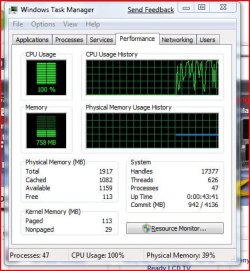
My CPU usage reaches up to 100% without opening any programs, how can I rectify it please? TIA.
 

Attachments

  • Capture9.JPG
    Capture9.JPG
    51.9 KB · Views: 149

My Computer

Computer Manufacturer/Model Number
Acer Aspire 5750
OS
Windows 7 Home Premium 64bit
CPU
Intel Core i3-2310M
Motherboard
Acer OEM
Memory
8GB
Graphics Card(s)
Intel HD3000
Screen Resolution
1366x768
Hard Drives
320GB Toshiba
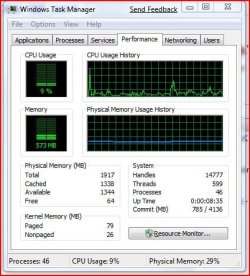
Click on the Resource Monitor button, and see what's using the CPU..
 

My Computer

Computer Manufacturer/Model Number
Gateway FX-510X
OS
Windows 7 Ultimate x64 RTM
CPU
Intel(R) Pentium(R) D CPU 3.00GHz
Motherboard
Intel OEMD975XW2G1
Memory
6 GB dual channel DDR2 333 MHz
Graphics Card(s)
NVIDIA GeForce 7800 GTX 256 MB
Sound Card
Creative X-Fi Fatal1ty Extreme Gamer
Monitor(s) Displays
15" Planar PL170 LCD, 17" Gateway FPD1965 LCD
Screen Resolution
1280 x 1024
Hard Drives
64 GB SSD Crucial
2000 GB internal WDC
500 GB internal WDC
Click on the Resource Monitor button, and see what's using the CPU..

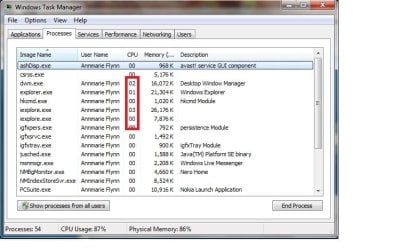
The processes tab can also show CPU% used by each process.
 

Attachments

  • Untitled.jpg
    Untitled.jpg
    57.3 KB · Views: 348

My Computer

Computer Manufacturer/Model Number
Compaq Desktop
OS
Windows 7 Ultimate x64
CPU
AMD Sempron Dual Core
Memory
3GB
Graphics Card(s)
NVIDIA GeForce 6150SE nForce 430
Screen Resolution
1024x768
Hard Drives
150GB Sata
Post a picture of the processes page in Task Manager.
 

My Computer

Computer Manufacturer/Model Number
Self Build 64bit
OS
Vista Ult64, Win7600
CPU
Intel Core 2 Quad Q6600 @ 2400 MHz 64bit OS
Motherboard
Asus P5E3 Deluxe WiFi @p 64 bit OS
Memory
4096 MB DDR3-SDRAM
Graphics Card(s)
ATI Radeon HD 3870 Series x2 Crossfired
Sound Card
Realtek on board
Monitor(s) Displays
Samsung SyncMaster - 23 inches
Screen Resolution
1680x1050 pixels at 60 Hz in True Colors
Hard Drives
Hitachi (250 GB)/Samsung 750 GB. /Barracuda 160 GB.
My Book 1 TB external..
PSU
Cooler Master 1000w
Case
Cooler Master Cosmos 1000.
Cooling
Fans and fresh air,
Keyboard
Wireless
Mouse
Wireless
Internet Speed
Never fast enough
Other Info
I use a Magnum.
Thank you guys, it looks all OK now. When I checked this morning everything seems fine, it must have been a minor glitch. Thanks again for the help.
 

Attachments

  • Capture10.JPG
    Capture10.JPG
    48.8 KB · Views: 36

My Computer

Computer Manufacturer/Model Number
Acer Aspire 5750
OS
Windows 7 Home Premium 64bit
CPU
Intel Core i3-2310M
Motherboard
Acer OEM
Memory
8GB
Graphics Card(s)
Intel HD3000
Screen Resolution
1366x768
Hard Drives
320GB Toshiba
Hi,Glad its fixed.
 

My Computer

Computer Manufacturer/Model Number
Self Build 64bit
OS
Vista Ult64, Win7600
CPU
Intel Core 2 Quad Q6600 @ 2400 MHz 64bit OS
Motherboard
Asus P5E3 Deluxe WiFi @p 64 bit OS
Memory
4096 MB DDR3-SDRAM
Graphics Card(s)
ATI Radeon HD 3870 Series x2 Crossfired
Sound Card
Realtek on board
Monitor(s) Displays
Samsung SyncMaster - 23 inches
Screen Resolution
1680x1050 pixels at 60 Hz in True Colors
Hard Drives
Hitachi (250 GB)/Samsung 750 GB. /Barracuda 160 GB.
My Book 1 TB external..
PSU
Cooler Master 1000w
Case
Cooler Master Cosmos 1000.
Cooling
Fans and fresh air,
Keyboard
Wireless
Mouse
Wireless
Internet Speed
Never fast enough
Other Info
I use a Magnum.
Hi, glad it's sorted :)
 

My Computer

Computer Manufacturer/Model Number
Compaq Desktop
OS
Windows 7 Ultimate x64
CPU
AMD Sempron Dual Core
Memory
3GB
Graphics Card(s)
NVIDIA GeForce 6150SE nForce 430
Screen Resolution
1024x768
Hard Drives
150GB Sata
wmpnetwk cpu issue

I have same sort of problem, but i can see what is causing the problem - wmpnetwk.exe - i assume that is windows media player networking for streaming? I usually network with my other pc's through my server? If i turn it off it starts back again. I guess i can turn services for it off, but will it make my network drives unavailable?
Thanks for help.
I'm an XP guy can ya tell - lol

http://img8.imageshack.us/img8/1176/newpicture034.jpg
 

My Computer

Computer Manufacturer/Model Number
dell optiplex - 2003
OS
windows7 7600 x86
CPU
itel pentium 4
Memory
3.00 GB
Graphics Card(s)
diamond radion x1050
Sound Card
SoundMax
Monitor(s) Displays
dell 2408wfp dell e172fp
Screen Resolution
1920 x 1200 1280 x 1024
Hard Drives
2 - 80 GB internals WD
1 - 01 TB ext
2 - 750 GB ext
1- 500 GB ext
all running on system no problems
Keyboard
old logitech cordless
Mouse
logitech wireless
Internet Speed
16 / 4
Other Info
networked into my sbs2003 server running sp1 still
it's a wonder I could even get windows 7 to connect to it
Yes it is, and no it will not disable your network - it is *strictly* for sharing and searching for shared media, that's all.
 

My Computers

System One System Two

  • Computer type
    PC/Desktop
    Computer Manufacturer/Model Number
    The Beast Model A (homebrew)
    OS
    Windows 11 21H2 Current build
    CPU
    AMD Ryzen 9 3950X
    Motherboard
    MSI MEG X570 GODLIKE
    Memory
    4 * 32 GB - Corsair Vengeance 3600 MHz
    Graphics Card(s)
    EVGA GeForce RTX 3080 Ti XC3 ULTRA GAMING (12G-P5-3955-KR)
    Sound Card
    Realtek® ALC1220 Codec
    Monitor(s) Displays
    2x Eve Spectrum ES07D03 4K Gaming Monitor (Matte) | Eve Spec
    Screen Resolution
    3x 3840 x 2160
    Hard Drives
    3x Samsung 980 Pro NVMe PCIe 4 M.2 2 TB SSD (MZ-V8P2T0B/AM) } 3x Sabrent Rocket NVMe 4.0 1 TB SSD
    PSU
    PC Power & Cooling’s Silencer Series 1050 Watt, 80 Plus Plat
    Case
    Fractal Design Define 7 XL Dark ATX Full Tower Case
    Cooling
    SteelSeries Apex Pro Wired Gaming Keyboard
    Keyboard
    SteelSeries Apex Pro
    Mouse
    Logitech MX Master 3S | MX Master 3 for business
    Internet Speed
    AT&T LightSpeed Gigabit Duplex Ftth
    Antivirus
    Windows Defender + MB 3
    Browser
    Nightly (default) + Firefox (stable),Chrome, Edge
  • Computer type
    PC/Desktop
    System Manufacturer/Model Number
    Dell Latitude E5470
    OS
    ChromeOS Flex Dev Channel (current)
    CPU
    Intel(R) Core(TM) i5-6300U CPU @ 2.40GHz, 2501 Mhz, 2 Core(s), 4 Logical Processor(s)
    Motherboard
    Dell
    Memory
    16 GB
    Graphics Card(s)
    Intel(R) HD Graphics 520
    Sound Card
    Intel(R) HD Graphics 520 + RealTek Audio
    Monitor(s) Displays
    Dell laptop display 15"
    Screen Resolution
    1920 * 1080
    Hard Drives
    Toshiba 128GB M.2 22300 drive
    INTEL Cherryville 520 Series SSDSC2CW180A 180 GB SATA III SSD
    PSU
    Dell
    Case
    Dell
    Cooling
    Dell
    Keyboard
    Dell
    Mouse
    Logitech MX Master 3S (shared w. Sys 1) | Dell TouchPad
    Internet Speed
    AT&T LightSpeed Gigabit Duplex Ftth

My Computer

Computer Manufacturer/Model Number
dell optiplex - 2003
OS
windows7 7600 x86
CPU
itel pentium 4
Memory
3.00 GB
Graphics Card(s)
diamond radion x1050
Sound Card
SoundMax
Monitor(s) Displays
dell 2408wfp dell e172fp
Screen Resolution
1920 x 1200 1280 x 1024
Hard Drives
2 - 80 GB internals WD
1 - 01 TB ext
2 - 750 GB ext
1- 500 GB ext
all running on system no problems
Keyboard
old logitech cordless
Mouse
logitech wireless
Internet Speed
16 / 4
Other Info
networked into my sbs2003 server running sp1 still
it's a wonder I could even get windows 7 to connect to it

My Computer

OS
Windows 7 Professional
Thanks Johngalt - that was it :D - just wanted to confirm - as i found here for the benefit of others to see and understand it

What are wmpnscfg.exe and wmpnetwk.exe and Why Are They Running? :: the How-To Geek

I have this problem, but I want to still run media sharing to my 360.

Are there any known actual fixes for this problem?

I could run media sharing with my 360 fine on my Vista install, but now on Windows 7 I just get CPU maxing out all the time. :(

Have you installed any codecs? I heard around here on the fourm that the service in question gets stuck on certain files and thrown into a loop. Which sounds like a problem with a codec.
 

My Computer

Computer type
PC/Desktop
Computer Manufacturer/Model Number
Alienware Aurora ALX R4
OS
Windows 10 Pro (x64)
CPU
Intel Core i7-3930K (3.2GHz - 4.5GHz)
Motherboard
Alienware Aurora-R4 x79
Memory
4x Samsung 4GB PC3-12800 DDR3 (16GB 1600MHz)
Graphics Card(s)
Nvidia Geforce GTX 690
Sound Card
SteelSeries Siberia Elite
Monitor(s) Displays
Dell UltraSharp U3011
Screen Resolution
2560x1600
Hard Drives
Samsung 850 Pro 256 GB, Seagate 1TB Desktop Hybrid HDD, 2x Western Digital 4TB Green HDD
PSU
875W Some Dell PSU <.<
Case
Alienware Aurora ALX
Cooling
Custom Liquid Cooling (EK CPU & GPU blocks) dual EK 480RAD
Keyboard
Logitech G710+ Mechanical
Mouse
Logitech G700s
Internet Speed
Verizon Fios (50 mbps average)
Other Info
Server: Intel NUC D54250WYK: i5-4250U, 16GB, 256 GB mSATA, Windows Server 2012 R2
Nope, I was having the problem before I installed anything. I had it before and figured it could have been an install issue, so reinstalled W7, run Windows Update etc. only, didn't install anything else, ran WMP12, then after telling it where to find my media it started throwing a fit.

Could it be due to video files that WMP12 needs codecs for, so it gets stuck? I don't normally use WMP for watching videos, I use another player, but have to import it into there to be able to use it on the 360 should I wish to do that.
 

My Computer

OS
Windows 7 Professional
Nope, I was having the problem before I installed anything. I had it before and figured it could have been an install issue, so reinstalled W7, run Windows Update etc. only, didn't install anything else, ran WMP12, then after telling it where to find my media it started throwing a fit.

Could it be due to video files that WMP12 needs codecs for, so it gets stuck? I don't normally use WMP for watching videos, I use another player, but have to import it into there to be able to use it on the 360 should I wish to do that.

Might just be the initial startup phase, lots of indexing to do and other activities. If you have a lot of media and told it to index it then yeah thats going to hammer away on your CPU until its done.
 

My Computer

Computer type
PC/Desktop
Computer Manufacturer/Model Number
Alienware Aurora ALX R4
OS
Windows 10 Pro (x64)
CPU
Intel Core i7-3930K (3.2GHz - 4.5GHz)
Motherboard
Alienware Aurora-R4 x79
Memory
4x Samsung 4GB PC3-12800 DDR3 (16GB 1600MHz)
Graphics Card(s)
Nvidia Geforce GTX 690
Sound Card
SteelSeries Siberia Elite
Monitor(s) Displays
Dell UltraSharp U3011
Screen Resolution
2560x1600
Hard Drives
Samsung 850 Pro 256 GB, Seagate 1TB Desktop Hybrid HDD, 2x Western Digital 4TB Green HDD
PSU
875W Some Dell PSU <.<
Case
Alienware Aurora ALX
Cooling
Custom Liquid Cooling (EK CPU & GPU blocks) dual EK 480RAD
Keyboard
Logitech G710+ Mechanical
Mouse
Logitech G700s
Internet Speed
Verizon Fios (50 mbps average)
Other Info
Server: Intel NUC D54250WYK: i5-4250U, 16GB, 256 GB mSATA, Windows Server 2012 R2
Might just be the initial startup phase, lots of indexing to do and other activities. If you have a lot of media and told it to index it then yeah thats going to hammer away on your CPU until its done.

That's a pain...I have ~730GB videos, ~130GB music and ~16GB pictures. :shock: :p
 

My Computer

OS
Windows 7 Professional
Did WMP ever stop hammering your CPU?
I ended up stopping the service but now think of using Media Center and will have to start the WMP service again.
Was curious if the was a fix?
 

My Computer

OS
Windows 7 Ultimate 64bit
CPU
Intel Core 2 Duo E8500 Wolfdale 3.16GHz 6MB L2 Cache LGA 775
Motherboard
GIGABYTE GA-EP45-UD3P LGA 775 Intel P45 ATX
Memory
CORSAIR DOMINATOR 4GB (2 x 2GB) TWIN2X4096-8500C5DF
Graphics Card(s)
XFX Nvidia 9800GTX +
Sound Card
Creative Sound Blaster X-Fi Titanium Fatal1ty Professional
Monitor(s) Displays
Acer H233H
Screen Resolution
1920x1080
Hard Drives
Seagate Barracuda 7200.12 ST3750330AS 1TB 7200 RPM SATA x2
PSU
ENERMAX INFINITI EIN720AWT 720W ATX12V/ EPS12V SLI Certified
Case
Cooler Master Cosmos 1000
Cooling
Zalman 9700/AeroCool 140mm x2/Thermaltake A2029 120mm x3
Keyboard
Logitech G15
Mouse
Logitech MX518
Internet Speed
Comcast
I installed (clean install) my Win7 a week or so after it first came out (via advanced purchace). Ran fine until a week or two ago, then I started having problems with it maxing out the CPU. I could "fix" it temporarily by rebooting, but sometimes it would take an hour to shut down, and sometime I just had to use the reset button!

Some investigation lead me to disable the wmpnetwk service and, so far, it has seemed fine. I hope it will stay fine.

Meanwhile, I need to ask if an update effecting wmpnetwk came out recently? Like I say, the system was fine until recently. I am fine without wmpnetwk.exe running as I don't do any media sharing, and don't even use wmp, but I would like to know why things changed.

Any thoughts?

Scott
 

My Computer

Computer Manufacturer/Model Number
Custom built
OS
Windows 7 Prfessional 64 bit
CPU
AMD Athelon 64 X2 Dual Core 6400+ (3.2 GHz)
Memory
8 Gb
Monitor(s) Displays
Gateway FPD2485W, Acer P241W
Screen Resolution
1920 X 1200 (both)
If it's anything like my problem it will come back randomly
 

My Computer

Computer Manufacturer/Model Number
HP
OS
Windows 7 64 Bit
Memory
4GB
Graphics Card(s)
NVidia Geforce 130m 1gb w/ Cuda
Screen Resolution
1366 x 768
Hard Drives
500gb
My CPU sometimes runs at 100%, but I'm pretty sure it's just throttling. Some modern processors slow down their clock speed or shut off some cores when not in much use.
 

My Computer

OS
Windows 7 x64
Back
Top