CPU Hike to 100% Everytime.

Dhwani Desai

New member
Local time
12:34 PM
Messages
5
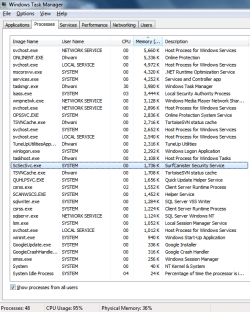
I am having Dell Vostro 1015. I am having 4GB RAM and 32-bit windows 7 installed on my laptop. My CPU hike to 100% though I don't use anything. I have just installed 2GB RAM 15 days ago and new HDD, So is it the reason for this? I am attaching my task manager's all services snapshot. Kindly help me with this. I have already checked for viruses but I found nothing. I am copying through Tera Copy, then task manager shows it is the highest memory user and If I am using Chrome, then it shows Chrome is highest user of memory. And if everything is closes, then also CPU 100%.
 

Attachments
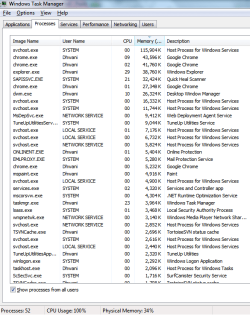
  • Task Manager 1.png
    Task Manager 1.png
    25.3 KB · Views: 8
  • Task Manager 2.png
    Task Manager 2.png
    26.1 KB · Views: 7

My Computer

OS
Windows 7 Ultimate 32 bit
Resource Monitor may be able to give you a better understanding of why your CPU usage is so high. You might have a malware scan going on, or perhaps a scheduled disk defrag while the computer is idle.

http://www.sevenforums.com/tutorials/12523-resource-monitor.html

You could also give this free utility from Microsoft a try. It's called Process Explorer and gives a much deeper look into what's using your CPU. You don't even have to install it. You can simply run it in your browser. There's a link for Proces Explorer in this "How-to" article.

Process Explorer

This Microsoft forum thread also has some suggestions on how to isolate the high CPU usage.

My CPU usage is at 100%, but task manager says nothing's using - Microsoft Community
 

My Computer

Computer type
Laptop
Computer Manufacturer/Model Number
Sony Vaio VPCEB47GM Laptop
OS
Win 7 Pro 64-bit
CPU
Intel i5 2.4 Ghz
Memory
8GB DDR3
Graphics Card(s)
Intel HD 3000
Sound Card
IDT High Definition
Monitor(s) Displays
15.6 WGXA Anti-Glare LED
Screen Resolution
1280x800
Hard Drives
640Gb 7200rpm
Antivirus
MSE
Browser
Opera (primary) with IE9 backup
I am uploading process explorer file. Kindly look at it.

You have several processes for Chrome.

Why Does Chrome Have So Many Open Processes? - How-To Geek

And several process that belong to Quick Heal including SCANWSCS.EXE, QUHLPSVC.EXE, ScSecSvc.exe, OPSSVC.EXE, ONLINENT.EXE. I'm guessing that Quick Heal is your installed security suite. You might consider using a less resource intensive product like Microsoft Security Essentials or Avast both of which are free.

You've also got Tuneup Utilities which is a 3rd party "optimizer". Windows 7 really doesn't need these tools because they tend to do more harm than good. Microsoft includes it's own "optimizing" tools like disk defrag, disk cleanup, etc that are safer than these other programs.

http://www.sevenforums.com/tutorials/11728-optimize-windows-7-a.html
 

My Computer

Computer type
Laptop
Computer Manufacturer/Model Number
Sony Vaio VPCEB47GM Laptop
OS
Win 7 Pro 64-bit
CPU
Intel i5 2.4 Ghz
Memory
8GB DDR3
Graphics Card(s)
Intel HD 3000
Sound Card
IDT High Definition
Monitor(s) Displays
15.6 WGXA Anti-Glare LED
Screen Resolution
1280x800
Hard Drives
640Gb 7200rpm
Antivirus
MSE
Browser
Opera (primary) with IE9 backup
Back
Top