CPU is Throttling with High Performance power profile

elbeasto

New member
Member
VIP
Local time
2:38 AM
Messages
127
Location
Sydney Australia
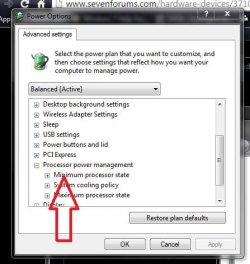
My CPU keeps throttling down with the high performance power profile instead of staying at it's highest clock speed.

I've reset the high performance settings but still doesn't work.

Any ideas?

Thanks
 

My Computer My Computer

OS
Windows 7 Home Premium x64
CPU
i7 5930K
Motherboard
Asus X99-A
Memory
Corsair Dominator, DDR4 16GB
Graphics Card(s)
EVGA GTX 980 SLI
Sound Card
Onboard Realtek HD
Monitor(s) Displays
Dell U3011
Screen Resolution
2560x1600 (16:10, as god intended)
Hard Drives
Samsung 850 EVO 1TB SSD (Boot OS)
2 x Hitachi 7K3000 2TB (Storage)
PSU
Seasonic 1250W
Case
Corsair 900D
Cooling
Corsair H110 280
Keyboard
Logitech Wireless Illuminated keyboard K800
Mouse
Loigitech M950 Performance
Internet Speed
ADSL 2+
Antivirus
MS SE
Browser
Chrome
Disabled Intel Speedstep (may be called EIST) and C1E in BIOS yet? How are the temps?
 

My Computer My Computer

Computer type
PC/Desktop
Computer Manufacturer/Model Number
Custom Build
OS
Windows 7 Ultimate x64 SP1
CPU
AMD Phenom 2 1090T
Motherboard
Gigabyte GA-890FXA-UD5
Memory
2x8GB Kingston HyperX Fury Black 1600Mhz Unganged
Graphics Card(s)
MSI GTX 970 Gaming 4G
Sound Card
Realtek On-Board HD 7.1 Audio / Logitech G35
Monitor(s) Displays
3xAcer GD245HQ
Screen Resolution
1920x1080
Hard Drives
Samsung 850 Pro 512GB SSD - OS /
WD Caviar Black SATA 3 - 1 TBx2 - Dynamic RAID 0 /
WD Caviar Green SATA 2 - 640GBx2 - Dynamic RAID 0 /
WD Caviar Green SATA 2 - 640GB - Internal Backup /
Seagate Barracude SATA 3 - 3TB - External Backup/ Sync
PSU
HighPower 1000W
Case
Cooler Master HAF 932
Cooling
Noctua NH-D14
Keyboard
Logitech G19
Mouse
Logitech G500
Internet Speed
100/4 Mbit Cable (100GB quota)
Antivirus
ZoneAlarm Extreme Security / MBAM Pro / MBAE Free / SAS Free
Browser
IE 11 - Firefox - Chrome
Other Info
Logitech F710/ G27/ G940/ Z5500 // TrackIR 5 // Nvidia 3D Surround Vision
Change this to 100%

But why in the world do you want your cpu to stay at 100% ?

Especially with an air cooler :(
 

Attachments

  • Capture1.JPG
    Capture1.JPG
    40.6 KB · Views: 10

My Computer My Computer

Computer type
PC/Desktop
Computer Manufacturer/Model Number
Skylake Special #666
OS
Windows 10 Pro x64
CPU
Intel Core i7 6700K
Motherboard
Asus Sabertooth Z170 Mark 1
Memory
GSkill TridentZ RGB 16GB 3600 16-16-16-36
Graphics Card(s)
EVGA GTX 980 Ti SC x2
Sound Card
Realtek High Definition
Monitor(s) Displays
AOC G2460PG
Screen Resolution
1920 x 1080 144Hz
Hard Drives
Samsung 860 Pro 256GB, Seagate Barracuda 4TB x2
PSU
EVGA 1000 P2, EVGA White Custom Braided Cables
Case
Corsair Vengeance C70 Gunmetal Black
Cooling
Corsair H100i v2, Corsair ML120 x2, Thermal Grizzly Kryonaut
Keyboard
Logitech G910 Orion Spectrum
Mouse
Logitech G700s
Internet Speed
Verizon Fios Quantum Gateway 75/75
Antivirus
Windows Defender, Malwarebytes Free 3.8.3
Browser
Chrome
Other Info
Corsair SP120 x4, LG Blu-ray Drive, Durabrand HT-395 100 Watt Dolby Digital Amp, Corsair H2100 Wireless 7.1 Headset
Got it sorted, I had to "sync all cores" in BIOS which isn't the default setting for Intel core reasons I suppose.
Interestingly enough, this same setting was disabling Turbo as well, now it works. :)

Disabled Intel Speedstep (may be called EIST) and C1E in BIOS yet? How are the temps?

disabling both speedstepping & power states worked but I wanted them at default settings and just controlled via the power profiles.

Change this to 100%

But why in the world do you want your cpu to stay at 100% ?

Especially with an air cooler :(

You're right, I wouldn't want it at 100% all the time, it just bothered me that it wasn't doing it when it should have.
PS edited my air cooler to my current H110 280 :cool:
Not quite water cooled but not air either :D
 

My Computer My Computer

OS
Windows 7 Home Premium x64
CPU
i7 5930K
Motherboard
Asus X99-A
Memory
Corsair Dominator, DDR4 16GB
Graphics Card(s)
EVGA GTX 980 SLI
Sound Card
Onboard Realtek HD
Monitor(s) Displays
Dell U3011
Screen Resolution
2560x1600 (16:10, as god intended)
Hard Drives
Samsung 850 EVO 1TB SSD (Boot OS)
2 x Hitachi 7K3000 2TB (Storage)
PSU
Seasonic 1250W
Case
Corsair 900D
Cooling
Corsair H110 280
Keyboard
Logitech Wireless Illuminated keyboard K800
Mouse
Loigitech M950 Performance
Internet Speed
ADSL 2+
Antivirus
MS SE
Browser
Chrome
Maybe you just need a BIOS update to be able to use the default settings. Not familiar with syncing cores but as I get it all cores get bumped to same speed/ voltage regardless of load?
 

My Computer My Computer

Computer type
PC/Desktop
Computer Manufacturer/Model Number
Custom Build
OS
Windows 7 Ultimate x64 SP1
CPU
AMD Phenom 2 1090T
Motherboard
Gigabyte GA-890FXA-UD5
Memory
2x8GB Kingston HyperX Fury Black 1600Mhz Unganged
Graphics Card(s)
MSI GTX 970 Gaming 4G
Sound Card
Realtek On-Board HD 7.1 Audio / Logitech G35
Monitor(s) Displays
3xAcer GD245HQ
Screen Resolution
1920x1080
Hard Drives
Samsung 850 Pro 512GB SSD - OS /
WD Caviar Black SATA 3 - 1 TBx2 - Dynamic RAID 0 /
WD Caviar Green SATA 2 - 640GBx2 - Dynamic RAID 0 /
WD Caviar Green SATA 2 - 640GB - Internal Backup /
Seagate Barracude SATA 3 - 3TB - External Backup/ Sync
PSU
HighPower 1000W
Case
Cooler Master HAF 932
Cooling
Noctua NH-D14
Keyboard
Logitech G19
Mouse
Logitech G500
Internet Speed
100/4 Mbit Cable (100GB quota)
Antivirus
ZoneAlarm Extreme Security / MBAM Pro / MBAE Free / SAS Free
Browser
IE 11 - Firefox - Chrome
Other Info
Logitech F710/ G27/ G940/ Z5500 // TrackIR 5 // Nvidia 3D Surround Vision
Maybe you just need a BIOS update to be able to use the default settings. Not familiar with syncing cores but as I get it all cores get bumped to same speed/ voltage regardless of load?

BIOS is the newest one for my board.

A good source tells me that it's CPU-z and unsynced cores that don't seem to communicate well.

As far as my understanding goes syncing the cores means that when the CPU is under load all the cores will speed up rather than just the one.
Intel makes them so that only one core will turbo up when the CPU is under load.
 

My Computer My Computer

OS
Windows 7 Home Premium x64
CPU
i7 5930K
Motherboard
Asus X99-A
Memory
Corsair Dominator, DDR4 16GB
Graphics Card(s)
EVGA GTX 980 SLI
Sound Card
Onboard Realtek HD
Monitor(s) Displays
Dell U3011
Screen Resolution
2560x1600 (16:10, as god intended)
Hard Drives
Samsung 850 EVO 1TB SSD (Boot OS)
2 x Hitachi 7K3000 2TB (Storage)
PSU
Seasonic 1250W
Case
Corsair 900D
Cooling
Corsair H110 280
Keyboard
Logitech Wireless Illuminated keyboard K800
Mouse
Loigitech M950 Performance
Internet Speed
ADSL 2+
Antivirus
MS SE
Browser
Chrome
Back
Top