metaturbo707
New member
- Local time
- 4:18 PM
- Messages
- 25
I have a really horrible problem I really need help with!
Whenever I watch any video on the web (such as from YouTube), the video begins to constantly glitch and repeatedly freeze briefly and it's a really horrible experience. It seems to happen for a few minutes at a time, and then is ok for a few minutes, and this repeats periodically. When it glitches it is glitching several times a second and it becomes unintelligible. This typically gets worse the longer the video is. This happens the same if I use Chrome, IE, or Opera.
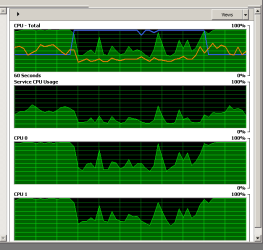
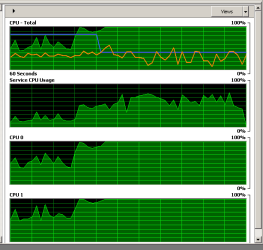
I've found from watching the Performance tab of the task manager that the CPU is completely maxed out during these periods of glitching. The video will eventually "stick" completely for several seconds, and then release and it runs ok for a minute or two. It's horrible! It's not the internet connection because the player shows the video has loaded enough buffer. If I look at the processes, there is no process shown that is taking very much CPU, just maybe < 10 % typically! That is really strange I don't understand that!!!!
It typically gets worse the longer the video plays (after 10 min it's a lot worse). Could this be an overheating GPU? Does GPU usage show up as CPU on the performance graph???
It is a really awful experience.
I could really use some help.
I recently added 2GB memory to the existing 2GB. Memory use during video playing is typically steady at < 2GB. Also, I have a dual boot OS with Ubuntu 14.04. Videos seems to play fine without glitching at all if I use Ubuntu.
What could make the CPU show up high on the performance graph but not show up as a process on the process list???
thanks!
steve
Whenever I watch any video on the web (such as from YouTube), the video begins to constantly glitch and repeatedly freeze briefly and it's a really horrible experience. It seems to happen for a few minutes at a time, and then is ok for a few minutes, and this repeats periodically. When it glitches it is glitching several times a second and it becomes unintelligible. This typically gets worse the longer the video is. This happens the same if I use Chrome, IE, or Opera.
I've found from watching the Performance tab of the task manager that the CPU is completely maxed out during these periods of glitching. The video will eventually "stick" completely for several seconds, and then release and it runs ok for a minute or two. It's horrible! It's not the internet connection because the player shows the video has loaded enough buffer. If I look at the processes, there is no process shown that is taking very much CPU, just maybe < 10 % typically! That is really strange I don't understand that!!!!
It typically gets worse the longer the video plays (after 10 min it's a lot worse). Could this be an overheating GPU? Does GPU usage show up as CPU on the performance graph???
It is a really awful experience.
I could really use some help.
I recently added 2GB memory to the existing 2GB. Memory use during video playing is typically steady at < 2GB. Also, I have a dual boot OS with Ubuntu 14.04. Videos seems to play fine without glitching at all if I use Ubuntu.
What could make the CPU show up high on the performance graph but not show up as a process on the process list???
thanks!
steve
My Computer
- Computer type
- Laptop
- Computer Manufacturer/Model Number
- HP Pavillion Notebook PC tx1308nr upgraded from Vista to 7
- OS
- Windows 7 Home Premium 32 bit SP1
- CPU
- AMD Turion 64 X2 Mobile Technology TL-58 1.90GHz (stock)
- Motherboard
- (stock)
- Memory
- 2GB (stock)
- Graphics Card(s)
- NVIDIA GeForce Go 6150 Driver version 179.67 (Stock)
- Monitor(s) Displays
- Sanmsung 23"
- Hard Drives
- 320 GB, stock drive replaced due to failure of stock drive, 1 TB backup drive.
- Keyboard
- Logitech cordless
- Mouse
- Logitech cordless
- Antivirus
- Avast (previously Norton)
- Browser
- Explorer, Chrome, Opera