CPU Maxed playing Freecell, Spider, or Minesweeper

SailingNut

New member
Member
VIP
Local time
6:56 AM
Messages
127
Hi all!

I'm having a very perplexing problem with my system. As I mantioned in the title, when I play Freecell, Spider or Minesweeper, I see the CPU usage go way up and the game becomes very slow in responding. I am running a CPU meeter and it sometimes goes all the way to 100% usage.

I find this hard to believe since I have a dual core Q6400, a GeForce 8800GTS, and 3GB RAM. Also I can play Oblivion with fairly high settings without any performance problems.

I'm at a bit of a loss on how to troubleshoot this one. Any suggestions?

Oh, forgot to mention that I have been having this problem for a while and it seems to be getting worse. I've been upgrading my video card drivers in an attempt to fix things, but to no avail.

Any help is appreciated! TIA!
 

My Computer My Computer

Computer Manufacturer/Model Number
Home Build
OS
Windows 7 Ultimate x64
CPU
Core i5 760
Motherboard
Biostar T5XE (P55)
Memory
2x2GB Mushkin PC3-10666
Graphics Card(s)
GeForce GTX 460
Internet Speed
FiOS 25Gbps down & up
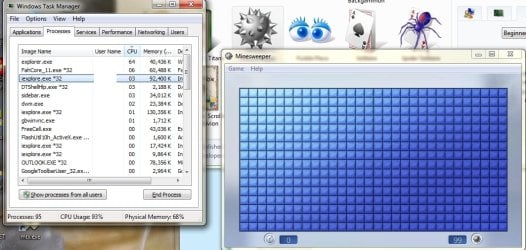
Can you please post a screenshot of your task manager when you have Minesweeper open (the processes tab)?
 

My Computer My Computer

Computer Manufacturer/Model Number
Custom Built
OS
Windows 7 Ultimate
CPU
AMD Athlon II X2 245 2.90Ghz
Motherboard
Some Gigabyte one, dont remember model
Memory
3.00 GB
Graphics Card(s)
8800GTS 512MB
Sound Card
Sound Blaster X-Fi Titanium Fatal1ty
Monitor(s) Displays
Dual 22" widescreen
Hard Drives
250GB internal, 500GB internal
PSU
CORSAIR CMPSU-850TX 850W Power Supply
Case
Thermalkake Tsunami Dream
Cooling
Thermaltake Golden Orb II
Keyboard
Saitek Eclipse 2
Mouse
Logitech MX518
Here's a shot of task manager and minesweeper open at the same time. This is right after opening minesweeper when it's doing the opening animation. (The CPU doesn't stay at high usage, it does go down if I'm not doing anything with the game, but when I begin to play it san spike up.)
 

Attachments

  • CPU Problem.jpg
    CPU Problem.jpg
    102.1 KB · Views: 73

My Computer My Computer

Computer Manufacturer/Model Number
Home Build
OS
Windows 7 Ultimate x64
CPU
Core i5 760
Motherboard
Biostar T5XE (P55)
Memory
2x2GB Mushkin PC3-10666
Graphics Card(s)
GeForce GTX 460
Internet Speed
FiOS 25Gbps down & up
It looks like you have a lot of things running at once, some of which you might not even need. Please follow these steps :

Click Start
Type "msconfig", hit enter
Click the startup tab
Go through this list and UNCHECK anything you don't NEED to start at bootup (i.e. leave any antivirus/spyware checked)
Restart the computer

Before opening anything else, run Minesweeper.
 

My Computer My Computer

Computer Manufacturer/Model Number
Custom Built
OS
Windows 7 Ultimate
CPU
AMD Athlon II X2 245 2.90Ghz
Motherboard
Some Gigabyte one, dont remember model
Memory
3.00 GB
Graphics Card(s)
8800GTS 512MB
Sound Card
Sound Blaster X-Fi Titanium Fatal1ty
Monitor(s) Displays
Dual 22" widescreen
Hard Drives
250GB internal, 500GB internal
PSU
CORSAIR CMPSU-850TX 850W Power Supply
Case
Thermalkake Tsunami Dream
Cooling
Thermaltake Golden Orb II
Keyboard
Saitek Eclipse 2
Mouse
Logitech MX518
I can give that a try.

It's really odd that other programs don't see the same problems. Only those games.
 

My Computer My Computer

Computer Manufacturer/Model Number
Home Build
OS
Windows 7 Ultimate x64
CPU
Core i5 760
Motherboard
Biostar T5XE (P55)
Memory
2x2GB Mushkin PC3-10666
Graphics Card(s)
GeForce GTX 460
Internet Speed
FiOS 25Gbps down & up
I'm seeing exactly the same issue

Although on a slower machine, a Toshiba R100. Before starting these games I see a warning saying that graphics acceleration is not enabled [the R100 doesn't have accelerated graphics] and to expect slow performance. That's fine, but maxing out CPU at 100% for minutes at a time is not just slow, it's ridiculous. The XP versions worked fine on machines that were less powerful than this one. A weird W7 bug.
 

My Computer My Computer

OS
Windows 7 Ultimate x64
Try turning off Folding @ Home.
 

My Computer My Computer

Computer Manufacturer/Model Number
Custom
OS
Windows 7 Ultimate SP1 x64
CPU
AMD Phenom II x6 1090T
Motherboard
ASUS Crosshair V Formula
Memory
16GB Mushkin Silverline DDR3-1333
Graphics Card(s)
XFX Radeon HD 7970
Sound Card
Onboard
Monitor(s) Displays
ASUS VK246H
Screen Resolution
24", 1920x1080
Hard Drives
60GB OCZ Vertex 2
3TB Hitachi Deskstar (5400 RPM)
3TB Hitachi Deskstar (7200 RPM)
PSU
Corsair AX1200
Case
NXZT Phantom
Cooling
Cooler Master Hyper 212+ (push-pull, 2x Blade Master 120mm)
Keyboard
Razer Black Widow
Mouse
Razer Abyssus
Internet Speed
10mbit down, 1 mbit up
Back
Top