CPU Parking

spyknee

Banned
Local time
12:01 PM
Messages
382
Location
NYC
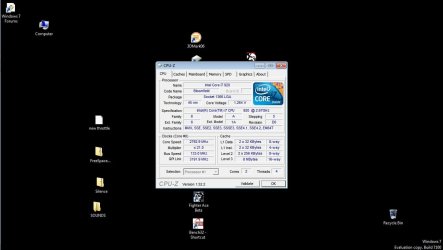
Should not CPUZ show all 4 cores?. i7 920 cpu
DXDIAG does.;)
Performance Monitor shows two cores parked.:cry:
Set for Maximum Performance in power scheme.:cool:
Can you force cores to remain unparked? Windows or Bios.:o
 

Attachments

  • CPUZ.jpg
    CPUZ.jpg
    56.4 KB · Views: 1,029

My Computer

Computer Manufacturer/Model Number
DIY #3, #2
OS
W7 Ulti/64, XP Pro/32
CPU
INTEL i7 920 DO, Core2 Duo 6400
Motherboard
GIGABYTE EX58 UD3R-SLI, EP45-UD3R
Memory
KINGSTON DDR3 1333MHz, CORSAIR DDR2 800MHz
Graphics Card(s)
EVGA GTX 260 x2, 8800 GTX
Sound Card
REALTEK HD onboard, ditto
Monitor(s) Displays
SONY 40" BRAVIA LCD
Screen Resolution
1360 X 768
Hard Drives
OCZ VERTEX/RAID0 -3, Vertex 30GB
PSU
COOLERMASTER 900W, ENERMAX 850W
Case
COOLERMASTER HAF 932 x2
Cooling
stock
Keyboard
MS
Mouse
MS
Internet Speed
ADSL 3MB/768KBs
Other Info
amateur enthusiast
There is a option in the bios that limits the cores used, I cant remember what it is but find it and turn it off. I also heard that i7 don't like to be overclocked.
 

My Computer

OS
Windows 7 Ultimate x64 Service Pack 1 (Build 6.1.7601)
CPU
Intel Core 2 Quad Q6600 (G0 Kentsfield) LGA775 (FC-LGA6)
Motherboard
GIGABYTE GA-EP35C-DS3R (Rev. 2.1)
Memory
Corsair TW3X4G1333C9A 4GB PC-10600 (2x XMS3 2GB)
Graphics Card(s)
ASUS nVIDIA GeForce 560
Sound Card
RealTek ALC885/889A/890
Monitor(s) Displays
ChiMei CMV CT-730D 17inch (LCD Monitor)
Screen Resolution
1280-1024 60Hertz (Ture Colour 32bit)
Hard Drives
2x Barracuda 7200.10 SATA 3.0Gb/s 160-GB Hard Drive ST3160815AS (AHCI)
PSU
ANTEC 750w Earthwatts
Case
Thermaltake Shark (VA7000SWA ATX) Full Tower
Cooling
Front 120mm fan (1400 RPM) /Rear 120mm (1400 RPM) blue LED
Keyboard
Labtec Media Desktop Y-SAD65
Mouse
Razer DeathAdder 3G Infrared Sensor (1800DPI)
Internet Speed
Telstra BigPond Elite Liberty ADSL2+ 24Mbps/256kbps
Other Info
ASUS PCE-N13 802.11n Wireless LAN card
Right click CPU-Z in task manager (obviously when it is running!) and look at the settings under the affinity option to see how many cores it's set to use by default... ;)
 

My Computer

Computer Manufacturer/Model Number
Custom built machine
OS
W7 x64
CPU
Intel Q9300 2.5Ghz Quad LGA775 (Would like Q9650)
Motherboard
Gigabyte GA-EP45T-UD3R (F6 Bios)
Memory
4Gb OCZ Gold 1,333Mhz
Graphics Card(s)
Palit HD4850 O/C Sonic 512Mb DDR3, Dual DViD's
Sound Card
Azalia to twin Samson 50w Studio Monitors
Monitor(s) Displays
Twin Dell (E-IPS) U2311H 23.6" Screens
Screen Resolution
1920 x 1080 @ 60Hz
Hard Drives
Crucial M4 SSD, archives on twin Western Digital Caviar Black WD2002FAEX, 2TB, 7200rpm HDD's, Samsung Ritemaster CD/DVD Burner...
PSU
OCZ 600w
Case
Lian-Li PC8 acoustifoamed' aluminium tower
Cooling
Scythe 140mm Zipang
Keyboard
Cherry PS/2 custom model
Mouse
Lenovo USB laser "Thinkpad" Mouse
Internet Speed
ADSL2+ @14Mbps downstream & Cat6 Gigabit Ethernet
Antivirus
NOD32
Browser
Opera
Other Info
Silicon Dust HD Homerun Dual FTA (Ethernet) TV Tuners, Dray Tek Vigor 2850Vn router and 8x HP Gigabit Switch. Lian-Li CR26 Card Reader, Canon MF4430 iSensys laser printer/scanner.
Probably speedstep? Crispy heard wrong,1366 i7's run well above 4G on air, D0 stepping especially.
 

My Computer

Computer Manufacturer/Model Number
SevenForums
OS
7 Prof
CPU
Q9550
Motherboard
Maximus II Formula
Memory
2x2 Mushkin Ascent 8500
Graphics Card(s)
4870X2
Sound Card
X-Fi Xtreme Gamer
Monitor(s) Displays
LN32A550
Screen Resolution
1920x1080
Hard Drives
Intel G2 80GB
5x1TB
PSU
Corsair 1000
Case
Cosmos
Cooling
Yates^13
Keyboard
G15v1
Mouse
MX518
Internet Speed
6Mbps
Probably speedstep? Crispy heard wrong,1366 i7's run well above 4G on air, D0 stepping especially.


I know thats why I have it!
TY
 

My Computer

Computer Manufacturer/Model Number
DIY #3, #2
OS
W7 Ulti/64, XP Pro/32
CPU
INTEL i7 920 DO, Core2 Duo 6400
Motherboard
GIGABYTE EX58 UD3R-SLI, EP45-UD3R
Memory
KINGSTON DDR3 1333MHz, CORSAIR DDR2 800MHz
Graphics Card(s)
EVGA GTX 260 x2, 8800 GTX
Sound Card
REALTEK HD onboard, ditto
Monitor(s) Displays
SONY 40" BRAVIA LCD
Screen Resolution
1360 X 768
Hard Drives
OCZ VERTEX/RAID0 -3, Vertex 30GB
PSU
COOLERMASTER 900W, ENERMAX 850W
Case
COOLERMASTER HAF 932 x2
Cooling
stock
Keyboard
MS
Mouse
MS
Internet Speed
ADSL 3MB/768KBs
Other Info
amateur enthusiast
With the install of retail version, the core and thread numbers became right with CPUZ. I have also found a way to disable core parking since then. Gave me a slight performance boost. Next I disabled HT. Altho cpu numbers dropped a little, it gave me a big ram boost worth 5000MB/s +=.

ps turned off speed step!
 

My Computer

Computer Manufacturer/Model Number
DIY #3, #2
OS
W7 Ulti/64, XP Pro/32
CPU
INTEL i7 920 DO, Core2 Duo 6400
Motherboard
GIGABYTE EX58 UD3R-SLI, EP45-UD3R
Memory
KINGSTON DDR3 1333MHz, CORSAIR DDR2 800MHz
Graphics Card(s)
EVGA GTX 260 x2, 8800 GTX
Sound Card
REALTEK HD onboard, ditto
Monitor(s) Displays
SONY 40" BRAVIA LCD
Screen Resolution
1360 X 768
Hard Drives
OCZ VERTEX/RAID0 -3, Vertex 30GB
PSU
COOLERMASTER 900W, ENERMAX 850W
Case
COOLERMASTER HAF 932 x2
Cooling
stock
Keyboard
MS
Mouse
MS
Internet Speed
ADSL 3MB/768KBs
Other Info
amateur enthusiast
Here , found this on google :

For those of you who are using laptops with Windows 7 or Vista installed, you may be disappointed to find out the dual, quad or octal core processor you invested in isn't actually using all of the cores. That's right... out of the box these operating systems do not fully enable the distribution of processes over the cores for certain system configurations. For the most part, these configurations are limited to laptops.

The reason for disabling multiple cores really comes down to energy consumption. The default power profiles set forth by Microsoft opt for an energy savings based configuration, even when the power settings are set to full performance. Personally, I find it rather obnoxious, as once I disabled core parking, I saw a significant increase in all of my processor intensive tasks.

How To Disable CPU Core Parking For Dual And Quad Processors:

1. Copy the following registry key entry between the brackets [ 0cc5b647-c1df-4637-891a-dec35c318583 ].

2. Select your start button.

3. In the search box, type 'regedit' and press enter.

4. Once your registry editor is open, select 'Edit' and 'Find...'.

5. Paste the above registry key in the box and select 'Find'.

6. Once it has located it, look for the keys on the right hand side labeled MinValue and MaxValue.

7. Double click on each value and make sure they are both set to '0'.

8. Select 'Edit' and 'Find Next...'.

9. Continue to replace MinValue and MaxValue for each entry until you have replaced them all.

10. Close the registry editor and shut down your computer.

11. Power the computer back up.

12. Core Parking should now be disabled.

To check whether or not your cores are parked simply press ctrl + alt + del and open the task manager. You can then select the 'Performance' tab and open the 'Resource Monitor...'. Within the resource monitor, select the 'CPU' tab and look at the graphs on the right hand side. None of the CPUs should say, in text, that they are parked. If they do not, then your processor cores are not parked.

 

My Computer

Computer Manufacturer/Model Number
Alienware MX17-r2
OS
win7 64 bit
CPU
i740
Memory
8 gigs
Graphics Card(s)
ATI
Sound Card
Harden carden
Hard Drives
WD Scorpio black
Seems like this would be easier - run and reboot:

Code:
@echo off
 
cd %temp%
powercfg -l | findstr GUID > %temp%\list.txt

FOR /F "tokens=4* delims= " %%i in (%temp%\list.txt) DO powercfg.exe -SETACVALUEINDEX %%i 54533251-82be-4824-96c1-47b60b740d00 0cc5b647-c1df-4637-891a-dec35c318583 100
del /q %temp%\list.txt
ECHO Done
PAUSE
 

My Computer

Computer type
PC/Desktop
Computer Manufacturer/Model Number
Custom
OS
Windows 10 Pro x64
CPU
Intel Core i7 4790K @ 4.5GHz
Motherboard
Asus Maximus Hero VII
Memory
32GB DDR3
Graphics Card(s)
Nvidia GeForce GTX970
Sound Card
Realtek HD Audio
Screen Resolution
1920x1200
Hard Drives
1x Samsung 250GB SSD
4x WD RE 2TB (RAIDZ)
PSU
Corsair AX760i
Case
Fractal Design Define R4
Cooling
Noctua NH-D15
Well Honestly that is not a concern for me maybe others

I already know laptops lack performance vs the Desktop counter part

Maybe ill give it a whirl but right now i see no need

There is nothing really bogging me down maybe for future use Thanks !
 

My Computer

Computer type
PC/Desktop
Computer Manufacturer/Model Number
CoreI7-6700K MrFingerIII Special Builds
OS
Windows 10 Home Premium 64bit sp1
CPU
Intel I7-6700K @ 4.6 Ghz 1.344 volts everyday OC
Motherboard
Asrock Fatality K6 Z170 Socket 1151
Memory
32GB G-Skill TridentZ 3200mhz 16-18-18-38 DDR4
Graphics Card(s)
Sli Gigabyte Windforce GTX 980 G1
Sound Card
AC97 Creative Rage Tactic 3D Headphones Bluetooth
Monitor(s) Displays
27" Asus ROG Swift PG278Q G-Sync 48" Vizio Smart HD TV
Screen Resolution
2560x1440p 27"- 48" Currently Gaming at 2560x1440p Res 2K
Hard Drives
250GB Samsung Evo840SSD Seagate baracuda 500 GB WD Mybook 500Gb 1TB Seagate Barracuda
PSU
HX1050w Corsair Silver 80plus certified crosfire/sli
Case
Enthod Pro Full Tower
Cooling
Corsair H110i GT 280 mm High Performance WaterBlock
Keyboard
Logitech wireless keyboard
Mouse
Logitech wireless mouse
Internet Speed
Cox Cable 100+ mb
Antivirus
WebRoot Spysweeper with Antivirus
Browser
IE-10, Chrome, Opera
Other Info
My Other Rig is a AMD FX8320E @4.6Ghz 16GB Ballistic Sport Ram
Mobo Asrock Fatality 990FX 120GB OCZ SSD 1TB Seagate Barracuda Corsair H75 Cooling PSU Corsair CX750
GPU GTX Gigabyte 970G1
Back
Top