
CPU performance issues in gaming and video playback?

dustomcgee

New member
Local time
6:48 AM
Messages
7
Hello!

I have been having trouble off and on with sound and video stutter in games and video playback (mostly through flash players but can be seen sometimes with video players like MPC).

I believe it is something eating up my CPU but am not positive. Gaming-wise it doesn't matter if I have it on high or low settings. I mainly play online games but I'm confident my internet connection would not be the problem (don't exactly see how it could be in this case anyways). My system does not have the best specs but should be able to play the games I'm running and shouldn't have problems with video playback.

My temps are fine from what I can see (using CPUID HWMonitor for that).

Basic system specs are in my profile and I've attached my dxdiag for a bit more info. ;)

If you need any other detailed info please ask.
 

Attachments

My Computer My Computer

OS
Microsoft Windows 7 Ultimate 64-bit 7600 Multiprocessor Free
CPU
Intel(R) Core(TM)2 CPU 6600 @ 2.40GHz
Motherboard
ASUSTeK Computer INC. P5B-Deluxe
Memory
4.00 GB
Graphics Card(s)
NVIDIA GeForce GTS 250
Sound Card
(1) USB Audio Device (2) HD Pro Webcam C920 (3) SoundMAX
Screen Resolution
1440x900 and 1360x768
Hard Drives
(1) ST3250310AS ATA Device (2) WDC WD1600YS-01SHB1 ATA Device
Other Info
BIOS Date: 01/22/07 17:14:23 Ver: 08.00.12

My Computer My Computer

Computer Manufacturer/Model Number
Nothing specific....what ever the clients provide for Repair
OS
Windows 7 ultimate x64
Run this program and see whether you have any red bars - if yes, you most likely have a driver problem. DPC Latency Checker
 

My Computer My Computer

Computer Manufacturer/Model Number
HP, Dell, Gateway, Toshiba - 4 laptops and 2 desktops
OS
Vista, Windows7, Mint Mate, Zorin, Windows 8
CPU
from 1.6GHz Duo to i7
Monitor(s) Displays
2x HP w2207
Hard Drives
5x HDD, 7x SSD, 12x Externals
Keyboard
with trackball - no mices
Mouse
Trackball mice
Internet Speed
DSL 6000
Please use this tool to update your profile specs

And then use this tool to post all the files here

Updated system specs via that tool.
SF Diagnostic tool generates an empty folder every time. Have UAC disabled and am running as admin each time. Not sure what that means.

EDIT: Third times the charm with the SF Tool? ZIP file attached. :D

Upload the full system specifications, and what are the minimum system requirements for the games you are playing?

Mainly WoW and other lower end MMOs. I even had the stutter problem in Altitude though which is quite low on the spectrum of requirements.

When the problem isn't happening I can get 30-40 fps in Guild Wars 2 on low/med settings. When it is happening I get 8-10 fps. WoW has the same problem. I can play that on high-ultra with great fps when it's not happening. Barely playable on low settings when it is.


Run this program and see whether you have any red bars - if yes, you most likely have a driver problem. DPC Latency Checker

I saw green bars all the way running it for 5 minutes or so. I did however still get this message:

Code:
Some device drivers on this machine behave bad and will probably cause drop-outs in real-time audio and/or video streams. To isolate the misbehaving driver use Device Manager and disable/re-enable various devices, one at a time. Try network and W-LAN adapters, modems, internal sound devices, USB host controllers, etc.
 

Attachments

My Computer My Computer

OS
Microsoft Windows 7 Ultimate 64-bit 7600 Multiprocessor Free
CPU
Intel(R) Core(TM)2 CPU 6600 @ 2.40GHz
Motherboard
ASUSTeK Computer INC. P5B-Deluxe
Memory
4.00 GB
Graphics Card(s)
NVIDIA GeForce GTS 250
Sound Card
(1) USB Audio Device (2) HD Pro Webcam C920 (3) SoundMAX
Screen Resolution
1440x900 and 1360x768
Hard Drives
(1) ST3250310AS ATA Device (2) WDC WD1600YS-01SHB1 ATA Device
Other Info
BIOS Date: 01/22/07 17:14:23 Ver: 08.00.12
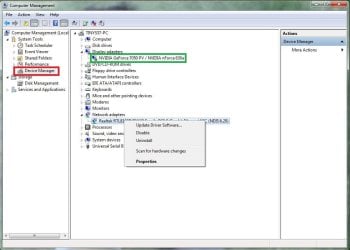
How to get to Device Manager if you don't know:

Start > Right-Click Computer > Manage (need Admin rights I believe) > Computer Management > Device Manager > Click-the tree-view for a device > Right-Click for options of that driver (Disable, Uninstall etc.)

Hope this helps,

Harry
 

Attachments

  • Computer Management - Device Manager - Drivers.JPG
    Computer Management - Device Manager - Drivers.JPG
    68.3 KB · Views: 12

My Computer My Computer

Computer type
Laptop
How to get to Device Manager if you don't know:

Start > Right-Click Computer > Manage (need Admin rights I believe) > Computer Management > Device Manager > Click-the tree-view for a device > Right-Click for options of that driver (Disable, Uninstall etc.)

Hope this helps,

Harry

I'm honestly not sure what you wanted me to do in the Device Manager? :confused:
 

My Computer My Computer

OS
Microsoft Windows 7 Ultimate 64-bit 7600 Multiprocessor Free
CPU
Intel(R) Core(TM)2 CPU 6600 @ 2.40GHz
Motherboard
ASUSTeK Computer INC. P5B-Deluxe
Memory
4.00 GB
Graphics Card(s)
NVIDIA GeForce GTS 250
Sound Card
(1) USB Audio Device (2) HD Pro Webcam C920 (3) SoundMAX
Screen Resolution
1440x900 and 1360x768
Hard Drives
(1) ST3250310AS ATA Device (2) WDC WD1600YS-01SHB1 ATA Device
Other Info
BIOS Date: 01/22/07 17:14:23 Ver: 08.00.12
How to get to Device Manager if you don't know:

Start > Right-Click Computer > Manage (need Admin rights I believe) > Computer Management > Device Manager > Click-the tree-view for a device > Right-Click for options of that driver (Disable, Uninstall etc.)

Hope this helps,

Harry

I'm honestly not sure what you wanted me to do in the Device Manager? :confused:

You could have a corrupted driver, and a reinstall of a driver for that device may work, you will be able to get drivers from the vendors website.

The device manager also usually displays which drivers are corrupted.

This PCWorld article may be of use to you: http://www.pcworld.com/article/165774/fix_corrupt_drivers.html

Hope this helps,

Harry
 
Last edited:

My Computer My Computer

Computer type
Laptop
How to get to Device Manager if you don't know:

Start > Right-Click Computer > Manage (need Admin rights I believe) > Computer Management > Device Manager > Click-the tree-view for a device > Right-Click for options of that driver (Disable, Uninstall etc.)

Hope this helps,

Harry

I'm honestly not sure what you wanted me to do in the Device Manager? :confused:

You could have a corrupted driver, and a reinstall of a driver for that device may work, you will be able to get drivers from the vendors website.

The device manager also usually displays which drivers are corrupted.

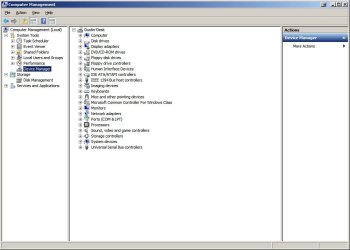
Ah okay. Not seeing any corrupted drivers in the device manager.
 

Attachments

  • dustomcgee-device-manager.jpg
    dustomcgee-device-manager.jpg
    53.6 KB · Views: 4

My Computer My Computer

OS
Microsoft Windows 7 Ultimate 64-bit 7600 Multiprocessor Free
CPU
Intel(R) Core(TM)2 CPU 6600 @ 2.40GHz
Motherboard
ASUSTeK Computer INC. P5B-Deluxe
Memory
4.00 GB
Graphics Card(s)
NVIDIA GeForce GTS 250
Sound Card
(1) USB Audio Device (2) HD Pro Webcam C920 (3) SoundMAX
Screen Resolution
1440x900 and 1360x768
Hard Drives
(1) ST3250310AS ATA Device (2) WDC WD1600YS-01SHB1 ATA Device
Other Info
BIOS Date: 01/22/07 17:14:23 Ver: 08.00.12
Expand your "Sound, video and game controllers" to see the drivers.
 

My Computer My Computer

Computer type
Laptop
Expand your "Sound, video and game controllers" to see the drivers.

Oh I know the screenshot didn't show that expanded but I checked every category and saw no problems at all.
 

My Computer My Computer

OS
Microsoft Windows 7 Ultimate 64-bit 7600 Multiprocessor Free
CPU
Intel(R) Core(TM)2 CPU 6600 @ 2.40GHz
Motherboard
ASUSTeK Computer INC. P5B-Deluxe
Memory
4.00 GB
Graphics Card(s)
NVIDIA GeForce GTS 250
Sound Card
(1) USB Audio Device (2) HD Pro Webcam C920 (3) SoundMAX
Screen Resolution
1440x900 and 1360x768
Hard Drives
(1) ST3250310AS ATA Device (2) WDC WD1600YS-01SHB1 ATA Device
Other Info
BIOS Date: 01/22/07 17:14:23 Ver: 08.00.12
You did mention having problems with flash players, have you installed the latest versions for the flash players?

I think your system requirements may be slightly low for WoW's recommended settings, the RAM is probably being fully used by the game; I noticed a paging file said to be created within the system specifications .txt document which was attached to your question.

http://us.battle.net/support/en/article/minimum-system-requirements-for-world-of-warcraft
 

My Computer My Computer

Computer type
Laptop
You did mention having problems with flash players, have you installed the latest versions for the flash players?

I think your system requirements may be slightly low for WoW's recommended settings, the RAM is probably being fully used by the game; I noticed a paging file said to be created within the system specifications .txt document which was attached to your question.

World of Warcraft System Requirements - Battle.net Support

I'm confident my computer is quite capable of running WoW. Even looking at that page I meet the recommended. When the stutter happens it happens to everything.

A good example:

I'm playing WoW and the problem happens. I exit WoW and try to watch a movie. The problem is still consistent. Will even happen when talking to someone on Skype.

I do have the latest version of Flash and that shouldn't be the problem anyways as it can occur in regular media players as well.
 

My Computer My Computer

OS
Microsoft Windows 7 Ultimate 64-bit 7600 Multiprocessor Free
CPU
Intel(R) Core(TM)2 CPU 6600 @ 2.40GHz
Motherboard
ASUSTeK Computer INC. P5B-Deluxe
Memory
4.00 GB
Graphics Card(s)
NVIDIA GeForce GTS 250
Sound Card
(1) USB Audio Device (2) HD Pro Webcam C920 (3) SoundMAX
Screen Resolution
1440x900 and 1360x768
Hard Drives
(1) ST3250310AS ATA Device (2) WDC WD1600YS-01SHB1 ATA Device
Other Info
BIOS Date: 01/22/07 17:14:23 Ver: 08.00.12
Have you tried installing the latest drivers for your sound and graphics devices?
 

My Computer My Computer

Computer type
Laptop

My Computer My Computer

OS
Microsoft Windows 7 Ultimate 64-bit 7600 Multiprocessor Free
CPU
Intel(R) Core(TM)2 CPU 6600 @ 2.40GHz
Motherboard
ASUSTeK Computer INC. P5B-Deluxe
Memory
4.00 GB
Graphics Card(s)
NVIDIA GeForce GTS 250
Sound Card
(1) USB Audio Device (2) HD Pro Webcam C920 (3) SoundMAX
Screen Resolution
1440x900 and 1360x768
Hard Drives
(1) ST3250310AS ATA Device (2) WDC WD1600YS-01SHB1 ATA Device
Other Info
BIOS Date: 01/22/07 17:14:23 Ver: 08.00.12
hi

1. Your bios has updates...

2. Please update windows to SP2

3. Reseat the graphics card

Do these and let me know
 

My Computer My Computer

Computer Manufacturer/Model Number
Nothing specific....what ever the clients provide for Repair
OS
Windows 7 ultimate x64
Back
Top