CPU says sound coming through speakers, but its coming via headphones

nvd88

New member
Local time
5:09 PM
Messages
3
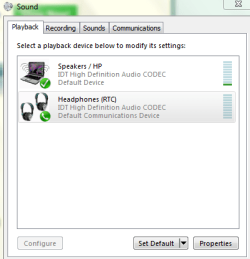
Hi everyone. I have my headphones plugged in and am getting poor sound quality out of them. My computer says that the sound is coming through my speakers, but its not (its just coming through the headphones.) I've attached a picture of what the comp's showing me for reference. I've tried going to the Sound menu and making the headphones the default device, with no luck. This issue seemed to happen after I was done using Google video chat with my headphones plugged in. I am trying to get the sound quality in my headphones back to normal. They work with every other device. Please help!

Sound.PNG
 

My Computer My Computer

At a glance

Windows 7 x64250 GB
Computer type
PC/Desktop
Computer Manufacturer/Model Number
HP EliteBook
OS
Windows 7 x64
Memory
250 GB
Did you try re-plugging the headphones yet? Is it jacked or USB?
 

My Computer My Computer

At a glance

Windows 7 Ultimate x64 SP1AMD Phenom 2 1090T2x8GB Kingston HyperX Fury Black 1600Mhz Unga...MSI GTX 970 Gaming 4G
Computer type
PC/Desktop
Computer Manufacturer/Model Number
Custom Build
OS
Windows 7 Ultimate x64 SP1
CPU
AMD Phenom 2 1090T
Motherboard
Gigabyte GA-890FXA-UD5
Memory
2x8GB Kingston HyperX Fury Black 1600Mhz Unganged
Graphics Card(s)
MSI GTX 970 Gaming 4G
Sound Card
Realtek On-Board HD 7.1 Audio / Logitech G35
Monitor(s) Displays
3xAcer GD245HQ
Screen Resolution
1920x1080
Hard Drives
Samsung 850 Pro 512GB SSD - OS /
WD Caviar Black SATA 3 - 1 TBx2 - Dynamic RAID 0 /
WD Caviar Green SATA 2 - 640GBx2 - Dynamic RAID 0 /
WD Caviar Green SATA 2 - 640GB - Internal Backup /
Seagate Barracude SATA 3 - 3TB - External Backup/ Sync
PSU
HighPower 1000W
Case
Cooler Master HAF 932
Cooling
Noctua NH-D14
Keyboard
Logitech G19
Mouse
Logitech G500
Internet Speed
100/4 Mbit Cable (100GB quota)
Antivirus
ZoneAlarm Extreme Security / MBAM Pro / MBAE Free / SAS Free
Browser
IE 11 - Firefox - Chrome
Other Info
Logitech F710/ G27/ G940/ Z5500 // TrackIR 5 // Nvidia 3D Surround Vision
Yes I've replugged them a bunch, still nothing. They are jacked
 

My Computer My Computer

At a glance

Windows 7 x64250 GB
Computer type
PC/Desktop
Computer Manufacturer/Model Number
HP EliteBook
OS
Windows 7 x64
Memory
250 GB
What happens if you manually set the headphones as default in Playback devices?
 

My Computer My Computer

At a glance

Windows 7 Ultimate x64 SP1AMD Phenom 2 1090T2x8GB Kingston HyperX Fury Black 1600Mhz Unga...MSI GTX 970 Gaming 4G
Computer type
PC/Desktop
Computer Manufacturer/Model Number
Custom Build
OS
Windows 7 Ultimate x64 SP1
CPU
AMD Phenom 2 1090T
Motherboard
Gigabyte GA-890FXA-UD5
Memory
2x8GB Kingston HyperX Fury Black 1600Mhz Unganged
Graphics Card(s)
MSI GTX 970 Gaming 4G
Sound Card
Realtek On-Board HD 7.1 Audio / Logitech G35
Monitor(s) Displays
3xAcer GD245HQ
Screen Resolution
1920x1080
Hard Drives
Samsung 850 Pro 512GB SSD - OS /
WD Caviar Black SATA 3 - 1 TBx2 - Dynamic RAID 0 /
WD Caviar Green SATA 2 - 640GBx2 - Dynamic RAID 0 /
WD Caviar Green SATA 2 - 640GB - Internal Backup /
Seagate Barracude SATA 3 - 3TB - External Backup/ Sync
PSU
HighPower 1000W
Case
Cooler Master HAF 932
Cooling
Noctua NH-D14
Keyboard
Logitech G19
Mouse
Logitech G500
Internet Speed
100/4 Mbit Cable (100GB quota)
Antivirus
ZoneAlarm Extreme Security / MBAM Pro / MBAE Free / SAS Free
Browser
IE 11 - Firefox - Chrome
Other Info
Logitech F710/ G27/ G940/ Z5500 // TrackIR 5 // Nvidia 3D Surround Vision
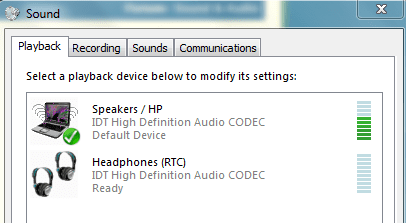
It will not let me make the headphones the default device manually, even if I select the headphones and select "Default Device." For some reason, it only makes them the default communication device when I do that. I've attached a picture for reference.


Sound1.PNG

Also, I have a volume control switch on my headphones that will not control the volume on my computer when the headphones are plugged in, although it will control the volume on my smart phone. A very strange occurrence!
 

My Computer My Computer

At a glance

Windows 7 x64250 GB
Computer type
PC/Desktop
Computer Manufacturer/Model Number
HP EliteBook
OS
Windows 7 x64
Memory
250 GB
Back
Top