Solved CPU temp is very high

jetablack4

New member
Member
Local time
2:12 PM
Messages
56
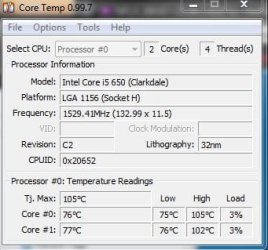
I recently have been looking at my CPU temperature and noticed that it seems extremely high, however, I am unsure if is actually high or it is an error with Core Temp and other temp monitoring programs (I also tried speed fan to verify). I have a new dell xps8100 desktop (about a year old) with a Core i5 650 CPU which has 2 cores with hyper threading. My computer has always run smooth and can't understand how my CPU temps can be this high. Can this be an error since my computer has 2 physical and 2 logical cores? I mean Core Temp is showing that my computer hit the TJmax. Any ideas?

Here are some pics:
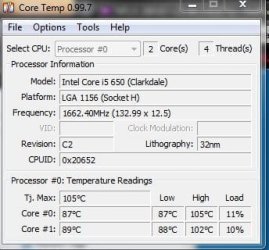
Capture.JPG

Capture1.JPG

Capture2.JPG
 

My Computer

Computer Manufacturer/Model Number
Dell XPS 8100
OS
Windows 7 64 bit
CPU
Intel Core i5 650
Memory
6 GB RAM
Make sure the exhaust fan is working, and the cpu heatsink is free of dust?
 

My Computer

Computer type
PC/Desktop
OS
Microsoft Windows 10 Professional / Windows 7 Professional
CPU
Intel i5-3570
Motherboard
Lenovo Mahobay
Memory
16GB DDR3
Graphics Card(s)
AMD Radeon HD 7850 2GB
Sound Card
(1) Realtek HD Audio (2) AMD HD Audio
Monitor(s) Displays
LG LS192WS
Screen Resolution
1440 x 900 @ 32bit color
Hard Drives
(1) SUV300S37A/120G (2) ST3500413AS SATA Disk Device AHCI mode enabled.
PSU
Corsair HX620
Case
Thermaltake V4 Black Edition
Cooling
Cooler Master Hyper 212 + Artic Silver 5 on CPU/GPU
Keyboard
Dell SK-8115
Mouse
Razer Copperhead with MAPED mat (awesome!)
Internet Speed
100 Mbps up/down
Browser
Chrome
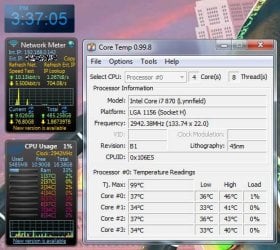
try a newer version of CoreTemp.
I am running version 0.99.8
 

My Computer

Computer Manufacturer/Model Number
HAL-9000
OS
Windows 7 Ultimate 64bit
CPU
Intel i7 3770K
Motherboard
Asus Sabertooth Z77
Memory
16GB DDR3 1333 Corsair XMS3
Graphics Card(s)
XFX HD6950 2GB EyeFinity
Sound Card
Logitech G35 & Sennheiser PC135 & VIA HD
Monitor(s) Displays
23" HP 2310e, 23" Samsung B2230, 21.5" Viewsonic
Screen Resolution
5760x1080
Hard Drives
16TB of Storage
128GB & 256GB Crucial M4 SSD's, 2X 1TB WD Black, 3x 2TB WD, 3x 2TB Samsung F4, 1.5TB Seagate, WD 500GB,
PSU
Antec True Power New 650watt
Case
Cooler Master HAF-932
Cooling
Corsair H60 Hydro Cooler, 3x 230mm Fans, 2x120mm Fan
Keyboard
Logitech G15 and G13
Mouse
Logitech G700 Gaming Mouse
Internet Speed
50/10 Mbit
Other Info
Speakers : Alesis M1 Active Mk2 Studio Monitors , APC RS 1200 UPS, HP 4500DN Color Laser, HP P1006 mono Laser, Kodak 8500 Dye-Sub, Epson 1280 inkjet, Epson Worforce 610 MFC
Make sure that your fans are clear of dust. Also you can buy some additional fans.
 

My Computer

Computer type
PC/Desktop
Computer Manufacturer/Model Number
Custom Build
OS
Windows 10 Pro x64
CPU
Intel Core i5 4440 @Stock
Motherboard
Gigabyte Z97 D3H
Memory
4 x 4GB HyperX Fury DDR3
Graphics Card(s)
Gigabyte GTX 1050Ti O4G
Sound Card
Integrated
Monitor(s) Displays
Dell P2417H
Screen Resolution
1920 x 1080
Hard Drives
Samsung EVO 850 120GB / Toshiba DT01ACA050 1TB 7200prm 32MB
PSU
Riotoro Onyx 750W
Case
NZXT H500 Black-Red
Cooling
Stock CPU + NZXT 120mm + 2x120mm red fans
Keyboard
Modecom Volcano Lanparty
Mouse
Asus ROG Gladius / DeepCool E-Pad Plus
Internet Speed
DOCSIS 50/3 Mbit
Browser
Google Chrome
Other Info
Asus K55VJ(i5 3210M, GT635M / 2GB, 8GB DDR3, 500GB HDD)
This is indeed very high. Dirt can be one cause. The other cause could be a misaligned heatsink or dry paste (which you may want to replace).
 

My Computer

Computer Manufacturer/Model Number
HP, Dell, Gateway, Toshiba - 4 laptops and 2 desktops
OS
Vista, Windows7, Mint Mate, Zorin, Windows 8
CPU
from 1.6GHz Duo to i7
Monitor(s) Displays
2x HP w2207
Hard Drives
5x HDD, 7x SSD, 12x Externals
Keyboard
with trackball - no mices
Mouse
Trackball mice
Internet Speed
DSL 6000
OK - so I seems like all who responded feel that this has something to do with the cooling and it is not related to my system having logical cores (I was hoping that the program might be doubling my cpu temps for that reason). I will check my fans for some dust but I do not really know much about the heat sink or dry paste and really would prefer avoiding going into my computer as I am afraid I might touch the wrong thing.

Additionally when my computer starts up the core temps are around 70 degrees C - which seems kind of high.
 

My Computer

Computer Manufacturer/Model Number
Dell XPS 8100
OS
Windows 7 64 bit
CPU
Intel Core i5 650
Memory
6 GB RAM

My Computer

Computer type
PC/Desktop
Computer Manufacturer/Model Number
Custom Build
OS
Windows 10 Pro x64
CPU
Intel Core i5 4440 @Stock
Motherboard
Gigabyte Z97 D3H
Memory
4 x 4GB HyperX Fury DDR3
Graphics Card(s)
Gigabyte GTX 1050Ti O4G
Sound Card
Integrated
Monitor(s) Displays
Dell P2417H
Screen Resolution
1920 x 1080
Hard Drives
Samsung EVO 850 120GB / Toshiba DT01ACA050 1TB 7200prm 32MB
PSU
Riotoro Onyx 750W
Case
NZXT H500 Black-Red
Cooling
Stock CPU + NZXT 120mm + 2x120mm red fans
Keyboard
Modecom Volcano Lanparty
Mouse
Asus ROG Gladius / DeepCool E-Pad Plus
Internet Speed
DOCSIS 50/3 Mbit
Browser
Google Chrome
Other Info
Asus K55VJ(i5 3210M, GT635M / 2GB, 8GB DDR3, 500GB HDD)
70C at startup is a lot. Do you happen to know what PSU is installed in your system and did you ever check whether it functions properly. Maybe the CPU gets too much juice.
 

My Computer

Computer Manufacturer/Model Number
HP, Dell, Gateway, Toshiba - 4 laptops and 2 desktops
OS
Vista, Windows7, Mint Mate, Zorin, Windows 8
CPU
from 1.6GHz Duo to i7
Monitor(s) Displays
2x HP w2207
Hard Drives
5x HDD, 7x SSD, 12x Externals
Keyboard
with trackball - no mices
Mouse
Trackball mice
Internet Speed
DSL 6000
70C at startup is a lot. Do you happen to know what PSU is installed in your system and did you ever check whether it functions properly. Maybe the CPU gets too much juice.

Hi WHS, I don't know for sure what the PSU is but I read from others who have the same computer that it is a 350 watt power supply, which they say is not much. Also, to sort of confirm my doubts regarding the accuracy of Core Temp due to the hyper threading I ran my dell pc checkup (which is PC-Doctor) and performed a stress test on my CPU and this a a screen shot of what I got:

Capture3.JPG

From what I can tell the 88c and 82c were the max temps recorded during the test. Does this provide any insight?
 

My Computer

Computer Manufacturer/Model Number
Dell XPS 8100
OS
Windows 7 64 bit
CPU
Intel Core i5 650
Memory
6 GB RAM
A 350 Watt PSU is usually sufficent unless you have a high powered graphics card. What is more important is the quality of the PSU - and if your PC is from one of the big manufacturers, that is something hard to determine. They usually put cheap PSUs into the systems because few people focus on that.

As far as your other measurement goes, 80+ degrees is still not splendid, but if it maximizes at that, you can probably live with it.

Although your box is only 1 year old, I would still give it a good cleanup. Use a soft brush and some compressed air (you can find that at Home Depot).
 

My Computer

Computer Manufacturer/Model Number
HP, Dell, Gateway, Toshiba - 4 laptops and 2 desktops
OS
Vista, Windows7, Mint Mate, Zorin, Windows 8
CPU
from 1.6GHz Duo to i7
Monitor(s) Displays
2x HP w2207
Hard Drives
5x HDD, 7x SSD, 12x Externals
Keyboard
with trackball - no mices
Mouse
Trackball mice
Internet Speed
DSL 6000
I use the same program with my i7 with hyper threading and I am getting correct temps.
If all the programs are showing high temps, then you probably actually have high temps and do what others have suggested and check your heatsink and fan and make sure that the top of the heatsink isn't caked with dust/dirt.
 

Attachments

  • cpu-temp.jpg
    cpu-temp.jpg
    76.2 KB · Views: 67

My Computer

Computer Manufacturer/Model Number
HAL-9000
OS
Windows 7 Ultimate 64bit
CPU
Intel i7 3770K
Motherboard
Asus Sabertooth Z77
Memory
16GB DDR3 1333 Corsair XMS3
Graphics Card(s)
XFX HD6950 2GB EyeFinity
Sound Card
Logitech G35 & Sennheiser PC135 & VIA HD
Monitor(s) Displays
23" HP 2310e, 23" Samsung B2230, 21.5" Viewsonic
Screen Resolution
5760x1080
Hard Drives
16TB of Storage
128GB & 256GB Crucial M4 SSD's, 2X 1TB WD Black, 3x 2TB WD, 3x 2TB Samsung F4, 1.5TB Seagate, WD 500GB,
PSU
Antec True Power New 650watt
Case
Cooler Master HAF-932
Cooling
Corsair H60 Hydro Cooler, 3x 230mm Fans, 2x120mm Fan
Keyboard
Logitech G15 and G13
Mouse
Logitech G700 Gaming Mouse
Internet Speed
50/10 Mbit
Other Info
Speakers : Alesis M1 Active Mk2 Studio Monitors , APC RS 1200 UPS, HP 4500DN Color Laser, HP P1006 mono Laser, Kodak 8500 Dye-Sub, Epson 1280 inkjet, Epson Worforce 610 MFC
Thanks everyone for the responses. My computer is still under warranty from Dell, so I called them and they ran some diagnostics and everything passed - so I explained to them how the CPU temps were abnormally high and they agreed to send out a tech to replace my heat sink and install a new fan. I would rather them do this in case something deeper is the problem they can figure it out and take care of it. I will keep everyone updated after I get the new parts installed.
 

My Computer

Computer Manufacturer/Model Number
Dell XPS 8100
OS
Windows 7 64 bit
CPU
Intel Core i5 650
Memory
6 GB RAM
That sounds like a good solution. If they mess it up (which is unlikely), then you are not responsible.
 

My Computer

Computer Manufacturer/Model Number
HP, Dell, Gateway, Toshiba - 4 laptops and 2 desktops
OS
Vista, Windows7, Mint Mate, Zorin, Windows 8
CPU
from 1.6GHz Duo to i7
Monitor(s) Displays
2x HP w2207
Hard Drives
5x HDD, 7x SSD, 12x Externals
Keyboard
with trackball - no mices
Mouse
Trackball mice
Internet Speed
DSL 6000
I agree, that sounds like a good solution
 

My Computer

Computer Manufacturer/Model Number
Pugh Technologies
OS
W7 Professional x64
CPU
AMD Athlon II X3 445 Rana 3.10 GHz
Motherboard
MSI 870A-G54
Memory
PNY XLR DDR3 1600 4x2GB
Graphics Card(s)
NVIDIA GeForce GTS 450 (fermi) 1GB GDDR5
Sound Card
Realtek ALC892 onboard
Monitor(s) Displays
ASUS VE205t, Viewsonic VX2035WM
Screen Resolution
1600x900, 1600x1050
Hard Drives
977GB Hitachi Hitachi HDS721010CLA332
244GB Western Digital WDC WD2500AAJS-65B4A0
488GB Western Digital WDC WD5000AAJS-00A8B0
488GB Western Digital WDC WD5000AAKS-00UU3A0
PSU
Antec EarthWatts EA650 650W
Case
ThermalTake Armor A90 Mid Tower
Cooling
3x 120mm in, 1x 120mm & 200mm out, self built hydro-cooler
Keyboard
Logitec 55
Mouse
Razer Deathadder
Internet Speed
20 Mbps D/L, 9 Mbps U/L
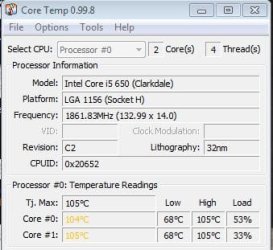
This was a picture of my core temps when Dell was remotley connected to my system yesterday, it was at the max like this for about 30 min - that can't be good :sick:

Hopefully they come for the repair early next week - until then I will not be running anything that will strain my computer - it runs on avg around 75c

Capture5.JPG
 

My Computer

Computer Manufacturer/Model Number
Dell XPS 8100
OS
Windows 7 64 bit
CPU
Intel Core i5 650
Memory
6 GB RAM
Now that's really not good.
 

My Computer

Computer type
PC/Desktop
Computer Manufacturer/Model Number
Custom Build
OS
Windows 10 Pro x64
CPU
Intel Core i5 4440 @Stock
Motherboard
Gigabyte Z97 D3H
Memory
4 x 4GB HyperX Fury DDR3
Graphics Card(s)
Gigabyte GTX 1050Ti O4G
Sound Card
Integrated
Monitor(s) Displays
Dell P2417H
Screen Resolution
1920 x 1080
Hard Drives
Samsung EVO 850 120GB / Toshiba DT01ACA050 1TB 7200prm 32MB
PSU
Riotoro Onyx 750W
Case
NZXT H500 Black-Red
Cooling
Stock CPU + NZXT 120mm + 2x120mm red fans
Keyboard
Modecom Volcano Lanparty
Mouse
Asus ROG Gladius / DeepCool E-Pad Plus
Internet Speed
DOCSIS 50/3 Mbit
Browser
Google Chrome
Other Info
Asus K55VJ(i5 3210M, GT635M / 2GB, 8GB DDR3, 500GB HDD)
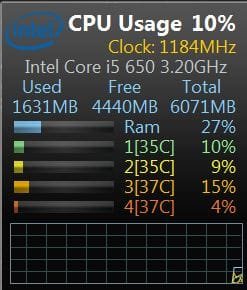
Much better :D
Capture33.JPG

Dell repair came today and replaced my heat sink and fan along with a new motherboard. The heat sink was only half way on, two of the attachment arms were not fasten. The new heat sink was able to be screwed into the new motherboard. Problem is solved. The tech said the high temps would not have caused any harm to the CPU because the computer would automatically shut down if it over heated.
 

My Computer

Computer Manufacturer/Model Number
Dell XPS 8100
OS
Windows 7 64 bit
CPU
Intel Core i5 650
Memory
6 GB RAM
Glad to hear that now it's ok. :)
 

My Computer

Computer type
PC/Desktop
Computer Manufacturer/Model Number
Custom Build
OS
Windows 10 Pro x64
CPU
Intel Core i5 4440 @Stock
Motherboard
Gigabyte Z97 D3H
Memory
4 x 4GB HyperX Fury DDR3
Graphics Card(s)
Gigabyte GTX 1050Ti O4G
Sound Card
Integrated
Monitor(s) Displays
Dell P2417H
Screen Resolution
1920 x 1080
Hard Drives
Samsung EVO 850 120GB / Toshiba DT01ACA050 1TB 7200prm 32MB
PSU
Riotoro Onyx 750W
Case
NZXT H500 Black-Red
Cooling
Stock CPU + NZXT 120mm + 2x120mm red fans
Keyboard
Modecom Volcano Lanparty
Mouse
Asus ROG Gladius / DeepCool E-Pad Plus
Internet Speed
DOCSIS 50/3 Mbit
Browser
Google Chrome
Other Info
Asus K55VJ(i5 3210M, GT635M / 2GB, 8GB DDR3, 500GB HDD)
Back
Top