Solved CPU Usage @ 100%

hunuok

New member
Power User
Local time
7:09 PM
Messages
102
I have a strange problem in that my CPU usage is at a constant 100%, slowing the machine considerably.

I have run virus scans (Avast and Malwarebytes) and came up clean.

When I Ctrl+Alt+Del into task manager, CPU utilization goes down to normal. There are no processes utilizing CPU.

However, when I exit task manager, CPU usage goes back up to 100%. I am using a gadget called System Information to check.

I just spent the last few days doing a clean install of Windows and essential programs. It seemed to work for a day then suddenly the same problem occurred.

I have not made any changes to hardware and software except updates to programs. The system had been working fine for the last 2 years.

Any advice would be greatly appreciated.
 

My Computer My Computer

Computer Manufacturer/Model Number
N/A
OS
Windows 7 Ultimate x64
CPU
Intel i7 [email protected]
Motherboard
Asus Maximus IV Extreme-Z
Memory
G Skill DDR3 12800 DDR3 RipJaws 16Gb
Graphics Card(s)
EVGA GTX480 Tri SLI
Sound Card
SoundBlaster X-Fi Surround 5.1 Pro
Monitor(s) Displays
3 * Dell U2711
Screen Resolution
7680x1440
Hard Drives
2 * OCZ Vertex 3 120Gb
4 * Seagate Barracuda XT 2Tb
1 * WD Caviar Black 1Tb
PSU
Silverstone ST1500
Case
Corsair Obsidian 800D
Cooling
Koolance CPU-360 : Koolance VID-480 : Koolance 360x3 + 120x1
Keyboard
Microsoft Sidewinder X4
Mouse
Logitech G1 Optical
Internet Speed
100Mb
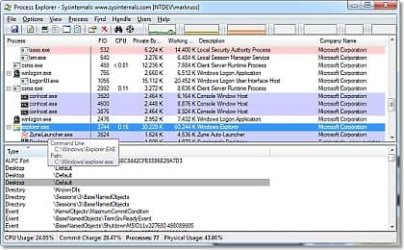
windows task manager is ok but try the sysinternals Process Explorer v15.23 available here ProcessExplorer

Introduction

Ever wondered which program has a particular file or directory open? Now you can find out. Process Explorer shows you information about which handles and DLLs processes have opened or loaded.

The Process Explorer display consists of two sub-windows. The top window always shows a list of the currently active processes, including the names of their owning accounts, whereas the information displayed in the bottom window depends on the mode that Process Explorer is in: if it is in handle mode you'll see the handles that the process selected in the top window has opened; if Process Explorer is in DLL mode you'll see the DLLs and memory-mapped files that the process has loaded. Process Explorer also has a powerful search capability that will quickly show you which processes have particular handles opened or DLLs loaded.

The unique capabilities of Process Explorer make it useful for tracking down DLL-version problems or handle leaks, and provide insight into the way Windows and applications work.
 

Attachments

  • bb896653.processexplorer(en-us,MSDN.10).jpg
    bb896653.processexplorer(en-us,MSDN.10).jpg
    26.4 KB · Views: 21

My Computer My Computer

Computer Manufacturer/Model Number
packard bell IXTREME M5722
OS
Operating System : Windows 7 Home Premium Edition 6.01.7600 SP1 (x64)
CPU
Processor : Intel Core 2 Quad Q8300 @ 2500 MHz
Motherboard
Mainboard : Packard Bell (Acer EG43M )
Memory
Physical Memory :8GB Corsair4x 2GB 800MHz C5 DDR2
Graphics Card(s)
Video Card : XFX 6700 AMD
Monitor(s) Displays
Maestro 234DL - BenQ V2220 - BenQ VW2420H
Screen Resolution
Current Display :1920x1080p pixels at 60 Hz in HD LED
Hard Drives
Hard Disks : WDC (1000 GB)
Drive C: (Hard Disk) : 428 GB available on 491 GB
Drive D: (Hard Disk) : 426 GB available on 492 GB
SAMSUNG spinpoint HD103SJ 1000.2 GB
(X 2) KINGSTON SSD NOW V 30GB
PSU
XFX ProSeries 550W PSU
Case
PACKARD BELL IXTREME
Cooling
System Blower Current: 150mA Air Flow16CFM ;Akasa 90mm rear
Keyboard
Gigabyte Aivia K8100
Mouse
TRUST-Wireless Laser Mouse - Carbon edition MI-7770C
Internet Speed
TP-LINK > TL-WN951N / AV500 Gigabit Powerline Adapters
Browser
chrome dev
Other Info
EXTRA COOLING>(FAN CONTROLLER) PC Bay Cooler 3 x 40mm fans; Akasa AK-HD-BL Blue hard drive cooler 2 x 40 mm fan 4500 rpm 29.7 dBA
Bios> American Megatrends Inc.
Version : P01-A1
Date : 08/31/2009
Thanks for fast reply.

I just ran process explorer. There are no services that are utilizing CPU.

ALL processes are showing <0.xx %.

However, when I exit the program (as well as Task Manager), CPU usage shoots back up to 100%.

I thought this might be an incorrect reading, but HW Monitor shows CPU temps @ 50C idle (when I exit Process Explorer or Task Manager) and 30C idle (when I enable Process Explorer or Task Manager).
 

My Computer My Computer

Computer Manufacturer/Model Number
N/A
OS
Windows 7 Ultimate x64
CPU
Intel i7 [email protected]
Motherboard
Asus Maximus IV Extreme-Z
Memory
G Skill DDR3 12800 DDR3 RipJaws 16Gb
Graphics Card(s)
EVGA GTX480 Tri SLI
Sound Card
SoundBlaster X-Fi Surround 5.1 Pro
Monitor(s) Displays
3 * Dell U2711
Screen Resolution
7680x1440
Hard Drives
2 * OCZ Vertex 3 120Gb
4 * Seagate Barracuda XT 2Tb
1 * WD Caviar Black 1Tb
PSU
Silverstone ST1500
Case
Corsair Obsidian 800D
Cooling
Koolance CPU-360 : Koolance VID-480 : Koolance 360x3 + 120x1
Keyboard
Microsoft Sidewinder X4
Mouse
Logitech G1 Optical
Internet Speed
100Mb
a common error when reading process explorer is to relize system idle process is not using any recorces just the reverse. is this maybe your case?
 

My Computer My Computer

Computer Manufacturer/Model Number
packard bell IXTREME M5722
OS
Operating System : Windows 7 Home Premium Edition 6.01.7600 SP1 (x64)
CPU
Processor : Intel Core 2 Quad Q8300 @ 2500 MHz
Motherboard
Mainboard : Packard Bell (Acer EG43M )
Memory
Physical Memory :8GB Corsair4x 2GB 800MHz C5 DDR2
Graphics Card(s)
Video Card : XFX 6700 AMD
Monitor(s) Displays
Maestro 234DL - BenQ V2220 - BenQ VW2420H
Screen Resolution
Current Display :1920x1080p pixels at 60 Hz in HD LED
Hard Drives
Hard Disks : WDC (1000 GB)
Drive C: (Hard Disk) : 428 GB available on 491 GB
Drive D: (Hard Disk) : 426 GB available on 492 GB
SAMSUNG spinpoint HD103SJ 1000.2 GB
(X 2) KINGSTON SSD NOW V 30GB
PSU
XFX ProSeries 550W PSU
Case
PACKARD BELL IXTREME
Cooling
System Blower Current: 150mA Air Flow16CFM ;Akasa 90mm rear
Keyboard
Gigabyte Aivia K8100
Mouse
TRUST-Wireless Laser Mouse - Carbon edition MI-7770C
Internet Speed
TP-LINK > TL-WN951N / AV500 Gigabit Powerline Adapters
Browser
chrome dev
Other Info
EXTRA COOLING>(FAN CONTROLLER) PC Bay Cooler 3 x 40mm fans; Akasa AK-HD-BL Blue hard drive cooler 2 x 40 mm fan 4500 rpm 29.7 dBA
Bios> American Megatrends Inc.
Version : P01-A1
Date : 08/31/2009
how are you seeing the 100% when you close the monitoring program/s down?
 

My Computer My Computer

Computer Manufacturer/Model Number
packard bell IXTREME M5722
OS
Operating System : Windows 7 Home Premium Edition 6.01.7600 SP1 (x64)
CPU
Processor : Intel Core 2 Quad Q8300 @ 2500 MHz
Motherboard
Mainboard : Packard Bell (Acer EG43M )
Memory
Physical Memory :8GB Corsair4x 2GB 800MHz C5 DDR2
Graphics Card(s)
Video Card : XFX 6700 AMD
Monitor(s) Displays
Maestro 234DL - BenQ V2220 - BenQ VW2420H
Screen Resolution
Current Display :1920x1080p pixels at 60 Hz in HD LED
Hard Drives
Hard Disks : WDC (1000 GB)
Drive C: (Hard Disk) : 428 GB available on 491 GB
Drive D: (Hard Disk) : 426 GB available on 492 GB
SAMSUNG spinpoint HD103SJ 1000.2 GB
(X 2) KINGSTON SSD NOW V 30GB
PSU
XFX ProSeries 550W PSU
Case
PACKARD BELL IXTREME
Cooling
System Blower Current: 150mA Air Flow16CFM ;Akasa 90mm rear
Keyboard
Gigabyte Aivia K8100
Mouse
TRUST-Wireless Laser Mouse - Carbon edition MI-7770C
Internet Speed
TP-LINK > TL-WN951N / AV500 Gigabit Powerline Adapters
Browser
chrome dev
Other Info
EXTRA COOLING>(FAN CONTROLLER) PC Bay Cooler 3 x 40mm fans; Akasa AK-HD-BL Blue hard drive cooler 2 x 40 mm fan 4500 rpm 29.7 dBA
Bios> American Megatrends Inc.
Version : P01-A1
Date : 08/31/2009
No. LOL.


Uploaded with ImageShack.us


Uploaded with ImageShack.us

I have made a couple of screenshots to demonstrate. Sorry if images are too small or too big.

The first one shows CPU usage when Task Manager or Process Explore is running.

The second one shows CPU usage as soon as I exit either program.
 

My Computer My Computer

Computer Manufacturer/Model Number
N/A
OS
Windows 7 Ultimate x64
CPU
Intel i7 [email protected]
Motherboard
Asus Maximus IV Extreme-Z
Memory
G Skill DDR3 12800 DDR3 RipJaws 16Gb
Graphics Card(s)
EVGA GTX480 Tri SLI
Sound Card
SoundBlaster X-Fi Surround 5.1 Pro
Monitor(s) Displays
3 * Dell U2711
Screen Resolution
7680x1440
Hard Drives
2 * OCZ Vertex 3 120Gb
4 * Seagate Barracuda XT 2Tb
1 * WD Caviar Black 1Tb
PSU
Silverstone ST1500
Case
Corsair Obsidian 800D
Cooling
Koolance CPU-360 : Koolance VID-480 : Koolance 360x3 + 120x1
Keyboard
Microsoft Sidewinder X4
Mouse
Logitech G1 Optical
Internet Speed
100Mb
It's just after 2am here. Will post in the morning.

Thanks for your efforts Brian.

PS. Isn't Red Bull Racing in Milton Keynes? If you see Webber, tell him to pull the lead out for 2013.;)
 

My Computer My Computer

Computer Manufacturer/Model Number
N/A
OS
Windows 7 Ultimate x64
CPU
Intel i7 [email protected]
Motherboard
Asus Maximus IV Extreme-Z
Memory
G Skill DDR3 12800 DDR3 RipJaws 16Gb
Graphics Card(s)
EVGA GTX480 Tri SLI
Sound Card
SoundBlaster X-Fi Surround 5.1 Pro
Monitor(s) Displays
3 * Dell U2711
Screen Resolution
7680x1440
Hard Drives
2 * OCZ Vertex 3 120Gb
4 * Seagate Barracuda XT 2Tb
1 * WD Caviar Black 1Tb
PSU
Silverstone ST1500
Case
Corsair Obsidian 800D
Cooling
Koolance CPU-360 : Koolance VID-480 : Koolance 360x3 + 120x1
Keyboard
Microsoft Sidewinder X4
Mouse
Logitech G1 Optical
Internet Speed
100Mb
It's just after 2am here. Will post in the morning.

Thanks for your efforts Brian.

PS. Isn't Red Bull Racing in Milton Keynes? If you see Webber, tell him to pull the lead out for 2013.;)
yes they are up the road from me red bull racing. ok i will get back to you and im sure there will be some other users help.
 

My Computer My Computer

Computer Manufacturer/Model Number
packard bell IXTREME M5722
OS
Operating System : Windows 7 Home Premium Edition 6.01.7600 SP1 (x64)
CPU
Processor : Intel Core 2 Quad Q8300 @ 2500 MHz
Motherboard
Mainboard : Packard Bell (Acer EG43M )
Memory
Physical Memory :8GB Corsair4x 2GB 800MHz C5 DDR2
Graphics Card(s)
Video Card : XFX 6700 AMD
Monitor(s) Displays
Maestro 234DL - BenQ V2220 - BenQ VW2420H
Screen Resolution
Current Display :1920x1080p pixels at 60 Hz in HD LED
Hard Drives
Hard Disks : WDC (1000 GB)
Drive C: (Hard Disk) : 428 GB available on 491 GB
Drive D: (Hard Disk) : 426 GB available on 492 GB
SAMSUNG spinpoint HD103SJ 1000.2 GB
(X 2) KINGSTON SSD NOW V 30GB
PSU
XFX ProSeries 550W PSU
Case
PACKARD BELL IXTREME
Cooling
System Blower Current: 150mA Air Flow16CFM ;Akasa 90mm rear
Keyboard
Gigabyte Aivia K8100
Mouse
TRUST-Wireless Laser Mouse - Carbon edition MI-7770C
Internet Speed
TP-LINK > TL-WN951N / AV500 Gigabit Powerline Adapters
Browser
chrome dev
Other Info
EXTRA COOLING>(FAN CONTROLLER) PC Bay Cooler 3 x 40mm fans; Akasa AK-HD-BL Blue hard drive cooler 2 x 40 mm fan 4500 rpm 29.7 dBA
Bios> American Megatrends Inc.
Version : P01-A1
Date : 08/31/2009
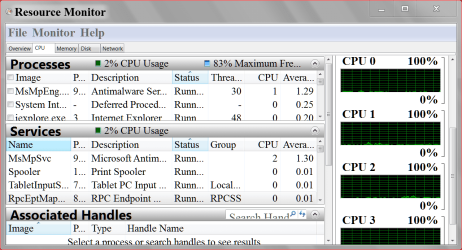
Try using Resource Monitor that is built into Windows 7 to compare readings.

RESOURCE MONITOR 11 29.PNG

Some anti virus programs will cause this problem. Which one do you use?
 

My Computer My Computer

Computer type
PC/Desktop
Computer Manufacturer/Model Number
Home made Desktop
OS
Windows 10 Pro. 64/ version 1709 Windows 7 Pro/64
CPU
Intel i7-6800K @ 4.3
Motherboard
ASUS X-99 Deluxe II
Memory
Corsair Platinum 16 gig @2400
Graphics Card(s)
EVGA GTX 1070 OC
Monitor(s) Displays
Asus 27" LED LCD/VE278Q
Screen Resolution
1920-1080 or 1280-720 HDMI
Hard Drives
INTEL SSD 730-240 Gb Sata 3.0/
PSU
EVGA Platium 1200W
Case
Phanteks Luxe Tempered Glass 8 fans/ one radiator
Cooling
XSPC/ Water Cooled CPU
Keyboard
Das 4 Professional
Mouse
Logitech M705/MX Anywhere 2-S
Internet Speed
100 mbits
Antivirus
Microsoft Security Essentials/ Malwarebytes Premium 3.0/ SAS
Browser
I.E. 11 default/Firefox/ ISP Time Warner Cable/Spectrum
Other Info
LG BluRay Burner/
Sound system-KLipsch-THX/
Icy Dock ssd Hot Swap bays.
Try using Resource Monitor that is built into Windows 7 to compare readings.
- I tried this with the same results. Near 0% CPU usage but as soon as I exit the program, CPU usage jumps to 100% and temps go to 50+C.

Some anti virus programs will cause this problem. Which one do you use?
- I use Avast and Malwarebytes. I tried turning off Avast. No change.
 

My Computer My Computer

Computer Manufacturer/Model Number
N/A
OS
Windows 7 Ultimate x64
CPU
Intel i7 [email protected]
Motherboard
Asus Maximus IV Extreme-Z
Memory
G Skill DDR3 12800 DDR3 RipJaws 16Gb
Graphics Card(s)
EVGA GTX480 Tri SLI
Sound Card
SoundBlaster X-Fi Surround 5.1 Pro
Monitor(s) Displays
3 * Dell U2711
Screen Resolution
7680x1440
Hard Drives
2 * OCZ Vertex 3 120Gb
4 * Seagate Barracuda XT 2Tb
1 * WD Caviar Black 1Tb
PSU
Silverstone ST1500
Case
Corsair Obsidian 800D
Cooling
Koolance CPU-360 : Koolance VID-480 : Koolance 360x3 + 120x1
Keyboard
Microsoft Sidewinder X4
Mouse
Logitech G1 Optical
Internet Speed
100Mb
I'm thinking the 3rd party program you are using after you shut down Task Manager and Process Explore to read cpu usage is not working correctly.
You could try removing that program and monitor your temps while using Task Manager and Process Explorer. Jumping for 30 to 50c is a big jump.
What is the name of this program.
 

My Computer My Computer

Computer type
PC/Desktop
Computer Manufacturer/Model Number
Home made Desktop
OS
Windows 10 Pro. 64/ version 1709 Windows 7 Pro/64
CPU
Intel i7-6800K @ 4.3
Motherboard
ASUS X-99 Deluxe II
Memory
Corsair Platinum 16 gig @2400
Graphics Card(s)
EVGA GTX 1070 OC
Monitor(s) Displays
Asus 27" LED LCD/VE278Q
Screen Resolution
1920-1080 or 1280-720 HDMI
Hard Drives
INTEL SSD 730-240 Gb Sata 3.0/
PSU
EVGA Platium 1200W
Case
Phanteks Luxe Tempered Glass 8 fans/ one radiator
Cooling
XSPC/ Water Cooled CPU
Keyboard
Das 4 Professional
Mouse
Logitech M705/MX Anywhere 2-S
Internet Speed
100 mbits
Antivirus
Microsoft Security Essentials/ Malwarebytes Premium 3.0/ SAS
Browser
I.E. 11 default/Firefox/ ISP Time Warner Cable/Spectrum
Other Info
LG BluRay Burner/
Sound system-KLipsch-THX/
Icy Dock ssd Hot Swap bays.
The program I use to monitor CPU usage is a gadget called System Information. I have used this without issues for years. I tried disabling it. No change.

I'm basically thinking about reinstalling Windows, however I get the feeling the same problem will arise. The 3rd party programs are pretty much the same ones I've been using for years.

I thought about a bad reading being the cause, but how would it account for the increased temps in HW Monitor? (Also another program I've been using for years). *scratches head*

ATM, I've left Task Manager open to stabilize the system. This is the only way I can keep usage and temps stable.

Could it be a hardware issue?
 

My Computer My Computer

Computer Manufacturer/Model Number
N/A
OS
Windows 7 Ultimate x64
CPU
Intel i7 [email protected]
Motherboard
Asus Maximus IV Extreme-Z
Memory
G Skill DDR3 12800 DDR3 RipJaws 16Gb
Graphics Card(s)
EVGA GTX480 Tri SLI
Sound Card
SoundBlaster X-Fi Surround 5.1 Pro
Monitor(s) Displays
3 * Dell U2711
Screen Resolution
7680x1440
Hard Drives
2 * OCZ Vertex 3 120Gb
4 * Seagate Barracuda XT 2Tb
1 * WD Caviar Black 1Tb
PSU
Silverstone ST1500
Case
Corsair Obsidian 800D
Cooling
Koolance CPU-360 : Koolance VID-480 : Koolance 360x3 + 120x1
Keyboard
Microsoft Sidewinder X4
Mouse
Logitech G1 Optical
Internet Speed
100Mb
I think I solved the problem.

I created a new account on Windows. After switching to the new account, the issues disappeared.

Don't know why though.....but will monitor situation.

Thanks for your help. Have a great weekend.
 

My Computer My Computer

Computer Manufacturer/Model Number
N/A
OS
Windows 7 Ultimate x64
CPU
Intel i7 [email protected]
Motherboard
Asus Maximus IV Extreme-Z
Memory
G Skill DDR3 12800 DDR3 RipJaws 16Gb
Graphics Card(s)
EVGA GTX480 Tri SLI
Sound Card
SoundBlaster X-Fi Surround 5.1 Pro
Monitor(s) Displays
3 * Dell U2711
Screen Resolution
7680x1440
Hard Drives
2 * OCZ Vertex 3 120Gb
4 * Seagate Barracuda XT 2Tb
1 * WD Caviar Black 1Tb
PSU
Silverstone ST1500
Case
Corsair Obsidian 800D
Cooling
Koolance CPU-360 : Koolance VID-480 : Koolance 360x3 + 120x1
Keyboard
Microsoft Sidewinder X4
Mouse
Logitech G1 Optical
Internet Speed
100Mb
Sometime a program like the gadget you are using to monitor need to be removed not just disabled.
Here is my thoughts.
1. HW Monitor is a quality program and should be giving correct readings.
2. Process Explorer is a quality program and shows nothing unusual running.
3. Something is running or it's a false temp reading generated by something.
4. Task Monitor is reliable, and doesn't know how to lie unless something has infected the computer.
5. Running HW Monitor, Processor Explorer, and Task Monitor running at the same time should not raise temps 20C unless your system has poor cooling and running anything should also raising the temps. Try other programs and see what happens.
5. Running Task Manager should not stabilize anything, it should just monitor.
6. Your over clocked but running any programs should have the same temp. effect. Remove the over clock for now.
7. Your computer could be infected by the use of Gadgets or other things.
Microsoft Security Advisory (2719662): Vulnerabilities in Gadgets Could Allow Remote Code Execution
Kill those Vista and Win7 gadgets now!
-----------------------------------------------------
I would start by setting your bios to default. I would also make sure Windows is set to default. No selection of number of processor core running when ect. No over clocking for testing.
Remove all Gadgets. We need to know if your computer is clean.
You use Avast and Malwarebytes both good programs. I would run updated full scans using both programs. I would also run Eset on line scan to be sure.
Free Online Virus Scanner | ESET
Let us know what you do and the results.
 

My Computer My Computer

Computer type
PC/Desktop
Computer Manufacturer/Model Number
Home made Desktop
OS
Windows 10 Pro. 64/ version 1709 Windows 7 Pro/64
CPU
Intel i7-6800K @ 4.3
Motherboard
ASUS X-99 Deluxe II
Memory
Corsair Platinum 16 gig @2400
Graphics Card(s)
EVGA GTX 1070 OC
Monitor(s) Displays
Asus 27" LED LCD/VE278Q
Screen Resolution
1920-1080 or 1280-720 HDMI
Hard Drives
INTEL SSD 730-240 Gb Sata 3.0/
PSU
EVGA Platium 1200W
Case
Phanteks Luxe Tempered Glass 8 fans/ one radiator
Cooling
XSPC/ Water Cooled CPU
Keyboard
Das 4 Professional
Mouse
Logitech M705/MX Anywhere 2-S
Internet Speed
100 mbits
Antivirus
Microsoft Security Essentials/ Malwarebytes Premium 3.0/ SAS
Browser
I.E. 11 default/Firefox/ ISP Time Warner Cable/Spectrum
Other Info
LG BluRay Burner/
Sound system-KLipsch-THX/
Icy Dock ssd Hot Swap bays.
Well as you can see I have just made a long post with my thoughts and suggestions. Seem I have been doing to much thinking.
Take a read through them just the same. It would make me feel better.
Changing user accounts should not effect your temps. It could of effected a infections ability to run using a new user account. A infection can still be hiding.
Because of your last post a over clock should not be a problem.
 

My Computer My Computer

Computer type
PC/Desktop
Computer Manufacturer/Model Number
Home made Desktop
OS
Windows 10 Pro. 64/ version 1709 Windows 7 Pro/64
CPU
Intel i7-6800K @ 4.3
Motherboard
ASUS X-99 Deluxe II
Memory
Corsair Platinum 16 gig @2400
Graphics Card(s)
EVGA GTX 1070 OC
Monitor(s) Displays
Asus 27" LED LCD/VE278Q
Screen Resolution
1920-1080 or 1280-720 HDMI
Hard Drives
INTEL SSD 730-240 Gb Sata 3.0/
PSU
EVGA Platium 1200W
Case
Phanteks Luxe Tempered Glass 8 fans/ one radiator
Cooling
XSPC/ Water Cooled CPU
Keyboard
Das 4 Professional
Mouse
Logitech M705/MX Anywhere 2-S
Internet Speed
100 mbits
Antivirus
Microsoft Security Essentials/ Malwarebytes Premium 3.0/ SAS
Browser
I.E. 11 default/Firefox/ ISP Time Warner Cable/Spectrum
Other Info
LG BluRay Burner/
Sound system-KLipsch-THX/
Icy Dock ssd Hot Swap bays.
@Layback Bear

Thanks for such an in depth reply.

Much appreciated. I am away from my desk and I am weighing up doing another clean install following your suggestions.

Will inform you of any actions.

Cheers.
 

My Computer My Computer

Computer Manufacturer/Model Number
N/A
OS
Windows 7 Ultimate x64
CPU
Intel i7 [email protected]
Motherboard
Asus Maximus IV Extreme-Z
Memory
G Skill DDR3 12800 DDR3 RipJaws 16Gb
Graphics Card(s)
EVGA GTX480 Tri SLI
Sound Card
SoundBlaster X-Fi Surround 5.1 Pro
Monitor(s) Displays
3 * Dell U2711
Screen Resolution
7680x1440
Hard Drives
2 * OCZ Vertex 3 120Gb
4 * Seagate Barracuda XT 2Tb
1 * WD Caviar Black 1Tb
PSU
Silverstone ST1500
Case
Corsair Obsidian 800D
Cooling
Koolance CPU-360 : Koolance VID-480 : Koolance 360x3 + 120x1
Keyboard
Microsoft Sidewinder X4
Mouse
Logitech G1 Optical
Internet Speed
100Mb
Update.

As it turns out, changing user accounts brought back the problem.

Bit the bullet and did another clean install.

Before installing, used diskpart.

Changed account name and password.

Installed Avast first then HW monitor.

Installed updates and 3rd party programs checking temps in HW Monitor during each install and application.

Did not install any gadgets.

I think SysInfo was the culprit (tho handy), as it is hard to find and I downloaded from a non reputable site.

System runs fine and idle temps are 25-30C.

Still monitoring.
 

My Computer My Computer

Computer Manufacturer/Model Number
N/A
OS
Windows 7 Ultimate x64
CPU
Intel i7 [email protected]
Motherboard
Asus Maximus IV Extreme-Z
Memory
G Skill DDR3 12800 DDR3 RipJaws 16Gb
Graphics Card(s)
EVGA GTX480 Tri SLI
Sound Card
SoundBlaster X-Fi Surround 5.1 Pro
Monitor(s) Displays
3 * Dell U2711
Screen Resolution
7680x1440
Hard Drives
2 * OCZ Vertex 3 120Gb
4 * Seagate Barracuda XT 2Tb
1 * WD Caviar Black 1Tb
PSU
Silverstone ST1500
Case
Corsair Obsidian 800D
Cooling
Koolance CPU-360 : Koolance VID-480 : Koolance 360x3 + 120x1
Keyboard
Microsoft Sidewinder X4
Mouse
Logitech G1 Optical
Internet Speed
100Mb

My Computer My Computer

Computer Manufacturer/Model Number
N/A
OS
Windows 7 Ultimate x64
CPU
Intel i7 [email protected]
Motherboard
Asus Maximus IV Extreme-Z
Memory
G Skill DDR3 12800 DDR3 RipJaws 16Gb
Graphics Card(s)
EVGA GTX480 Tri SLI
Sound Card
SoundBlaster X-Fi Surround 5.1 Pro
Monitor(s) Displays
3 * Dell U2711
Screen Resolution
7680x1440
Hard Drives
2 * OCZ Vertex 3 120Gb
4 * Seagate Barracuda XT 2Tb
1 * WD Caviar Black 1Tb
PSU
Silverstone ST1500
Case
Corsair Obsidian 800D
Cooling
Koolance CPU-360 : Koolance VID-480 : Koolance 360x3 + 120x1
Keyboard
Microsoft Sidewinder X4
Mouse
Logitech G1 Optical
Internet Speed
100Mb
Back
Top