
You are using an out of date browser. It may not display this or other websites correctly.
You should upgrade or use an alternative browser.
You should upgrade or use an alternative browser.
CPU usage 95% when 'puter is idle, off network, and indexing turned of
- Thread starter zzita
- Start date
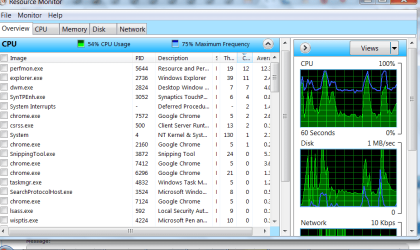
i turned off the WMP network thingy, too, and my resting cpu usage is now at 12-25%. i'll give it another day before i decide it's for-sure fixed, but i think that was my problem.
thank you so much, guys, and i learned stuff for next time .
.
thank you so much, guys, and i learned stuff for next time
.My Computer
At a glance
Windows 7 Professional 32 bit
- OS
- Windows 7 Professional 32 bit

- Local time
- 10:14 AM
- Messages
- 5,063
Hope it "stays fixed" for you. I think I've had 4 HP machines that came with wireless capability. Never tried it. Just seemed like a pita. But my "network" is only 2 PCs on the same desk with kvma switch, network switch, router and modem. More like 2 towers hooked to one set of everything else.
My Computer
At a glance
Windows 7 32 bitAMD 5200+ dual core2 GBNVidia GeForce 6150SE 128 MB
- Computer Manufacturer/Model Number
- HP Media Center
- OS
- Windows 7 32 bit
- CPU
- AMD 5200+ dual core
- Memory
- 2 GB
- Graphics Card(s)
- NVidia GeForce 6150SE 128 MB
- Monitor(s) Displays
- CRT
- Screen Resolution
- 1280x1024
- Hard Drives
- 500 GB Sata internal :
SIIG USB 3.0 docking stations w/WD Caviar Black 6 Gb/s drives
- Keyboard
- PS/2
- Mouse
- PS/2 Wheel Mouse
- Other Info
- SIIG USB 3.0 PCIexpress card.
well my wifi is working fine for both internet and home network. i dunno what that thing does, but it seems nonessential. back in the beginning, it kept trying to turn my bluetooth on, but i think i'd successfully turned off that aspect. i hate bossy software.
My Computer
At a glance
Windows 7 Professional 32 bit
- OS
- Windows 7 Professional 32 bit

- Local time
- 4:14 PM
- Messages
- 797
wow, unifex, that made a dramatic difference!
I'm glad you're making progress.
If I were you, I would also disable that "wisptis.exe", that may also consume resources, although most likely it's not related to your CPU usage problem. This is a "pen input" stuff for Tablet PC. As far as I understand you don't have a tablet, right? In this case, I would go to Control Panel -> Programs and Features -> Turn Windows features on or off and remove the Tablet PC features (just un-check the box next to Tablet PC Components). To be honest, I am not sure why these are always turned on by default in desktop and laptop PCs that have nothing to do with tablets.
My Computer
At a glance
Windows 7 Ultimate (x64)Q66008 GBATI Radeon HD 2600 XT
- Computer Manufacturer/Model Number
- Dell Inspiron 530
- OS
- Windows 7 Ultimate (x64)
- CPU
- Q6600
- Memory
- 8 GB
- Graphics Card(s)
- ATI Radeon HD 2600 XT
- Monitor(s) Displays
- Samsung Syncmaster P2450
- Screen Resolution
- 1920x1080
- Hard Drives
- Samsung HD103UJ
Samsung HD501LJ
- Internet Speed
- 25 Mb/s
Try AutoRuns from SysInternals.
Right Click became very erratic about whether I could get the context menu..
I was advised to try AutoRuns and I discovered that the File sharing thing called Dropbox had infested Explorer with 10 hooks at start-up.
I then found Dropbox was frantically creating log files in one of its folders during boot up, i.e. time-stamps that exactly matched the first system event of the day, not much different from a Rootkit ! !
When I installed Dropbox I unchecked the auto-start box and that prevented the icon from appearing in the notification tray. I thought they had obeyed me.
AutoRuns was able to stop all the Dropbox nonsense, but I decided not to suffer the same aggravation if Dropbox did an update so I uninstalled.
You may not have Dropbox, but you could have something else quite nasty, and AutoRuns will probably show you and allow you to control it.
Alan
Right Click became very erratic about whether I could get the context menu..
I was advised to try AutoRuns and I discovered that the File sharing thing called Dropbox had infested Explorer with 10 hooks at start-up.
I then found Dropbox was frantically creating log files in one of its folders during boot up, i.e. time-stamps that exactly matched the first system event of the day, not much different from a Rootkit ! !
When I installed Dropbox I unchecked the auto-start box and that prevented the icon from appearing in the notification tray. I thought they had obeyed me.
AutoRuns was able to stop all the Dropbox nonsense, but I decided not to suffer the same aggravation if Dropbox did an update so I uninstalled.
You may not have Dropbox, but you could have something else quite nasty, and AutoRuns will probably show you and allow you to control it.
Alan
My Computer
At a glance
Windows 7 Ultimate 64 bit SP1 x64AMD Phenom X4 95008 GBATI Radeon HD 4600 Series
- Computer Manufacturer/Model Number
- ASUSTeK Computer INC. M3A32-MVP DELUXE (CPU 1)
- OS
- Windows 7 Ultimate 64 bit SP1 x64
- CPU
- AMD Phenom X4 9500
- Motherboard
- ASUSTeK M3A32-MVP Deluxe (CPU 1)
- Memory
- 8 GB
- Graphics Card(s)
- ATI Radeon HD 4600 Series
- Sound Card
- AMD High Definition Audio Device
- Monitor(s) Displays
- SyncMaster (1680x1050@60Hz)
- Hard Drives
- 59GB OCZ-VERTEX2 ATA Device
+
977GB SAMSUNG HD103SJ ATA Device
+
625GB WDC WD6401AALS-00L3B2 ATA Device
- Local time
- 10:14 AM
- Messages
- 5,063
I remember when I got Vista before SP1 this page was very helpful giving a hint of what all these new Vista services did:
SpeedyVista.com - Windows Vista Services - Summary/Details Page
It's not as bad since SP1 Vista and W7 but you may still spot something useful on the page.
SpeedyVista.com - Windows Vista Services - Summary/Details Page
It's not as bad since SP1 Vista and W7 but you may still spot something useful on the page.
My Computer
At a glance
Windows 7 32 bitAMD 5200+ dual core2 GBNVidia GeForce 6150SE 128 MB
- Computer Manufacturer/Model Number
- HP Media Center
- OS
- Windows 7 32 bit
- CPU
- AMD 5200+ dual core
- Memory
- 2 GB
- Graphics Card(s)
- NVidia GeForce 6150SE 128 MB
- Monitor(s) Displays
- CRT
- Screen Resolution
- 1280x1024
- Hard Drives
- 500 GB Sata internal :
SIIG USB 3.0 docking stations w/WD Caviar Black 6 Gb/s drives
- Keyboard
- PS/2
- Mouse
- PS/2 Wheel Mouse
- Other Info
- SIIG USB 3.0 PCIexpress card.

wow, unifex, that made a dramatic difference!
I'm glad you're making progress.
If I were you, I would also disable that "wisptis.exe", that may also consume resources, although most likely it's not related to your CPU usage problem. This is a "pen input" stuff for Tablet PC. As far as I understand you don't have a tablet, right? In this case, I would go to Control Panel -> Programs and Features -> Turn Windows features on or off and remove the Tablet PC features (just un-check the box next to Tablet PC Components). To be honest, I am not sure why these are always turned on by default in desktop and laptop PCs that have nothing to do with tablets.
Dear unifex,
You deserve a +1 for sure!
Regards,
Sreedhav
My Computer
At a glance
MS Windows 7 Home Premium 64-bit SP1IntelCore [email protected]; Sandy Bridge 32nm Tech.4096Mb RAM; Single ChannelDDR3@665MHz; DRAM F...AMD Radeon HD 6630M; GPU:Whistler;BIOS Core&m...
- Computer Manufacturer/Model Number
- Sony Vaio C series VPCCB35FN laptop
- OS
- MS Windows 7 Home Premium 64-bit SP1
- CPU
- IntelCore [email protected]; Sandy Bridge 32nm Tech.
- Motherboard
- Sony Vaio Version:C609NJYJ
- Memory
- 4096Mb RAM; Single ChannelDDR3@665MHz; DRAM Freq:662MHz
- Graphics Card(s)
- AMD Radeon HD 6630M; GPU:Whistler;BIOS Core&mem Clock:123.36
- Sound Card
- REALTEK High Definition Audio Device; INTEL Display Card
- Monitor(s) Displays
- Generic PnP Intel HD;Resolution:1920*1040 Pixels; BPP:32bits
- Screen Resolution
- Current Resolution:1920*1080 Pixels; Monitor Frequency:60Hz
- Hard Drives
- Internal HD:TOSHIBA MK5061GSY; Real Size:488 GB;NTFS; 3 Partitions; SATA; HEADS:16
External HDD: WD Elements 1023 PORTABLE; Estimated Size: 1TB; NTFS; 3 Partitions
- Cooling
- Lateral Exhaust with a Cooling Pad Placed Beneath.
- Keyboard
- Logitech Bluetooth+ Generic Integrated K-B
- Mouse
- Logitech Bluetooth
- Internet Speed
- 2MBPS
- Other Info
- 1)Trend Micro Titanium Maximum Security Suite Version:3
2)SAS-PRO
3)MBAM--PRO
4)WATERFOX+IE9 +WOT+LINKEXTEND+ DRWEBCUREIT LINK CHECKER
5)SPYWAREBLASTER
6) WINPATROL PLUS
7) SANDBOXIE and
8) A BIT OF COMMON SENSE.