geeksindrome
New member
hello all.. thiz is my first post n my first thread.. i'm sorry if there is a lot of mistaken word.. coz my english language are not good enough..
i'm using windows 7 ultimate and KIS 2010...
everything going good until last night disaster..
when i'm exit from Modern Warfare II games, everything become so lag and i'm also forget to close Opera 10 which is still active with a lot tabs when i'm playing that games..
when i'm check the sidebar gadget, the 4 cores are in 100% usage.. there is no application that active, the condition on that time is idle.. then i'm restarted the PC which is still shows that problem..
so far i have been doing this:
- turn off background process that unused
- turn off the side bar
- set visual style tu best performance
but my system is still abnormal.. there is still high cpu usage activity when idle..
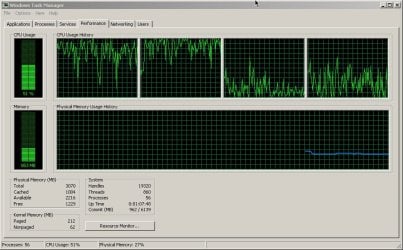
this is the performance Screenshot when idle :
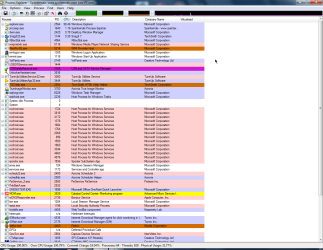
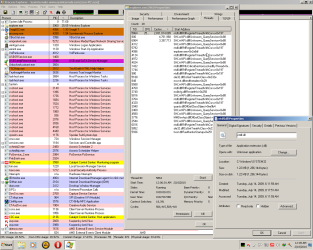
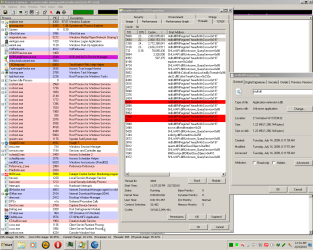
Process Screenshot :

HijackThis log files..
pliss help me.. what should i do?? i'm really miss my "healthy" PC..
i'm using windows 7 ultimate and KIS 2010...
everything going good until last night disaster..
when i'm exit from Modern Warfare II games, everything become so lag and i'm also forget to close Opera 10 which is still active with a lot tabs when i'm playing that games..
when i'm check the sidebar gadget, the 4 cores are in 100% usage..
there is no application that active, the condition on that time is idle.. then i'm restarted the PC which is still shows that problem..so far i have been doing this:
- turn off background process that unused
- turn off the side bar
- set visual style tu best performance
but my system is still abnormal.. there is still high cpu usage activity when idle..
this is the performance Screenshot when idle :
Process Screenshot :
HijackThis log files..
Code:
Logfile of Trend Micro HijackThis v2.0.3 (BETA)
Scan saved at 1:12:30 AM, on 2/17/2010
Platform: Unknown Windows (WinNT 6.01.3504)
MSIE: Internet Explorer v8.00 (8.00.7600.16385)
Boot mode: Normal

Running processes:
C:\Windows\system32\taskhost.exe
C:\Windows\system32\Dwm.exe
C:\Program Files\Common Files\Acronis\Schedule2\schedhlp.exe
C:\Program Files\TuneUp Utilities 2010\TuneUpUtilitiesApp32.exe
C:\Windows\System32\Ctxfihlp.exe
C:\Program Files\ATI Technologies\ATI.ACE\Core-Static\MOM.exe
C:\Program Files\Unlocker\UnlockerAssistant.exe
C:\Program Files\Acronis\TrueImageHome\TrueImageMonitor.exe
C:\Program Files\Kaspersky Lab\Kaspersky Internet Security 2010\avp.exe
C:\Program Files\Microsoft Xbox 360 Accessories\XBoxStat.exe
C:\Program Files\Creative\Volume Panel\VolPanlu.exe
C:\Program Files\Internet Download Manager\IDMan.exe
C:\Windows\SYSTEM32\CTXFISPI.EXE
C:\Program Files\USB Safely Remove\USBSafelyRemove.exe
C:\Program Files\ATI Technologies\ATI.ACE\Core-Static\CCC.exe
C:\Program Files\Internet Download Manager\IEMonitor.exe
C:\Windows\System32\rundll32.exe
C:\Windows\explorer.exe
C:\Windows\system32\taskmgr.exe
C:\Program Files\Mozilla Firefox\firefox.exe
C:\Program Files\Kaspersky Lab\Kaspersky Internet Security 2010\klwtblfs.exe
C:\Program Files\TrendMicro\HiJackThis\HiJackThis.exe

R1 - HKCU\Software\Microsoft\Internet Explorer\Main,Search Page = http://go.microsoft.com/fwlink/?LinkId=54896
R0 - HKCU\Software\Microsoft\Internet Explorer\Main,Start Page = http://go.microsoft.com/fwlink/?LinkId=69157
R1 - HKLM\Software\Microsoft\Internet Explorer\Main,Default_Page_URL = http://go.microsoft.com/fwlink/?LinkId=69157
R1 - HKLM\Software\Microsoft\Internet Explorer\Main,Default_Search_URL = http://go.microsoft.com/fwlink/?LinkId=54896
R1 - HKLM\Software\Microsoft\Internet Explorer\Main,Search Page = http://go.microsoft.com/fwlink/?LinkId=54896
R0 - HKLM\Software\Microsoft\Internet Explorer\Main,Start Page = http://go.microsoft.com/fwlink/?LinkId=69157
R0 - HKLM\Software\Microsoft\Internet Explorer\Search,SearchAssistant =
R0 - HKLM\Software\Microsoft\Internet Explorer\Search,CustomizeSearch =
R1 - HKCU\Software\Microsoft\Windows\CurrentVersion\Internet Settings,ProxyOverride = *.local
R0 - HKCU\Software\Microsoft\Internet Explorer\Toolbar,LinksFolderName =
O2 - BHO: IDM Helper - {0055C089-8582-441B-A0BF-17B458C2A3A8} - C:\Program Files\Internet Download Manager\IDMIECC.dll
O2 - BHO: HelperObject Class - {00C6482D-C502-44C8-8409-FCE54AD9C208} - C:\Program Files\TechSmith\SnagIt 7\SnagItBHO.dll
O2 - BHO: AcroIEHelperStub - {18DF081C-E8AD-4283-A596-FA578C2EBDC3} - C:\Program Files\Common Files\Adobe\Acrobat\ActiveX\AcroIEHelperShim.dll
O2 - BHO: IEVkbdBHO - {59273AB4-E7D3-40F9-A1A8-6FA9CCA1862C} - C:\Program Files\Kaspersky Lab\Kaspersky Internet Security 2010\ievkbd.dll
O2 - BHO: Groove GFS Browser Helper - {72853161-30C5-4D22-B7F9-0BBC1D38A37E} - C:\Program Files\Microsoft Office\Office12\GrooveShellExtensions.dll
O2 - BHO: Java(tm) Plug-In 2 SSV Helper - {DBC80044-A445-435b-BC74-9C25C1C588A9} - C:\Program Files\Java\jre6\bin\jp2ssv.dll
O2 - BHO: link filter bho - {E33CF602-D945-461A-83F0-819F76A199F8} - C:\Program Files\Kaspersky Lab\Kaspersky Internet Security 2010\klwtbbho.dll
O3 - Toolbar: SnagIt - {8FF5E183-ABDE-46EB-B09E-D2AAB95CABE3} - C:\Program Files\TechSmith\SnagIt 7\SnagItIEAddin.dll
O3 - Toolbar: DAEMON Tools Toolbar - {32099AAC-C132-4136-9E9A-4E364A424E17} - C:\Program Files\DAEMON Tools Toolbar\DTToolbar.dll
O4 - HKLM\..\Run: [StartCCC] "C:\Program Files\ATI Technologies\ATI.ACE\Core-Static\CLIStart.exe" MSRun
O4 - HKLM\..\Run: [CTxfiHlp] CTXFIHLP.EXE
O4 - HKLM\..\Run: [UnlockerAssistant] "C:\Program Files\Unlocker\UnlockerAssistant.exe"
O4 - HKLM\..\Run: [TrueImageMonitor.exe] C:\Program Files\Acronis\TrueImageHome\TrueImageMonitor.exe
O4 - HKLM\..\Run: [Acronis Scheduler2 Service] "C:\Program Files\Common Files\Acronis\Schedule2\schedhlp.exe"
O4 - HKLM\..\Run: [AVP] "C:\Program Files\Kaspersky Lab\Kaspersky Internet Security 2010\avp.exe"
O4 - HKLM\..\Run: [XboxStat] "C:\Program Files\Microsoft Xbox 360 Accessories\XboxStat.exe" silentrun
O4 - HKLM\..\Run: [VolPanel] "C:\Program Files\Creative\Volume Panel\VolPanlu.exe" /r
O4 - HKCU\..\Run: [IDMan] C:\Program Files\Internet Download Manager\IDMan.exe /onboot
O4 - HKCU\..\Run: [USB Safely Remove] C:\Program Files\USB Safely Remove\USBSafelyRemove.exe /startup
O4 - HKUS\S-1-5-19\..\Run: [Sidebar] %ProgramFiles%\Windows Sidebar\Sidebar.exe /autoRun (User 'LOCAL SERVICE')
O4 - HKUS\S-1-5-19\..\RunOnce: [mctadmin] C:\Windows\System32\mctadmin.exe (User 'LOCAL SERVICE')
O4 - HKUS\S-1-5-20\..\Run: [Sidebar] %ProgramFiles%\Windows Sidebar\Sidebar.exe /autoRun (User 'NETWORK SERVICE')
O4 - HKUS\S-1-5-20\..\RunOnce: [mctadmin] C:\Windows\System32\mctadmin.exe (User 'NETWORK SERVICE')
O4 - Startup: OneNote 2007 Screen Clipper and Launcher.lnk = C:\Program Files\Microsoft Office\Office12\ONENOTEM.EXE
O8 - Extra context menu item: Add to Anti-Banner - C:\Program Files\Kaspersky Lab\Kaspersky Internet Security 2010\ie_banner_deny.htm
O8 - Extra context menu item: Download all links with IDM - C:\Program Files\Internet Download Manager\IEGetAll.htm
O8 - Extra context menu item: Download FLV video content with IDM - C:\Program Files\Internet Download Manager\IEGetVL.htm
O8 - Extra context menu item: Download with IDM - C:\Program Files\Internet Download Manager\IEExt.htm
O8 - Extra context menu item: E&xport to Microsoft Excel - res://C:\PROGRA~1\MICROS~2\Office12\EXCEL.EXE/3000
O9 - Extra button: Send to OneNote - {2670000A-7350-4f3c-8081-5663EE0C6C49} - C:\PROGRA~1\MICROS~2\Office12\ONBttnIE.dll
O9 - Extra 'Tools' menuitem: S&end to OneNote - {2670000A-7350-4f3c-8081-5663EE0C6C49} - C:\PROGRA~1\MICROS~2\Office12\ONBttnIE.dll
O9 - Extra button: &Virtual keyboard - {4248FE82-7FCB-46AC-B270-339F08212110} - C:\Program Files\Kaspersky Lab\Kaspersky Internet Security 2010\klwtbbho.dll
O9 - Extra button: Research - {92780B25-18CC-41C8-B9BE-3C9C571A8263} - C:\PROGRA~1\MICROS~2\Office12\REFIEBAR.DLL
O9 - Extra button: URLs c&heck - {CCF151D8-D089-449F-A5A4-D9909053F20F} - C:\Program Files\Kaspersky Lab\Kaspersky Internet Security 2010\klwtbbho.dll
O13 - Gopher Prefix:
O18 - Protocol: grooveLocalGWS - {88FED34C-F0CA-4636-A375-3CB6248B04CD} - C:\Program Files\Microsoft Office\Office12\GrooveSystemServices.dll
O20 - AppInit_DLLs: C:\PROGRA~1\KASPER~1\KASPER~1\mzvkbd3.dll,C:\PROGRA~1\KASPER~1\KASPER~1\kloehk.dll
O22 - SharedTaskScheduler: Windows DreamScene - {E31004D1-A431-41B8-826F-E902F9D95C81} - C:\Windows\System32\DreamScene.dll
O23 - Service: Acronis OS Selector Reinstall Service (AcronisOSSReinstallSvc) - Unknown owner - C:\Program Files\Common Files\Acronis\Acronis Disk Director

\oss_reinstall_svc.exe
O23 - Service: Acronis Scheduler2 Service (AcrSch2Svc) - Acronis - C:\Program Files\Common Files\Acronis\Schedule2\schedul2.exe
O23 - Service: Adobe LM Service - Adobe Systems - C:\Program Files\Common Files\Adobe Systems Shared\Service\Adobelmsvc.exe
O23 - Service: Adobe Version Cue CS3 - Adobe Systems Incorporated - C:\Program Files\Common Files\Adobe\Adobe Version Cue CS3\Server\bin\VersionCueCS3.exe
O23 - Service: Acronis Nonstop Backup service (afcdpsrv) - Acronis - C:\Program Files\Common Files\Acronis\CDP\afcdpsrv.exe
O23 - Service: AMD External Events Utility - AMD - C:\Windows\system32\atiesrxx.exe
O23 - Service: AST Service (astcc) - Nalpeiron Ltd. - C:\Windows\system32\astsrv.exe
O23 - Service: Kaspersky Internet Security (AVP) - Kaspersky Lab - C:\Program Files\Kaspersky Lab\Kaspersky Internet Security 2010\avp.exe
O23 - Service: ##Id_String1.6844F930_1628_4223_B5CC_5BB94B879762## (Bonjour Service) - Apple Computer, Inc. - C:\Program Files\Bonjour\mDNSResponder.exe
O23 - Service: Capture Device Service - InterVideo Inc. - C:\Program Files\Common Files\InterVideo\DeviceService\DevSvc.exe
O23 - Service: Creative Audio Engine Licensing Service - Creative Labs - C:\Program Files\Common Files\Creative Labs Shared\Service\CTAELicensing.exe
O23 - Service: Creative Audio Service (CTAudSvcService) - Creative Technology Ltd - C:\Program Files\Creative\Shared Files\CTAudSvc.exe
O23 - Service: Dragon Age: Origins - Content Updater (DAUpdaterSvc) - BioWare - K:\G A M E Z\Dragon Age\bin_ship\DAUpdaterSvc.Service.exe
O23 - Service: FLEXnet Licensing Service - Macrovision Europe Ltd. - C:\Program Files\Common Files\Macrovision Shared\FLEXnet Publisher

\FNPLicensingService.exe
O23 - Service: InstallDriver Table Manager (IDriverT) - Macrovision Corporation - C:\Program Files\Common Files\InstallShield\Driver\11\Intel

32\IDriverT.exe
O23 - Service: PnkBstrA - Unknown owner - C:\Windows\system32\PnkBstrA.exe
O23 - Service: Protexis Licensing V2 (PSI_SVC_2) - Protexis Inc. - c:\Program Files\Common Files\Protexis\License Service\PsiService_2.exe
O23 - Service: ServiceLayer - Nokia. - C:\Program Files\PC Connectivity Solution\ServiceLayer.exe
O23 - Service: Steam Client Service - Valve Corporation - C:\Program Files\Common Files\Steam\SteamService.exe
O23 - Service: @C:\Program Files\TuneUp Utilities 2010\TuneUpDefragService.exe,-1 (TuneUp.Defrag) - TuneUp Software - C:\Program Files\TuneUp Utilities

2010\TuneUpDefragService.exe
O23 - Service: TuneUp Utilities Service (TuneUp.UtilitiesSvc) - TuneUp Software - C:\Program Files\TuneUp Utilities 2010\TuneUpUtilitiesService32.exe
O23 - Service: USB Safely Remove Assistant (USBSafelyRemoveService) - Unknown owner - C:\Program Files\USB Safely Remove\USBSRService.exe

--
End of file - 9668 bytes
pliss help me.. what should i do?? i'm really miss my "healthy" PC..
My Computer
- OS
- windows seven
- CPU
- Intel Q9550 @default
- Motherboard
- Gigabyte X48T-DQ6
- Memory
- COrsair DDR3 1333 C9DHX 2 Gb kit x2
- Graphics Card(s)
- ASUS EAH4870 512 MB
- Sound Card
- XFI Xtreme Gamer Fatal1ty Pro
- Monitor(s) Displays
- GTC Primera 19"
- Hard Drives
- WDC WD5000AACS + Seagate 320 GB Sata II
- PSU
- COrsair TX750W
- Case
- Cooler Master HAF932

 i have download and scans with the last update of malwarebytes.. the results is clean..