
CPU Usage Monitor needed

dsscottage

New member
Member
Local time
10:57 AM
Messages
49
I'm running Win 7 Ultimate on a backup computer and it is running like it is stuck in molasses.

When I look at task manager, the running applications are taking a small percentage of CPU usage but the Performance tab indicates 100% CPU usage. Unlike Win 10, Win 7 doesn't show the CPU usage for each of the running processes. However, something that I can't see is taking up all the CPU capacity.

Is there any other CPU monitoring program that will show me what is causing all this usage?
 

My Computer My Computer

Computer type
PC/Desktop
Computer Manufacturer/Model Number
ASUS
OS
Windows 10 Pro
CPU
Intel Core i7-3770
Motherboard
ASUS CM6870
Memory
16MB
Graphics Card(s)
NVIDIA GeForce GT 640
Sound Card
Onboard HD Audio
Monitor(s) Displays
Hanns.G HZ281
Screen Resolution
1920x1200
Hard Drives
Samsung 850 EVO 512GB SSD and
ST2000DM 2TB HDD
Internet Speed
Gigabit
Antivirus
Windows Defender
Browser
Chrome
Other Info
Second desktop computer - Intel Core 2 Duo - Win 7 Ultimate,
Laptop - ASUS Intel Core i5-3317U - Win 10 Home
What does it show under Processes in the Task Manager? It should show how much CPU is used by each process.
Don't forget to select show for all users.
 

My Computer My Computer

Computer type
PC/Desktop
Computer Manufacturer/Model Number
Custom Built
OS
Windows 10 Pro x64, Windows 8.1 Pro x64, Windows 7 Ultimate x64 SP1,
CPU
INTEL i9-7920X LGA 2066
Motherboard
Gigabyte X299-WU8 F3
Memory
64 GB (4 X 16 GB) G-Skill V Series DDR4 3200 Quad Channel
Graphics Card(s)
EVGA GTX 1060 SC 3 GB
Sound Card
Realtek Onboard ALC1220
Monitor(s) Displays
2 x Samsung S27E310
Screen Resolution
1920x1080
Hard Drives
Samsung 2 x 970 EVO Plus 500 GB NVMe
1 x 6TB WD 6003FZBX SATA
1 x 6TB WD 60EFRX SATA
12 x 3TB WD 30EFRX SATA
PSU
Seasonic X-1050
Case
Thermaltake Armor+
Cooling
Corsair H80i V2 Liquid AOI Cooler
Keyboard
Logitech G510s
Mouse
Logitech MX Master 2S
Internet Speed
200 Mb/s
Antivirus
ESET NOD32 13.1
Browser
EDGE (Dev, Canary, Beta), Chrome
Other Info
ASUS RT-AC68U router
Malwarebytes 4.0.4
What does it show under Processes in the Task Manager? It should show how much CPU is used by each process.
Don't forget to select show for all users.

There is only one user on the computer but I clicked "Show Processes from all Users" anyway and displayed more processes.

Here is what is happening immediately after booting:
-Total CPU usage bounces from 20%-100% ultimately stabilizing at 100% after 4 or 5 minutes
-Under the Applications tab, there is nothing running
-Under the Processes tab, Avast UI, Taskmgr and Explorer show usage from 1%-3%
-As the CPU usage increases, there is a lot of CPU usage from "TrustedInstaller" but it ultimately reduces to 0%. Then usage on one scvhost increases to almost 100%
-The percent of physical memory increases to almost 100%

I terminated this one scvhost process and both the CPU and memory usage dropped dramatically.

I then loaded one application (Chrome) and the process started all over again.


There is something hogging the CPU and I'm looking for a way to identify the culprit before I resort to a fresh Windows install.
 
Last edited:

My Computer My Computer

Computer type
PC/Desktop
Computer Manufacturer/Model Number
ASUS
OS
Windows 10 Pro
CPU
Intel Core i7-3770
Motherboard
ASUS CM6870
Memory
16MB
Graphics Card(s)
NVIDIA GeForce GT 640
Sound Card
Onboard HD Audio
Monitor(s) Displays
Hanns.G HZ281
Screen Resolution
1920x1200
Hard Drives
Samsung 850 EVO 512GB SSD and
ST2000DM 2TB HDD
Internet Speed
Gigabit
Antivirus
Windows Defender
Browser
Chrome
Other Info
Second desktop computer - Intel Core 2 Duo - Win 7 Ultimate,
Laptop - ASUS Intel Core i5-3317U - Win 10 Home

My Computer My Computer

Computer type
PC/Desktop
Computer Manufacturer/Model Number
Custom Built
OS
Windows 10 Pro x64, Windows 8.1 Pro x64, Windows 7 Ultimate x64 SP1,
CPU
INTEL i9-7920X LGA 2066
Motherboard
Gigabyte X299-WU8 F3
Memory
64 GB (4 X 16 GB) G-Skill V Series DDR4 3200 Quad Channel
Graphics Card(s)
EVGA GTX 1060 SC 3 GB
Sound Card
Realtek Onboard ALC1220
Monitor(s) Displays
2 x Samsung S27E310
Screen Resolution
1920x1080
Hard Drives
Samsung 2 x 970 EVO Plus 500 GB NVMe
1 x 6TB WD 6003FZBX SATA
1 x 6TB WD 60EFRX SATA
12 x 3TB WD 30EFRX SATA
PSU
Seasonic X-1050
Case
Thermaltake Armor+
Cooling
Corsair H80i V2 Liquid AOI Cooler
Keyboard
Logitech G510s
Mouse
Logitech MX Master 2S
Internet Speed
200 Mb/s
Antivirus
ESET NOD32 13.1
Browser
EDGE (Dev, Canary, Beta), Chrome
Other Info
ASUS RT-AC68U router
Malwarebytes 4.0.4

Thank-you for the suggestion but it didn't work.

I've been working on this for over 2 weeks. These is so much wrong with my system and everything that I try fails so I have decided to reinstall Windows but I can't even do that.

Because, my problem reinstalling Windows is different from the subject of this thread, I'm going to start a new thread on that issue.

http://www.sevenforums.com/installa...do-fresh-install-windows-7-a.html#post3211313

...but thank you for trying to help.
 

My Computer My Computer

Computer type
PC/Desktop
Computer Manufacturer/Model Number
ASUS
OS
Windows 10 Pro
CPU
Intel Core i7-3770
Motherboard
ASUS CM6870
Memory
16MB
Graphics Card(s)
NVIDIA GeForce GT 640
Sound Card
Onboard HD Audio
Monitor(s) Displays
Hanns.G HZ281
Screen Resolution
1920x1200
Hard Drives
Samsung 850 EVO 512GB SSD and
ST2000DM 2TB HDD
Internet Speed
Gigabit
Antivirus
Windows Defender
Browser
Chrome
Other Info
Second desktop computer - Intel Core 2 Duo - Win 7 Ultimate,
Laptop - ASUS Intel Core i5-3317U - Win 10 Home
My Computer My Computer

Computer type
PC/Desktop
Computer Manufacturer/Model Number
Custom assembled by me :}
OS
Win-7-Pro64bit 7-H-Prem-64bit
CPU
i7-5930K 2nd i9-9940x both water blocked VRM's too
Motherboard
ASUS SABERTOOTH X99 2nd ASUS x299 Apex
Memory
Trident-z 3200C14 2nd Trident-z 3600C16
Graphics Card(s)
EVGA 1080ti ftw3 2nd Titan Xp both water blocked
Sound Card
Built-in Realtek
Monitor(s) Displays
1-AOC G2460PG 24"G-Sync 144Hz/ 2nd 1-ASUS VG248QE 24" 144Hz
Screen Resolution
1920 x 1080 144Hz
Hard Drives
2-Samsung M.2 Evo & Evo Plus
2-Samsung 850 EVO 500GB SSD's/ 3-2.5 W.D. Black 1tb-&3-1tb/3-3.5 WD Black 1tb hdd's
PSU
EVGA SuperNOVA 1000-P2 2nd 1200-P2
Case
2-Corsair Obsidian Series 450D Black ATX Mid Tower
Cooling
Custom water loops
Keyboard
Logitech G710+/ 2nd Logitech G910
Mouse
2-RedDragon M901 Perdition 16400 dpi Gaming mouse = wired
Internet Speed
Comcast Ping 19ms 89.31mbps download speed 6.12mbps upload
Antivirus
Malwarebytes Pro/ Superantispyware Pro
Browser
FireFox & Pale moon
Other Info
2nd ASUS X299 Apex/Intel i9-9940x with Custom water loop/7H-Prem-x64/Corsair 450D case/Ram Trident-z 3600C16 4x8gb / Samsung970Evo plus 500gb SSD/Dual ssd EZ swap evo/PSU EVGA SuperNova 1200w-P2 80+Platinum/GPU Titan Xp /8-ML-140 on push-pull on 2-280GTX rads
Have you looked at Task Manager / Performance / Resource Monitor ?

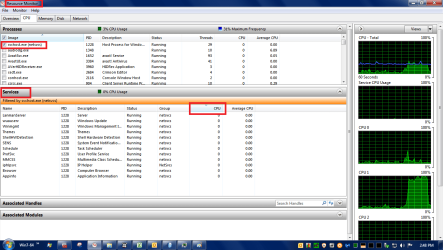
In Resource Monitor:
Click the check box for the svchost.exe process that is hogging CPU.
Sort the Services pane by CPU usage.
See if you can find what service(s) are hogging CPU.
If you can determine what services are hogging CPU, you can google for that and look for fixes.

My example has all 0's, but i highlighted the fields i'm trying to explain in words.

TaskMgrResMon_01.png
 

My Computer My Computer

Computer type
PC/Desktop
Computer Manufacturer/Model Number
home built
OS
Multi-Boot W7_Pro_x64 W8.1_Pro_x64 W10_Pro_x64 +Linux_VMs +Chromium_VM
CPU
AMD Athlon II x4 620
Motherboard
Gigabyte GA-MA785G-UD3H
Memory
6GB GSkill DDR2 800
Graphics Card(s)
AMD 4670 GPU + AMD 4200 IGP
Sound Card
on board Realtek ALC889A
Monitor(s) Displays
RCA 40" LCD TV, Insignia 32" LCD TV, HP 15" LCD monitor
Screen Resolution
1680 x 1050
Hard Drives
OCZ Vertex 3 120GB,
Samsung F3 1TB (3),
Several others - WD, Seagate, Hitachi, ...
PSU
Corsair 500 W
Case
Rosewill mid tower
Cooling
CM 90mm rifle
Keyboard
Gyration wireless, Logitech wireless, Dell USB wired
Mouse
Gyration wireless, Logitech wireless, V7 USB wired
Internet Speed
Spectrum - 100Mbps D / 10Mbps U
Antivirus
Avast, MBAM3, EMET, WinPatrol
Browser
Pale Moon, Firefox, IE
Other Info
2 multi-boot PC's
Mainly HTPC/Office/Gen purpose (no gaming).
Trendnet USB KVM.
LG DVD burner/Blue Ray Player.
Tray system for removable SATA backup drives.

Not currently OCd, under-volted.
I use Hybrid sleep, rarely re-boot or shutdown.

Hauppauge HD-PVR, Avermedia PCIe TV Tuner, Hauppauge PCI TV Tuner.
Have you looked at Task Manager / Performance / Resource Monitor ?

In Resource Monitor:
Click the check box for the svchost.exe process that is hogging CPU.
Sort the Services pane by CPU usage.
See if you can find what service(s) are hogging CPU.
If you can determine what services are hogging CPU, you can google for that and look for fixes.

My example has all 0's, but i highlighted the fields i'm trying to explain in words.

View attachment 381044

To answer your specific suggestion, given what I have done since I last posted, I can no longer get into the original version of Win 7 to check the resource monitor.

Actually I started to ask for help in another thread under a different subject. As the issue changed, I though it best to end that post and repost under a different title (this one). However, I'm still getting help under the original post:
http://www.sevenforums.com/installa...do-fresh-install-windows-7-a.html#post3211800

I don't want to waste forum resources on a double post so I'll thank those who have offered help here but ask that we put this thread on hold as I continue to deal with the original thread.

Sorry it this has been a waste of time.
 

My Computer My Computer

Computer type
PC/Desktop
Computer Manufacturer/Model Number
ASUS
OS
Windows 10 Pro
CPU
Intel Core i7-3770
Motherboard
ASUS CM6870
Memory
16MB
Graphics Card(s)
NVIDIA GeForce GT 640
Sound Card
Onboard HD Audio
Monitor(s) Displays
Hanns.G HZ281
Screen Resolution
1920x1200
Hard Drives
Samsung 850 EVO 512GB SSD and
ST2000DM 2TB HDD
Internet Speed
Gigabit
Antivirus
Windows Defender
Browser
Chrome
Other Info
Second desktop computer - Intel Core 2 Duo - Win 7 Ultimate,
Laptop - ASUS Intel Core i5-3317U - Win 10 Home
It's not a waste of time, most folks here are volunteers and try to help whenever they can :)

I just posted in your other thread.
 

My Computer My Computer

Computer type
PC/Desktop
Computer Manufacturer/Model Number
home built
OS
Multi-Boot W7_Pro_x64 W8.1_Pro_x64 W10_Pro_x64 +Linux_VMs +Chromium_VM
CPU
AMD Athlon II x4 620
Motherboard
Gigabyte GA-MA785G-UD3H
Memory
6GB GSkill DDR2 800
Graphics Card(s)
AMD 4670 GPU + AMD 4200 IGP
Sound Card
on board Realtek ALC889A
Monitor(s) Displays
RCA 40" LCD TV, Insignia 32" LCD TV, HP 15" LCD monitor
Screen Resolution
1680 x 1050
Hard Drives
OCZ Vertex 3 120GB,
Samsung F3 1TB (3),
Several others - WD, Seagate, Hitachi, ...
PSU
Corsair 500 W
Case
Rosewill mid tower
Cooling
CM 90mm rifle
Keyboard
Gyration wireless, Logitech wireless, Dell USB wired
Mouse
Gyration wireless, Logitech wireless, V7 USB wired
Internet Speed
Spectrum - 100Mbps D / 10Mbps U
Antivirus
Avast, MBAM3, EMET, WinPatrol
Browser
Pale Moon, Firefox, IE
Other Info
2 multi-boot PC's
Mainly HTPC/Office/Gen purpose (no gaming).
Trendnet USB KVM.
LG DVD burner/Blue Ray Player.
Tray system for removable SATA backup drives.

Not currently OCd, under-volted.
I use Hybrid sleep, rarely re-boot or shutdown.

Hauppauge HD-PVR, Avermedia PCIe TV Tuner, Hauppauge PCI TV Tuner.

I've done more research and believe that I've found the answer. (not a solution - just an answer).

Because, I couldn't initially solve the 100% CPU occupancy issue, I did a fresh install of Windows 7 (an agonizing process but it was completed). Shortly afterward, the 100% CPU occupancy issue returned on the fresh install.

After a lot of searching, the suggestion provided by pbcopter is the answer. However, it only works on systems equipped with a multi core CPU. The Win 7 update process consumes a lot of CPU resources (100%) and the suggested fix seems to dedicate that process to one of the CPU cores, leaving the other to work on other tasks. However, in my case, my old computer has a single core CPU and apparently the only way to solve the issue is to turn off Windows Update. This is what I did and now Win 7 operates as it should.

To me it seems that Microsoft is being a little shady on this issue. If they can issue a fix to restrict Windows Update activity to one core, surely they could develop a fix to limit the activity to a proportion of the CPU in a single core system (50%?). If I'm cynical, it would seem that they were trying to force people with older systems to upgrade. If this is truly the case, they definitely won't dedicate resources to the problem now that they have moved on to Window 8 and Windows 10.
 

My Computer My Computer

Computer type
PC/Desktop
Computer Manufacturer/Model Number
ASUS
OS
Windows 10 Pro
CPU
Intel Core i7-3770
Motherboard
ASUS CM6870
Memory
16MB
Graphics Card(s)
NVIDIA GeForce GT 640
Sound Card
Onboard HD Audio
Monitor(s) Displays
Hanns.G HZ281
Screen Resolution
1920x1200
Hard Drives
Samsung 850 EVO 512GB SSD and
ST2000DM 2TB HDD
Internet Speed
Gigabit
Antivirus
Windows Defender
Browser
Chrome
Other Info
Second desktop computer - Intel Core 2 Duo - Win 7 Ultimate,
Laptop - ASUS Intel Core i5-3317U - Win 10 Home
You have a very old and slow system. You know that already.
Microsoft doesn't know and doesn't care. How your system is able to handle processes is not up to Microsoft. Your system is your system. Your system is only able to do so much in a given period of time. Nothing Microsoft can do anything about. Microsoft has no control of how your single core cpu handles any work load.
 

My Computer My Computer

Computer type
PC/Desktop
Computer Manufacturer/Model Number
Home made Desktop
OS
Windows 10 Pro. 64/ version 1709 Windows 7 Pro/64
CPU
Intel i7-6800K @ 4.3
Motherboard
ASUS X-99 Deluxe II
Memory
Corsair Platinum 16 gig @2400
Graphics Card(s)
EVGA GTX 1070 OC
Monitor(s) Displays
Asus 27" LED LCD/VE278Q
Screen Resolution
1920-1080 or 1280-720 HDMI
Hard Drives
INTEL SSD 730-240 Gb Sata 3.0/
PSU
EVGA Platium 1200W
Case
Phanteks Luxe Tempered Glass 8 fans/ one radiator
Cooling
XSPC/ Water Cooled CPU
Keyboard
Das 4 Professional
Mouse
Logitech M705/MX Anywhere 2-S
Internet Speed
100 mbits
Antivirus
Microsoft Security Essentials/ Malwarebytes Premium 3.0/ SAS
Browser
I.E. 11 default/Firefox/ ISP Time Warner Cable/Spectrum
Other Info
LG BluRay Burner/
Sound system-KLipsch-THX/
Icy Dock ssd Hot Swap bays.
You have a very old and slow system. You know that already.
Microsoft doesn't know and doesn't care. How your system is able to handle processes is not up to Microsoft. Your system is your system. Your system is only able to do so much in a given period of time. Nothing Microsoft can do anything about. Microsoft has no control of how your single core cpu handles any work load.

You are correct. This computer is slow and outdated and is only used as a backup to test software so I don't screw up my production machine.

I can accept that my old machine will be much slower handling demanding software.

However, the MS Windows 7 Update process consumes way too much CPU power and even MS has issued a fix for multi core systems. Maybe I have a distorted view but I wouldn't expect an OS process to monopolize all the CPU capacity (particularly the update process). After all, how different could the Win 7 update process be from the Win XP process and it worked quite well on those old machines.
 

My Computer My Computer

Computer type
PC/Desktop
Computer Manufacturer/Model Number
ASUS
OS
Windows 10 Pro
CPU
Intel Core i7-3770
Motherboard
ASUS CM6870
Memory
16MB
Graphics Card(s)
NVIDIA GeForce GT 640
Sound Card
Onboard HD Audio
Monitor(s) Displays
Hanns.G HZ281
Screen Resolution
1920x1200
Hard Drives
Samsung 850 EVO 512GB SSD and
ST2000DM 2TB HDD
Internet Speed
Gigabit
Antivirus
Windows Defender
Browser
Chrome
Other Info
Second desktop computer - Intel Core 2 Duo - Win 7 Ultimate,
Laptop - ASUS Intel Core i5-3317U - Win 10 Home
My Rant

OK. This post doesn't really contribute anything other than allowing me to rant and vent!

Even though I occasionally post here asking for assistance, I am seem by several of my friends and relatives as "the local geek". As such, they call me to fix their computer problems. A number of these people still have Windows 7 on a older computers with dual core CPUs.

As a result of the issues in this post, I checked every one of these computers and every one was running at 50% CPU occupancy (100% on one of the cores) while otherwise idle. It was always caused by the process svchost.exe which was used to load the Windows update process.

As recommended, I installed https://support.microsoft.com/en-us/kb/3102810 and it resolved the issue on the dual core systems.

Now my rant:
This update was made available by Microsoft but not classified as a critical, recommended or optional update. It was necessary to find it in a forum like this. (Kudos to the forum and it's participants!). Shame on Microsoft! The Windows update process should never have required such a high level of CPU activity. Once (for whatever reason) it to started to consume so much CPU power, it should have been immediately fixed by a "critical" windows update. The only reason that I can see that this didn't happen is that Microsoft is attempting to force everyone to update to Windows 10. I've updated my main computer to Windows 10 and am very happy with it. Therefore, I don't have a problem with a forced update particularly when it's free. However, all of the dual core CPU systems belonging to my friends and relatives don't pass the Window 8 compatibility test and can not be upgraded to Win 8 or 10. Maybe Microsoft wants these people to buy a new computer with Windows 10. If that's the case , that is an immoral strategy. If so, shame on you Microsoft. I've passed this feedback on to Microsoft but don't expect an answer or action.
 

My Computer My Computer

Computer type
PC/Desktop
Computer Manufacturer/Model Number
ASUS
OS
Windows 10 Pro
CPU
Intel Core i7-3770
Motherboard
ASUS CM6870
Memory
16MB
Graphics Card(s)
NVIDIA GeForce GT 640
Sound Card
Onboard HD Audio
Monitor(s) Displays
Hanns.G HZ281
Screen Resolution
1920x1200
Hard Drives
Samsung 850 EVO 512GB SSD and
ST2000DM 2TB HDD
Internet Speed
Gigabit
Antivirus
Windows Defender
Browser
Chrome
Other Info
Second desktop computer - Intel Core 2 Duo - Win 7 Ultimate,
Laptop - ASUS Intel Core i5-3317U - Win 10 Home
Back
Top