CPU usage randomly spikes to 100% and horrific audio distortion.

DanP1994

New member
Local time
7:16 AM
Messages
3
Hey all.

I apologise if this is in the wrong section - I did look through each of the categories and deemed this one to be most appropriate.

The problem:

I've had my custom built PC for roughly a year now. Everything was working swimmingly until about August this year. After about an hour of the computer being booted - sometimes less - whenever I proceed to refresh a Google Chrome tab, the system jitters for a second and causes any audio (be it Spotify, Skype, game audio) to have an awful amount of distortion (As if someone is scratching on a record). The CPU usage spikes to well over 80% and often reaching 100% for a few seconds until the tab has finished loading. I should probably mention that this problem also persists in browsers other than Chrome. Tested on IE, Firefox and Opera. They all experience the same issue.

This will indefinitely happen whenever I boot the computer; to the point where using it for more than 30 minutes becomes rather frustrating.

I had experienced this sort of audio distortion - just without the CPU usage spikes - early this year. I thought this would just be an issue with the on-board audio. So I bought a relatively cheap sound card off of Amazon. Problem was solved until August. I have removed this card thinking it was the cause of the issue - but with the card either removed or in the computer - the problem still persists.

I have checked the various manufacturers' websites for driver updates. I believe I have the latest drivers for the hardware I have.

Being an avid video editor, I would really like to resolve this problem. (I've searched for similar problems on Google but nothing has showed up)

Specifications of my computer:
AMD Phenom II x4 980 @ 3.7Ghz
2x4GB Corsair Vengeance RAM @ 1600mhz
EVGA GTX550ti
Corsair GS700w PSU
ASUS M4A87TD (not the USB3 or EVO editions) motherboard.
Samsung Spinpoint 1TB HDD (storage)
OCZ Vertex 3 SSD 60GB (boot)
Windows 7 Ultimate, 64bit


Any help would be GREATLY appreciated.

Thanks,

Dan.
 
Last edited:

My Computer My Computer

At a glance

Windows 7 Ultimate x64AMD Phenom II x4 980 @ 3.7Ghz2x4GB Corsair VengeanceEVGA GTX550ti
OS
Windows 7 Ultimate x64
CPU
AMD Phenom II x4 980 @ 3.7Ghz
Motherboard
ASUS M4A87TD
Memory
2x4GB Corsair Vengeance
Graphics Card(s)
EVGA GTX550ti
Hard Drives
Samsung Spinpoint 1TB
PSU
Corsair GS700
Hello Dan and welcome to Seven Forums.

Since the audio distortion seems to coincide with the spike in CPU usage, I'm going to recommend you install a free utility from Microsoft called Process Explorer.

Process Explorer

When the CPU spike occurs, if you click the column labeled CPU, Process Explorer will sort the processes by CPU usage. The process using the most CPU will be listed at the top with other running processes listed in descending order by CPU usage. Once the process is known it may lead to a solution.
 

My Computer My Computer

At a glance

Win 7 Pro 64-bitIntel i5 2.4 Ghz8GB DDR3Intel HD 3000
Computer type
Laptop
Computer Manufacturer/Model Number
Sony Vaio VPCEB47GM Laptop
OS
Win 7 Pro 64-bit
CPU
Intel i5 2.4 Ghz
Memory
8GB DDR3
Graphics Card(s)
Intel HD 3000
Sound Card
IDT High Definition
Monitor(s) Displays
15.6 WGXA Anti-Glare LED
Screen Resolution
1280x800
Hard Drives
640Gb 7200rpm
Antivirus
MSE
Browser
Opera (primary) with IE9 backup
Hello Dan and welcome to Seven Forums.

Since the audio distortion seems to coincide with the spike in CPU usage, I'm going to recommend you install a free utility from Microsoft called Process Explorer.

Process Explorer

When the CPU spike occurs, if you click the column labeled CPU, Process Explorer will sort the processes by CPU usage. The process using the most CPU will be listed at the top with other running processes listed in descending order by CPU usage. Once the process is known it may lead to a solution.

Thank you for your reply.

I ran Process Explorer and was able to re-create the problem. Upon reloading a tab in Chrome; svchost.exe shoots to the top of the process list (under System Idle Process) reaching anywhere from 15% to 60% of CPU usage. It also shoots to the top in synchronisation with the audio distortion; only lowering its CPU usage upon the disappearance of the distortion.

Any ideas?
 

My Computer My Computer

At a glance

Windows 7 Ultimate x64AMD Phenom II x4 980 @ 3.7Ghz2x4GB Corsair VengeanceEVGA GTX550ti
OS
Windows 7 Ultimate x64
CPU
AMD Phenom II x4 980 @ 3.7Ghz
Motherboard
ASUS M4A87TD
Memory
2x4GB Corsair Vengeance
Graphics Card(s)
EVGA GTX550ti
Hard Drives
Samsung Spinpoint 1TB
PSU
Corsair GS700
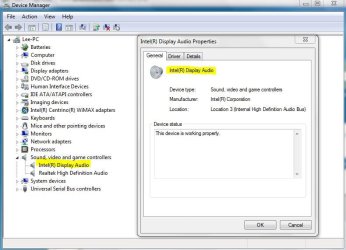
By chance, have you recently updated any audio drivers? Perhaps through automatic Windows Updates? Expand the Sound, Video and Game Controllers section of Device Manager. Double-click each controller listed to make sure they're working properly.

devmgr.JPG

On the off chance that something corrupted or damaged system files, I'd also run a full antimalware scan with your AV suite of choice. And since no AV product is 100% effective 100% of the time, I'd suggest running a couple of free on-demand scanners as well.

Malwarebytes

ESET Online Scanner

Windows Defender Offline

Assuming the scans come back clean I'd also run a system file checker scan from an elevated command prompt (option two.) If problems are found, run the scan 3 times and reboot the computer in between each scan.

http://www.sevenforums.com/tutorials/1538-sfc-scannow-command-system-file-checker.html
 

My Computer My Computer

At a glance

Win 7 Pro 64-bitIntel i5 2.4 Ghz8GB DDR3Intel HD 3000
Computer type
Laptop
Computer Manufacturer/Model Number
Sony Vaio VPCEB47GM Laptop
OS
Win 7 Pro 64-bit
CPU
Intel i5 2.4 Ghz
Memory
8GB DDR3
Graphics Card(s)
Intel HD 3000
Sound Card
IDT High Definition
Monitor(s) Displays
15.6 WGXA Anti-Glare LED
Screen Resolution
1280x800
Hard Drives
640Gb 7200rpm
Antivirus
MSE
Browser
Opera (primary) with IE9 backup
Run this program and see whether you have a lot of DPCs (red bars will tell). If yes, there is something wrong with the driver(s). The text below the bars may give you a hint.
 

My Computer My Computer

At a glance

Vista, Windows7, Mint Mate, Zorin, Windows 8from 1.6GHz Duo to i7
Computer Manufacturer/Model Number
HP, Dell, Gateway, Toshiba - 4 laptops and 2 desktops
OS
Vista, Windows7, Mint Mate, Zorin, Windows 8
CPU
from 1.6GHz Duo to i7
Monitor(s) Displays
2x HP w2207
Hard Drives
5x HDD, 7x SSD, 12x Externals
Keyboard
with trackball - no mices
Mouse
Trackball mice
Internet Speed
DSL 6000
Run this program and see whether you have a lot of DPCs (red bars will tell). If yes, there is something wrong with the driver(s). The text below the bars may give you a hint.

By chance, have you recently updated any audio drivers? Perhaps through automatic Windows Updates? Expand the Sound, Video and Game Controllers section of Device Manager. Double-click each controller listed to make sure they're working properly.

View attachment 238536

On the off chance that something corrupted or damaged system files, I'd also run a full antimalware scan with your AV suite of choice. And since no AV product is 100% effective 100% of the time, I'd suggest running a couple of free on-demand scanners as well.

Malwarebytes

ESET Online Scanner

Windows Defender Offline

Assuming the scans come back clean I'd also run a system file checker scan from an elevated command prompt (option two.) If problems are found, run the scan 3 times and reboot the computer in between each scan.

http://www.sevenforums.com/tutorials/1538-sfc-scannow-command-system-file-checker.html

I apologise for the late reply - university has been rather stressful lately with exams and the like.

I tried both of the suggestions that were offered - Antivirus scans showed no malicious files. When scanning for DPCs; there were a few red bars appearing. In the end, I just decided to format my C: drive and re-install Windows.

The PC has now been on for over 5 hours and has had NO issues!

Thank you for your assistance.


Greatly appreciated,

Dan.
 

My Computer My Computer

At a glance

Windows 7 Ultimate x64AMD Phenom II x4 980 @ 3.7Ghz2x4GB Corsair VengeanceEVGA GTX550ti
OS
Windows 7 Ultimate x64
CPU
AMD Phenom II x4 980 @ 3.7Ghz
Motherboard
ASUS M4A87TD
Memory
2x4GB Corsair Vengeance
Graphics Card(s)
EVGA GTX550ti
Hard Drives
Samsung Spinpoint 1TB
PSU
Corsair GS700
Hopefully the problem has been resolved. Thanks for posting back!
 

My Computer My Computer

At a glance

Win 7 Pro 64-bitIntel i5 2.4 Ghz8GB DDR3Intel HD 3000
Computer type
Laptop
Computer Manufacturer/Model Number
Sony Vaio VPCEB47GM Laptop
OS
Win 7 Pro 64-bit
CPU
Intel i5 2.4 Ghz
Memory
8GB DDR3
Graphics Card(s)
Intel HD 3000
Sound Card
IDT High Definition
Monitor(s) Displays
15.6 WGXA Anti-Glare LED
Screen Resolution
1280x800
Hard Drives
640Gb 7200rpm
Antivirus
MSE
Browser
Opera (primary) with IE9 backup
Back
Top