CPU-Z pics: A-Data vs Corsair mem in my rig: pls advise

VulcanSoulPatch

New member
Local time
6:44 PM
Messages
89
Location
SoCal
When I bought my rig, the builder had put the wrong memory in it. They read the build sheet as "Corsair or Major Brand" and "upgraded" me to A-Data Gaming Series. The thing is, I had ordered Corsair Dominator. They were OOS of the Dom when I picked it up, so they offered to refund the upgrade fee and keep the A-Data, or ship the Dom to me when it was restocked. I went with the latter and have been running off the A-Data for over a month. I received the Dom a few weeks ago, but did not have the chance to pop it into my rig until today. I ran CPU-Z and now I am wondering if the Dom specs are truly better that the A-Data or not (I am not that well-versed in memory ratings and such). I think I would still have the option of shipping the Dom back and keeping the A-Data, but I want to keep whatever is best. Please advise.

A-Data SPD tab
adataspd.png


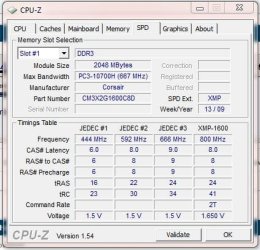
Corsair Dominator SPD tab
dominatorspd.png


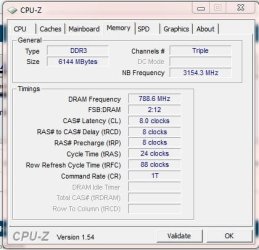
A-Data Mem tab
adatamem.png


Corsair Dominator Mem tab
dominatormem.png


From the Mem tabs, the Dom looks better than the A-Data, but to me the SPD tabs make it look as if the A-Data is better than the Dom. Maybe I am just reading this wrong. I dunno. I be :confused:. Any explanations will be greatly appreciated. TIA!

BTW, if there is a better util to run to rate my mem, please let me know and I can do that. It will not be a problem to pop the A-Data back in and get a reading.

VSP
 

My Computer My Computer

At a glance

Win7 Pro x64i7 860 @ 2.80GHZCorsair Dominator DDR3 1600 (8GB) in XMP modeRadeon HD 5850 XFX XXX Edition
Computer Manufacturer/Model Number
Custom Built
OS
Win7 Pro x64
CPU
i7 860 @ 2.80GHZ
Motherboard
Gigabyte P55A-UD4P
Memory
Corsair Dominator DDR3 1600 (8GB) in XMP mode
Graphics Card(s)
Radeon HD 5850 XFX XXX Edition
Monitor(s) Displays
Hanns-G HG281D
Screen Resolution
1920 x 1200
Hard Drives
Seagate Barracuda 7200.11 1.5TB (300GB C: part ;) )
PSU
Corsair TX750W
Case
NZXT Tempest EVO
Cooling
Asetek LCLC 120, NZXT Stock Fans (4x120mm, 2x140mm)
Keyboard
Cyber Snipa V2 (oh, and MS Natural Multimedia 1.0A)
Mouse
Wolfking Trooper MVP Blue
Internet Speed
FiOS 15/5
You should check whenever the A-Data are especially made for the i7 processor series...on the manufacturer site or your retailler.
Looks some of DDR3 PC3-10700 are made for this i7, and are generaly mentionned.

I think the Corsair are good but not the new generation for your " i7 860 @ 2.80GHZ "
 

My Computer My Computer

At a glance

Windows 7 Professional SP1 - x64 [Non-UEFI Boot]Ivy Bridge Core i5 3570K (Delidded)G.Skill "Ares" DDR3 PC3-12800 - 1600MHz (16Gb)Asus Dual-RX480-O4G
Computer type
PC/Desktop
Computer Manufacturer/Model Number
Custom Build
OS
Windows 7 Professional SP1 - x64 [Non-UEFI Boot]
CPU
Ivy Bridge Core i5 3570K (Delidded)
Motherboard
Asus P8Z77-V LE PLUS
Memory
G.Skill "Ares" DDR3 PC3-12800 - 1600MHz (16Gb)
Graphics Card(s)
Asus Dual-RX480-O4G
Sound Card
Creative Sound Blaster Z w/5.1 sound system
Monitor(s) Displays
Asus IPS 23"
Screen Resolution
16/9
Hard Drives
Internal:
500Go Sata 6Gb/s (x2)
500Go Sata 3Gb/s (x2)
SSD 60Go Sata 6Gb/s
PSU
In Win C 900W Series 80+ Platinum
Case
Thermaltake Chaser A71
Cooling
Custom Water Cooling Loop
Keyboard
Cooler Master QuickFire XTi
Mouse
Razer Imperator 2012 (4G)
Antivirus
MSE
Browser
IE 11.0.xxx Rtm
Other Info
"Raid0" with Intel Smart Response Technology (HDD/SSD)
Thanks for the reply. I guess I am a little green on this memory stuff, but I am not quite sure what you are getting at. How does "being made for the i7" actually work? I can understand some memory is better than others, but how can one be better for one type of processor and another better for a different one? Would the better one be better all around???

Anyway, as far as it goes, WYSIW I Can Get... I have no ability to specify what I want the builder to give me (other than A-Data Gaming or Corsair Dominator). Given that, would the A-Data be better since they are the PC3-10700, or are the Corsair Doms better because of the lower CAS, even though they are only PC3-8500F?

Thanks again!

VSP
 

My Computer My Computer

At a glance

Win7 Pro x64i7 860 @ 2.80GHZCorsair Dominator DDR3 1600 (8GB) in XMP modeRadeon HD 5850 XFX XXX Edition
Computer Manufacturer/Model Number
Custom Built
OS
Win7 Pro x64
CPU
i7 860 @ 2.80GHZ
Motherboard
Gigabyte P55A-UD4P
Memory
Corsair Dominator DDR3 1600 (8GB) in XMP mode
Graphics Card(s)
Radeon HD 5850 XFX XXX Edition
Monitor(s) Displays
Hanns-G HG281D
Screen Resolution
1920 x 1200
Hard Drives
Seagate Barracuda 7200.11 1.5TB (300GB C: part ;) )
PSU
Corsair TX750W
Case
NZXT Tempest EVO
Cooling
Asetek LCLC 120, NZXT Stock Fans (4x120mm, 2x140mm)
Keyboard
Cyber Snipa V2 (oh, and MS Natural Multimedia 1.0A)
Mouse
Wolfking Trooper MVP Blue
Internet Speed
FiOS 15/5
Thanks for the reply. I guess I am a little green on this memory stuff, but I am not quite sure what you are getting at. How does "being made for the i7" actually work? I can understand some memory is better than others, but how can one be better for one type of processor and another better for a different one? Would the better one be better all around???

Anyway, as far as it goes, WYSIW I Can Get... I have no ability to specify what I want the builder to give me (other than A-Data Gaming or Corsair Dominator). Given that, would the A-Data be better since they are the PC3-10700, or are the Corsair Doms better because of the lower CAS, even though they are only PC3-8500F?

Thanks again!

VSP

I'm a little green as you on this either...but i was hoping an answer for myself on another thread and it came to me looking at your thread, i went to a retailler site to check what's up with PC3-8500F Ram for desktop (as mine actually, but on laptop) and PC3-10700 for desktop.

They did mentionned that those ram sticks (PC3-10700) were the newest made for the i7 Core series. If they're made for that processor it could mean they do suit perfect to your machine.
But as always makers are very annoying when popping up a new stuff, advertizing it is the best and sometimes older generation stuff works fine!

That's why i'm telling you to see whenever they do suit your processor. In that case it will be perhaps a clue for you when asking to the retailler, him to be more precise.
 

My Computer My Computer

At a glance

Windows 7 Professional SP1 - x64 [Non-UEFI Boot]Ivy Bridge Core i5 3570K (Delidded)G.Skill "Ares" DDR3 PC3-12800 - 1600MHz (16Gb)Asus Dual-RX480-O4G
Computer type
PC/Desktop
Computer Manufacturer/Model Number
Custom Build
OS
Windows 7 Professional SP1 - x64 [Non-UEFI Boot]
CPU
Ivy Bridge Core i5 3570K (Delidded)
Motherboard
Asus P8Z77-V LE PLUS
Memory
G.Skill "Ares" DDR3 PC3-12800 - 1600MHz (16Gb)
Graphics Card(s)
Asus Dual-RX480-O4G
Sound Card
Creative Sound Blaster Z w/5.1 sound system
Monitor(s) Displays
Asus IPS 23"
Screen Resolution
16/9
Hard Drives
Internal:
500Go Sata 6Gb/s (x2)
500Go Sata 3Gb/s (x2)
SSD 60Go Sata 6Gb/s
PSU
In Win C 900W Series 80+ Platinum
Case
Thermaltake Chaser A71
Cooling
Custom Water Cooling Loop
Keyboard
Cooler Master QuickFire XTi
Mouse
Razer Imperator 2012 (4G)
Antivirus
MSE
Browser
IE 11.0.xxx Rtm
Other Info
"Raid0" with Intel Smart Response Technology (HDD/SSD)
I doubt youll see much diff. between higher bandwidth/looser timings and lower bandwith with tighter timings in a real world situation.
Maybe in a benchmark.

To get a better idea of the performance difference you could run a benchmark and see what kind of bandwidth you have on each.

Windows has a built in one.

Open a elevated command prompt and type:

winsat mem
 

My Computer My Computer

At a glance

Windows 7 Home Premium 64bitIntel Core i7 2700k8GB Mushkin Redline Ridgebacks @1866EVGA GTX570 SC
Computer Manufacturer/Model Number
Custom (Self Build)
OS
Windows 7 Home Premium 64bit
CPU
Intel Core i7 2700k
Motherboard
eVGA P67 SLI
Memory
8GB Mushkin Redline Ridgebacks @1866
Graphics Card(s)
EVGA GTX570 SC
Sound Card
XiFi Titanium HD
Monitor(s) Displays
LG W2453V
Screen Resolution
1920x1080
Hard Drives
Intel 320 80GB -- Intel X25-V 40GB --WD Black 1TB x2 -- WD Blue 640GB
PSU
Seasonic x750
Case
Corsair 600T SE White
Cooling
eVGA Superclocked CPU Cooler
Keyboard
Saitek Cyborg
Antivirus
Kaspersky
Browser
IE
Other Info
LG BD/DVD
Wishmaster, thanks for the reply. If understand correctly, the A-Data is the one with the higher bandwidth/looser timings and the Dom has lower bandwidth/tighter timings, right?

Thanks for the heads-up on winsat mem. I ran it with on the Dom (which is currently installed) and here is the result:
winsatmemdom.png


I don't have the time to swap the mem out right now and run it on the A-Data, but I will do that the first chance I get and post the results.

VSP
 

My Computer My Computer

At a glance

Win7 Pro x64i7 860 @ 2.80GHZCorsair Dominator DDR3 1600 (8GB) in XMP modeRadeon HD 5850 XFX XXX Edition
Computer Manufacturer/Model Number
Custom Built
OS
Win7 Pro x64
CPU
i7 860 @ 2.80GHZ
Motherboard
Gigabyte P55A-UD4P
Memory
Corsair Dominator DDR3 1600 (8GB) in XMP mode
Graphics Card(s)
Radeon HD 5850 XFX XXX Edition
Monitor(s) Displays
Hanns-G HG281D
Screen Resolution
1920 x 1200
Hard Drives
Seagate Barracuda 7200.11 1.5TB (300GB C: part ;) )
PSU
Corsair TX750W
Case
NZXT Tempest EVO
Cooling
Asetek LCLC 120, NZXT Stock Fans (4x120mm, 2x140mm)
Keyboard
Cyber Snipa V2 (oh, and MS Natural Multimedia 1.0A)
Mouse
Wolfking Trooper MVP Blue
Internet Speed
FiOS 15/5
The A-Data is absolutely better. Not just because it's faster, but because it's designed specifically for your hardware, and is newer.

Peace
 

My Computer My Computer

At a glance

HP Win7 Pro x64 | Custom Win7 Pro x64HP PhII X4 965 Black Ed. 3.4Ghz | PhII X6 110...8GB DDR3 1333 OC Black Edition x2HP XFX Radeon HD4890 1GB | AMD Radeon HD 6990
Computer Manufacturer/Model Number
HPE-112y Custom + Custom Build
OS
HP Win7 Pro x64 | Custom Win7 Pro x64
CPU
HP PhII X4 965 Black Ed. 3.4Ghz | PhII X6 1100T 3.3/3.7
Motherboard
OEM HP | ASUS Crosshair IV Extreme 890FX
Memory
8GB DDR3 1333 OC Black Edition x2
Graphics Card(s)
HP XFX Radeon HD4890 1GB | AMD Radeon HD 6990
Sound Card
Realtek 7.1 Digital HDMI x2
Monitor(s) Displays
HP 20" 1680x1050 LCD | Samsung 23" 2ms 1920x1200 LED
Screen Resolution
1680x1050 + 1920x1200 & HDTV for Gaming/TV
Hard Drives
1TB WD "Green" 5,400 RPM SCSI W/ AMD RAID/Xpert
Custom 2x 128GB OCZ Enyo SSD
PSU
Thermaltake Black Widow 850watt Modular x2
Case
HP HPE- 112y OEM Modded | Custom Xclio A380S
Cooling
HP Antec120mm | Custom Antec 360mm/250mm/200mm/120mm
Keyboard
HP G15 | G19
Mouse
G500 x2
Internet Speed
15mb down, 2mb up
Other Info
2x DVD-RAM | 2x BD-ROM
Rhammstein, thanks for the reply. While I haven't had the chance to swap out the memory to check the A-Data with winsat, I would like to know how you can tell the A-Data is faster. I understand what Wishmaster stated above, and thanks makes sense which is why I am going to look into it, but I just want to know how you are reading the stats I posted above. Thanks!

VSP
 

My Computer My Computer

At a glance

Win7 Pro x64i7 860 @ 2.80GHZCorsair Dominator DDR3 1600 (8GB) in XMP modeRadeon HD 5850 XFX XXX Edition
Computer Manufacturer/Model Number
Custom Built
OS
Win7 Pro x64
CPU
i7 860 @ 2.80GHZ
Motherboard
Gigabyte P55A-UD4P
Memory
Corsair Dominator DDR3 1600 (8GB) in XMP mode
Graphics Card(s)
Radeon HD 5850 XFX XXX Edition
Monitor(s) Displays
Hanns-G HG281D
Screen Resolution
1920 x 1200
Hard Drives
Seagate Barracuda 7200.11 1.5TB (300GB C: part ;) )
PSU
Corsair TX750W
Case
NZXT Tempest EVO
Cooling
Asetek LCLC 120, NZXT Stock Fans (4x120mm, 2x140mm)
Keyboard
Cyber Snipa V2 (oh, and MS Natural Multimedia 1.0A)
Mouse
Wolfking Trooper MVP Blue
Internet Speed
FiOS 15/5
Well, simply the A-Date will move more data per second, however, it does have a higher latency, however latency is far less an issue, than data/sec. With these numbers, the A-Data will move more data, so long as your mobo recognizes it and it's clocked accordingly, which it should. The memory is specifically designed for that Intel chipset.

I hope that answers your question, if you want more technical explanations, ask away.

Very simply, PC8500 equates to 8,500mb/sec, however the chipset has an influence as well. The exact numbers will differ always, depending on other components, which is "exactly" why they tell you what the memory is rated for, because memory will not always perform exactly as said, bottlenecks often exist, or the opposite, a great chipset and Cpu with heavy overclocking, for example. Take the PC3, 10700, this equates to 10,700mb/sec. I hope this helps.

Once you swap the memory and run the test, you'll see that the A-Data moves more data.

Peace

Edit: For example, on my main rig, not my gaming rig, the HP HPE-112y, this is how it scores, and it's only PC3 1066.
http://i7.photobucket.com/albums/y293/Flugrekorder/memsat_test_HPE-112y_HD4890_1066mhz.jpg

So, it can be very misleading. This good result is primarily because of the 4000mhz HT link.

Any other questions feel free, or PM. Peace, and no, I don't care about reputation points :)

Out
 

My Computer My Computer

At a glance

HP Win7 Pro x64 | Custom Win7 Pro x64HP PhII X4 965 Black Ed. 3.4Ghz | PhII X6 110...8GB DDR3 1333 OC Black Edition x2HP XFX Radeon HD4890 1GB | AMD Radeon HD 6990
Computer Manufacturer/Model Number
HPE-112y Custom + Custom Build
OS
HP Win7 Pro x64 | Custom Win7 Pro x64
CPU
HP PhII X4 965 Black Ed. 3.4Ghz | PhII X6 1100T 3.3/3.7
Motherboard
OEM HP | ASUS Crosshair IV Extreme 890FX
Memory
8GB DDR3 1333 OC Black Edition x2
Graphics Card(s)
HP XFX Radeon HD4890 1GB | AMD Radeon HD 6990
Sound Card
Realtek 7.1 Digital HDMI x2
Monitor(s) Displays
HP 20" 1680x1050 LCD | Samsung 23" 2ms 1920x1200 LED
Screen Resolution
1680x1050 + 1920x1200 & HDTV for Gaming/TV
Hard Drives
1TB WD "Green" 5,400 RPM SCSI W/ AMD RAID/Xpert
Custom 2x 128GB OCZ Enyo SSD
PSU
Thermaltake Black Widow 850watt Modular x2
Case
HP HPE- 112y OEM Modded | Custom Xclio A380S
Cooling
HP Antec120mm | Custom Antec 360mm/250mm/200mm/120mm
Keyboard
HP G15 | G19
Mouse
G500 x2
Internet Speed
15mb down, 2mb up
Other Info
2x DVD-RAM | 2x BD-ROM
Hmmm.....never heard of A-Data, but I can say Corsair's memory is VERY good.

At any rate, looking at CPU-Z, the dominators run at 1600MHz, were as the A-Data will only do 1370? I'd personally go with the Dominators as they are better sticks and will also clock higher.

One other thing, If your know how to enter the BIOS, set your Dominator RAM to XMP mode. Looking at this pic says there aren't running in full spec....

dominatormem.png


BTW I use Dominators myself. Here's mine....

mine1.JPGmine2.JPG

In the first shot you can see my memory running at 1600MHz. In the second shot under part number notice the "1600". The only difference between your and mine is that I have tighter (better) timings. Yours is 9-9-9-24-2T, Mine is 8-8-8-24-1T, other than that we can both run at 1600MHz.

Hope this helps.
 

My Computer My Computer

At a glance

Windows 10 ProIntel Core i7-4770K (3.5Ghz)32 gig Corsair Dominator Platinum (4x8Gig)Sapphire Tri-X R9 Fury
Computer type
PC/Desktop
Computer Manufacturer/Model Number
Custom built by me.
OS
Windows 10 Pro
CPU
Intel Core i7-4770K (3.5Ghz)
Motherboard
Gigabyte G1 Sniper 5 (F10 Bios)
Memory
32 gig Corsair Dominator Platinum (4x8Gig)
Graphics Card(s)
Sapphire Tri-X R9 Fury
Sound Card
Soundblaster ZXR
Monitor(s) Displays
NEC PA242W 24" LCD Monitor
Screen Resolution
1920 x 1200
Hard Drives
Primary - Samsung 850 Pro (512gig), Samsung 840 Pro (256gig), 2TB WD Caviar Black.
PSU
EVGA Supernova 1000 G2
Case
Cooler Master HAF X
Cooling
Corsair H100i with Corsair Air Series SP120 Quiet Fans
Keyboard
Logitech Wireless Wave
Mouse
Logitech Performance MX
Internet Speed
High Speed Cable
Antivirus
Norton Security
Browser
IE11
Other Info
Memory Timings - 1866MHz @ 9-9-9-27-1T @ 1.5 volts
This holds true if you can achieve the 1600mhz. I usually assume not so, but I'm not entirely familiar with your motherboard and chipset, I've been with AMD since 2003.
 

My Computer My Computer

At a glance

HP Win7 Pro x64 | Custom Win7 Pro x64HP PhII X4 965 Black Ed. 3.4Ghz | PhII X6 110...8GB DDR3 1333 OC Black Edition x2HP XFX Radeon HD4890 1GB | AMD Radeon HD 6990
Computer Manufacturer/Model Number
HPE-112y Custom + Custom Build
OS
HP Win7 Pro x64 | Custom Win7 Pro x64
CPU
HP PhII X4 965 Black Ed. 3.4Ghz | PhII X6 1100T 3.3/3.7
Motherboard
OEM HP | ASUS Crosshair IV Extreme 890FX
Memory
8GB DDR3 1333 OC Black Edition x2
Graphics Card(s)
HP XFX Radeon HD4890 1GB | AMD Radeon HD 6990
Sound Card
Realtek 7.1 Digital HDMI x2
Monitor(s) Displays
HP 20" 1680x1050 LCD | Samsung 23" 2ms 1920x1200 LED
Screen Resolution
1680x1050 + 1920x1200 & HDTV for Gaming/TV
Hard Drives
1TB WD "Green" 5,400 RPM SCSI W/ AMD RAID/Xpert
Custom 2x 128GB OCZ Enyo SSD
PSU
Thermaltake Black Widow 850watt Modular x2
Case
HP HPE- 112y OEM Modded | Custom Xclio A380S
Cooling
HP Antec120mm | Custom Antec 360mm/250mm/200mm/120mm
Keyboard
HP G15 | G19
Mouse
G500 x2
Internet Speed
15mb down, 2mb up
Other Info
2x DVD-RAM | 2x BD-ROM
14K is good.

I think I would stick w/the Corsair tbh. Then again, when it comes to RAM my personal pref. would be Corsair or Gskill so its purely a personal choice there.

As sygnus21 has suggested, bios settings will play a role as to how well it performs as well. May wish to look into it further.


But as I said before, at the end of the day, I seriously doubt youll really notice any diff. between 1333 & 1600 in real world use, even gaming. Except for a few apps that can show some gain.

So unless your one that just loves to tweak bios settings and get all you can (I am one of those :D) It really wont make much difference in the grand scheme of things.

Another reason I would stay w/the Corsair, is its capable of 1600. So even if you arent running at that now, it just means you have breathing room on the RAM for some overclocking, if you choose to do so now or in the future.

Good Luck :)
 
Last edited:

My Computer My Computer

At a glance

Windows 7 Home Premium 64bitIntel Core i7 2700k8GB Mushkin Redline Ridgebacks @1866EVGA GTX570 SC
Computer Manufacturer/Model Number
Custom (Self Build)
OS
Windows 7 Home Premium 64bit
CPU
Intel Core i7 2700k
Motherboard
eVGA P67 SLI
Memory
8GB Mushkin Redline Ridgebacks @1866
Graphics Card(s)
EVGA GTX570 SC
Sound Card
XiFi Titanium HD
Monitor(s) Displays
LG W2453V
Screen Resolution
1920x1080
Hard Drives
Intel 320 80GB -- Intel X25-V 40GB --WD Black 1TB x2 -- WD Blue 640GB
PSU
Seasonic x750
Case
Corsair 600T SE White
Cooling
eVGA Superclocked CPU Cooler
Keyboard
Saitek Cyborg
Antivirus
Kaspersky
Browser
IE
Other Info
LG BD/DVD
Rhammstein, thank you for your much more in-depth reply, I appreciate it. BTW, what is your 1066 memory listed at? Over 15GB/s, that pretty damn good! I turned HT off in my BIOS, so maybe turning it back on will make a difference, too.

I am hoping to steal a little free time today when I get home from work to do the swap out and test. I am also thinking about running Memtest86+. Have any of you tried it out? Is it a good tool?

VSP
 

My Computer My Computer

At a glance

Win7 Pro x64i7 860 @ 2.80GHZCorsair Dominator DDR3 1600 (8GB) in XMP modeRadeon HD 5850 XFX XXX Edition
Computer Manufacturer/Model Number
Custom Built
OS
Win7 Pro x64
CPU
i7 860 @ 2.80GHZ
Motherboard
Gigabyte P55A-UD4P
Memory
Corsair Dominator DDR3 1600 (8GB) in XMP mode
Graphics Card(s)
Radeon HD 5850 XFX XXX Edition
Monitor(s) Displays
Hanns-G HG281D
Screen Resolution
1920 x 1200
Hard Drives
Seagate Barracuda 7200.11 1.5TB (300GB C: part ;) )
PSU
Corsair TX750W
Case
NZXT Tempest EVO
Cooling
Asetek LCLC 120, NZXT Stock Fans (4x120mm, 2x140mm)
Keyboard
Cyber Snipa V2 (oh, and MS Natural Multimedia 1.0A)
Mouse
Wolfking Trooper MVP Blue
Internet Speed
FiOS 15/5
At any rate, looking at CPU-Z, the dominators run at 1600MHz, were as the A-Data will only do 1370? I'd personally go with the Dominators as they are better sticks and will also clock higher.
They are both listed to me as 1600, and I believe this to be true. Furthermore, looking at the A-Data part number, it is DDR3 1600G, which tells me they are 1600s.

One other thing, If your know how to enter the BIOS, set your Dominator RAM to XMP mode.
Yes, this I still have to check on. Will change this setting and rerun the winsat before swapping out to A-Data.

The only difference between your and mine is that I have tighter (better) timings. Yours is 9-9-9-24-2T, Mine is 8-8-8-24-1T, other than that we can both run at 1600MHz.
... and mine is 8500F and yours is 10700H, so your bandwidth is 667MHz vs my 533MHz.
But this timing thing is still confusing me. I was told when I selected the Doms for purchase that they were 9-9-9-24. I can see in the "XMP-1600" column that they are 9-9-9-24 there, but then CPU-Z validator tells me that they are 7-7-7-20 as well as the Mem tab from the Dom results (4th pic in OP). Then I was talking about it with my Dad yesterday, and he was telling me that the second to last number in the Corsair model number is the CAS, so in my case it is 9 (CM3X2G1600C9D6), so I am even more confused. I know that it really all boils down to actual performance, but I would like to understand what it is I am seeing so that I can have realistic expectations.

VSP
 
Last edited:

My Computer My Computer

At a glance

Win7 Pro x64i7 860 @ 2.80GHZCorsair Dominator DDR3 1600 (8GB) in XMP modeRadeon HD 5850 XFX XXX Edition
Computer Manufacturer/Model Number
Custom Built
OS
Win7 Pro x64
CPU
i7 860 @ 2.80GHZ
Motherboard
Gigabyte P55A-UD4P
Memory
Corsair Dominator DDR3 1600 (8GB) in XMP mode
Graphics Card(s)
Radeon HD 5850 XFX XXX Edition
Monitor(s) Displays
Hanns-G HG281D
Screen Resolution
1920 x 1200
Hard Drives
Seagate Barracuda 7200.11 1.5TB (300GB C: part ;) )
PSU
Corsair TX750W
Case
NZXT Tempest EVO
Cooling
Asetek LCLC 120, NZXT Stock Fans (4x120mm, 2x140mm)
Keyboard
Cyber Snipa V2 (oh, and MS Natural Multimedia 1.0A)
Mouse
Wolfking Trooper MVP Blue
Internet Speed
FiOS 15/5
I think I would stick w/the Corsair tbh. Then again, when it comes to RAM my personal pref. would be Corsair or Gskill so its purely a personal choice there.
I have the same preference, too, as I had issues with an A-Data 4GB CF card that I bought from Fry's ~2 years ago (replaced it with a Sandisk Ultra II 8GB). Thing is, I am paying more for the Doms but quite a large margin, ~$75. I am guessing the builders offer to keep the A-Data and take the refund still stands, but I don't know. There is also the issue of whether or not they will refund me the difference between the A-Data and generic, since at the time I ordered they were fronting the A-Data to ppl who ordered the generic since they ran out of the generic and did not want to hold up the orders toooo long. So you can see now why this has become such a big issue to me. If they were the same price, meh... keep the Doms and be done with it. But since I am paying more, is it a wise investment. Esp. since if I do end up buying a second 4GB set in the future, there is the difference in cost between the two (though my cursory serach showed not as much of a difference as I had believed back when I first picked up my rig).

As sygnus21 has suggested, bios settings will play a role as to how well it performs as well. May wish to look into it further. [...] So unless your one that just loves to tweak bios settings and get all you can (I am one of those :D) It really wont make much difference in the grand scheme of things.
I am not afraid to go into the BIOS to tweak settings, but I am not one to tweak and test ad nauseum. OTOH, I would like to have the best running machine that I possible can given the equipment I have. So, any tweaks I can make to get better performance I will do. Aside from OC'ing... since I am still under "warranty", I don't want to mess with that until later. Plus, at this point in time I have no real need to OC since my rig is handling everything I have thrown at it thus far.

Another reason I would stay w/the Corsair, is its capable of 1600. So even if you arent running at that now, it just means you have breathing room on the RAM for some overclocking, if you choose to do so now or in the future.
Like I said, OC'ing for the future. But I would like to get the memory running at 1600 now if that is possible w/o OC'ing. On my old board, changing the speed was as simple as flipping a switch on the mobo that changed the FSB from 200MHz to 266MHz. Since I haven't looked into it at all with this setup, I have no idea how to achieve it. Here's the link to my mobo. I believe I am still running an older BIOS, so I need to flash that, too, along with the myriad of other things on my to-do list. :p

Thanks again for all of the input everybody! I am learning a lot with this, and hopefully by the time we are done I will be satisfied with my decision (hope, since I am the eternal post-purchase re-evaluator :rolleyes:).

VSP
 

My Computer My Computer

At a glance

Win7 Pro x64i7 860 @ 2.80GHZCorsair Dominator DDR3 1600 (8GB) in XMP modeRadeon HD 5850 XFX XXX Edition
Computer Manufacturer/Model Number
Custom Built
OS
Win7 Pro x64
CPU
i7 860 @ 2.80GHZ
Motherboard
Gigabyte P55A-UD4P
Memory
Corsair Dominator DDR3 1600 (8GB) in XMP mode
Graphics Card(s)
Radeon HD 5850 XFX XXX Edition
Monitor(s) Displays
Hanns-G HG281D
Screen Resolution
1920 x 1200
Hard Drives
Seagate Barracuda 7200.11 1.5TB (300GB C: part ;) )
PSU
Corsair TX750W
Case
NZXT Tempest EVO
Cooling
Asetek LCLC 120, NZXT Stock Fans (4x120mm, 2x140mm)
Keyboard
Cyber Snipa V2 (oh, and MS Natural Multimedia 1.0A)
Mouse
Wolfking Trooper MVP Blue
Internet Speed
FiOS 15/5
The only difference between your and mine is that I have tighter (better) timings. Yours is 9-9-9-24-2T, Mine is 8-8-8-24-1T, other than that we can both run at 1600MHz.
... and mine is 8500F and yours is 10700H, so your bandwidth is 667MHz vs my 533MHz.
But this timing thing is still confusing me. I was told when I selected the Doms for purchase that they were 9-9-9-24. I can see in the "XMP-1600" column that they are 9-9-9-24 there, but then CPU-Z validator tells me that they are 7-7-7-20 as well as the Mem tab from the Dom results (4th pic in OP). Then I was talking about it with my Dad yesterday, and he was telling me that the second to last number in the Corsair model number is the CAS, so in my case it is 9 (CM3X2G1600C9D6), so I am even more confused. I know that it really all boils down to actual performance, but I would like to understand what it is I am seeing so that I can have realistic expectations.
VSP

Our ram will run with tighter timings but at lower frequncies. If you take a closer look at CPU-Z you'll notice the the "tighter" timings come at the cost of "lower" frequencies. It's more or less a give and take thing. So, for example, if you wanted to run at 7-7-7-20, you couldn't do it at 1600MHz with that RAM. You could try, but it'll fail because it's not designed to run with those timing at that high a frequency.

As for the "9" at the end, that means the memory's timings are 9-9-9-, meaning it's not quite as fast as 8-8-8. I'm no memory expert so if you want to get a grasp on those timing and things, look here - XMS Qualification and Testing! - The Corsair Support Forums

And Wishmaster is right, you may not see a big difference between 1333 and 1600, but the 1600 sticks are better for tweaking/overclocking because you have more headroom.

Also - What is memtest86+, what do I use it for?

Good luck.
 

My Computer My Computer

At a glance

Windows 10 ProIntel Core i7-4770K (3.5Ghz)32 gig Corsair Dominator Platinum (4x8Gig)Sapphire Tri-X R9 Fury
Computer type
PC/Desktop
Computer Manufacturer/Model Number
Custom built by me.
OS
Windows 10 Pro
CPU
Intel Core i7-4770K (3.5Ghz)
Motherboard
Gigabyte G1 Sniper 5 (F10 Bios)
Memory
32 gig Corsair Dominator Platinum (4x8Gig)
Graphics Card(s)
Sapphire Tri-X R9 Fury
Sound Card
Soundblaster ZXR
Monitor(s) Displays
NEC PA242W 24" LCD Monitor
Screen Resolution
1920 x 1200
Hard Drives
Primary - Samsung 850 Pro (512gig), Samsung 840 Pro (256gig), 2TB WD Caviar Black.
PSU
EVGA Supernova 1000 G2
Case
Cooler Master HAF X
Cooling
Corsair H100i with Corsair Air Series SP120 Quiet Fans
Keyboard
Logitech Wireless Wave
Mouse
Logitech Performance MX
Internet Speed
High Speed Cable
Antivirus
Norton Security
Browser
IE11
Other Info
Memory Timings - 1866MHz @ 9-9-9-27-1T @ 1.5 volts
Our ram will run with tighter timings but at lower frequncies. If you take a closer look at CPU-Z you'll notice the the "tighter" timings come at the cost of "lower" frequencies. It's more or less a give and take thing. So, for example, if you wanted to run at 7-7-7-20, you couldn't do it at 1600MHz with that RAM. You could try, but it'll fail because it's not designed to run with those timing at that high a frequency.
Wait for it... wait for it... >:tip:<
....................................:D

I think I get it now. The JEDEC columns show the possible timings I can have with the associated bandwidth settings. As you stated, the tighter the timings, the lower the bandwidth. So, if I am reading this correctly, at JEDEC #4, the A-Data and the Doms are equal, since they sport the same 9-9-9-25 @ 685MHz (though, to be fair, the Doms are 26, not 25). But the Doms sport an extra column due to XMP, which shows they can run at 9-9-9-24 @ 800MHz. I am guessing that I could possibly push the A-Data to do the same (since they are supposed to be rated at 1600), but to do that, I would have to OC. Doing it with the Doms is just a BIOS setting (turning on XMP). Am I getting this right?

Further, it appears that my CPU-Z results are with the A-Data in JEDEC #4 while the Doms are only operating ~ JEDEC #2. I am guessing I would have to play with the BIOS to get them into JEDEC #4, but since I will there anyway I will just put them into XMP (although it would be nice to see how it performs in JEDEC #4 so that I can compares apples to apples).

So, am I on the right track?

Also, thanks for the links. I will read them more in-depth later. Now, to see if I can duck out of here and get some "real work" done today... ;)

VSP
 

My Computer My Computer

At a glance

Win7 Pro x64i7 860 @ 2.80GHZCorsair Dominator DDR3 1600 (8GB) in XMP modeRadeon HD 5850 XFX XXX Edition
Computer Manufacturer/Model Number
Custom Built
OS
Win7 Pro x64
CPU
i7 860 @ 2.80GHZ
Motherboard
Gigabyte P55A-UD4P
Memory
Corsair Dominator DDR3 1600 (8GB) in XMP mode
Graphics Card(s)
Radeon HD 5850 XFX XXX Edition
Monitor(s) Displays
Hanns-G HG281D
Screen Resolution
1920 x 1200
Hard Drives
Seagate Barracuda 7200.11 1.5TB (300GB C: part ;) )
PSU
Corsair TX750W
Case
NZXT Tempest EVO
Cooling
Asetek LCLC 120, NZXT Stock Fans (4x120mm, 2x140mm)
Keyboard
Cyber Snipa V2 (oh, and MS Natural Multimedia 1.0A)
Mouse
Wolfking Trooper MVP Blue
Internet Speed
FiOS 15/5
The 15GB/sec performance I get from my PC3 1066 Samsung memory is mostly a result of the chipset. Something else to consider, because you would expect that your memory would outperform mine easily, but it actually falls behind, the Corsair. Nothing technical, it's the HyperTransport link, if you disabled, my god enable it! I didn't know you could even disable such a thing.....I'm actually a little confused now /must think

Also, keep in mind, many chipsets will "NOT" allow those higher clocks if you run 8GB of ram, you should consider this carefully before you go with the other memory. This is why I stick to my original suggestion, the A-Data. 1600 over 1333 is nothing, almost no application can peak that kind of bandwidth, I'd say timings are more important, for that reason. Anyway, just wanted to let ya know, since nobody has warned you, adding that second 4GB may make 1600 impossible, "may", I'm not certain with your chipset, but if so, there's no reason to pay $75 more for 1600 memory only because it's easier to achieve the 1600, when you may not be able to run it in the end anyways.
Assuming you'd prefer 8GB of Ram at a slightly slower bandwidth, which is certainly the right call, especially if you're running 7 x64.

I can't tell how interested you are, if you'd like CpuZ screens of my memory performance etc etc, let me know I'll do that for you. Keep in mind, important, this is my HP HPE rig, not my performance gamer rig, so not to confuse you, they both use 8GB ram.

Memtest86 is only a tool for testing memory for errors. It is no kind of benchmark and not necessary, however, I very, very highly recommend using it if you ever encounter bizarre behavior with your system, rule out memory, Psu, and then malicious software, not in that order, but, yeah.

Peace


Edit: Here are 3 screens showing the HPE, this should give some insight. Chipset plays a huge role eh?

http://i7.photobucket.com/albums/y293/Flugrekorder/Dave_specs1.jpg
http://i7.photobucket.com/albums/y293/Flugrekorder/Dave_specs2.jpg
http://i7.photobucket.com/albums/y293/Flugrekorder/Dave_specs3.jpg

I didn't feel like resizing them, forgot to and they're too big to do an IMG.

Peace
 
Last edited:

My Computer My Computer

At a glance

HP Win7 Pro x64 | Custom Win7 Pro x64HP PhII X4 965 Black Ed. 3.4Ghz | PhII X6 110...8GB DDR3 1333 OC Black Edition x2HP XFX Radeon HD4890 1GB | AMD Radeon HD 6990
Computer Manufacturer/Model Number
HPE-112y Custom + Custom Build
OS
HP Win7 Pro x64 | Custom Win7 Pro x64
CPU
HP PhII X4 965 Black Ed. 3.4Ghz | PhII X6 1100T 3.3/3.7
Motherboard
OEM HP | ASUS Crosshair IV Extreme 890FX
Memory
8GB DDR3 1333 OC Black Edition x2
Graphics Card(s)
HP XFX Radeon HD4890 1GB | AMD Radeon HD 6990
Sound Card
Realtek 7.1 Digital HDMI x2
Monitor(s) Displays
HP 20" 1680x1050 LCD | Samsung 23" 2ms 1920x1200 LED
Screen Resolution
1680x1050 + 1920x1200 & HDTV for Gaming/TV
Hard Drives
1TB WD "Green" 5,400 RPM SCSI W/ AMD RAID/Xpert
Custom 2x 128GB OCZ Enyo SSD
PSU
Thermaltake Black Widow 850watt Modular x2
Case
HP HPE- 112y OEM Modded | Custom Xclio A380S
Cooling
HP Antec120mm | Custom Antec 360mm/250mm/200mm/120mm
Keyboard
HP G15 | G19
Mouse
G500 x2
Internet Speed
15mb down, 2mb up
Other Info
2x DVD-RAM | 2x BD-ROM
My mistake... I thought the "HT" you were referring to was HyperThreading, not HyperTransport. I am not sure what the latter is, or if I even have it (am assuming it is a mobo/BIOS thing, right?).

Also, keep in mind, many chipsets will "NOT" allow those higher clocks if you run 8GB of ram, you should consider this carefully before you go with the other memory. This is why I stick to my original suggestion, the A-Data. 1600 over 1333 is nothing, almost no application can peak that kind of bandwidth, I'd say timings are more important, for that reason. Anyway, just wanted to let ya know, since nobody has warned you, adding that second 4GB may make 1600 impossible, "may", I'm not certain with your chipset, but if so, there's no reason to pay $75 more for 1600 memory only because it's easier to achieve the 1600, when you may not be able to run it in the end anyways.
Assuming you'd prefer 8GB of Ram at a slightly slower bandwidth, which is certainly the right call, especially if you're running 7 x64.
OK, back to Confusionville for me. I believe the A-Data is also 1600 due to what it was listed at on the builders site, in conjunction with the model info from the CPU-Z screen in the OP (don't have the complete model # with me, but I do have a pic of it on my camera). That being said, the results of my CPU-Z tests show that the Corsair Dominator sticks are, by default, running at a lower bandwidth with tighter timings, so I am confused by your suggestion since it seems that the Doms would fit the bill according to your statement (bolded above). Maybe I am reading it wrong.

I have heard about an issue with OC'ing when you have higher amounts of mem, but not that I might not be able to achieve 1600. Would that be because of my mobo, or what? I am running Win7 x64, but I have heard that adding more mem to the system will only help out programs that will actually use it, such as CAD and video processing software. Games not being on that list. I have a HD camcorder that I have taken many hours of footage with and need to process onto DVD (no BD Writer yet). I am thinking that is where the extra mem will come into play and I am leaving myself open to whichever option will give me the best overall performance (which is also why I went with the i7 860 vs the i7 920... system balance over pure HyperThreading performance).

Thanks for the screenies (no worries about resizing... high bandwidth at work); the second one answered my question from post 13 that your DDR3 1066 memory is PC3 10700, the same as the A-Data. And it is only 4 months old. Nice! Don't know how old the A-Data is since the Week/Year field is greyed out, but I think it should be about the same age as yours, solely because it is 10700 and not 8500 like the ol' fogey Doms from mid 2008.

BTW, aside from double-checking to see if XMP is enabled in my BIOS, how can I set the mem timing/bandwidth? I am still not sure why the Doms set themselves at a lower bandwidth than the A-Data did (as I mentioned before, ~JEDEC #2 vs JEDEC #4), and I am interested in finding out if it is possible to manually set it.

VSP
 

My Computer My Computer

At a glance

Win7 Pro x64i7 860 @ 2.80GHZCorsair Dominator DDR3 1600 (8GB) in XMP modeRadeon HD 5850 XFX XXX Edition
Computer Manufacturer/Model Number
Custom Built
OS
Win7 Pro x64
CPU
i7 860 @ 2.80GHZ
Motherboard
Gigabyte P55A-UD4P
Memory
Corsair Dominator DDR3 1600 (8GB) in XMP mode
Graphics Card(s)
Radeon HD 5850 XFX XXX Edition
Monitor(s) Displays
Hanns-G HG281D
Screen Resolution
1920 x 1200
Hard Drives
Seagate Barracuda 7200.11 1.5TB (300GB C: part ;) )
PSU
Corsair TX750W
Case
NZXT Tempest EVO
Cooling
Asetek LCLC 120, NZXT Stock Fans (4x120mm, 2x140mm)
Keyboard
Cyber Snipa V2 (oh, and MS Natural Multimedia 1.0A)
Mouse
Wolfking Trooper MVP Blue
Internet Speed
FiOS 15/5
So, if I am reading this correctly, at JEDEC #4, the A-Data and the Doms are equal, since they sport the same 9-9-9-25 @ 685MHz (though, to be fair, the Doms are 26, not 25). But the Doms sport an extra column due to XMP, which shows they can run at 9-9-9-24 @ 800MHz.

To see what your memory is "actually" running, look at the "Memory" tab in CPU-Z. The "SPD" tab shows your memory table, thus all the possible settings.

Certain memory modules, like Corsair's Dominators use what’s called XMP which stands for Extreme memory profiles (XMP) are SPD (Serial Presence Detect) settings that are activated once memory modules are installed onto a motherboard that supports such settings. What this basically means is that the memory is automatically set to its performance settings. Once again, you motherboard (specifically the BIOS) has to support this, otherwise you'll have to do it manually. This is why I asked if your motherboard has XMP support, if it does use it to "maximize" your memory's performance.

Further, it appears that my CPU-Z results are with the A-Data in JEDEC #4 while the Doms are only operating ~ JEDEC #2. I am guessing I would have to play with the BIOS to get them into JEDEC #4, but since I will there anyway I will just put them into XMP (although it would be nice to see how it performs in JEDEC #4 so that I can compares apples to apples.

Since the "Doms" use XMP you can just select XMP in the BIOS if it supports it. For the A-Data you'll have to set the memory manually.

Now, most "tweakers", me included, set their memory setting manually anyway, with or without XMP. This way we "know" that the memory is running at the settings "we" choose, even if those settings are the same as the XMP profile calls for. It’s the old manual vs auto trust factor. However I can say that XMP works on my board as advertised, though I still prefer to set them manually.

I am guessing that I could possibly push the A-Data to do the same (since they are supposed to be rated at 1600), but to do that, I would have to OC. Doing it with the Doms is just a BIOS setting (turning on XMP). Am I getting this right?
You "may or may not" be able to run at 1600MHz (800 x2) if that speed is not supported! Memtest will bear this out should you try and push them and run the test. If the memory passes at that speed, you’re good.

Hope this helps.
 

My Computer My Computer

At a glance

Windows 10 ProIntel Core i7-4770K (3.5Ghz)32 gig Corsair Dominator Platinum (4x8Gig)Sapphire Tri-X R9 Fury
Computer type
PC/Desktop
Computer Manufacturer/Model Number
Custom built by me.
OS
Windows 10 Pro
CPU
Intel Core i7-4770K (3.5Ghz)
Motherboard
Gigabyte G1 Sniper 5 (F10 Bios)
Memory
32 gig Corsair Dominator Platinum (4x8Gig)
Graphics Card(s)
Sapphire Tri-X R9 Fury
Sound Card
Soundblaster ZXR
Monitor(s) Displays
NEC PA242W 24" LCD Monitor
Screen Resolution
1920 x 1200
Hard Drives
Primary - Samsung 850 Pro (512gig), Samsung 840 Pro (256gig), 2TB WD Caviar Black.
PSU
EVGA Supernova 1000 G2
Case
Cooler Master HAF X
Cooling
Corsair H100i with Corsair Air Series SP120 Quiet Fans
Keyboard
Logitech Wireless Wave
Mouse
Logitech Performance MX
Internet Speed
High Speed Cable
Antivirus
Norton Security
Browser
IE11
Other Info
Memory Timings - 1866MHz @ 9-9-9-27-1T @ 1.5 volts
Back
Top