CPU-Z pics: A-Data vs Corsair mem in my rig: pls advise

@ VulcanSoulPatch,

To clearify, 1- If you're going to run 8gig of RAM by populating all RAM slots, than yes, you might not be able to run at "1600" however like everyting in life there are trade off's. In this case you have more memory, but lower frequency. Now, to be honest, 8gig at 1066 or 1333 isn't going to be that much slower than 4gig at 1600. Benchies may see it, but real world probably won't.

One word of caution I will put out is matching your memory. You will very well want to make sure your memory is matched. That's why most manufactures sell kits...becaus they're matched!!!

If you really want to get a grasp on memory and tweaks and stull like that visit here - The Corsair Support Forums - Powered by vBulletin. They have a wealth of knowledge. In fact, a lot of stuff I've mentioned, I got from them. I'm also a registered member there.

Again, I've never heard of A-Data but I can vouch for Corsair and their tech support, customer service, and their forums.

Hope this helps.
 

My Computer My Computer

At a glance

Windows 10 ProIntel Core i7-4770K (3.5Ghz)32 gig Corsair Dominator Platinum (4x8Gig)Sapphire Tri-X R9 Fury
Computer type
PC/Desktop
Computer Manufacturer/Model Number
Custom built by me.
OS
Windows 10 Pro
CPU
Intel Core i7-4770K (3.5Ghz)
Motherboard
Gigabyte G1 Sniper 5 (F10 Bios)
Memory
32 gig Corsair Dominator Platinum (4x8Gig)
Graphics Card(s)
Sapphire Tri-X R9 Fury
Sound Card
Soundblaster ZXR
Monitor(s) Displays
NEC PA242W 24" LCD Monitor
Screen Resolution
1920 x 1200
Hard Drives
Primary - Samsung 850 Pro (512gig), Samsung 840 Pro (256gig), 2TB WD Caviar Black.
PSU
EVGA Supernova 1000 G2
Case
Cooler Master HAF X
Cooling
Corsair H100i with Corsair Air Series SP120 Quiet Fans
Keyboard
Logitech Wireless Wave
Mouse
Logitech Performance MX
Internet Speed
High Speed Cable
Antivirus
Norton Security
Browser
IE11
Other Info
Memory Timings - 1866MHz @ 9-9-9-27-1T @ 1.5 volts
You should be on "(DC Mode) Symmetric" when all matched mounted ram...

I saw you can have some kit like: CORSAIR DDR3 Dominator 4x2 Go PC3-10666 (1333 MHz) model: CMD8GX3M4A1333C7, and are rated CAS 7 latency (made for i7 series), instead of A-DATA PC3-10700, CAS 9 latency.

If it's what you're looking for.
 
Last edited:

My Computer My Computer

At a glance

Windows 7 Professional SP1 - x64 [Non-UEFI Boot]Ivy Bridge Core i5 3570K (Delidded)G.Skill "Ares" DDR3 PC3-12800 - 1600MHz (16Gb)Asus Dual-RX480-O4G
Computer type
PC/Desktop
Computer Manufacturer/Model Number
Custom Build
OS
Windows 7 Professional SP1 - x64 [Non-UEFI Boot]
CPU
Ivy Bridge Core i5 3570K (Delidded)
Motherboard
Asus P8Z77-V LE PLUS
Memory
G.Skill "Ares" DDR3 PC3-12800 - 1600MHz (16Gb)
Graphics Card(s)
Asus Dual-RX480-O4G
Sound Card
Creative Sound Blaster Z w/5.1 sound system
Monitor(s) Displays
Asus IPS 23"
Screen Resolution
16/9
Hard Drives
Internal:
500Go Sata 6Gb/s (x2)
500Go Sata 3Gb/s (x2)
SSD 60Go Sata 6Gb/s
PSU
In Win C 900W Series 80+ Platinum
Case
Thermaltake Chaser A71
Cooling
Custom Water Cooling Loop
Keyboard
Cooler Master QuickFire XTi
Mouse
Razer Imperator 2012 (4G)
Antivirus
MSE
Browser
IE 11.0.xxx Rtm
Other Info
"Raid0" with Intel Smart Response Technology (HDD/SSD)
Thanks sygnus and NoN. I have checked to see if I can by the exact same model number as what I have. I read that it was OEM mem that Corsair sold to system builders, so I was only able to find it at one place sold in singles: TechNPS. They only have 4 ratings on ResellerRatings, and the last one was bad, but it could be worth a shot for the matched mem. Only downside is I would have to pay both tax and shipping since they are in Nor Cal, which bumps the price up to ~$190 for 2x2GB. Every other place that I have found that sells them list exorbitant prices in addition to being OOS. Not sure why that is. I am guessing I could try to find a more modern set, but I realize that I won't be able to take advantage of any higher bandwidth or tighter timings they may have (weakest link theory, right?).

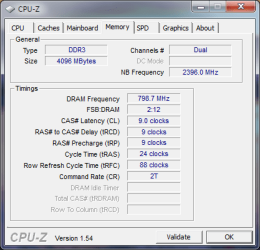
OK, onto the good stuff. I went ahead and enabled XMP mode in my BIOS. First thing I noticed was that when disabled the memory was in 1066 mode, and enabled it jumped to the 1600 mode that was anticipated. Here are the results:
Dominator Mem XMP.png

As you can see, the frequency has now jumped from ~545MHz up to ~800MHz, which was to be expected. The CAS has increased to 9-9-9-24, also as expected. The only disconcerting thing is that the tRFC is now way up at 88 clocks, tho I don't know if that is to be worried about too much.

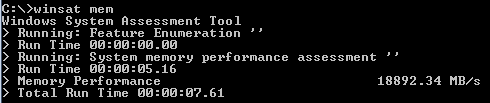
And now, the best part, the new winsat mem bench:
Winsat mem Dom XMP.png

Nearly 19GB/s... niiiiiice. Well, at least to me. :rolleyes:

So, given this info, now where do we stand? I know sygnus and Wishmaster have supported the Corsair since the beginning, so I am guess this will only strengthen their position. Rhammstein, does this change your thoughts on the A-Data? Or is the idea of adding 4GB more and not being able to hit 1600 make the A-Data a better investment?

VSP
 

My Computer My Computer

At a glance

Win7 Pro x64i7 860 @ 2.80GHZCorsair Dominator DDR3 1600 (8GB) in XMP modeRadeon HD 5850 XFX XXX Edition
Computer Manufacturer/Model Number
Custom Built
OS
Win7 Pro x64
CPU
i7 860 @ 2.80GHZ
Motherboard
Gigabyte P55A-UD4P
Memory
Corsair Dominator DDR3 1600 (8GB) in XMP mode
Graphics Card(s)
Radeon HD 5850 XFX XXX Edition
Monitor(s) Displays
Hanns-G HG281D
Screen Resolution
1920 x 1200
Hard Drives
Seagate Barracuda 7200.11 1.5TB (300GB C: part ;) )
PSU
Corsair TX750W
Case
NZXT Tempest EVO
Cooling
Asetek LCLC 120, NZXT Stock Fans (4x120mm, 2x140mm)
Keyboard
Cyber Snipa V2 (oh, and MS Natural Multimedia 1.0A)
Mouse
Wolfking Trooper MVP Blue
Internet Speed
FiOS 15/5
sygnus, regarding the matched sets... were you referring to making sure I buy 2 matched 2GB sticks, or that the 2x2GB that I buy be matched with the 2x2GB I already have? If it is the former, than I could get these for almost $50 less AR. Like I mentioned, I most likely won't be able to take advantage of the lower CAS, but they are cheaper than the CAS 9s available.

BTW, know anything about the difference between the CMD and CMP prefixes on the Dominator memory (last two items at the bottom of the page)? Does it indicate the version or manufacture date or anything?

VSP
 

My Computer My Computer

At a glance

Win7 Pro x64i7 860 @ 2.80GHZCorsair Dominator DDR3 1600 (8GB) in XMP modeRadeon HD 5850 XFX XXX Edition
Computer Manufacturer/Model Number
Custom Built
OS
Win7 Pro x64
CPU
i7 860 @ 2.80GHZ
Motherboard
Gigabyte P55A-UD4P
Memory
Corsair Dominator DDR3 1600 (8GB) in XMP mode
Graphics Card(s)
Radeon HD 5850 XFX XXX Edition
Monitor(s) Displays
Hanns-G HG281D
Screen Resolution
1920 x 1200
Hard Drives
Seagate Barracuda 7200.11 1.5TB (300GB C: part ;) )
PSU
Corsair TX750W
Case
NZXT Tempest EVO
Cooling
Asetek LCLC 120, NZXT Stock Fans (4x120mm, 2x140mm)
Keyboard
Cyber Snipa V2 (oh, and MS Natural Multimedia 1.0A)
Mouse
Wolfking Trooper MVP Blue
Internet Speed
FiOS 15/5
@ Non - CAS7's are expensive compared to CAS9; all things being equal of course.

And bear in mind that even those sticks say 1333MHz; he still may be limited to 1066MHz or lower, if he fills all DIMM slots with memory. That's because some motherboards cannot run the memory at full frequency with all DIMM slot populated. And some users manual will have some cryptic way of saying this, or not. Example – My manual says my motherboard says in can support up to 24GB of memory. In the next bullet it says can support DDR3 2200/1333/1066/800 memory modules.

Now, we can infer that that means the board supports up to 24GB running at 2200MHz…well???

Read the owner's manual!

PS, I kept saying I've never heard of A-Data, well now I have - A-Data DDR3-2200+ DRAM XPG Plus 2.0 review. Nice sticks!


sygnus, regarding the matched sets... were you referring to making sure I buy 2 matched 2GB sticks, or that the 2x2GB that I buy be matched with the 2x2GB I already have?

Get a matched kit. Example, if you want 8gig, get a 4x2 kit, not two 2x2 kits!

BTW, know anything about the difference between the CMD and CMP prefixes on the Dominator memory (last two items at the bottom of the page)? Does it indicate the version or manufacture date or anything?

I can't say I do. Visit Corsair's website here - F.A.Q. - The Corsair Support Forums

As you can see, the frequency has now jumped from ~545MHz up to ~800MHz, which was to be expected. The CAS has increased to 9-9-9-24, also as expected. The only disconcerting thing is that the tRFC is now way up at 88 clocks, tho I don't know if that is to be worried about too much

Your memory is running in peak performance. Don't worry about the 88 clocks thing. As for the A-Data sticks, remember I said you could "manually" set them to see if they'll run at the same speed as the Dominators. It's just that you can't do them "Auto" like you did with the Doms. i.e. set them to XMP because they son't support it.

Good luck.
 

My Computer My Computer

At a glance

Windows 10 ProIntel Core i7-4770K (3.5Ghz)32 gig Corsair Dominator Platinum (4x8Gig)Sapphire Tri-X R9 Fury
Computer type
PC/Desktop
Computer Manufacturer/Model Number
Custom built by me.
OS
Windows 10 Pro
CPU
Intel Core i7-4770K (3.5Ghz)
Motherboard
Gigabyte G1 Sniper 5 (F10 Bios)
Memory
32 gig Corsair Dominator Platinum (4x8Gig)
Graphics Card(s)
Sapphire Tri-X R9 Fury
Sound Card
Soundblaster ZXR
Monitor(s) Displays
NEC PA242W 24" LCD Monitor
Screen Resolution
1920 x 1200
Hard Drives
Primary - Samsung 850 Pro (512gig), Samsung 840 Pro (256gig), 2TB WD Caviar Black.
PSU
EVGA Supernova 1000 G2
Case
Cooler Master HAF X
Cooling
Corsair H100i with Corsair Air Series SP120 Quiet Fans
Keyboard
Logitech Wireless Wave
Mouse
Logitech Performance MX
Internet Speed
High Speed Cable
Antivirus
Norton Security
Browser
IE11
Other Info
Memory Timings - 1866MHz @ 9-9-9-27-1T @ 1.5 volts
Gotcha, well I am stuck with 2x2GB of whichever I choose now. For a premium (and I do mean PREMIUM), I can purchase another 2x2GB from the builder and it would most likely be the same stock. For the Doms the fee would be ~$235 ATM. This is not desirable at all. So, if I want to run 8GB total, I will have to add a 2x2GB kit to what I already have, since I can't flat out refuse and get refunded the money for the mem they included with the system. Would be nice, since all told it would reduce my cost to <$100 over what I already paid them to get the extra 4GB of memory at today's prices.

BTW, what do you think about the new winsat mem score I posted above?

VSP
 

My Computer My Computer

At a glance

Win7 Pro x64i7 860 @ 2.80GHZCorsair Dominator DDR3 1600 (8GB) in XMP modeRadeon HD 5850 XFX XXX Edition
Computer Manufacturer/Model Number
Custom Built
OS
Win7 Pro x64
CPU
i7 860 @ 2.80GHZ
Motherboard
Gigabyte P55A-UD4P
Memory
Corsair Dominator DDR3 1600 (8GB) in XMP mode
Graphics Card(s)
Radeon HD 5850 XFX XXX Edition
Monitor(s) Displays
Hanns-G HG281D
Screen Resolution
1920 x 1200
Hard Drives
Seagate Barracuda 7200.11 1.5TB (300GB C: part ;) )
PSU
Corsair TX750W
Case
NZXT Tempest EVO
Cooling
Asetek LCLC 120, NZXT Stock Fans (4x120mm, 2x140mm)
Keyboard
Cyber Snipa V2 (oh, and MS Natural Multimedia 1.0A)
Mouse
Wolfking Trooper MVP Blue
Internet Speed
FiOS 15/5
Thanks for the FAQ link. D = Dominator, P = Dominator "but with something added"... :huh:
Sounds mysterious. Will have to look into that more later.

VSP
 

My Computer My Computer

At a glance

Win7 Pro x64i7 860 @ 2.80GHZCorsair Dominator DDR3 1600 (8GB) in XMP modeRadeon HD 5850 XFX XXX Edition
Computer Manufacturer/Model Number
Custom Built
OS
Win7 Pro x64
CPU
i7 860 @ 2.80GHZ
Motherboard
Gigabyte P55A-UD4P
Memory
Corsair Dominator DDR3 1600 (8GB) in XMP mode
Graphics Card(s)
Radeon HD 5850 XFX XXX Edition
Monitor(s) Displays
Hanns-G HG281D
Screen Resolution
1920 x 1200
Hard Drives
Seagate Barracuda 7200.11 1.5TB (300GB C: part ;) )
PSU
Corsair TX750W
Case
NZXT Tempest EVO
Cooling
Asetek LCLC 120, NZXT Stock Fans (4x120mm, 2x140mm)
Keyboard
Cyber Snipa V2 (oh, and MS Natural Multimedia 1.0A)
Mouse
Wolfking Trooper MVP Blue
Internet Speed
FiOS 15/5
@ Non - CAS7's are expensive compared to CAS9; all things being equal of course.

And bear in mind that even those sticks say 1333MHz; he still may be limited to 1066MHz or lower, if he fills all DIMM slots with memory. That's because some motherboards cannot run the memory at full frequency with all DIMM slot populated. And some users manual will have some cryptic way of saying this, or not. Example – My manual says my motherboard says in can support up to 24GB of memory. In the next bullet it says can support DDR3 2200/1333/1066/800 memory modules.

Now, we can infer that that means the board supports up to 24GB running at 2200MHz…well???

Read the owner's manual!

Yep!
I saw that priced Corsair Dom PC3-10666, CAS 7 but they weren't as much expensive as the CORSAIR DDR3 XMS3 4x2 Go PC3-10666 (1333MHz) rated CAS latency 9, model: CMX8GX3M4A1333C9, (even slightly more expensive)

Unfortunetly i haven't the chance to access to some proper bios settings as i'm on laptop and restricted. The owner's manual for me will be no help! I'm following this discuss with interrest and find it good to read...
 

My Computer My Computer

At a glance

Windows 7 Professional SP1 - x64 [Non-UEFI Boot]Ivy Bridge Core i5 3570K (Delidded)G.Skill "Ares" DDR3 PC3-12800 - 1600MHz (16Gb)Asus Dual-RX480-O4G
Computer type
PC/Desktop
Computer Manufacturer/Model Number
Custom Build
OS
Windows 7 Professional SP1 - x64 [Non-UEFI Boot]
CPU
Ivy Bridge Core i5 3570K (Delidded)
Motherboard
Asus P8Z77-V LE PLUS
Memory
G.Skill "Ares" DDR3 PC3-12800 - 1600MHz (16Gb)
Graphics Card(s)
Asus Dual-RX480-O4G
Sound Card
Creative Sound Blaster Z w/5.1 sound system
Monitor(s) Displays
Asus IPS 23"
Screen Resolution
16/9
Hard Drives
Internal:
500Go Sata 6Gb/s (x2)
500Go Sata 3Gb/s (x2)
SSD 60Go Sata 6Gb/s
PSU
In Win C 900W Series 80+ Platinum
Case
Thermaltake Chaser A71
Cooling
Custom Water Cooling Loop
Keyboard
Cooler Master QuickFire XTi
Mouse
Razer Imperator 2012 (4G)
Antivirus
MSE
Browser
IE 11.0.xxx Rtm
Other Info
"Raid0" with Intel Smart Response Technology (HDD/SSD)
Okay, I'm gonna make, well my point, very simple, others are making "great" points, but I cannot speak for them, we all differ in our knowledge.

Okay, the A-Data is FAR cheaper, and you're FAR better off with 8GB of Ram, at only a slightly slower frequency. Now, it seems I'm contradicting myself with the Dominator Ram, but I'm conidering it's "price", not it's timings.

You are better off, period, with 8GB of the A-Data, it is certified for i7. When you grab your next 2x2GB ram kit, get the exact same thing. That's a HUUUUGE savings, and again, it's certified for i7. Now, Corsair is a great company, if I had to choose between two dimms, equal in price, 100% of the time I would take Corsiar, easy!! However, you will not have a problem with a somewhat generic brand so long as it works as advertised, and it saving you $75 right now, and probably well over $150 when you grab the second 4GB.

Hope this helps. Just... Run 8GB of the A-Data, if the store will still credit you, if not, just take the Corsiar :)

Peace, and good luck. And hey, you're learning a lot, I like that you don't just ask questions, you'll know as much as us if not more in no time. Buy those recommended books too. Again, good luck.

This is a budget system, having 30% of cost tied up in memory would be ridiculous, so, it depends on whether you want to run 8GB of memory, if so, go A-Data, if not, go Corsair I guess.

P.S. If you want strategy on how to manipulate the store into giving you the credit, just ask.
 
Last edited:

My Computer My Computer

At a glance

HP Win7 Pro x64 | Custom Win7 Pro x64HP PhII X4 965 Black Ed. 3.4Ghz | PhII X6 110...8GB DDR3 1333 OC Black Edition x2HP XFX Radeon HD4890 1GB | AMD Radeon HD 6990
Computer Manufacturer/Model Number
HPE-112y Custom + Custom Build
OS
HP Win7 Pro x64 | Custom Win7 Pro x64
CPU
HP PhII X4 965 Black Ed. 3.4Ghz | PhII X6 1100T 3.3/3.7
Motherboard
OEM HP | ASUS Crosshair IV Extreme 890FX
Memory
8GB DDR3 1333 OC Black Edition x2
Graphics Card(s)
HP XFX Radeon HD4890 1GB | AMD Radeon HD 6990
Sound Card
Realtek 7.1 Digital HDMI x2
Monitor(s) Displays
HP 20" 1680x1050 LCD | Samsung 23" 2ms 1920x1200 LED
Screen Resolution
1680x1050 + 1920x1200 & HDTV for Gaming/TV
Hard Drives
1TB WD "Green" 5,400 RPM SCSI W/ AMD RAID/Xpert
Custom 2x 128GB OCZ Enyo SSD
PSU
Thermaltake Black Widow 850watt Modular x2
Case
HP HPE- 112y OEM Modded | Custom Xclio A380S
Cooling
HP Antec120mm | Custom Antec 360mm/250mm/200mm/120mm
Keyboard
HP G15 | G19
Mouse
G500 x2
Internet Speed
15mb down, 2mb up
Other Info
2x DVD-RAM | 2x BD-ROM
I would have to agree with what Rhammstein is saying about saving a dollar or two. If A-Data is a reputable company and have quality RAM for a respectable price, save a dollar or two and go for it.

However you need to know that the Corsair Dominators are in a different class than those A-Data sticks, just as the Corsair Dominators are in a different class than the Corsair XMS3 memory sticks.

So, if you interested in tweaking/overclocking/performance, the dominators have the edge there. If that's not you cup of tea, the A-Data's will work just fine. In that respect, Rhammstein is correct; it all comes down to budget and performance needs.

BTW, the article I pointed when I said I now heard of A-Data says they make good RAM, at least the sticks the article is talking about. If they were a "cheap" company, I don’t think those would be under review ;)

PS, I kept saying I've never heard of A-Data, well now I have - A-Data DDR3-2200+ DRAM XPG Plus 2.0 review. Nice sticks!

Good luck on your decision.
 

My Computer My Computer

At a glance

Windows 10 ProIntel Core i7-4770K (3.5Ghz)32 gig Corsair Dominator Platinum (4x8Gig)Sapphire Tri-X R9 Fury
Computer type
PC/Desktop
Computer Manufacturer/Model Number
Custom built by me.
OS
Windows 10 Pro
CPU
Intel Core i7-4770K (3.5Ghz)
Motherboard
Gigabyte G1 Sniper 5 (F10 Bios)
Memory
32 gig Corsair Dominator Platinum (4x8Gig)
Graphics Card(s)
Sapphire Tri-X R9 Fury
Sound Card
Soundblaster ZXR
Monitor(s) Displays
NEC PA242W 24" LCD Monitor
Screen Resolution
1920 x 1200
Hard Drives
Primary - Samsung 850 Pro (512gig), Samsung 840 Pro (256gig), 2TB WD Caviar Black.
PSU
EVGA Supernova 1000 G2
Case
Cooler Master HAF X
Cooling
Corsair H100i with Corsair Air Series SP120 Quiet Fans
Keyboard
Logitech Wireless Wave
Mouse
Logitech Performance MX
Internet Speed
High Speed Cable
Antivirus
Norton Security
Browser
IE11
Other Info
Memory Timings - 1866MHz @ 9-9-9-27-1T @ 1.5 volts
What you want or need does exist...it might not be very pleasant to know, but at least you can sorted it out!:)
 

My Computer My Computer

At a glance

Windows 7 Professional SP1 - x64 [Non-UEFI Boot]Ivy Bridge Core i5 3570K (Delidded)G.Skill "Ares" DDR3 PC3-12800 - 1600MHz (16Gb)Asus Dual-RX480-O4G
Computer type
PC/Desktop
Computer Manufacturer/Model Number
Custom Build
OS
Windows 7 Professional SP1 - x64 [Non-UEFI Boot]
CPU
Ivy Bridge Core i5 3570K (Delidded)
Motherboard
Asus P8Z77-V LE PLUS
Memory
G.Skill "Ares" DDR3 PC3-12800 - 1600MHz (16Gb)
Graphics Card(s)
Asus Dual-RX480-O4G
Sound Card
Creative Sound Blaster Z w/5.1 sound system
Monitor(s) Displays
Asus IPS 23"
Screen Resolution
16/9
Hard Drives
Internal:
500Go Sata 6Gb/s (x2)
500Go Sata 3Gb/s (x2)
SSD 60Go Sata 6Gb/s
PSU
In Win C 900W Series 80+ Platinum
Case
Thermaltake Chaser A71
Cooling
Custom Water Cooling Loop
Keyboard
Cooler Master QuickFire XTi
Mouse
Razer Imperator 2012 (4G)
Antivirus
MSE
Browser
IE 11.0.xxx Rtm
Other Info
"Raid0" with Intel Smart Response Technology (HDD/SSD)
Back
Top