Crackling sound and audiodg.exe problems

I also am experiencing the same issues.

( on 2 laptops and a desktop)

The desktop has a internal PCI soundblaster card

the laptops both have IDT audio.

Something for you guys to try, that gets my audio really staticy is running speedtest.net, If i run it 3X at once, audio gets really out of control.

Also if im downloading a lot, and watching a video / audio, streaming or not, it gets really bad as well.

The desktop prior to running windows 7 had windows XP and the sound worked fine. even when running 3 speed tests at once, or downloading and listening to audio. So it must be a 7/vista issue since it wasnt present in XP.

Does anyone know of any fixes for IDT audio cards?

I dont have any of those services running that are discussed above.
 

My Computer My Computer

At a glance

Windows 7 ProfessionalAMD Turion ULTRA X 2 2.5ghz4GB DDR2ATI RADEON 4530 512MB DEDICATED
Computer Manufacturer/Model Number
HP DV7-3160US
OS
Windows 7 Professional
CPU
AMD Turion ULTRA X 2 2.5ghz
Memory
4GB DDR2
Graphics Card(s)
ATI RADEON 4530 512MB DEDICATED
Sound Card
IDT AUDIO
Monitor(s) Displays
LED
Hard Drives
500GB SATA 7200RPM
So after reading all that, what do you think the solution will be? updates in a service pack? Updated drivers in the future?
 

My Computer My Computer

At a glance

Windows 7 ProfessionalAMD Turion ULTRA X 2 2.5ghz4GB DDR2ATI RADEON 4530 512MB DEDICATED
Computer Manufacturer/Model Number
HP DV7-3160US
OS
Windows 7 Professional
CPU
AMD Turion ULTRA X 2 2.5ghz
Memory
4GB DDR2
Graphics Card(s)
ATI RADEON 4530 512MB DEDICATED
Sound Card
IDT AUDIO
Monitor(s) Displays
LED
Hard Drives
500GB SATA 7200RPM
solved 4 me

For me it solved after deleted malwarebite's antimalware aplication.
It seems that some antivir / anti malware scan the network conecction and could interfiere with each other in my case i had avast antivir and malwarebites.
Also try to turn off the firewall, if you'r behind a router, in your house, it is not needed.
 

My Computer My Computer

At a glance

7Amd 26001,5 gbati radeon 9750
OS
7
CPU
Amd 2600
Motherboard
asrock k7vt4a pro
Memory
1,5 gb
Graphics Card(s)
ati radeon 9750
Hard Drives
Samsumg 500Gb
Maxtor 300Gb
External:
Seagate 500Gb, 1,5Tb
LaCie 1Tb
I have an update:

I emailed microsoft all this information and the research and development team is going to be calling me. It seems microsoft is very interested in this topic. I sent them this thread and another one about the same issue elsewhere.

Hopefully if everything works out Either microsoft or the other manufacturers will release updates to fix the issue.
 

My Computer My Computer

At a glance

Windows 7 ProfessionalAMD Turion ULTRA X 2 2.5ghz4GB DDR2ATI RADEON 4530 512MB DEDICATED
Computer Manufacturer/Model Number
HP DV7-3160US
OS
Windows 7 Professional
CPU
AMD Turion ULTRA X 2 2.5ghz
Memory
4GB DDR2
Graphics Card(s)
ATI RADEON 4530 512MB DEDICATED
Sound Card
IDT AUDIO
Monitor(s) Displays
LED
Hard Drives
500GB SATA 7200RPM
I have an update:

I emailed microsoft all this information and the research and development team is going to be calling me. It seems microsoft is very interested in this topic. I sent them this thread and another one about the same issue elsewhere.

Hopefully if everything works out Either microsoft or the other manufacturers will release updates to fix the issue.

Nice! Have them come take a look at the audio forums here.

I've worked through all of the Windows versions, at least back to v3.1, have to say that I've seen more (diverse) problems with Win-7 audio than any other release.

Ap
 

My Computer My Computer

At a glance

Windows 7 Home PremiumIntel Core 2 Duo @ 3.00gHz4 GBATI Radeon HD 2600 XT
Computer Manufacturer/Model Number
Assembled in my workshop
OS
Windows 7 Home Premium
CPU
Intel Core 2 Duo @ 3.00gHz
Motherboard
Gigabyte GA-P35-S3G
Memory
4 GB
Graphics Card(s)
ATI Radeon HD 2600 XT
Sound Card
RME 24/96 Card, Realtek Internal Audio PreSonus FireStudio
Monitor(s) Displays
Acer 1917 (x2)
Screen Resolution
1280 x 1024 on both monitors
Hard Drives
Three 250GB Seagate SATA Barracuda 7200rpm
PSU
Rosewill 500-watt
Case
Rosewill mid-tower
Cooling
Noctua NH-U9B (CPU), PwrSupply fan + single large case Fan
Keyboard
Macally w/2/USB ports.
Mouse
Trackman Wheel
Other Info
Event 20/20 bas studio monitors, Yamaha sub.
Rackmount Korg/Roland/Yamaha synthesizers,
Cubase MIDI/audio recording. Sony Soundforge audio/mastering software. CD Architect Mastering. RME & Presonus audio interfaces.
For me it solved after deleted malwarebite's antimalware aplication.
It seems that some antivir / anti malware scan the network conecction and could interfiere with each other in my case i had avast antivir and malwarebites.
Also try to turn off the firewall, if you'r behind a router, in your house, it is not needed.
Thanks for suggestion. I turned off real-time protection in MS Security Essentials and problem went away. :D I'm can listen to music and very happy
 

My Computer My Computer

At a glance

windows 7 x64
OS
windows 7 x64
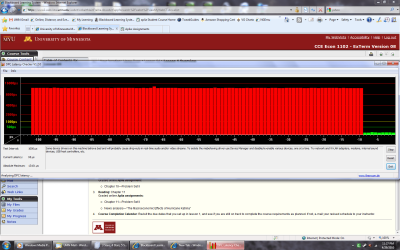
Well I have an update on the issue. My system configuration not having changed since the last time I posted, I encountered an isolated incidence of sound popping. It was a relatively mild case, but, I quickly brough up the DPC Latency Checker. I was playing some music in Media Player, using the Internet, etc., the usual stuff.... and, then, it just happened.

While the DPC Latency Checker was up, the intermittent popping continued. And if you look at the attached image, you can see why. Then, suddenly, the popping stopped, corresponding with a drop in the lag spikes. Given that it took me a few seconds to bring up the DPC Latency Checker, it appears this incident lasted about two minutes. I was planning on disabling my network adapter as soon as two minutes had passed on the DPC tool, alas, the lag spikes quit before I had that chance.

Of course, the normal lag spikes that happen in my system with the network adapter enabled still continue to happen, but, no sound popping since that incident in the attached image....
 

Attachments

  • Untitled.png
    Untitled.png
    116.7 KB · Views: 171

My Computer My Computer

At a glance

Windows 7 Ultimate Signature Edition 64-bitAMD Althlon 64 X2 5000+ Black EditionMushkin XP2-6400 - 8 GB (4x2GB) DDR2 800 MHzEVGA e-GeForce 8800GTS 640MB x2 SLI
Computer Manufacturer/Model Number
Custom / Personally built
OS
Windows 7 Ultimate Signature Edition 64-bit
CPU
AMD Althlon 64 X2 5000+ Black Edition
Motherboard
EVGA nForce 590 SLI AM2
Memory
Mushkin XP2-6400 - 8 GB (4x2GB) DDR2 800 MHz
Graphics Card(s)
EVGA e-GeForce 8800GTS 640MB x2 SLI
Sound Card
Onboard Realtek
Monitor(s) Displays
ViewSonic Optiquest Q20wb 20.1" 1680x1050
Hard Drives
Seagate Barracuda 7200.11 ST310005N1A1AS-RK 1TB SATA 3GB/s
Seagate Barracuda 7200.7 Plus ST3160023A 160GB IDE ATA100
PSU
Corsair CMPSU-650TX 650W ATX12V / EPS12V - Single 12V @ 52A
Case
Cooler Master Centurion 532 RC-532-SKN1 Black SECC ATX Mid T
Cooling
Sunbeam CR-CCTF 120 mm Core-Contact Freezer CPU Cooler
hey all, Microsoft and I figured out, that it was malwarebytes, i have contacted them and now they will work on a Bug fix in which will be released in the next few weeks. I figured out for me that i couldnt just disable the service and stop the program after it had been running, if i did, it didnt change the static. But when i prevented it from starting up with the PC using MSCONFIG it solved the problem 98% :D

Also, The Microsoft tech was actually pretty helpful once i caught there attention. They also stated that this forum is one of the better ones when getting help with windows 7 issues and he told me that he read this thread and has read and possibly even posted, but not sure about the posting part, on this thread prior to my issue and sending him the links.

He also said that the latency program is a decent program but he has experienced spikes and such on computers that dont have any issues playing audio or video so he said you cant always go by that because it will naturally have spikes, and that doesnt mean that your audio / video will get staticy or choppy.
 

My Computer My Computer

At a glance

Windows 7 ProfessionalAMD Turion ULTRA X 2 2.5ghz4GB DDR2ATI RADEON 4530 512MB DEDICATED
Computer Manufacturer/Model Number
HP DV7-3160US
OS
Windows 7 Professional
CPU
AMD Turion ULTRA X 2 2.5ghz
Memory
4GB DDR2
Graphics Card(s)
ATI RADEON 4530 512MB DEDICATED
Sound Card
IDT AUDIO
Monitor(s) Displays
LED
Hard Drives
500GB SATA 7200RPM
I contacted malwarebytes ** i see that wasnt very clear*
 

My Computer My Computer

At a glance

Windows 7 ProfessionalAMD Turion ULTRA X 2 2.5ghz4GB DDR2ATI RADEON 4530 512MB DEDICATED
Computer Manufacturer/Model Number
HP DV7-3160US
OS
Windows 7 Professional
CPU
AMD Turion ULTRA X 2 2.5ghz
Memory
4GB DDR2
Graphics Card(s)
ATI RADEON 4530 512MB DEDICATED
Sound Card
IDT AUDIO
Monitor(s) Displays
LED
Hard Drives
500GB SATA 7200RPM
hey all, Microsoft and I figured out, that it was malwarebytes, i have contacted them and now they will work on a Bug fix in which will be released in the next few weeks. I figured out for me that i couldnt just disable the service and stop the program after it had been running, if i did, it didnt change the static. But when i prevented it from starting up with the PC using MSCONFIG it solved the problem 98% :D

Also, The Microsoft tech was actually pretty helpful once i caught there attention. They also stated that this forum is one of the better ones when getting help with windows 7 issues and he told me that he read this thread and has read and possibly even posted, but not sure about the posting part, on this thread prior to my issue and sending him the links.

He also said that the latency program is a decent program but he has experienced spikes and such on computers that dont have any issues playing audio or video so he said you cant always go by that because it will naturally have spikes, and that doesnt mean that your audio / video will get staticy or choppy.


Just so you know, I don't have Malwarebytes, or any true anti-virus software, for that matter, installed on my machine. And I never have since I've upgraded to Win 7. And I still get audio problems. I only use Windows Defender. I have not actually tried disabling Defender, but, I suppose that might be worth a shot.
 

My Computer My Computer

At a glance

Windows 7 Ultimate Signature Edition 64-bitAMD Althlon 64 X2 5000+ Black EditionMushkin XP2-6400 - 8 GB (4x2GB) DDR2 800 MHzEVGA e-GeForce 8800GTS 640MB x2 SLI
Computer Manufacturer/Model Number
Custom / Personally built
OS
Windows 7 Ultimate Signature Edition 64-bit
CPU
AMD Althlon 64 X2 5000+ Black Edition
Motherboard
EVGA nForce 590 SLI AM2
Memory
Mushkin XP2-6400 - 8 GB (4x2GB) DDR2 800 MHz
Graphics Card(s)
EVGA e-GeForce 8800GTS 640MB x2 SLI
Sound Card
Onboard Realtek
Monitor(s) Displays
ViewSonic Optiquest Q20wb 20.1" 1680x1050
Hard Drives
Seagate Barracuda 7200.11 ST310005N1A1AS-RK 1TB SATA 3GB/s
Seagate Barracuda 7200.7 Plus ST3160023A 160GB IDE ATA100
PSU
Corsair CMPSU-650TX 650W ATX12V / EPS12V - Single 12V @ 52A
Case
Cooler Master Centurion 532 RC-532-SKN1 Black SECC ATX Mid T
Cooling
Sunbeam CR-CCTF 120 mm Core-Contact Freezer CPU Cooler
He also said that the latency program is a decent program but he has experienced spikes and such on computers that dont have any issues playing audio or video so he said you cant always go by that because it will naturally have spikes, and that doesnt mean that your audio / video will get staticy or choppy.


That's right, a single spike or two doesn't make much, if any difference under normal use, but if you're using the system for pro audio and streaming 20, 24-bit audio tracks off a hard drive while recording six, you can bet it does make a difference.

So far Windows-7 is not as reliable at real-time operations as WinXP, which is the all-time champ.

(re-evalution posted in new thread DAW Systems)

Ap
 
Last edited:

My Computer My Computer

At a glance

Windows 7 Home PremiumIntel Core 2 Duo @ 3.00gHz4 GBATI Radeon HD 2600 XT
Computer Manufacturer/Model Number
Assembled in my workshop
OS
Windows 7 Home Premium
CPU
Intel Core 2 Duo @ 3.00gHz
Motherboard
Gigabyte GA-P35-S3G
Memory
4 GB
Graphics Card(s)
ATI Radeon HD 2600 XT
Sound Card
RME 24/96 Card, Realtek Internal Audio PreSonus FireStudio
Monitor(s) Displays
Acer 1917 (x2)
Screen Resolution
1280 x 1024 on both monitors
Hard Drives
Three 250GB Seagate SATA Barracuda 7200rpm
PSU
Rosewill 500-watt
Case
Rosewill mid-tower
Cooling
Noctua NH-U9B (CPU), PwrSupply fan + single large case Fan
Keyboard
Macally w/2/USB ports.
Mouse
Trackman Wheel
Other Info
Event 20/20 bas studio monitors, Yamaha sub.
Rackmount Korg/Roland/Yamaha synthesizers,
Cubase MIDI/audio recording. Sony Soundforge audio/mastering software. CD Architect Mastering. RME & Presonus audio interfaces.
Well I have an update on the issue. My system configuration not having changed since the last time I posted, I encountered an isolated incidence of sound popping. It was a relatively mild case, but, I quickly brough up the DPC Latency Checker. I was playing some music in Media Player, using the Internet, etc., the usual stuff.... and, then, it just happened.

While the DPC Latency Checker was up, the intermittent popping continued. And if you look at the attached image, you can see why. Then, suddenly, the popping stopped, corresponding with a drop in the lag spikes. Given that it took me a few seconds to bring up the DPC Latency Checker, it appears this incident lasted about two minutes. I was planning on disabling my network adapter as soon as two minutes had passed on the DPC tool, alas, the lag spikes quit before I had that chance.

Ok, that graphic is the all-time worst DPC latency I've ever seen! Wow! What the h#ll happened?

I see the MYU logo up there, are you running on the school's network? I've heard of problems being caused by system glitches on campus networks.

Ap
 

My Computer My Computer

At a glance

Windows 7 Home PremiumIntel Core 2 Duo @ 3.00gHz4 GBATI Radeon HD 2600 XT
Computer Manufacturer/Model Number
Assembled in my workshop
OS
Windows 7 Home Premium
CPU
Intel Core 2 Duo @ 3.00gHz
Motherboard
Gigabyte GA-P35-S3G
Memory
4 GB
Graphics Card(s)
ATI Radeon HD 2600 XT
Sound Card
RME 24/96 Card, Realtek Internal Audio PreSonus FireStudio
Monitor(s) Displays
Acer 1917 (x2)
Screen Resolution
1280 x 1024 on both monitors
Hard Drives
Three 250GB Seagate SATA Barracuda 7200rpm
PSU
Rosewill 500-watt
Case
Rosewill mid-tower
Cooling
Noctua NH-U9B (CPU), PwrSupply fan + single large case Fan
Keyboard
Macally w/2/USB ports.
Mouse
Trackman Wheel
Other Info
Event 20/20 bas studio monitors, Yamaha sub.
Rackmount Korg/Roland/Yamaha synthesizers,
Cubase MIDI/audio recording. Sony Soundforge audio/mastering software. CD Architect Mastering. RME & Presonus audio interfaces.
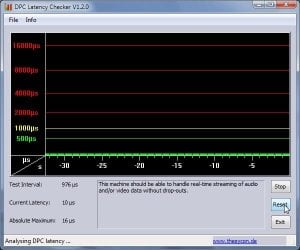
Here's my current best DPC latency, taken about 3 minutes after rebooting the computer.

DPCLatency.jpg


Ap
 

My Computer My Computer

At a glance

Windows 7 Home PremiumIntel Core 2 Duo @ 3.00gHz4 GBATI Radeon HD 2600 XT
Computer Manufacturer/Model Number
Assembled in my workshop
OS
Windows 7 Home Premium
CPU
Intel Core 2 Duo @ 3.00gHz
Motherboard
Gigabyte GA-P35-S3G
Memory
4 GB
Graphics Card(s)
ATI Radeon HD 2600 XT
Sound Card
RME 24/96 Card, Realtek Internal Audio PreSonus FireStudio
Monitor(s) Displays
Acer 1917 (x2)
Screen Resolution
1280 x 1024 on both monitors
Hard Drives
Three 250GB Seagate SATA Barracuda 7200rpm
PSU
Rosewill 500-watt
Case
Rosewill mid-tower
Cooling
Noctua NH-U9B (CPU), PwrSupply fan + single large case Fan
Keyboard
Macally w/2/USB ports.
Mouse
Trackman Wheel
Other Info
Event 20/20 bas studio monitors, Yamaha sub.
Rackmount Korg/Roland/Yamaha synthesizers,
Cubase MIDI/audio recording. Sony Soundforge audio/mastering software. CD Architect Mastering. RME & Presonus audio interfaces.
For me it solved after deleted malwarebite's antimalware aplication.
It seems that some antivir / anti malware scan the network conecction and could interfiere with each other in my case i had avast antivir and malwarebites.
Also try to turn off the firewall, if you'r behind a router, in your house, it is not needed.
Thanks for suggestion. I turned off real-time protection in MS Security Essentials and problem went away. :D I'm can listen to music and very happy
Wow! I registered here just to post a THANK YOU that this fixed my problem! I built this system in January, and since day one I've been having these crackling problems EXACTLY as described as in the OP. Finally today I had enough, and searched for a solution. I came here, read this entire thread, and came across your post. I disabled Real Time Protection in MSE and the problem went away instantly... my DPC Latency Checker went from full red bars to full green bars. Kind of sucks though that you have to gimp your AV program to listen to music properly. :confused:

Thanks again! I hope anyone who comes across this thread via Google in the future looks to their AV program as the culprit!
 

My Computer My Computer

At a glance

Windows 7 Professional x64Intel C2Q Q9300OCZ 4GB DDR3ATI Radeon HD 4870
OS
Windows 7 Professional x64
CPU
Intel C2Q Q9300
Motherboard
Intel DP45SG
Memory
OCZ 4GB DDR3
Graphics Card(s)
ATI Radeon HD 4870
Sound Card
Creative X-Fi XtremeGamer
Monitor(s) Displays
22" Samsung T220 / 42" Sharp Aquos
Hard Drives
Seagate Barracuda 500GB
Lacie 500GB
Seagate FreeAgent 1TB
Thanks for registering to post!

What it shows is that Win-7's audio subsystem is somewhat fragile and easily knocked off track, realtime performance is not good for most users until some optimizations have been performed.

I guess it could be that the OS is still new enough that driver technology hasn't caught up.

Ap
 

My Computer My Computer

At a glance

Windows 7 Home PremiumIntel Core 2 Duo @ 3.00gHz4 GBATI Radeon HD 2600 XT
Computer Manufacturer/Model Number
Assembled in my workshop
OS
Windows 7 Home Premium
CPU
Intel Core 2 Duo @ 3.00gHz
Motherboard
Gigabyte GA-P35-S3G
Memory
4 GB
Graphics Card(s)
ATI Radeon HD 2600 XT
Sound Card
RME 24/96 Card, Realtek Internal Audio PreSonus FireStudio
Monitor(s) Displays
Acer 1917 (x2)
Screen Resolution
1280 x 1024 on both monitors
Hard Drives
Three 250GB Seagate SATA Barracuda 7200rpm
PSU
Rosewill 500-watt
Case
Rosewill mid-tower
Cooling
Noctua NH-U9B (CPU), PwrSupply fan + single large case Fan
Keyboard
Macally w/2/USB ports.
Mouse
Trackman Wheel
Other Info
Event 20/20 bas studio monitors, Yamaha sub.
Rackmount Korg/Roland/Yamaha synthesizers,
Cubase MIDI/audio recording. Sony Soundforge audio/mastering software. CD Architect Mastering. RME & Presonus audio interfaces.
Ok, that graphic is the all-time worst DPC latency I've ever seen! Wow! What the h#ll happened?

I see the MYU logo up there, are you running on the school's network? I've heard of problems being caused by system glitches on campus networks.

Ap
Yeah, and this was a relatively mild case of sound popping (in the past, the popping was much more... annoying). Just goes to show that when I was getting sound popping in the past (and especially under Vista), my lag spikes would have been off the charts had I been using the DPC Tool!

Haha, and actually, that's "My U" -- which is for the Universtiy of Minnesota, but, no -- that was just a webpage. I had it up for a couple of hours before the lag popping, doing nothing, actually (although that page does use Java, of course which I have Update 20 on my machine). No network connection or anything funky in that regard. Although, I AM on a personal network, where other roommates' machines are also, all under the standard Windows network framework (Samba is it?)

See, there really was nothing that should have triggered that crazy lag spike. There were no funny background programs running (I checked task manager... no Windows Update or anything else going on, based on cpu usage and I/O usag, didn't seem that search indexer nor windows defender were working (which would realistically be the only two Windows-default "background" programs that would cause conflicts).... everything just seemed normal, except for audio popping / lag spikes...

I had been about an hour earlier playing a little Left 4 Dead 2, with my cards OC'd... which, I've tried all kinds of experiments, there never seems to be any correlation with OC settings and the latency. Anyway, my cards (I have SLI) were still OC'd when the audio popping started -- I then after getting the DPC tool up, turned the OC down (corresponding to about half-way through the lag spikes on my picture a few posts ago -- I actually underclocked to the cards' minimum, which is what I normally have them at when not gaming), but, during the course of changing clock speeds, there was no discernable effect on the DPC lag spikes, as you can see from the graphic, and it made no difference on the audio popping. It just continued... before it just randomly stopped.
 

My Computer My Computer

At a glance

Windows 7 Ultimate Signature Edition 64-bitAMD Althlon 64 X2 5000+ Black EditionMushkin XP2-6400 - 8 GB (4x2GB) DDR2 800 MHzEVGA e-GeForce 8800GTS 640MB x2 SLI
Computer Manufacturer/Model Number
Custom / Personally built
OS
Windows 7 Ultimate Signature Edition 64-bit
CPU
AMD Althlon 64 X2 5000+ Black Edition
Motherboard
EVGA nForce 590 SLI AM2
Memory
Mushkin XP2-6400 - 8 GB (4x2GB) DDR2 800 MHz
Graphics Card(s)
EVGA e-GeForce 8800GTS 640MB x2 SLI
Sound Card
Onboard Realtek
Monitor(s) Displays
ViewSonic Optiquest Q20wb 20.1" 1680x1050
Hard Drives
Seagate Barracuda 7200.11 ST310005N1A1AS-RK 1TB SATA 3GB/s
Seagate Barracuda 7200.7 Plus ST3160023A 160GB IDE ATA100
PSU
Corsair CMPSU-650TX 650W ATX12V / EPS12V - Single 12V @ 52A
Case
Cooler Master Centurion 532 RC-532-SKN1 Black SECC ATX Mid T
Cooling
Sunbeam CR-CCTF 120 mm Core-Contact Freezer CPU Cooler
I was looking through all of the services (srv) I've disabled over the past few months.

ThreatFire Srv---------------- is set to manual
Browser Defender Update Srv ----------manual
Block Level Backup Srv-----------------manual
Disk Defragmenter Srv------------------manual
Windows Defender Srv------------------manual
Error Reporting Srv---------------------manual

I use PC Tools Spyware Doctor/Virus to manually check my system each day.
Also use Macrium "Reflect" to image my system disk twice a week (takes 2.5 minutes, great program)

Basically.. I shut everything down possible because I think :huh: I can do it better myself. (remains to be seen, so far, so good).

Oh yeah... empty "Task Scheduler".

The main benefit is, a much smoother running system.

p.s. I also have nothing in my startup folder
Also, running msconfig, under the startup tab, no background processes running

Ap
 
Last edited:

My Computer My Computer

At a glance

Windows 7 Home PremiumIntel Core 2 Duo @ 3.00gHz4 GBATI Radeon HD 2600 XT
Computer Manufacturer/Model Number
Assembled in my workshop
OS
Windows 7 Home Premium
CPU
Intel Core 2 Duo @ 3.00gHz
Motherboard
Gigabyte GA-P35-S3G
Memory
4 GB
Graphics Card(s)
ATI Radeon HD 2600 XT
Sound Card
RME 24/96 Card, Realtek Internal Audio PreSonus FireStudio
Monitor(s) Displays
Acer 1917 (x2)
Screen Resolution
1280 x 1024 on both monitors
Hard Drives
Three 250GB Seagate SATA Barracuda 7200rpm
PSU
Rosewill 500-watt
Case
Rosewill mid-tower
Cooling
Noctua NH-U9B (CPU), PwrSupply fan + single large case Fan
Keyboard
Macally w/2/USB ports.
Mouse
Trackman Wheel
Other Info
Event 20/20 bas studio monitors, Yamaha sub.
Rackmount Korg/Roland/Yamaha synthesizers,
Cubase MIDI/audio recording. Sony Soundforge audio/mastering software. CD Architect Mastering. RME & Presonus audio interfaces.
I've been having the cracking / suddenly having audiodg.exe taking up 4gb of RAM issue ever since I went to Win7. For the past three hours I've been using Resource Monitor to watch audiodg.exe and I noticed something odd: When running Ventrilo, every single time I've clicked my Push-To-Talk key and the .wav "click" sound plays signaling my mic is active / inactive, the RAM usage of audiodg.exe goes up by a margin. It's not much to start with, but within an hour and a half it's taking up two gigs of RAM.

So if anyone is in Win7 using Ventrilo and Creative drivers, keep tabs on audiodg.exe! Just thought I'd throw the warning out there :)
 

My Computer My Computer

At a glance

Windows 7 Ultimate x64Intel QX96004gb DDR3 1600XFX ATI 5770 PCI-E 1GB
Computer Manufacturer/Model Number
Self-Built
OS
Windows 7 Ultimate x64
CPU
Intel QX9600
Motherboard
Foxconn Blackops
Memory
4gb DDR3 1600
Graphics Card(s)
XFX ATI 5770 PCI-E 1GB
Sound Card
Creative X-Fi Titanium Pro
Monitor(s) Displays
Samsung ToC-HD 22"
Hard Drives
Three Seagate Barracuda 320gb HDDs
PSU
OCZ Stealth Xtreme 1300w
Case
Antec 900
Cooling
9 Fans
I was looking through all of the services (srv) I've disabled over the past few months.

ThreatFire Srv---------------- is set to manual
Browser Defender Update Srv ----------manual
Block Level Backup Srv-----------------manual
Disk Defragmenter Srv------------------manual
Windows Defender Srv------------------manual
Error Reporting Srv---------------------manual

I use PC Tools Spyware Doctor/Virus to manually check my system each day.
Also use Macrium "Reflect" to image my system disk twice a week (takes 2.5 minutes, great program)

Basically.. I shut everything down possible because I think :huh: I can do it better myself. (remains to be seen, so far, so good).

Oh yeah... empty "Task Scheduler".

The main benefit is, a much smoother running system.

p.s. I also have nothing in my startup folder
Also, running msconfig, under the startup tab, no background processes running

Ap

Oh yes, I run a bare minimum when it comes to services / startup programs as well. Only windows services / driver services are allowed to remain. A few of them, such as "Java Quick Starter" or Apple's "Bonjour!" service, I even disable, never allowing them to run, ever!

It's really amazing all the different ways programs can start up with your computer. Sometimes the conventional spots don't help. Using this list: Windows Program Automatic Startup Locations or Autoruns gets rid of pretty much everything else. There has been one program, however, for the life of me I can't figure out how to stop it from running at boot. This is a bit off-topic, but it's the main adobe flash program, which now is called "FlashUtil10e.exe" It doesn't *always* run at boot, but a lot of times does, usually checking to see if there's updates for flash. There's ways you can circumvent it from checking for the update, such as making a file telling it not to, but, that's not actually preventing it from running at startup, it's just preventing it from doing anything when it runs. As far as I can tell, it uses DCOM to be able to run at startup, but, I know too little about how DCOM is configured to actually change anything related to startup behavior. You can view DCOM objects if you type in "services" into the start bar without the ".msc" and then look under "Component Services."

Yes, I know the flash program has little to no ill effects on my startup, but, it's annoying that it happens nonetheless.
 

My Computer My Computer

At a glance

Windows 7 Ultimate Signature Edition 64-bitAMD Althlon 64 X2 5000+ Black EditionMushkin XP2-6400 - 8 GB (4x2GB) DDR2 800 MHzEVGA e-GeForce 8800GTS 640MB x2 SLI
Computer Manufacturer/Model Number
Custom / Personally built
OS
Windows 7 Ultimate Signature Edition 64-bit
CPU
AMD Althlon 64 X2 5000+ Black Edition
Motherboard
EVGA nForce 590 SLI AM2
Memory
Mushkin XP2-6400 - 8 GB (4x2GB) DDR2 800 MHz
Graphics Card(s)
EVGA e-GeForce 8800GTS 640MB x2 SLI
Sound Card
Onboard Realtek
Monitor(s) Displays
ViewSonic Optiquest Q20wb 20.1" 1680x1050
Hard Drives
Seagate Barracuda 7200.11 ST310005N1A1AS-RK 1TB SATA 3GB/s
Seagate Barracuda 7200.7 Plus ST3160023A 160GB IDE ATA100
PSU
Corsair CMPSU-650TX 650W ATX12V / EPS12V - Single 12V @ 52A
Case
Cooler Master Centurion 532 RC-532-SKN1 Black SECC ATX Mid T
Cooling
Sunbeam CR-CCTF 120 mm Core-Contact Freezer CPU Cooler
I registered as I found this problem mentioned here is the one I'm encountering. I however have NONE of the things you people have and I still have this problem. It just did it a little while ago for a full minute when I was watching a flash video and then it wouldn't come out. I have Logitech Z-5500 speakers so I was afraid it could've been something there but it's going digital coax so there's no chance for distortion or jitter. I powered the speakers on and off and cycled them through a test pattern and I know it's not them, so it is the PC.

Thing is, I'm not using a cheap on-board sound card - I have an M-Audio Revolution 5.1 PCI sound card. I've had this thing forever and it works great, I don't even remember having problems in Vista but in Windows 7 I now get these annoying periodic times where it will start to distort and get crackly (I'd say it's best described like listening to an older analog FM radio and slowly dialing away from the station and it gets more hazy and fuzzy) but it seems to be random and I have no control over it or a clue why it does it! I use the latest drivers from M-Audio but they are SUPER slow making newer drivers (I almost bought an HT Omega because they had no Vista 64-bit drivers when I made that switch but they came through just in time). My drivers were coded for Vista 64-bit SP2 the newest ones they have released 4/20/09. I have all the latest Windows updates too.

I don't have MS Security Essentials or anything, I have Malwarebyes Spyware remover but NOT the anti-virus. I use Avast 5.0 for Anti-Virus and COMODO for Firewall and access permissions and I do have the Windows Firewall disabled. I also use Spybot S&D's TeaTimer which provides protection against changes to registry files (I get pop-ups asking if I want to allow stuff to be changed or not basically). I also run EVGA's Precision Tune program to monitor video card temperature and fan speed.

So what can I do to fix this? This usually happens when I'm not in-game but it has happened while I was playing L4D before and it sucks because I can't do anything but wait for it to stop doing it and I never had the problem in the past. I can't use my on-board sound because A) It's only Optical out and I use Digital Coax as it's the best digital format and has no jitter and is a more stable platform - and B) In all seriousness I have a dedicated high quality sound card...I'm not using the crappy on-board one that doesn't do 24-bit high quality audio - M-Audio makes professional audio equipment and being that I use Reason 4.0 to create music...I pretty much can't use on-board.

So is this something I can do anything about or do I basically have to wait for the M-Audio guys to stop making drivers for all their other products before remembering they still have people using their now discontinued sound cards? This problem drives me nuts and I want to remedy it for good!
 

My Computer My Computer

At a glance

Windows 7 Professional 64-bitIntel Core 2 Duo E8400 @ 3 GHz4 GB (2 x 1024 MB Corsair XMS2 + 2 x 1024 MB ...EVGA GTX 260
Computer Manufacturer/Model Number
Self-Built
OS
Windows 7 Professional 64-bit
CPU
Intel Core 2 Duo E8400 @ 3 GHz
Motherboard
EVGA 750i FTW
Memory
4 GB (2 x 1024 MB Corsair XMS2 + 2 x 1024 MB OCZ Platinum)
Graphics Card(s)
EVGA GTX 260
Sound Card
M-Audio Revolution 5.1
Monitor(s) Displays
Samsung 244T 24" S-PVA LCD monitor (TN Panels are teh UGLEH)
Screen Resolution
1920 x 1200 (16:10 FTW!)
Hard Drives
Western Digital 500 GB 32 MB Cache Black Label SATA 7,200 RPM (O/S Install drive) - Western Digital 320 GB 16 MB Cache SATA 7,200 RPM
PSU
ABS Tagan ITZ800W
Case
Antec P182
Cooling
Antec Tri-Cool fans
Keyboard
Saitek Eclipse Red Edition
Mouse
Logitech G500
Internet Speed
Cable (20 mbps - or so they say)
Other Info
Logitech Z-5500 THX 5.1 Speakers, M-Audio Oxygen 61 Controller; Intel Fanboy + Nvidia Fanboy = Me!
Back
Top