Crashes several times daily. no bsod

Odelay

New member
Local time
5:36 AM
Messages
43
Location
Here and There
I have had windows 7 for about 5 days now. My initial install was an upgrade to my XP installation. I was having problems with deleting old files and a friend sudjested I do a fresh install, so I formatted that particular partition after I moved all the files I wanted to save. After the fresh install, my system crashes at random times, several times a day. I don't get a BSOD, and after I do I hard reset I don't get any kind of error message. Some times I will leave my computer on while I am at work, and when I come home it is turned off.

I have browsed the forums a bit, and see that a minidump file is often times needed for assistance, but I can't seem to find one. I turned on small memory dump "%SystemRoot%\Minidump" a while ago and after the next crash I couldn't find it.

Thanks in advance for any info. I have most of my system specs listed, if you need more info I would be happy to supply it.

Also, I thought this could be a problem running a 64-bit OS and runing 32-bit applications... This is my first 64-bit OS so obviously that would be the first thing I would blame.

Thanks

-Ode
 

My Computer My Computer

At a glance

Windows 7 Ultimate x64Pentium D Dual Core 3.6Ghz2 x 2GB PC6400 DDR2XFX GeForce 9800GT
OS
Windows 7 Ultimate x64
CPU
Pentium D Dual Core 3.6Ghz
Motherboard
XFX 680i LT SLI
Memory
2 x 2GB PC6400 DDR2
Graphics Card(s)
XFX GeForce 9800GT
Sound Card
Realtek
Monitor(s) Displays
LG FLATRON, CTX POS
PSU
630W
Mouse
Mamba
C:\Windows\Minidump is the location.

Compress a few of the latest to Winrar and attach to your next post. We will have a look for you.
 

My Computer My Computer

At a glance

7600.20510 x86P4 550 3.4 GHz HT running at 3.5 GHzOCZ 2 GB(2x1GB) DDR400mHz running @ 414 mHzHIS Radeon HD 3850 IceQ 3 Turbo HDMI Dual DL-...
Computer Manufacturer/Model Number
self built
OS
7600.20510 x86
CPU
P4 550 3.4 GHz HT running at 3.5 GHz
Motherboard
MSI PM8M3-V (MS-7211 v1.x) Micro-ATX mainboard
Memory
OCZ 2 GB(2x1GB) DDR400mHz running @ 414 mHz
Graphics Card(s)
HIS Radeon HD 3850 IceQ 3 Turbo HDMI Dual DL-DVI AGP
Sound Card
MOTU Traveler firewire studio interface 192 kHz 24 bit
Monitor(s) Displays
22" widescreen Acer X223W LCD, 17" Compaq P75 CRT
Screen Resolution
1680x1050 and 1280x1024
Hard Drives
SATA I x2 WD, 400 GB and 120 GB, SATA 2 WD Caviar Black 1 TB
PSU
350W generic
Case
Cybertronpc, it glows blue
Cooling
stock cpu fan, Ice-Q 3 gpu and system, many case fans
Keyboard
Logitch Classical Keyboard 200
Mouse
Logitech Mediaplay cordless
Internet Speed
1792/448 kbits/sec
Other Info
SATA II PCI fake RAID adapter, 1 GB Readyboost, original ATI Remote Wonder (even works with WMC perfectly), Logitech Rumblepad 2 game controller x2
There is no such folder or file in the C:\Windows DIR. I should of posted that in the beginning. Is that the default location for the dump file?

That's why I changed the memory dump, I thought that's why there was nothing.

Sorry, I am a noob.

Thanks for the reply.

-Ode
 

My Computer My Computer

At a glance

Windows 7 Ultimate x64Pentium D Dual Core 3.6Ghz2 x 2GB PC6400 DDR2XFX GeForce 9800GT
OS
Windows 7 Ultimate x64
CPU
Pentium D Dual Core 3.6Ghz
Motherboard
XFX 680i LT SLI
Memory
2 x 2GB PC6400 DDR2
Graphics Card(s)
XFX GeForce 9800GT
Sound Card
Realtek
Monitor(s) Displays
LG FLATRON, CTX POS
PSU
630W
Mouse
Mamba
I turned on small memory dump "%SystemRoot%\Minidump" a while ago and after the next crash I couldn't find it.

What method did you use to accomplish this?

Not much of importance I suppose. Try this and then wait for next crash. Stress the system out by making it work, to help cause. Copy files across HDD or something similar. Play a demanding video game perhaps.

Right click Computer in start menu, choose properties. The click Advanced system settings near top left. Click settings in the Startup and Recovery section near bottom.

In the system failure part, check the box for Write an event to the system log. Uncheck the box for automatically restart.

For write debugging information, make it small memory dump. Hit ok 2x.

Check your system logs too. Copy and paste eventvwr.msc /s to start menu search box and hit enter for this. Double click Windows logs. Then click system. Then click level, near top left to put them in critical order.
Post a screenshot showing all red X and all red !
 

My Computer My Computer

At a glance

7600.20510 x86P4 550 3.4 GHz HT running at 3.5 GHzOCZ 2 GB(2x1GB) DDR400mHz running @ 414 mHzHIS Radeon HD 3850 IceQ 3 Turbo HDMI Dual DL-...
Computer Manufacturer/Model Number
self built
OS
7600.20510 x86
CPU
P4 550 3.4 GHz HT running at 3.5 GHz
Motherboard
MSI PM8M3-V (MS-7211 v1.x) Micro-ATX mainboard
Memory
OCZ 2 GB(2x1GB) DDR400mHz running @ 414 mHz
Graphics Card(s)
HIS Radeon HD 3850 IceQ 3 Turbo HDMI Dual DL-DVI AGP
Sound Card
MOTU Traveler firewire studio interface 192 kHz 24 bit
Monitor(s) Displays
22" widescreen Acer X223W LCD, 17" Compaq P75 CRT
Screen Resolution
1680x1050 and 1280x1024
Hard Drives
SATA I x2 WD, 400 GB and 120 GB, SATA 2 WD Caviar Black 1 TB
PSU
350W generic
Case
Cybertronpc, it glows blue
Cooling
stock cpu fan, Ice-Q 3 gpu and system, many case fans
Keyboard
Logitch Classical Keyboard 200
Mouse
Logitech Mediaplay cordless
Internet Speed
1792/448 kbits/sec
Other Info
SATA II PCI fake RAID adapter, 1 GB Readyboost, original ATI Remote Wonder (even works with WMC perfectly), Logitech Rumblepad 2 game controller x2
Right click Computer in start menu, choose properties. The click Advanced system settings near top left. Click settings in the Startup and Recovery section near bottom.

In the system failure part, check the box for Write an event to the system log. Uncheck the box for automatically restart.

For write debugging information, make it small memory dump. Hit ok 2x.


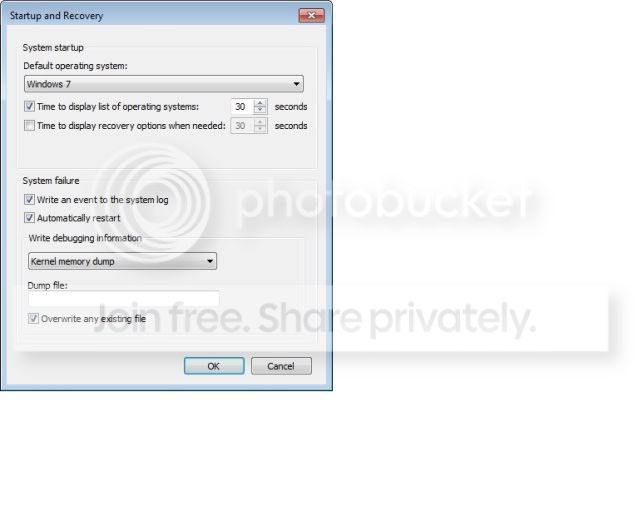
This is what I did, except for unchecking automatic restart. I should point out that when I went back following your steps, the setting were back at default, not what I set them at before, which to me sounds like they didn't take.

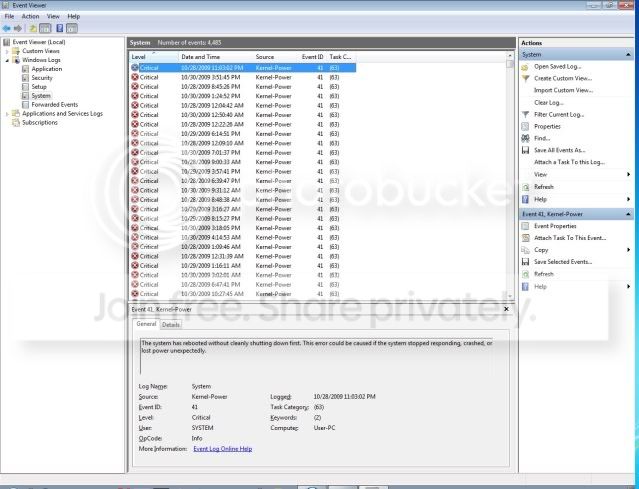
While taking the screen shot and going to post this along with it, I crashed again. None the less, here is the screen shot minus the last one.

Screen Shot

Critical.jpg


I also check for the minidump after uncheking auto restart and nothing is there and it is back tot he default settings.

Start up and Recovery Screen Shot

StartupandRecovery.jpg


Should it be going back to the default settings?
 

My Computer My Computer

At a glance

Windows 7 Ultimate x64Pentium D Dual Core 3.6Ghz2 x 2GB PC6400 DDR2XFX GeForce 9800GT
OS
Windows 7 Ultimate x64
CPU
Pentium D Dual Core 3.6Ghz
Motherboard
XFX 680i LT SLI
Memory
2 x 2GB PC6400 DDR2
Graphics Card(s)
XFX GeForce 9800GT
Sound Card
Realtek
Monitor(s) Displays
LG FLATRON, CTX POS
PSU
630W
Mouse
Mamba
Those kernal-power ones do not help so much, besides the fact we know they are there now.

Can you please scroll down further until other errors are shown? Post another screenshot with higher resolution. It's difficult to see how it is now. Thanks. :D
 

My Computer My Computer

At a glance

7600.20510 x86P4 550 3.4 GHz HT running at 3.5 GHzOCZ 2 GB(2x1GB) DDR400mHz running @ 414 mHzHIS Radeon HD 3850 IceQ 3 Turbo HDMI Dual DL-...
Computer Manufacturer/Model Number
self built
OS
7600.20510 x86
CPU
P4 550 3.4 GHz HT running at 3.5 GHz
Motherboard
MSI PM8M3-V (MS-7211 v1.x) Micro-ATX mainboard
Memory
OCZ 2 GB(2x1GB) DDR400mHz running @ 414 mHz
Graphics Card(s)
HIS Radeon HD 3850 IceQ 3 Turbo HDMI Dual DL-DVI AGP
Sound Card
MOTU Traveler firewire studio interface 192 kHz 24 bit
Monitor(s) Displays
22" widescreen Acer X223W LCD, 17" Compaq P75 CRT
Screen Resolution
1680x1050 and 1280x1024
Hard Drives
SATA I x2 WD, 400 GB and 120 GB, SATA 2 WD Caviar Black 1 TB
PSU
350W generic
Case
Cybertronpc, it glows blue
Cooling
stock cpu fan, Ice-Q 3 gpu and system, many case fans
Keyboard
Logitch Classical Keyboard 200
Mouse
Logitech Mediaplay cordless
Internet Speed
1792/448 kbits/sec
Other Info
SATA II PCI fake RAID adapter, 1 GB Readyboost, original ATI Remote Wonder (even works with WMC perfectly), Logitech Rumblepad 2 game controller x2
They are all Kernal-power, as for the Errors, they are mostly Eventlog and Service control manager. I will get a high red shot in a min.


Thanks! :]
 

My Computer My Computer

At a glance

Windows 7 Ultimate x64Pentium D Dual Core 3.6Ghz2 x 2GB PC6400 DDR2XFX GeForce 9800GT
OS
Windows 7 Ultimate x64
CPU
Pentium D Dual Core 3.6Ghz
Motherboard
XFX 680i LT SLI
Memory
2 x 2GB PC6400 DDR2
Graphics Card(s)
XFX GeForce 9800GT
Sound Card
Realtek
Monitor(s) Displays
LG FLATRON, CTX POS
PSU
630W
Mouse
Mamba

My Computer My Computer

At a glance

Windows 7 Ultimate x64Pentium D Dual Core 3.6Ghz2 x 2GB PC6400 DDR2XFX GeForce 9800GT
OS
Windows 7 Ultimate x64
CPU
Pentium D Dual Core 3.6Ghz
Motherboard
XFX 680i LT SLI
Memory
2 x 2GB PC6400 DDR2
Graphics Card(s)
XFX GeForce 9800GT
Sound Card
Realtek
Monitor(s) Displays
LG FLATRON, CTX POS
PSU
630W
Mouse
Mamba
Attach it here right in the forum. Use the paper clip.
 

My Computer My Computer

At a glance

7600.20510 x86P4 550 3.4 GHz HT running at 3.5 GHzOCZ 2 GB(2x1GB) DDR400mHz running @ 414 mHzHIS Radeon HD 3850 IceQ 3 Turbo HDMI Dual DL-...
Computer Manufacturer/Model Number
self built
OS
7600.20510 x86
CPU
P4 550 3.4 GHz HT running at 3.5 GHz
Motherboard
MSI PM8M3-V (MS-7211 v1.x) Micro-ATX mainboard
Memory
OCZ 2 GB(2x1GB) DDR400mHz running @ 414 mHz
Graphics Card(s)
HIS Radeon HD 3850 IceQ 3 Turbo HDMI Dual DL-DVI AGP
Sound Card
MOTU Traveler firewire studio interface 192 kHz 24 bit
Monitor(s) Displays
22" widescreen Acer X223W LCD, 17" Compaq P75 CRT
Screen Resolution
1680x1050 and 1280x1024
Hard Drives
SATA I x2 WD, 400 GB and 120 GB, SATA 2 WD Caviar Black 1 TB
PSU
350W generic
Case
Cybertronpc, it glows blue
Cooling
stock cpu fan, Ice-Q 3 gpu and system, many case fans
Keyboard
Logitch Classical Keyboard 200
Mouse
Logitech Mediaplay cordless
Internet Speed
1792/448 kbits/sec
Other Info
SATA II PCI fake RAID adapter, 1 GB Readyboost, original ATI Remote Wonder (even works with WMC perfectly), Logitech Rumblepad 2 game controller x2
heh, K.
 

My Computer My Computer

At a glance

Windows 7 Ultimate x64Pentium D Dual Core 3.6Ghz2 x 2GB PC6400 DDR2XFX GeForce 9800GT
OS
Windows 7 Ultimate x64
CPU
Pentium D Dual Core 3.6Ghz
Motherboard
XFX 680i LT SLI
Memory
2 x 2GB PC6400 DDR2
Graphics Card(s)
XFX GeForce 9800GT
Sound Card
Realtek
Monitor(s) Displays
LG FLATRON, CTX POS
PSU
630W
Mouse
Mamba
Please take your time to review the thread and my advices. They haven't been carefully considered as of yet.
 

My Computer My Computer

At a glance

7600.20510 x86P4 550 3.4 GHz HT running at 3.5 GHzOCZ 2 GB(2x1GB) DDR400mHz running @ 414 mHzHIS Radeon HD 3850 IceQ 3 Turbo HDMI Dual DL-...
Computer Manufacturer/Model Number
self built
OS
7600.20510 x86
CPU
P4 550 3.4 GHz HT running at 3.5 GHz
Motherboard
MSI PM8M3-V (MS-7211 v1.x) Micro-ATX mainboard
Memory
OCZ 2 GB(2x1GB) DDR400mHz running @ 414 mHz
Graphics Card(s)
HIS Radeon HD 3850 IceQ 3 Turbo HDMI Dual DL-DVI AGP
Sound Card
MOTU Traveler firewire studio interface 192 kHz 24 bit
Monitor(s) Displays
22" widescreen Acer X223W LCD, 17" Compaq P75 CRT
Screen Resolution
1680x1050 and 1280x1024
Hard Drives
SATA I x2 WD, 400 GB and 120 GB, SATA 2 WD Caviar Black 1 TB
PSU
350W generic
Case
Cybertronpc, it glows blue
Cooling
stock cpu fan, Ice-Q 3 gpu and system, many case fans
Keyboard
Logitch Classical Keyboard 200
Mouse
Logitech Mediaplay cordless
Internet Speed
1792/448 kbits/sec
Other Info
SATA II PCI fake RAID adapter, 1 GB Readyboost, original ATI Remote Wonder (even works with WMC perfectly), Logitech Rumblepad 2 game controller x2
Oh.. sorry.
 

My Computer My Computer

At a glance

Windows 7 Ultimate x64Pentium D Dual Core 3.6Ghz2 x 2GB PC6400 DDR2XFX GeForce 9800GT
OS
Windows 7 Ultimate x64
CPU
Pentium D Dual Core 3.6Ghz
Motherboard
XFX 680i LT SLI
Memory
2 x 2GB PC6400 DDR2
Graphics Card(s)
XFX GeForce 9800GT
Sound Card
Realtek
Monitor(s) Displays
LG FLATRON, CTX POS
PSU
630W
Mouse
Mamba
and down more
 

My Computer My Computer

At a glance

Windows 7 Ultimate x64Pentium D Dual Core 3.6Ghz2 x 2GB PC6400 DDR2XFX GeForce 9800GT
OS
Windows 7 Ultimate x64
CPU
Pentium D Dual Core 3.6Ghz
Motherboard
XFX 680i LT SLI
Memory
2 x 2GB PC6400 DDR2
Graphics Card(s)
XFX GeForce 9800GT
Sound Card
Realtek
Monitor(s) Displays
LG FLATRON, CTX POS
PSU
630W
Mouse
Mamba
and the end of error

Sorry, I thought you wanted the first in high res first, misread. Thanks!
 

My Computer My Computer

At a glance

Windows 7 Ultimate x64Pentium D Dual Core 3.6Ghz2 x 2GB PC6400 DDR2XFX GeForce 9800GT
OS
Windows 7 Ultimate x64
CPU
Pentium D Dual Core 3.6Ghz
Motherboard
XFX 680i LT SLI
Memory
2 x 2GB PC6400 DDR2
Graphics Card(s)
XFX GeForce 9800GT
Sound Card
Realtek
Monitor(s) Displays
LG FLATRON, CTX POS
PSU
630W
Mouse
Mamba
Going by final screenshot, NVidia display driver service is giving problems.
Disable it in services.msc. Or update your video card driver.
(I'd personally do both.)

You see the blue links at the bottom of the screenshots? You can click on them and Microsoft will tell you ways to fix. This may prove very helpful to you because they tend to be quite descriptive in their instructions.
 

My Computer My Computer

At a glance

7600.20510 x86P4 550 3.4 GHz HT running at 3.5 GHzOCZ 2 GB(2x1GB) DDR400mHz running @ 414 mHzHIS Radeon HD 3850 IceQ 3 Turbo HDMI Dual DL-...
Computer Manufacturer/Model Number
self built
OS
7600.20510 x86
CPU
P4 550 3.4 GHz HT running at 3.5 GHz
Motherboard
MSI PM8M3-V (MS-7211 v1.x) Micro-ATX mainboard
Memory
OCZ 2 GB(2x1GB) DDR400mHz running @ 414 mHz
Graphics Card(s)
HIS Radeon HD 3850 IceQ 3 Turbo HDMI Dual DL-DVI AGP
Sound Card
MOTU Traveler firewire studio interface 192 kHz 24 bit
Monitor(s) Displays
22" widescreen Acer X223W LCD, 17" Compaq P75 CRT
Screen Resolution
1680x1050 and 1280x1024
Hard Drives
SATA I x2 WD, 400 GB and 120 GB, SATA 2 WD Caviar Black 1 TB
PSU
350W generic
Case
Cybertronpc, it glows blue
Cooling
stock cpu fan, Ice-Q 3 gpu and system, many case fans
Keyboard
Logitch Classical Keyboard 200
Mouse
Logitech Mediaplay cordless
Internet Speed
1792/448 kbits/sec
Other Info
SATA II PCI fake RAID adapter, 1 GB Readyboost, original ATI Remote Wonder (even works with WMC perfectly), Logitech Rumblepad 2 game controller x2
Hmm... I have updated my drivers to the lastest I could find on the site. I will go ahead and disable the service and see what happens.

Thanks for the info. I will do a Restart and see what happens.

Once again, Thanks! :]
 

My Computer My Computer

At a glance

Windows 7 Ultimate x64Pentium D Dual Core 3.6Ghz2 x 2GB PC6400 DDR2XFX GeForce 9800GT
OS
Windows 7 Ultimate x64
CPU
Pentium D Dual Core 3.6Ghz
Motherboard
XFX 680i LT SLI
Memory
2 x 2GB PC6400 DDR2
Graphics Card(s)
XFX GeForce 9800GT
Sound Card
Realtek
Monitor(s) Displays
LG FLATRON, CTX POS
PSU
630W
Mouse
Mamba
Well so far so good. 3 hours is the longest I have went under load.

Thanks!
 

My Computer My Computer

At a glance

Windows 7 Ultimate x64Pentium D Dual Core 3.6Ghz2 x 2GB PC6400 DDR2XFX GeForce 9800GT
OS
Windows 7 Ultimate x64
CPU
Pentium D Dual Core 3.6Ghz
Motherboard
XFX 680i LT SLI
Memory
2 x 2GB PC6400 DDR2
Graphics Card(s)
XFX GeForce 9800GT
Sound Card
Realtek
Monitor(s) Displays
LG FLATRON, CTX POS
PSU
630W
Mouse
Mamba
You're very welcome. Hopefully the favorable results will be sustained.
 

My Computer My Computer

At a glance

7600.20510 x86P4 550 3.4 GHz HT running at 3.5 GHzOCZ 2 GB(2x1GB) DDR400mHz running @ 414 mHzHIS Radeon HD 3850 IceQ 3 Turbo HDMI Dual DL-...
Computer Manufacturer/Model Number
self built
OS
7600.20510 x86
CPU
P4 550 3.4 GHz HT running at 3.5 GHz
Motherboard
MSI PM8M3-V (MS-7211 v1.x) Micro-ATX mainboard
Memory
OCZ 2 GB(2x1GB) DDR400mHz running @ 414 mHz
Graphics Card(s)
HIS Radeon HD 3850 IceQ 3 Turbo HDMI Dual DL-DVI AGP
Sound Card
MOTU Traveler firewire studio interface 192 kHz 24 bit
Monitor(s) Displays
22" widescreen Acer X223W LCD, 17" Compaq P75 CRT
Screen Resolution
1680x1050 and 1280x1024
Hard Drives
SATA I x2 WD, 400 GB and 120 GB, SATA 2 WD Caviar Black 1 TB
PSU
350W generic
Case
Cybertronpc, it glows blue
Cooling
stock cpu fan, Ice-Q 3 gpu and system, many case fans
Keyboard
Logitch Classical Keyboard 200
Mouse
Logitech Mediaplay cordless
Internet Speed
1792/448 kbits/sec
Other Info
SATA II PCI fake RAID adapter, 1 GB Readyboost, original ATI Remote Wonder (even works with WMC perfectly), Logitech Rumblepad 2 game controller x2
Well, it happened again. Here is the screen shot in a time frame, going from when I restarted. Why is it I don't have a dump file? Like I said I am a noob.

Thanks again for any help!

-Ode
 

My Computer My Computer

At a glance

Windows 7 Ultimate x64Pentium D Dual Core 3.6Ghz2 x 2GB PC6400 DDR2XFX GeForce 9800GT
OS
Windows 7 Ultimate x64
CPU
Pentium D Dual Core 3.6Ghz
Motherboard
XFX 680i LT SLI
Memory
2 x 2GB PC6400 DDR2
Graphics Card(s)
XFX GeForce 9800GT
Sound Card
Realtek
Monitor(s) Displays
LG FLATRON, CTX POS
PSU
630W
Mouse
Mamba
  1. Click Start, right-click Computer, and then click Properties.
  2. Click Advanced system settings on the System page, and then click the Advanced tab.
  3. Click settings in Startup and Recovery section.
  4. In System Failure part, check both boxes. Change write debugging information dropdown to small.
 

My Computer My Computer

At a glance

7600.20510 x86P4 550 3.4 GHz HT running at 3.5 GHzOCZ 2 GB(2x1GB) DDR400mHz running @ 414 mHzHIS Radeon HD 3850 IceQ 3 Turbo HDMI Dual DL-...
Computer Manufacturer/Model Number
self built
OS
7600.20510 x86
CPU
P4 550 3.4 GHz HT running at 3.5 GHz
Motherboard
MSI PM8M3-V (MS-7211 v1.x) Micro-ATX mainboard
Memory
OCZ 2 GB(2x1GB) DDR400mHz running @ 414 mHz
Graphics Card(s)
HIS Radeon HD 3850 IceQ 3 Turbo HDMI Dual DL-DVI AGP
Sound Card
MOTU Traveler firewire studio interface 192 kHz 24 bit
Monitor(s) Displays
22" widescreen Acer X223W LCD, 17" Compaq P75 CRT
Screen Resolution
1680x1050 and 1280x1024
Hard Drives
SATA I x2 WD, 400 GB and 120 GB, SATA 2 WD Caviar Black 1 TB
PSU
350W generic
Case
Cybertronpc, it glows blue
Cooling
stock cpu fan, Ice-Q 3 gpu and system, many case fans
Keyboard
Logitch Classical Keyboard 200
Mouse
Logitech Mediaplay cordless
Internet Speed
1792/448 kbits/sec
Other Info
SATA II PCI fake RAID adapter, 1 GB Readyboost, original ATI Remote Wonder (even works with WMC perfectly), Logitech Rumblepad 2 game controller x2
Back
Top