
Crashing Help needed

SJMaye

New member
Member
VIP
Local time
5:46 PM
Messages
169
I would have done more searching , but the truth is my problems seem so odd I don't know where to begin.

I built a Win 7 Media Center for a Xmas present for my father. It seems to have had issues from the beginning. Most recently it began crashing regularly with the BSOD at his house. Strange thing is I tried to work on it there and it just kept crashing. I think even in safe mode. I have it at my house and it has not crashed once. Go figure.

At least now if I know where to begin I can troubleshoot. Here is something else strange. I decided to run an SFC /scannow. It found many problems and supposedly fixed them. Immediately there after I ran an SFC / verifyonly and it still found integrity violations.

I had considered flushing, reformat and reinstall. It is a brand new system. It would really be no problem. Just wanted to check with you guys first.


Thoughts.
 

My Computer

Computer type
PC/Desktop
Computer Manufacturer/Model Number
Custom
OS
Microsoft Windows 7 Home Premium 64-bit 7601 Multiprocessor Free Service Pack 1
CPU
Intel(R) Core(TM) i7 CPU 860 @ 2.80GHz
Motherboard
ASRock P55 Pro
Memory
8.00 GB
Graphics Card(s)
NVIDIA GeForce GTX 670
Sound Card
(1) High Definition Audio Device (2) Logitech G930 Headset
Screen Resolution
1920 x 1080 x 32 bits (4294967296 colors) @ 60 Hz
Hard Drives
(1) Hitachi HDS5C3020ALA632 ATA Device (2) Samsung SSD 850 EVO 500GB ATA Device (3) EPSON Stylus Storage USB Device (4) (5) Generic- MS/MS-Pro USB Device (6) Generic- SD/MMC USB Device (7) Generic- SM/xD-Picture USB Device

My Computer

Computer type
PC/Desktop
Computer Manufacturer/Model Number
Custom Build
OS
Windows 10 Pro x64, Arch Linux
CPU
Intel Core 2 Quad Q8200 OC'd 3.08GHz
Motherboard
Asus Rampage formula LGA775
Memory
8GB DDR2 900Mhz
Graphics Card(s)
MSI GT730 2GB GDDR5 (Kepler)
Sound Card
Supreme FX2
Monitor(s) Displays
Samsung LS22F350 LED
Screen Resolution
1080P
Hard Drives
Kingston SSDNow UV400 120GB, 500GB Hitachi, 2TB Samsung, 500GB Seagate FreeAgent, 640GB Samsung, 160GB Toshiba (Arch)
PSU
AeroCool 500W Bronze
Cooling
Cooler Master V6 + 3X fans
Keyboard
Prolink keyboard
Mouse
Logitech M705
Internet Speed
1MiB/s
Browser
Chrome Beta
Hello,

Thanks. My apologies. Attached are the files specified in the instructions.

Is Windows 7 . . .
- x86 (32-bit) or x64 ? Win 7 x64
- the original installed OS on the system? YES
- an OEM or full retail version? Retail
- OEM = came pre-installed on system- No. I built this PC
- Full Retail = you purchased it from retailer- YES

- What is the age of system (hardware)? 3 months
- What is the age of OS installation (have you re-installed the OS?) 3 months. Never reinstalled
 

Attachments

My Computer

Computer type
PC/Desktop
Computer Manufacturer/Model Number
Custom
OS
Microsoft Windows 7 Home Premium 64-bit 7601 Multiprocessor Free Service Pack 1
CPU
Intel(R) Core(TM) i7 CPU 860 @ 2.80GHz
Motherboard
ASRock P55 Pro
Memory
8.00 GB
Graphics Card(s)
NVIDIA GeForce GTX 670
Sound Card
(1) High Definition Audio Device (2) Logitech G930 Headset
Screen Resolution
1920 x 1080 x 32 bits (4294967296 colors) @ 60 Hz
Hard Drives
(1) Hitachi HDS5C3020ALA632 ATA Device (2) Samsung SSD 850 EVO 500GB ATA Device (3) EPSON Stylus Storage USB Device (4) (5) Generic- MS/MS-Pro USB Device (6) Generic- SD/MMC USB Device (7) Generic- SM/xD-Picture USB Device
Run http://www.sevenforums.com/tutorials/433-disk-check.html, the File System driver is blamed

Code:
BugCheck 24, {1904fb, fffff880033f7798, fffff880033f7000, fffff8800130ba84}

Probably caused by : Ntfs.sys ( Ntfs!NtfsFindPrefix+114 )
Are you using MSE and Windows Defender simultaneously?
A component of either program was invloved, remove MSE temporarily
Remove any other Antivirus, this might be a conflict

Code:
BugCheck 1000007E, {ffffffffc0000005, fffff80001beef8c, fffff8800258f918, fffff8800258f180}

Unable to load image \SystemRoot\system32\DRIVERS\MpFilter.sys, Win32 error 0n2
*** WARNING: Unable to verify timestamp for MpFilter.sys
*** ERROR: Module load completed but symbols could not be loaded for MpFilter.sys
Probably caused by : Pool_Corruption ( nt!ExDeferredFreePool+100 )
 

My Computer

Computer type
PC/Desktop
Computer Manufacturer/Model Number
Custom Build
OS
Windows 10 Pro x64, Arch Linux
CPU
Intel Core 2 Quad Q8200 OC'd 3.08GHz
Motherboard
Asus Rampage formula LGA775
Memory
8GB DDR2 900Mhz
Graphics Card(s)
MSI GT730 2GB GDDR5 (Kepler)
Sound Card
Supreme FX2
Monitor(s) Displays
Samsung LS22F350 LED
Screen Resolution
1080P
Hard Drives
Kingston SSDNow UV400 120GB, 500GB Hitachi, 2TB Samsung, 500GB Seagate FreeAgent, 640GB Samsung, 160GB Toshiba (Arch)
PSU
AeroCool 500W Bronze
Cooling
Cooler Master V6 + 3X fans
Keyboard
Prolink keyboard
Mouse
Logitech M705
Internet Speed
1MiB/s
Browser
Chrome Beta
Are you using MSE and Windows Defender simultaneously?
A component of either program was invloved, remove MSE temporarily
Remove any other Antivirus, this might be a conflict

I am running chkdsk now. As far as MSE and Windows Defender. I do not know. I never loaded Windows Defender. I thought Windows Defender was part of MSE. That's why I never questioned this in the past.
 

My Computer

Computer type
PC/Desktop
Computer Manufacturer/Model Number
Custom
OS
Microsoft Windows 7 Home Premium 64-bit 7601 Multiprocessor Free Service Pack 1
CPU
Intel(R) Core(TM) i7 CPU 860 @ 2.80GHz
Motherboard
ASRock P55 Pro
Memory
8.00 GB
Graphics Card(s)
NVIDIA GeForce GTX 670
Sound Card
(1) High Definition Audio Device (2) Logitech G930 Headset
Screen Resolution
1920 x 1080 x 32 bits (4294967296 colors) @ 60 Hz
Hard Drives
(1) Hitachi HDS5C3020ALA632 ATA Device (2) Samsung SSD 850 EVO 500GB ATA Device (3) EPSON Stylus Storage USB Device (4) (5) Generic- MS/MS-Pro USB Device (6) Generic- SD/MMC USB Device (7) Generic- SM/xD-Picture USB Device
Are you using MSE and Windows Defender simultaneously?
A component of either program was invloved, remove MSE temporarily
Remove any other Antivirus, this might be a conflict

I am running chkdsk now. As far as MSE and Windows Defender. I do not know. I never loaded Windows Defender. I thought Windows Defender was part of MSE. That's why I never questioned this in the past.

No, Windows Defender is not part of MSE. When you install MSE it disables Defender but for some reason if it was re-enabled switch it off
 

My Computer

Computer type
PC/Desktop
Computer Manufacturer/Model Number
Custom Build
OS
Windows 10 Pro x64, Arch Linux
CPU
Intel Core 2 Quad Q8200 OC'd 3.08GHz
Motherboard
Asus Rampage formula LGA775
Memory
8GB DDR2 900Mhz
Graphics Card(s)
MSI GT730 2GB GDDR5 (Kepler)
Sound Card
Supreme FX2
Monitor(s) Displays
Samsung LS22F350 LED
Screen Resolution
1080P
Hard Drives
Kingston SSDNow UV400 120GB, 500GB Hitachi, 2TB Samsung, 500GB Seagate FreeAgent, 640GB Samsung, 160GB Toshiba (Arch)
PSU
AeroCool 500W Bronze
Cooling
Cooler Master V6 + 3X fans
Keyboard
Prolink keyboard
Mouse
Logitech M705
Internet Speed
1MiB/s
Browser
Chrome Beta
Are you using MSE and Windows Defender simultaneously?
A component of either program was invloved, remove MSE temporarily
Remove any other Antivirus, this might be a conflict

I am running chkdsk now. As far as MSE and Windows Defender. I do not know. I never loaded Windows Defender. I thought Windows Defender was part of MSE. That's why I never questioned this in the past.

No, Windows Defender is not part of MSE. When you install MSE it disables Defender but for some reason if it was re-enabled switch it off

chkdsk is complete. Did not report finding any errors. I checked Windows Defender. When I tried to open it I got, "This program is turned OFF". I guess it was off already, but why the conflict? I have not yet removed MSE. Should I still?
 

My Computer

Computer type
PC/Desktop
Computer Manufacturer/Model Number
Custom
OS
Microsoft Windows 7 Home Premium 64-bit 7601 Multiprocessor Free Service Pack 1
CPU
Intel(R) Core(TM) i7 CPU 860 @ 2.80GHz
Motherboard
ASRock P55 Pro
Memory
8.00 GB
Graphics Card(s)
NVIDIA GeForce GTX 670
Sound Card
(1) High Definition Audio Device (2) Logitech G930 Headset
Screen Resolution
1920 x 1080 x 32 bits (4294967296 colors) @ 60 Hz
Hard Drives
(1) Hitachi HDS5C3020ALA632 ATA Device (2) Samsung SSD 850 EVO 500GB ATA Device (3) EPSON Stylus Storage USB Device (4) (5) Generic- MS/MS-Pro USB Device (6) Generic- SD/MMC USB Device (7) Generic- SM/xD-Picture USB Device
I am running chkdsk now. As far as MSE and Windows Defender. I do not know. I never loaded Windows Defender. I thought Windows Defender was part of MSE. That's why I never questioned this in the past.

No, Windows Defender is not part of MSE. When you install MSE it disables Defender but for some reason if it was re-enabled switch it off

chkdsk is complete. Did not report finding any errors. I checked Windows Defender. When I tried to open it I got, "This program is turned OFF". I guess it was off already, but why the conflict? I have not yet removed MSE. Should I still?

Remove MSE temporarily
 

My Computer

Computer type
PC/Desktop
Computer Manufacturer/Model Number
Custom Build
OS
Windows 10 Pro x64, Arch Linux
CPU
Intel Core 2 Quad Q8200 OC'd 3.08GHz
Motherboard
Asus Rampage formula LGA775
Memory
8GB DDR2 900Mhz
Graphics Card(s)
MSI GT730 2GB GDDR5 (Kepler)
Sound Card
Supreme FX2
Monitor(s) Displays
Samsung LS22F350 LED
Screen Resolution
1080P
Hard Drives
Kingston SSDNow UV400 120GB, 500GB Hitachi, 2TB Samsung, 500GB Seagate FreeAgent, 640GB Samsung, 160GB Toshiba (Arch)
PSU
AeroCool 500W Bronze
Cooling
Cooler Master V6 + 3X fans
Keyboard
Prolink keyboard
Mouse
Logitech M705
Internet Speed
1MiB/s
Browser
Chrome Beta

My Computer

Computer type
PC/Desktop
Computer Manufacturer/Model Number
Custom
OS
Microsoft Windows 7 Home Premium 64-bit 7601 Multiprocessor Free Service Pack 1
CPU
Intel(R) Core(TM) i7 CPU 860 @ 2.80GHz
Motherboard
ASRock P55 Pro
Memory
8.00 GB
Graphics Card(s)
NVIDIA GeForce GTX 670
Sound Card
(1) High Definition Audio Device (2) Logitech G930 Headset
Screen Resolution
1920 x 1080 x 32 bits (4294967296 colors) @ 60 Hz
Hard Drives
(1) Hitachi HDS5C3020ALA632 ATA Device (2) Samsung SSD 850 EVO 500GB ATA Device (3) EPSON Stylus Storage USB Device (4) (5) Generic- MS/MS-Pro USB Device (6) Generic- SD/MMC USB Device (7) Generic- SM/xD-Picture USB Device
I noticed after removing MSE that Windows turned on Windows Defender. I went in and turned it back off.

on the chkdsk- I attached the log file if it helps.
 

Attachments

My Computer

Computer type
PC/Desktop
Computer Manufacturer/Model Number
Custom
OS
Microsoft Windows 7 Home Premium 64-bit 7601 Multiprocessor Free Service Pack 1
CPU
Intel(R) Core(TM) i7 CPU 860 @ 2.80GHz
Motherboard
ASRock P55 Pro
Memory
8.00 GB
Graphics Card(s)
NVIDIA GeForce GTX 670
Sound Card
(1) High Definition Audio Device (2) Logitech G930 Headset
Screen Resolution
1920 x 1080 x 32 bits (4294967296 colors) @ 60 Hz
Hard Drives
(1) Hitachi HDS5C3020ALA632 ATA Device (2) Samsung SSD 850 EVO 500GB ATA Device (3) EPSON Stylus Storage USB Device (4) (5) Generic- MS/MS-Pro USB Device (6) Generic- SD/MMC USB Device (7) Generic- SM/xD-Picture USB Device
I noticed after removing MSE that Windows turned on Windows Defender. I went in and turned it back off.

on the chkdsk- I attached the log file if it helps.

Does your computer still crash after the removal of MSE?
 

My Computer

Computer type
PC/Desktop
Computer Manufacturer/Model Number
Custom Build
OS
Windows 10 Pro x64, Arch Linux
CPU
Intel Core 2 Quad Q8200 OC'd 3.08GHz
Motherboard
Asus Rampage formula LGA775
Memory
8GB DDR2 900Mhz
Graphics Card(s)
MSI GT730 2GB GDDR5 (Kepler)
Sound Card
Supreme FX2
Monitor(s) Displays
Samsung LS22F350 LED
Screen Resolution
1080P
Hard Drives
Kingston SSDNow UV400 120GB, 500GB Hitachi, 2TB Samsung, 500GB Seagate FreeAgent, 640GB Samsung, 160GB Toshiba (Arch)
PSU
AeroCool 500W Bronze
Cooling
Cooler Master V6 + 3X fans
Keyboard
Prolink keyboard
Mouse
Logitech M705
Internet Speed
1MiB/s
Browser
Chrome Beta
No, not yet. As I stated in the first post it was crashing every few minutes at my fathers house. Since bring it to my house it hasn't crashed once.

I will leave it running a while to observe.
 

My Computer

Computer type
PC/Desktop
Computer Manufacturer/Model Number
Custom
OS
Microsoft Windows 7 Home Premium 64-bit 7601 Multiprocessor Free Service Pack 1
CPU
Intel(R) Core(TM) i7 CPU 860 @ 2.80GHz
Motherboard
ASRock P55 Pro
Memory
8.00 GB
Graphics Card(s)
NVIDIA GeForce GTX 670
Sound Card
(1) High Definition Audio Device (2) Logitech G930 Headset
Screen Resolution
1920 x 1080 x 32 bits (4294967296 colors) @ 60 Hz
Hard Drives
(1) Hitachi HDS5C3020ALA632 ATA Device (2) Samsung SSD 850 EVO 500GB ATA Device (3) EPSON Stylus Storage USB Device (4) (5) Generic- MS/MS-Pro USB Device (6) Generic- SD/MMC USB Device (7) Generic- SM/xD-Picture USB Device
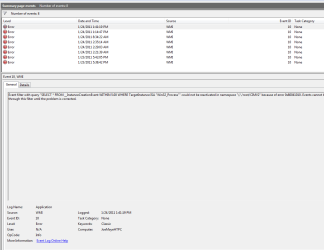
I am keeping an eye on it. I did a couple reboots and took a look at the event viewer. I seem to get a WMI error each time I reboot. Image attached.
 

Attachments

  • Capture.PNG
    Capture.PNG
    16.1 KB · Views: 10

My Computer

Computer type
PC/Desktop
Computer Manufacturer/Model Number
Custom
OS
Microsoft Windows 7 Home Premium 64-bit 7601 Multiprocessor Free Service Pack 1
CPU
Intel(R) Core(TM) i7 CPU 860 @ 2.80GHz
Motherboard
ASRock P55 Pro
Memory
8.00 GB
Graphics Card(s)
NVIDIA GeForce GTX 670
Sound Card
(1) High Definition Audio Device (2) Logitech G930 Headset
Screen Resolution
1920 x 1080 x 32 bits (4294967296 colors) @ 60 Hz
Hard Drives
(1) Hitachi HDS5C3020ALA632 ATA Device (2) Samsung SSD 850 EVO 500GB ATA Device (3) EPSON Stylus Storage USB Device (4) (5) Generic- MS/MS-Pro USB Device (6) Generic- SD/MMC USB Device (7) Generic- SM/xD-Picture USB Device
I am keeping an eye on it. I did a couple reboots and took a look at the event viewer. I seem to get a WMI error each time I reboot. Image attached.

Remove any unnecessary start up programs
 

My Computer

Computer type
PC/Desktop
Computer Manufacturer/Model Number
Custom Build
OS
Windows 10 Pro x64, Arch Linux
CPU
Intel Core 2 Quad Q8200 OC'd 3.08GHz
Motherboard
Asus Rampage formula LGA775
Memory
8GB DDR2 900Mhz
Graphics Card(s)
MSI GT730 2GB GDDR5 (Kepler)
Sound Card
Supreme FX2
Monitor(s) Displays
Samsung LS22F350 LED
Screen Resolution
1080P
Hard Drives
Kingston SSDNow UV400 120GB, 500GB Hitachi, 2TB Samsung, 500GB Seagate FreeAgent, 640GB Samsung, 160GB Toshiba (Arch)
PSU
AeroCool 500W Bronze
Cooling
Cooler Master V6 + 3X fans
Keyboard
Prolink keyboard
Mouse
Logitech M705
Internet Speed
1MiB/s
Browser
Chrome Beta
First, thanks for your help thus far yowanvista. I AM learning.

This is a basic HTPC with little extra startups added, but I will try eliminating them to solve the WMI issue. But I just checked the event viewer as I woke the HTPC up this morning. Strange. I had two event ID 5's while the HTPC should have been asleep.

Event ID 5 Kernel-General

{Registry Hive Recovered} Registry hive (file): '\??\Volume{124fb507-d634-11df-a573-806e6f6e6963}\System Volume Information\SPP\SppCbsHiveStore\{cd42efe1-f6f1-427c-b004-033192c625a4}{ADC753FE-2D28-4EA5-8524-7D08EAF8FC8A}' was corrupted and it has been recovered. Some data might have been lost.

This computer has rarely been used on since it was given as a gift at xmas, but I have 21 of these event ID 5s.

In searching posts relating to this event during the sleep function I only found one, but they did not know how they fixed it.
 

My Computer

Computer type
PC/Desktop
Computer Manufacturer/Model Number
Custom
OS
Microsoft Windows 7 Home Premium 64-bit 7601 Multiprocessor Free Service Pack 1
CPU
Intel(R) Core(TM) i7 CPU 860 @ 2.80GHz
Motherboard
ASRock P55 Pro
Memory
8.00 GB
Graphics Card(s)
NVIDIA GeForce GTX 670
Sound Card
(1) High Definition Audio Device (2) Logitech G930 Headset
Screen Resolution
1920 x 1080 x 32 bits (4294967296 colors) @ 60 Hz
Hard Drives
(1) Hitachi HDS5C3020ALA632 ATA Device (2) Samsung SSD 850 EVO 500GB ATA Device (3) EPSON Stylus Storage USB Device (4) (5) Generic- MS/MS-Pro USB Device (6) Generic- SD/MMC USB Device (7) Generic- SM/xD-Picture USB Device
OK. Using MSCONFIG I shutdown all startup programs. Rebooted and the WMI error was gone. Then one-by one I added them back. I now know which program is causing the error; the program for the little VFD display on the front of the HTPC case.

The only thing left is the event ID 5.
 

My Computer

Computer type
PC/Desktop
Computer Manufacturer/Model Number
Custom
OS
Microsoft Windows 7 Home Premium 64-bit 7601 Multiprocessor Free Service Pack 1
CPU
Intel(R) Core(TM) i7 CPU 860 @ 2.80GHz
Motherboard
ASRock P55 Pro
Memory
8.00 GB
Graphics Card(s)
NVIDIA GeForce GTX 670
Sound Card
(1) High Definition Audio Device (2) Logitech G930 Headset
Screen Resolution
1920 x 1080 x 32 bits (4294967296 colors) @ 60 Hz
Hard Drives
(1) Hitachi HDS5C3020ALA632 ATA Device (2) Samsung SSD 850 EVO 500GB ATA Device (3) EPSON Stylus Storage USB Device (4) (5) Generic- MS/MS-Pro USB Device (6) Generic- SD/MMC USB Device (7) Generic- SM/xD-Picture USB Device
OK. Using MSCONFIG I shutdown all startup programs. Rebooted and the WMI error was gone. Then one-by one I added them back. I now know which program is causing the error; the program for the little VFD display on the front of the HTPC case.

The only thing left is the event ID 5.

Then you should update that software
 

My Computer

Computer type
PC/Desktop
Computer Manufacturer/Model Number
Custom Build
OS
Windows 10 Pro x64, Arch Linux
CPU
Intel Core 2 Quad Q8200 OC'd 3.08GHz
Motherboard
Asus Rampage formula LGA775
Memory
8GB DDR2 900Mhz
Graphics Card(s)
MSI GT730 2GB GDDR5 (Kepler)
Sound Card
Supreme FX2
Monitor(s) Displays
Samsung LS22F350 LED
Screen Resolution
1080P
Hard Drives
Kingston SSDNow UV400 120GB, 500GB Hitachi, 2TB Samsung, 500GB Seagate FreeAgent, 640GB Samsung, 160GB Toshiba (Arch)
PSU
AeroCool 500W Bronze
Cooling
Cooler Master V6 + 3X fans
Keyboard
Prolink keyboard
Mouse
Logitech M705
Internet Speed
1MiB/s
Browser
Chrome Beta
Then you should update that software

This is the latest software, but not showing WIndows 7 compatible. I have an email in to the mfr to recommend which driver to use.

With regard to all the other crashes. All the crashes and errors ceased when MSE was removed.:cool: I mean with the exception of the event ID 5 mentioned above the event viewer shows nothing critical or errors.

That is strange. I had been using AVG(in other computers), but switched to MSE because I thought MS would know their OS better than anyone. I did not expect that to happen. What antivirus program(s) would you recommend to avoid this in the future?
 

My Computer

Computer type
PC/Desktop
Computer Manufacturer/Model Number
Custom
OS
Microsoft Windows 7 Home Premium 64-bit 7601 Multiprocessor Free Service Pack 1
CPU
Intel(R) Core(TM) i7 CPU 860 @ 2.80GHz
Motherboard
ASRock P55 Pro
Memory
8.00 GB
Graphics Card(s)
NVIDIA GeForce GTX 670
Sound Card
(1) High Definition Audio Device (2) Logitech G930 Headset
Screen Resolution
1920 x 1080 x 32 bits (4294967296 colors) @ 60 Hz
Hard Drives
(1) Hitachi HDS5C3020ALA632 ATA Device (2) Samsung SSD 850 EVO 500GB ATA Device (3) EPSON Stylus Storage USB Device (4) (5) Generic- MS/MS-Pro USB Device (6) Generic- SD/MMC USB Device (7) Generic- SM/xD-Picture USB Device
As for a free AV I would recommend Avast5/MSE, but if your want more protection try out trial versions of major vendors and see which one suites you best, I use KIS :)

Here are the most popular ones:

Norton AV/IS/360
Kaspersky IS/AV/Pure
Avast Free/Pro/IS
AVG
Avira
Eset

http://www.sevenforums.com/system-security/72070-whats-best-anti-virus.html

This is the latest software, but not showing WIndows 7 compatible. I have an email in to the mfr to recommend which driver to use.
It means that it was not Windows7 certified and this can cause problems on your computer, either remove/disable that device


but switched to MSE because I thought MS would know their OS better than anyone.
All AVs can cause BSODs but MSE is generally BSOD-friendly
 

My Computer

Computer type
PC/Desktop
Computer Manufacturer/Model Number
Custom Build
OS
Windows 10 Pro x64, Arch Linux
CPU
Intel Core 2 Quad Q8200 OC'd 3.08GHz
Motherboard
Asus Rampage formula LGA775
Memory
8GB DDR2 900Mhz
Graphics Card(s)
MSI GT730 2GB GDDR5 (Kepler)
Sound Card
Supreme FX2
Monitor(s) Displays
Samsung LS22F350 LED
Screen Resolution
1080P
Hard Drives
Kingston SSDNow UV400 120GB, 500GB Hitachi, 2TB Samsung, 500GB Seagate FreeAgent, 640GB Samsung, 160GB Toshiba (Arch)
PSU
AeroCool 500W Bronze
Cooling
Cooler Master V6 + 3X fans
Keyboard
Prolink keyboard
Mouse
Logitech M705
Internet Speed
1MiB/s
Browser
Chrome Beta
All AVs can cause BSODs but MSE is generally BSOD-friendly
I have installed Norton and continue to watch event viewer. Nothing yet. It may be great, but has all the bells and whistles. I know I can turn them off, but all I ever wanted was a simple, effective, lightweight anti-virus program. Norton is not that.

So, do you think something went wrong during my installation with MSE to cause all the problems I was having?

Also- I am coming up dry on event ID 5. has happened may 10 times in the last month. Should I be worried bout it? Have any pointers there?
 

My Computer

Computer type
PC/Desktop
Computer Manufacturer/Model Number
Custom
OS
Microsoft Windows 7 Home Premium 64-bit 7601 Multiprocessor Free Service Pack 1
CPU
Intel(R) Core(TM) i7 CPU 860 @ 2.80GHz
Motherboard
ASRock P55 Pro
Memory
8.00 GB
Graphics Card(s)
NVIDIA GeForce GTX 670
Sound Card
(1) High Definition Audio Device (2) Logitech G930 Headset
Screen Resolution
1920 x 1080 x 32 bits (4294967296 colors) @ 60 Hz
Hard Drives
(1) Hitachi HDS5C3020ALA632 ATA Device (2) Samsung SSD 850 EVO 500GB ATA Device (3) EPSON Stylus Storage USB Device (4) (5) Generic- MS/MS-Pro USB Device (6) Generic- SD/MMC USB Device (7) Generic- SM/xD-Picture USB Device
Back
Top