
create bookmarks option is greyed out in MS Word 2013

hoeyetee

New member
Local time
2:40 PM
Messages
1
Hi,

Using MS Word 2013

Open any word document, then select:

File -> Export -> Create a PDF/XPS Document

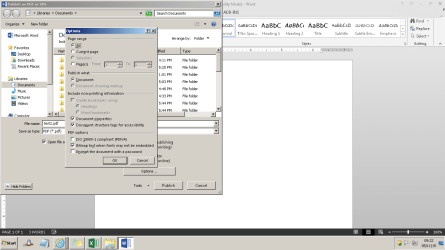
Then it gives the dialog box for where you want to save the document. In that box, select the Options button

Further as per screenshot, in the Options box I am getting the "Include non-printing information" option greyed out.

So how can I get rid of the greyed out option? And why is it greyed out?

Please help...
 

Attachments
  • test1.png
    test1.png
    28 KB · Views: 3

My Computer My Computer

At a glance

win 7 x64
Computer type
PC/Desktop
OS
win 7 x64
It's a guess, but I think your document must already have bookmarks (or other non-print information) to have this option available. I don't believe you can add them at this point. Perhaps the option just lets you pass this data along when you export the document?
 

My Computer My Computer

At a glance

Windows 7 Professional 64-bit
Computer type
PC/Desktop
Computer Manufacturer/Model Number
Custom
OS
Windows 7 Professional 64-bit
Hi Hoeyetee, welcome to the forum.

When you select Export from the File menu you will see notes under the Create a PDF/XPS Document.

The first says, Preserves layout, formatting, fonts & images.

The next says, Contents cannot be easily changed.

The last says, Free viewers are available on the web.

So I don't think you can do what you want, as surely you don't want all the paragraph breaks & all the other info on your exported document. I think this is related to the second item that relates to changing content. Normally you would have the document all set up with page breaks etc. before you export it.

You may be able to overcome this situation by sending the document by email if that's applicable.
 

My Computer My Computer

At a glance

Windows 7 Home Premium 64 bit sp1Intel i5 3570 3.4Ghz Ivy Bridge SKT 1155 quad...G-Skill Rip Jaws 16Gb (8x2) DDR3 -1600 PC3 12...Gigabyte NVIDIA GT610 1Gb DDR3 810/1200 PCI-E...
Computer type
PC/Desktop
Computer Manufacturer/Model Number
Self built using existing case
OS
Windows 7 Home Premium 64 bit sp1
CPU
Intel i5 3570 3.4Ghz Ivy Bridge SKT 1155 quad core
Motherboard
Gigabyte Z77-HD3 SKT 1155 2xSata 3, 4x USB 3.0
Memory
G-Skill Rip Jaws 16Gb (8x2) DDR3 -1600 PC3 12800 CL 10 red
Graphics Card(s)
Gigabyte NVIDIA GT610 1Gb DDR3 810/1200 PCI-E 2.0 Silent
Sound Card
NVIDIA High Definition & Realtech High Definition Audio
Monitor(s) Displays
2 x Philips 226V4L 16:9 aspect ratio
Screen Resolution
1920 x 1080 HD
Hard Drives
Samsung 840 Pro 256gb SSD, SATA 3.
Hitachi Touro Portable 1tb, USB 3.0 HDD used for image b/ups.
PSU
Corsair VS450
Case
Codeng
Cooling
PSU fan & CPU fan
Keyboard
Logitech
Mouse
Logitech Wireless trackball M570
Internet Speed
Wireless 3G. 3mg down & 550kb up.
Antivirus
Bitdefender Internet Security 2020
Browser
Opera (Current Version) & Firefox
Other Info
MS Office 2013 Pro. Davis weather station software. MGE Nova 600 avr UPS.
@Ranger 4

I am having the same issue as @hoeyetee. However, I don't understand how you can overcome the situation by sending the document by email. Do you mean to send the document by email to create a PDF? Otherwise, how does that solve the issue?

Is there an option that can be changed to Include the non-printing information and create bookmarks? I am running the program as administrator, I check all of my properties and options and could not identify which option needed to be modified. Instead of exporting, I attempted to save as the word document. I attempted to start a new file and go through the process. No matter which boxes are or are not checked, Word has not ever given me the option to check the "Create bookmarks using:" box.

Help!

R,
LACON
 

My Computer My Computer

At a glance

Windows 7 Professional
Computer type
PC/Desktop
OS
Windows 7 Professional
Hi LACON, welcome to the Forum.

I will admit I do not use PDF/XPS option in Word. But from what I can see the option to create bookmarks in the PDF/XPS export method is not available, so I imagine you would have to have all that done before you export it.

My suggestion of sending the document by email was just a suggestion & of course it would be sent as a straight document & not as a PDF/XPS document.
 

My Computer My Computer

At a glance

Windows 7 Home Premium 64 bit sp1Intel i5 3570 3.4Ghz Ivy Bridge SKT 1155 quad...G-Skill Rip Jaws 16Gb (8x2) DDR3 -1600 PC3 12...Gigabyte NVIDIA GT610 1Gb DDR3 810/1200 PCI-E...
Computer type
PC/Desktop
Computer Manufacturer/Model Number
Self built using existing case
OS
Windows 7 Home Premium 64 bit sp1
CPU
Intel i5 3570 3.4Ghz Ivy Bridge SKT 1155 quad core
Motherboard
Gigabyte Z77-HD3 SKT 1155 2xSata 3, 4x USB 3.0
Memory
G-Skill Rip Jaws 16Gb (8x2) DDR3 -1600 PC3 12800 CL 10 red
Graphics Card(s)
Gigabyte NVIDIA GT610 1Gb DDR3 810/1200 PCI-E 2.0 Silent
Sound Card
NVIDIA High Definition & Realtech High Definition Audio
Monitor(s) Displays
2 x Philips 226V4L 16:9 aspect ratio
Screen Resolution
1920 x 1080 HD
Hard Drives
Samsung 840 Pro 256gb SSD, SATA 3.
Hitachi Touro Portable 1tb, USB 3.0 HDD used for image b/ups.
PSU
Corsair VS450
Case
Codeng
Cooling
PSU fan & CPU fan
Keyboard
Logitech
Mouse
Logitech Wireless trackball M570
Internet Speed
Wireless 3G. 3mg down & 550kb up.
Antivirus
Bitdefender Internet Security 2020
Browser
Opera (Current Version) & Firefox
Other Info
MS Office 2013 Pro. Davis weather station software. MGE Nova 600 avr UPS.
Addition

@Ranger4

Its frustrating because my colleague has the same version of Word and Adobe Acrobat and after creating a Table of Contents that is hyperlinked within the word document, he can export to PDF/XPS documents and choose the Create bookmarks from headings option so the PDF creates his bookmarks automatically and he can navigate within the PDF via the bookmarks. There has to be a way to allow my programs to perform the same action. Uninstalling and reinstalling the programs is my last resort.

If you know of anything else, I would be much appreciative.

R,
LACON
 

My Computer My Computer

At a glance

Windows 7 Professional
Computer type
PC/Desktop
OS
Windows 7 Professional
LACON, read through this website & there is a section called "Setting Options" & it says that in order to be able to use Bookmarks in a PDF/XPS document you have to have created them in your original Word document. Anyway read through it & see if it helps you.

Microsoft Word 2013

Also read through this one as well. Scroll down to Word for info there on PDF/XPS. This is actually for Office 2007 but this should be applicable for 2013 as well.

https://support.office.com/en-nz/article/Publish-as-PDF-or-XPS-d3b9469c-59ba-49f9-9adf-5707db2451fa
 

My Computer My Computer

At a glance

Windows 7 Home Premium 64 bit sp1Intel i5 3570 3.4Ghz Ivy Bridge SKT 1155 quad...G-Skill Rip Jaws 16Gb (8x2) DDR3 -1600 PC3 12...Gigabyte NVIDIA GT610 1Gb DDR3 810/1200 PCI-E...
Computer type
PC/Desktop
Computer Manufacturer/Model Number
Self built using existing case
OS
Windows 7 Home Premium 64 bit sp1
CPU
Intel i5 3570 3.4Ghz Ivy Bridge SKT 1155 quad core
Motherboard
Gigabyte Z77-HD3 SKT 1155 2xSata 3, 4x USB 3.0
Memory
G-Skill Rip Jaws 16Gb (8x2) DDR3 -1600 PC3 12800 CL 10 red
Graphics Card(s)
Gigabyte NVIDIA GT610 1Gb DDR3 810/1200 PCI-E 2.0 Silent
Sound Card
NVIDIA High Definition & Realtech High Definition Audio
Monitor(s) Displays
2 x Philips 226V4L 16:9 aspect ratio
Screen Resolution
1920 x 1080 HD
Hard Drives
Samsung 840 Pro 256gb SSD, SATA 3.
Hitachi Touro Portable 1tb, USB 3.0 HDD used for image b/ups.
PSU
Corsair VS450
Case
Codeng
Cooling
PSU fan & CPU fan
Keyboard
Logitech
Mouse
Logitech Wireless trackball M570
Internet Speed
Wireless 3G. 3mg down & 550kb up.
Antivirus
Bitdefender Internet Security 2020
Browser
Opera (Current Version) & Firefox
Other Info
MS Office 2013 Pro. Davis weather station software. MGE Nova 600 avr UPS.
Back
Top