create bootable usb flash

muiacir

New member
Member
VIP
Local time
3:00 PM
Messages
161
hi my friends.i have some questions about creating bootable usb flash
1-i have an iso file of "windows password remover".the instruction said that i should write it on a Cd but can i want o have in on usb flash? i use ultraiso(open the iso file and in "bootalbe menu" use "write disk image") but it does not work?
2- as you know , when we create for example bootable usb flash for installing windows 7 , we should first format the flash. i have an old question in my mind that when we format the usb flash and bootable it for example windows 7 , if we put other files for example transfer a music file.the bootable feature of the flash will destroy( imean in bootable flash can we transfer files with and systems)?
3-is there a way to determine the 1st boot priority on usb in windows not in bios?
 

My Computer

OS
windows 7 ultimate x64
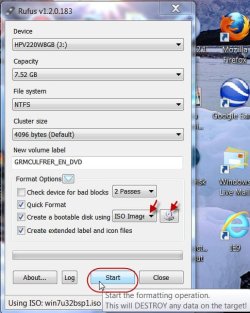
1. The easiest way to create a bootable flash drive is to use Rufus v1.2.0 Rufus - Create bootable USB drives

15-08-2012 14-18-54.jpg

As in the screenshot select ISO Image in the dropdown menu, browse to and click on the bootable ISO and then click on Start.

2. You can store any data in the remaining space available and that will not destroy the bootability. But make sure you put them in identifiable folders. Otherwise it will mix with the files and folders of the extracted ISO. You delete any extracted ISO file/folder by mistake, that program will not run properly.

My personal advice would be to have a dedicated pendrive for your bootable ISO. If you have many bootable ISOs then use YUMI - Multiboot USB creator. YUMI - Multiboot USB Creator (Windows) | USB Pen Drive Linux

3. Your purpose will be served if you use EasyBCD (free for non-commercial use) EasyBCD - Take control of your boot loader | NeoSmart Technologies and configure it to boot from the bootable ISOs stored in your internal drive. When the system boots you will be presented with a boot menu and you can choose to boot Windows (default) or any of the bootable ISOs run from the memory.

EDIT: Yep, I found this thread which I had read long back as a guest. http://www.sevenforums.com/software/116968-say-no-burning-bootable-cds-dvds-isos.html
That should give you an overall idea.
.
 
Last edited:

My Computer

OS
Windows 7 Home Premium 32 bit
thank you my friend.
1- Rufus it does not work for my software:( is it possible for you to download that software from the link that inserte and chech it by yourself?
and i have another question , is it possible to partitioning a Usb flash? like internal hard in our system
 

My Computer

OS
windows 7 ultimate x64
thank you my friend.
1- Rufus it does not work for my software:( is it possible for you to download that software from the link that inserte and chech it by yourself?
and i have another question , is it possible to partitioning a Usb flash? like internal hard in our system


Hi there
YES

cmd prompt in elevated mode (Admin mode)


DISKPART

LIST DISK
SELECT DISK X (your USB)

CLEAN

CREATE PARTITION PRIMARY

SELECT PARTITION 1
ACTIVE

FORMAT FS=NTFS /QUICK

ASSIGN

EXIT

Now use any partition manager to re-size the partition you created on your USB so you can have partition 2, 3 etc.

Easy

Job done

Cheers
jimbo
 

My Computer

Computer type
PC/Desktop
Computer Manufacturer/Model Number
Custom built, several laptops HP/ASUS
OS
Linux CENTOS 7 / various Windows OS'es and servers
CPU
Intel i7 Intel i5
Memory
8GB, 16GB
Graphics Card(s)
On Motherboard
Sound Card
Realtek HD audio
Monitor(s) Displays
Apple Cinema display, Samsung LCD
Screen Resolution
1920 X 1080
Hard Drives
4 X 1TB SATA
Mouse
Toshiba wireless laser
Internet Speed
> 20MB up
thank you my friend.
1- Rufus it does not work for my software:( is it possible for you to download that software from the link that inserte and chech it by yourself?
and i have another question , is it possible to partitioning a Usb flash? like internal hard in our system


Hi there
YES

cmd prompt in elevated mode (Admin mode)


DISKPART

LIST DISK
SELECT DISK X (your USB)

CLEAN

CREATE PARTITION PRIMARY

SELECT PARTITION 1
ACTIVE

FORMAT FS=NTFS /QUICK

ASSIGN

EXIT

Now use any partition manager to re-size the partition you created on your USB so you can have partition 2, 3 etc.

Easy

Job done

Cheers
jimbo
thanks bur when i type the format command it says:
"virtual disk service eror:
the file system is incompatible"
 

My Computer

OS
windows 7 ultimate x64
thank you my friend.
1- Rufus it does not work for my software:( is it possible for you to download that software from the link that inserte and chech it by yourself?
and i have another question , is it possible to partitioning a Usb flash? like internal hard in our system

Hi muiacir,

The link you had given takes me to a persian website (transalated into English) and it all appears shady to me.

If it is a genuine software please provide the software author's website from where I can download it. Anything else is taboo for me. Sorry.

Try a genuine iso with Rufus and it will work. No proof is required since I had used it umpteen times.

Download a shady ISO from shady sources and it will not work. No surprise here.

Good luck.
 

My Computer

OS
Windows 7 Home Premium 32 bit
Back
Top