
CREATE MBR

Brucemc

New member
Local time
12:11 AM
Messages
4
Dear Forumers,
During the installation of my new computer somehow Windows 7 wrote the MBR to disc 1 instead of disc 0 where the Windows operating system resides. In as much as this is not a problem for me, disc 1 is now starting to show signs of failure. Chkdsk /f is unable to repair this disc and diagnostic software from Western Digital confirms that the drive is failing.
Now I need to write the MBR to disc 0.
I did come across a tutorial on how to create an MBR but for the life of me I can’t locate it. Any help in this regard would be appreciated in order that I get this right the first time.
 

Attachments
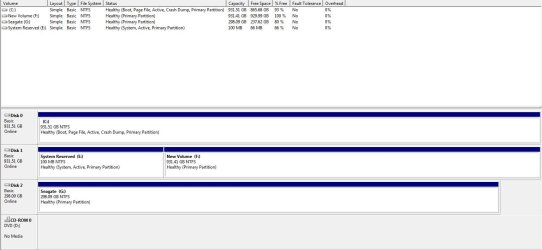
  • drives.JPG
    drives.JPG
    77.8 KB · Views: 322

My Computer

OS
Windows 7 Pro 64bit
CPU
Intel Core2 Quad
Motherboard
MSI G41M-P33
Memory
4Gb
Graphics Card(s)
ATI Radeon 5800
Sound Card
Real Tek on onboard sound
Monitor(s) Displays
LG 23" wide
Hard Drives
Western Digital 1T
Samsung 1T

My Computer

Computer Manufacturer/Model Number
Insane hobo technologies. ;-)
OS
Windows 7 x64
CPU
Intel i7 2600k
Motherboard
Asrock z68 extreme 4 gen 3
Memory
G.skill Ripjaw 16gigs @ 1866
Graphics Card(s)
Nvidia gtx580 (evga)
Sound Card
Integrated HD audio + hdmi
Monitor(s) Displays
24" ASUS widescreen + 42" insignia
Screen Resolution
1080p (1920x1080)
Hard Drives
128 Samsung 830
256 Samsung 840
3 x 1tb storage drive (various)
1 western digital 1tb (eSATA)
1 Seagate 1tb (eSATA)
PSU
1 kilowatt SLI/Crossfire rated Silverstone modular
Case
NZXT Phantom + additional 220 fan
Cooling
Zalmann
Keyboard
Microsoft wireless 3000 (v2)
Mouse
MS - wireless 5000 (bluetrack)
Internet Speed
depends on if you ask me or my provider.
Other Info
The above information is provided as is, and the author assumes no responsibility for issues it may cause with your sanity or fanboyism.

My Computer

Computer type
PC/Desktop
Computer Manufacturer/Model Number
Acer M5641
OS
Windows 7 Home Premium 64bit
CPU
Q6600
Motherboard
Nvidia MCP73PV
Memory
4GB.
Graphics Card(s)
Sapphire Vapor-X 5750
Sound Card
XFI Extreem music
Monitor(s) Displays
Acer X223W
Screen Resolution
1680x1050
Hard Drives
WD10 02FAEX
WD64 00AAKS
PSU
stock 450w
Case
acer
Cooling
stock
Keyboard
Microsoft Digital Media Pro.
Mouse
Logitech MX620
Internet Speed
49.51Mbs down 4.98Mbs up 17.6ms ping
Antivirus
MSE
Browser
Waterfox
Other Info
Shaw Cable
Netgear R6200
You need to set Disk 0, partition 1 active then write the boot configuration data, fix the mbr and fix the bootsector and rewrite the BCD record

Here's the manual way it should be done, I think:

Boot from the Windows 7 DVD, SHIFT-F10 from the first menu to bring up a command prompt window
Type DISKPART
from the prompt:

DISKPART> select disk 0
Disk 0 is now the selected disk

DISKPART> select partition 1
Partition 1 is now the selected partition
DISKPART> active
Partition 1 is now active

Reboot, startup Windows 7 DVD again and at the Windows Recovery console, shift-F10 at the first dialog again.
Now for the Boot Sector:
The Windows installation is on C:\Windows on an active partition. There is no boot information, no master boot record (MBR) and no Boot Configuration Data (BCD.)
From the recovery command line prompt, type:
BCDBOOT c:\windows
Then
BOOTREC /FIXMBR
BOOTREC /FIXBOOT
BOOTREC /REBUILDBCD
reboot by typing SHUTDOWN /r
That should reboot you back to windows
 

My Computer

Computer Manufacturer/Model Number
Acer 7520, Packard Bell dot se, Acer travelmate 2423
OS
Win 7 Ult + Starter, XP Pro +Home, 2kAS, Linux Mint 8, SuperOS
CPU
AMD 64 Athlon X2 , Intel Atom N450, Intel Celeron M 1.50 Ghz
Motherboard
Acer Fuquene
Memory
2.5GB ; 1GB; 2GB
Graphics Card(s)
Nvidia GeForce7000m; Intel; Intel
Sound Card
Realtek AC57
Monitor(s) Displays
17" ;10.1"; 19"
Screen Resolution
1440x900;1024x600;1440x900;
Hard Drives
WD 80, WD 320;
PSU
19v
Case
Laptop
Cooling
Air
Internet Speed
9.7Mb/s down 0.99Mb/s up
Other Info
ISP VIRGINMEDIA 10M cable broadband - D-Link DIR615 wireless router, 3Com OfficeConnect ASDL router used as wireless extender switch
As Win7 is already marked Active, just unplug DISK1, set Win7 HD as first HD to boot in BIOS setup (after DVD drive), boot the Win7 DVD Repair console or Repair CD to run Startup Repair up to 3 separate times with reboots until Win7 starts on its own. Startup Repair - Windows 7 Forums

Afterwards you can plug Disk1 back in to delete the 100mb partition in Disk Mgmt or using DIskpart "Force Delete override" command - just make sure it doesn't get set to boot first in BIOS.
 
I think you may be confusing the MBR with other things. This may help
http://www.sevenforums.com/software/139658-reflect-updates-3.html#post1207608
You have two options
a) Move the system reserved partition to drive 0
http://www.sevenforums.com/tutorials/119151-system-reserved-create-using-disk-management.html
OR
b) Incorporate the booting functions in system reserved boot functions including the MBR into drive 0.

I suggest you go with b)
Simply:
1) Disconnect drive 1 (the one currently with system reserved)
2) Using the System Repair Boot disk run the System Repair (repair my computer) 3 times.
 

My Computer

Computer type
PC/Desktop
Computer Manufacturer/Model Number
Own build
OS
Windows 7x64 Home Premium SP1
CPU
Intel i7 2600k
Motherboard
ASUS P8Z68 Deluxe
Memory
G.Skill Ripjaws (DDR3-1600) 2x4GB
Graphics Card(s)
Nvidia GeForce GTS 450; Intel HD Graphics 3000(GT2+)
Monitor(s) Displays
Dell Ultrasharp IPS panel U2311H, Samsung SyncMaster P2350
Screen Resolution
1920x1080
Hard Drives
Samsung 850 Pro SSD 256GB, Samsung SSD 840 120GB, Seagates 1TB Barracuda ST31000528AS x2
PSU
Seasonic M12II 520W
Case
Lian Li Lancool PC-K60
Cooling
Case: 1x120mm, 3x140mm CPU: Hyper 212+
Keyboard
Logitech MK520 (wireless)
Mouse
Logitech MK520
Internet Speed
6-7 Mbps
Antivirus
Norton Security Premium, Malwarebytes on 2 (MSE on 3rd PC)
Browser
FireFox
Other Info
Audio: Logitech Z523 2.1
thanks all for the help. I will try this today and see if I can get this done. One thing I did notice yesterday was when I went t the repair/restore console on the Win7 DVD, my operating system was not reflecting.
 

My Computer

OS
Windows 7 Pro 64bit
CPU
Intel Core2 Quad
Motherboard
MSI G41M-P33
Memory
4Gb
Graphics Card(s)
ATI Radeon 5800
Sound Card
Real Tek on onboard sound
Monitor(s) Displays
LG 23" wide
Hard Drives
Western Digital 1T
Samsung 1T
If Win7 doesn't show up in the Repair Console, choose from Recovery Options to open a Command Line, type:

bootrec.exe /fixmbr
bootrec.exe /fixboot

Then boot back in to see if it can find the installation to run the Repairs.

While these commands are automated in Startup Repair along with all other boot repair commands, sometimes one or both of them is required to cause the OS to be discovered by the Repair console.
 
Thanks all for the help. All sorted and working
 

My Computer

OS
Windows 7 Pro 64bit
CPU
Intel Core2 Quad
Motherboard
MSI G41M-P33
Memory
4Gb
Graphics Card(s)
ATI Radeon 5800
Sound Card
Real Tek on onboard sound
Monitor(s) Displays
LG 23" wide
Hard Drives
Western Digital 1T
Samsung 1T
Thanks Gregrocker. I followed your suggestion and all is sorted
 

My Computer

OS
Windows 7 Pro 64bit
CPU
Intel Core2 Quad
Motherboard
MSI G41M-P33
Memory
4Gb
Graphics Card(s)
ATI Radeon 5800
Sound Card
Real Tek on onboard sound
Monitor(s) Displays
LG 23" wide
Hard Drives
Western Digital 1T
Samsung 1T
You need to set Disk 0, partition 1 active then write the boot configuration data, fix the mbr and fix the bootsector and rewrite the BCD record

Here's the manual way it should be done, I think:

Boot from the Windows 7 DVD, SHIFT-F10 from the first menu to bring up a command prompt window
Type DISKPART
from the prompt:

DISKPART> select disk 0
Disk 0 is now the selected disk

DISKPART> select partition 1
Partition 1 is now the selected partition
DISKPART> active
Partition 1 is now active

Reboot, startup Windows 7 DVD again and at the Windows Recovery console, shift-F10 at the first dialog again.
Now for the Boot Sector:
The Windows installation is on C:\Windows on an active partition. There is no boot information, no master boot record (MBR) and no Boot Configuration Data (BCD.)
From the recovery command line prompt, type:
BCDBOOT c:\windows
Then
BOOTREC /FIXMBR
BOOTREC /FIXBOOT
BOOTREC /REBUILDBCD
reboot by typing SHUTDOWN /r
That should reboot you back to windows

Literally created an account to say thank you. this fixed me. You are awesome.
 

My Computer

Computer type
PC/Desktop
OS
Oh

My Computer

Computer type
PC/Desktop
Computer Manufacturer/Model Number
custom build
OS
windows 10 x64
CPU
i5 4460
Motherboard
asus z87-pro
Memory
hyperx savage 16 Gb
Graphics Card(s)
Gigabyte 980ti
Hard Drives
ssd 240
ssd 960
hd 250
Browser
yandex
Back
Top