
Dear Forumers,
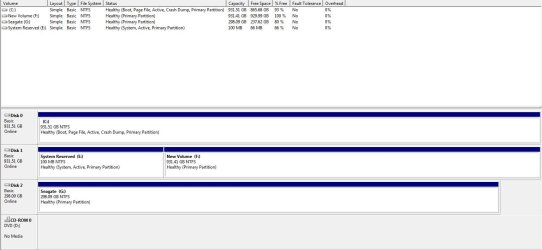
During the installation of my new computer somehow Windows 7 wrote the MBR to disc 1 instead of disc 0 where the Windows operating system resides. In as much as this is not a problem for me, disc 1 is now starting to show signs of failure. Chkdsk /f is unable to repair this disc and diagnostic software from Western Digital confirms that the drive is failing.
Now I need to write the MBR to disc 0.
I did come across a tutorial on how to create an MBR but for the life of me I can’t locate it. Any help in this regard would be appreciated in order that I get this right the first time.
During the installation of my new computer somehow Windows 7 wrote the MBR to disc 1 instead of disc 0 where the Windows operating system resides. In as much as this is not a problem for me, disc 1 is now starting to show signs of failure. Chkdsk /f is unable to repair this disc and diagnostic software from Western Digital confirms that the drive is failing.
Now I need to write the MBR to disc 0.
I did come across a tutorial on how to create an MBR but for the life of me I can’t locate it. Any help in this regard would be appreciated in order that I get this right the first time.
Attachments
My Computer
- OS
- Windows 7 Pro 64bit
- CPU
- Intel Core2 Quad
- Motherboard
- MSI G41M-P33
- Memory
- 4Gb
- Graphics Card(s)
- ATI Radeon 5800
- Sound Card
- Real Tek on onboard sound
- Monitor(s) Displays
- LG 23" wide
- Hard Drives
- Western Digital 1T
Samsung 1T


