Solved Create VHD on flash drive?

Coke Robot

New member
Power User
VIP
Local time
2:44 AM
Messages
402
Well, I'm at my wit's end here with getting 7 virtualized and portable.

And that's why I come here to see if creating a virtual hard drive onto a flash drive and then installing 7 on it is possible. I honestly didn't realize that Windows can support virtualization until a while ago...:doh:

So I'd say I'm pretty new to Hyper-V, is that what it's called? :rolleyes: I don't have much knowledge of how to use it properly and I'd love some info from you guys on how to use it. Most importantly, does it operate like VMware, where you can run the operating system in tandem? What are its benefits and drawbacks?

Also, does it support USB based virtual hard drives?

In case if you're wondering why I need this, it's because my ultimate goal of getting Office 2010 installed on it and take it where ever, a foreign laptop, puter, best buy, colleges, meth labs, strip clubs, anywhere. But Microsoft seems to be making this task difficult with Office's ridiculous anti-piracy measures that are screwing the process up and having Windows not able to install on whatever drive. I understand that running an operating system off a flash drive is somewhat slow, but it's better than nothing in my book.

I'm getting to the point of installing ubuntu and making it look like 7, then using Wine to get Office installed. I kind of don't want to do that since ubuntu is a whole other beast for super, uber geeks. :geek:
 

My Computer

Computer Manufacturer/Model Number
ASUS
OS
Windows 7 Ultimate x64
CPU
AMD Athlon 240 II @ 2.8-4.004 ghz
Motherboard
M4A78LT-M LE
Memory
SuperTalent 4gb DDR3
Graphics Card(s)
ATI Radeon 3000HD
Screen Resolution
1440*900
Case
Re-modded Dell Dimension 4550
Cooling
Vantec 92mm Tornado x2
Other Info
It looks pretty.
If "Office" is your goal. Open office on a linux bootable USB should be the easiest and totally legal solution. My understanding is that Open Office is quite compatible with MS Office 2007 now --- Office 2010?. I think linux Mint will support Open Office. You probably need an 8GB USB.
 

My Computer

Computer type
PC/Desktop
Computer Manufacturer/Model Number
Own build
OS
Windows 7x64 Home Premium SP1
CPU
Intel i7 2600k
Motherboard
ASUS P8Z68 Deluxe
Memory
G.Skill Ripjaws (DDR3-1600) 2x4GB
Graphics Card(s)
Nvidia GeForce GTS 450; Intel HD Graphics 3000(GT2+)
Monitor(s) Displays
Dell Ultrasharp IPS panel U2311H, Samsung SyncMaster P2350
Screen Resolution
1920x1080
Hard Drives
Samsung 850 Pro SSD 256GB, Samsung SSD 840 120GB, Seagates 1TB Barracuda ST31000528AS x2
PSU
Seasonic M12II 520W
Case
Lian Li Lancool PC-K60
Cooling
Case: 1x120mm, 3x140mm CPU: Hyper 212+
Keyboard
Logitech MK520 (wireless)
Mouse
Logitech MK520
Internet Speed
6-7 Mbps
Antivirus
Norton Security Premium, Malwarebytes on 2 (MSE on 3rd PC)
Browser
FireFox
Other Info
Audio: Logitech Z523 2.1
  • Like
Reactions: whs
If "Office" is your goal. Open office on a linux bootable USB should be the easiest and totally legal solution. My understanding is that Open Office is quite compatible with MS Office 2007 now --- Office 2010?. I think linux Mint will support Open Office. You probably need an 8GB USB.
+1, this is the way I would do it too.
 

My Computer

Computer Manufacturer/Model Number
HP, Dell, Gateway, Toshiba - 4 laptops and 2 desktops
OS
Vista, Windows7, Mint Mate, Zorin, Windows 8
CPU
from 1.6GHz Duo to i7
Monitor(s) Displays
2x HP w2207
Hard Drives
5x HDD, 7x SSD, 12x Externals
Keyboard
with trackball - no mices
Mouse
Trackball mice
Internet Speed
DSL 6000
May I suggest another approach? This is how I am keeping my documents with me, accessing them from any computer with Internet access.
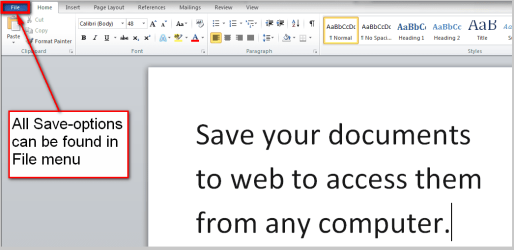
  • First, create or edit a document as you wish. When finished, click File on any Office application (Word, Excel, PowerPoint etc.):
    .
    OfficeWeb_0.png
    .
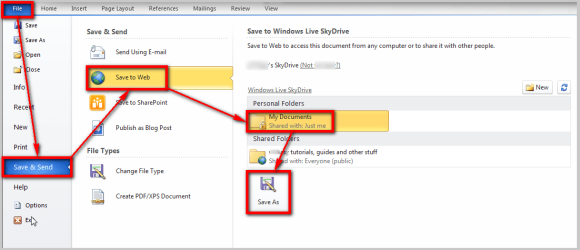
  • Save document to your Windows Live SkyDrive (if you have chosen not to be permanently logged in to Live, you need to enter your Live credentials when asked):
    .
    OfficeWeb_1.png
    .
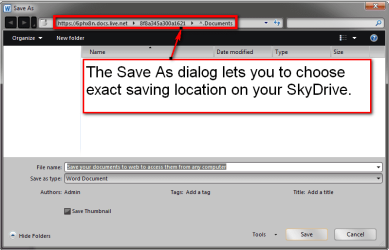
  • Choose Save As location normally as you would do when saving to local computer:
    .
    OfficeWeb_2.png
    .
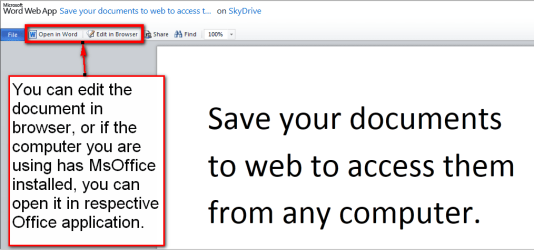
  • Your document is saved on SkyDrive and is accesible from any computer with Internet access:
    .
    OfficeWeb_3.png
    .
  • You can even edit / create documents using Office Live, no MsOffice needed on computer you are using. Just click the document to open it on Office Live:
    .
    OfficeWeb_4.png
Easy!

Kari
 

My Computer

Computer type
Laptop
Computer Manufacturer/Model Number
HP ENVY 17-1150eg
OS
Windows 10 Pro x64 EN-GB
CPU
1.6 GHz Intel Core i7-720QM Processor
Memory
6 GB
Graphics Card(s)
ATI Mobility Radeon HD 5850 Graphics
Sound Card
Beats sound system with integrated subwoofer
Monitor(s) Displays
17" laptop display, 22" LED and 32" Full HD TV through HDMI
Screen Resolution
1600*900 (1), 1920*1080 (2&3)
Hard Drives
Internal: 2 x 500 GB SATA Hard Disk Drive 7200 rpm
External: 2TB for backups, 3TB USB3 network drive for media
Cooling
As Envy runs a bit warm, I have it on a Cooler Master pad
Keyboard
Logitech diNovo Media Desktop Laser (bluetooth)
Mouse
Logitech Performance Mouse MX
Internet Speed
50/10 Mbps VDSL
Antivirus
Windows Defender 4.3.9431.0
Browser
Maxthon 3.5.2., IE11
Thanks! You guys' suggests are pretty great!

I prefer using Office 2010 since it's pretty. :p Open Office is great and all, but to me, it's kind of a pain to use when I know Office's commands and settings like the back of my hand, and also, PowerPoint 2010 is simply amazing. I'm thinking Wine and ubuntu is the best way to go.

As for SkyDrive, I do use that from time to time but sometimes I don't have network access when I'm around. So much for the cloud right? ;)
 

My Computer

Computer Manufacturer/Model Number
ASUS
OS
Windows 7 Ultimate x64
CPU
AMD Athlon 240 II @ 2.8-4.004 ghz
Motherboard
M4A78LT-M LE
Memory
SuperTalent 4gb DDR3
Graphics Card(s)
ATI Radeon 3000HD
Screen Resolution
1440*900
Case
Re-modded Dell Dimension 4550
Cooling
Vantec 92mm Tornado x2
Other Info
It looks pretty.
In case if you're wondering why I need this, it's because my ultimate goal of getting Office 2010 installed on it and take it where ever, a foreign laptop, puter, best buy, colleges, meth labs, strip clubs, anywhere. But Microsoft seems to be making this task difficult with Office's ridiculous anti-piracy measures that are screwing the process up and having Windows not able to install on whatever drive.


Sorry, I just thought this part was hilarious!:roflmao:
 

My Computer

Computer type
PC/Desktop
Computer Manufacturer/Model Number
Self Built
OS
Win 10 Pro x64
CPU
Intel I5-2500K @3.3GHz
Motherboard
Asrock P67 Extreme4
Memory
16GB G.Skill Ripjaws X (4x4GB)
Graphics Card(s)
EVGA GeForce 750 Ti SC 2GB
Sound Card
ASUS Xonar DG 5.1 Channels 24-bit 96KHz PCI Interface Sound
Monitor(s) Displays
auria eq2367
Screen Resolution
1920 x 1080
Hard Drives
250GB Samsung 850 EVO SSD
1TB WD Blue
1TB Hitachi
PSU
SeaSonic X 650W 80 Plus Gold
Case
Corsair Obsidian 750D
Cooling
Corsair H60, Three 140mm case fans
Keyboard
Logitech Wireless Keyboard K520
Mouse
Logitech Wireless Mouse M310
Internet Speed
Wave Broadband ~ 100 dn 5 up
Antivirus
Windows Defender, Malwarebytes Premium
Browser
Edge, IE11, Chrome
Other Info
Laptop specs: HP g7-1365dx /
CPU: AMD A6-3420M APU with Radeon(tm) HD Graphics /
RAM: Crucial 8Gb (2x4Gb) /
SSD: Crucial M4-CT128M4SSD2 ATA Device/ FW 000F /
GFX: AMD Radeon HD 6520G /
OS: Windows 10 Pro x64
Hi there
As always I tend to look at the question THE OTHER WAY AROUND.

Why not create ANY LINUX distro you like -- it will easily fit on to a bootable USB stick.

Then on this OS install VBOX or vmware and install a WINDOWS VM on which you can install your favourite Windows products - in particular OFFICE 2010 or whatever.

You can easily fit even a Windows W7 installation on to a 32 GB USB stick -- or if you are careful you might get it on to a 16 GB USB stick.

Just boot your Linux USB - then start the vm application whether it's vmware or vbox and open your Windows VM. An XP Virtual system will run Office 2010 as well and you should be able to get the whole kybosh on to a 4GB USB stick.

Remember the Windows Virtual machine is only DATA as far as the linux os is concerned so you don't need to format it as separate partitions.

You've now got a 100% portable Windows system !!!!! - take it to the "Pole dancing" club too if you want !!!!

Cheers
jimbo
 

My Computer

Computer type
PC/Desktop
Computer Manufacturer/Model Number
Custom built, several laptops HP/ASUS
OS
Linux CENTOS 7 / various Windows OS'es and servers
CPU
Intel i7 Intel i5
Memory
8GB, 16GB
Graphics Card(s)
On Motherboard
Sound Card
Realtek HD audio
Monitor(s) Displays
Apple Cinema display, Samsung LCD
Screen Resolution
1920 X 1080
Hard Drives
4 X 1TB SATA
Mouse
Toshiba wireless laser
Internet Speed
> 20MB up
Hi there
As always I tend to look at the question THE OTHER WAY AROUND.

Why not create ANY LINUX distro you like -- it will easily fit on to a bootable USB stick.

Then on this OS install VBOX or vmware and install a WINDOWS VM on which you can install your favourite Windows products - in particular OFFICE 2010 or whatever.

You can easily fit even a Windows W7 installation on to a 32 GB USB stick -- or if you are careful you might get it on to a 16 GB USB stick.

Just boot your Linux USB - then start the vm application whether it's vmware or vbox and open your Windows VM. An XP Virtual system will run Office 2010 as well and you should be able to get the whole kybosh on to a 4GB USB stick.

Remember the Windows Virtual machine is only DATA as far as the linux os is concerned so you don't need to format it as separate partitions.

You've now got a 100% portable Windows system !!!!! - take it to the "Pole dancing" club too if you want !!!!

Cheers
jimbo

Yeah, it looks like I'm forced to install linux on the flash drive and do it from there...shucks, although that's not the best method I'd go for there doesn't seem to be a way around it.

And yes, I will take it an exotic dance club! :D
 

My Computer

Computer Manufacturer/Model Number
ASUS
OS
Windows 7 Ultimate x64
CPU
AMD Athlon 240 II @ 2.8-4.004 ghz
Motherboard
M4A78LT-M LE
Memory
SuperTalent 4gb DDR3
Graphics Card(s)
ATI Radeon 3000HD
Screen Resolution
1440*900
Case
Re-modded Dell Dimension 4550
Cooling
Vantec 92mm Tornado x2
Other Info
It looks pretty.
Hi there
As always I tend to look at the question THE OTHER WAY AROUND.

Why not create ANY LINUX distro you like -- it will easily fit on to a bootable USB stick.

Then on this OS install VBOX or vmware and install a WINDOWS VM on which you can install your favourite Windows products - in particular OFFICE 2010 or whatever.

You can easily fit even a Windows W7 installation on to a 32 GB USB stick -- or if you are careful you might get it on to a 16 GB USB stick.

Just boot your Linux USB - then start the vm application whether it's vmware or vbox and open your Windows VM. An XP Virtual system will run Office 2010 as well and you should be able to get the whole kybosh on to a 4GB USB stick.

Remember the Windows Virtual machine is only DATA as far as the linux os is concerned so you don't need to format it as separate partitions.

You've now got a 100% portable Windows system !!!!! - take it to the "Pole dancing" club too if you want !!!!

Cheers
jimbo

Yeah, it looks like I'm forced to install linux on the flash drive and do it from there...shucks, although that's not the best method I'd go for there doesn't seem to be a way around it.

And yes, I will take it an exotic dance club! :D
Which was the first suggestion you were given. Again I would recommend linux Mint on a 8GB flash drive. There should be an option to download Open Office from Mint - easy.
 

My Computer

Computer type
PC/Desktop
Computer Manufacturer/Model Number
Own build
OS
Windows 7x64 Home Premium SP1
CPU
Intel i7 2600k
Motherboard
ASUS P8Z68 Deluxe
Memory
G.Skill Ripjaws (DDR3-1600) 2x4GB
Graphics Card(s)
Nvidia GeForce GTS 450; Intel HD Graphics 3000(GT2+)
Monitor(s) Displays
Dell Ultrasharp IPS panel U2311H, Samsung SyncMaster P2350
Screen Resolution
1920x1080
Hard Drives
Samsung 850 Pro SSD 256GB, Samsung SSD 840 120GB, Seagates 1TB Barracuda ST31000528AS x2
PSU
Seasonic M12II 520W
Case
Lian Li Lancool PC-K60
Cooling
Case: 1x120mm, 3x140mm CPU: Hyper 212+
Keyboard
Logitech MK520 (wireless)
Mouse
Logitech MK520
Internet Speed
6-7 Mbps
Antivirus
Norton Security Premium, Malwarebytes on 2 (MSE on 3rd PC)
Browser
FireFox
Other Info
Audio: Logitech Z523 2.1
Hi there
As always I tend to look at the question THE OTHER WAY AROUND.

Why not create ANY LINUX distro you like -- it will easily fit on to a bootable USB stick.

Then on this OS install VBOX or vmware and install a WINDOWS VM on which you can install your favourite Windows products - in particular OFFICE 2010 or whatever.

You can easily fit even a Windows W7 installation on to a 32 GB USB stick -- or if you are careful you might get it on to a 16 GB USB stick.

Just boot your Linux USB - then start the vm application whether it's vmware or vbox and open your Windows VM. An XP Virtual system will run Office 2010 as well and you should be able to get the whole kybosh on to a 4GB USB stick.

Remember the Windows Virtual machine is only DATA as far as the linux os is concerned so you don't need to format it as separate partitions.

You've now got a 100% portable Windows system !!!!! - take it to the "Pole dancing" club too if you want !!!!

Cheers
jimbo

Yeah, it looks like I'm forced to install linux on the flash drive and do it from there...shucks, although that's not the best method I'd go for there doesn't seem to be a way around it.

And yes, I will take it an exotic dance club! :D
Which was the first suggestion you were given. Again I would recommend linux Mint on a 8GB flash drive. There should be an option to download Open Office from Mint - easy.
Yeah... :o I take a while to mull things over and research things further before I make my mind up...
 

My Computer

Computer Manufacturer/Model Number
ASUS
OS
Windows 7 Ultimate x64
CPU
AMD Athlon 240 II @ 2.8-4.004 ghz
Motherboard
M4A78LT-M LE
Memory
SuperTalent 4gb DDR3
Graphics Card(s)
ATI Radeon 3000HD
Screen Resolution
1440*900
Case
Re-modded Dell Dimension 4550
Cooling
Vantec 92mm Tornado x2
Other Info
It looks pretty.
Hi there
if you need to use Office 2010 then you will need to install a Windows vm on your Linux OS -- I've messed around with WINE -- great idea but not really stable enough for a reliable "daily use" type of system.

If you don't want WINE or to install a Windows VM system you could try a product known as Cross Over Ties -- while this is WINE based it's reasonably stable --but it does cost a SMALL amount.

Note in any case you'll need an ms office 2010 (or 2007 / 2003) license too but I assume you have that anyway.

Here's the link for Cross over ties

Currently Office 2010 doesn't work, Office 2007 works reasonably well and office 2003 is prety well 100% OK.

If you just want MS office I'd install an XP VM -- this will be small portable and is obviously 100% compatable with the latest version of Office - Office 2010.


Compatibility - CodeWeavers


Cheers
jimbo
 

My Computer

Computer type
PC/Desktop
Computer Manufacturer/Model Number
Custom built, several laptops HP/ASUS
OS
Linux CENTOS 7 / various Windows OS'es and servers
CPU
Intel i7 Intel i5
Memory
8GB, 16GB
Graphics Card(s)
On Motherboard
Sound Card
Realtek HD audio
Monitor(s) Displays
Apple Cinema display, Samsung LCD
Screen Resolution
1920 X 1080
Hard Drives
4 X 1TB SATA
Mouse
Toshiba wireless laser
Internet Speed
> 20MB up
Obviously Open Office will need compatability work arounds which may prove too much of a nuisance. If you stick with MS products then surely you have licensing issues. eg. forgetting about the OS, to activate Office 2010 you need another license unless you have a multilicense pack.
 

My Computer

Computer type
PC/Desktop
Computer Manufacturer/Model Number
Own build
OS
Windows 7x64 Home Premium SP1
CPU
Intel i7 2600k
Motherboard
ASUS P8Z68 Deluxe
Memory
G.Skill Ripjaws (DDR3-1600) 2x4GB
Graphics Card(s)
Nvidia GeForce GTS 450; Intel HD Graphics 3000(GT2+)
Monitor(s) Displays
Dell Ultrasharp IPS panel U2311H, Samsung SyncMaster P2350
Screen Resolution
1920x1080
Hard Drives
Samsung 850 Pro SSD 256GB, Samsung SSD 840 120GB, Seagates 1TB Barracuda ST31000528AS x2
PSU
Seasonic M12II 520W
Case
Lian Li Lancool PC-K60
Cooling
Case: 1x120mm, 3x140mm CPU: Hyper 212+
Keyboard
Logitech MK520 (wireless)
Mouse
Logitech MK520
Internet Speed
6-7 Mbps
Antivirus
Norton Security Premium, Malwarebytes on 2 (MSE on 3rd PC)
Browser
FireFox
Other Info
Audio: Logitech Z523 2.1
Ok, so I've been working a bit today on getting this happening. I have ubuntu 11.04 installed (very Windows 7ny than anything) and I believe it's more of a Live USB with a four gig persistence file. I have VirtualBox installed and I'm was getting 7 installed but I chose an 8 gig, dynamically expanding file, so I ran out of space! :eek:

But I'm going to attempt this again with a fixed, allocated file. I must say, 7's setup started much faster than I thought it would. When I was trying portable VirtualBox, it took four minutes to startup, in ubuntu, it took almost as long as it would if it were a hard drive. Interesting.
 

My Computer

Computer Manufacturer/Model Number
ASUS
OS
Windows 7 Ultimate x64
CPU
AMD Athlon 240 II @ 2.8-4.004 ghz
Motherboard
M4A78LT-M LE
Memory
SuperTalent 4gb DDR3
Graphics Card(s)
ATI Radeon 3000HD
Screen Resolution
1440*900
Case
Re-modded Dell Dimension 4550
Cooling
Vantec 92mm Tornado x2
Other Info
It looks pretty.
Gah! I'm thinking of going all out with this. I obtained me the very first alpha build of Windows 8, 7850, to use its new feature Portable Workspace which allow me to install Windows 8 onto a 32 gig flash drive. Which reminds me, I need a 32 gig flash drive. :p
 

My Computer

Computer Manufacturer/Model Number
ASUS
OS
Windows 7 Ultimate x64
CPU
AMD Athlon 240 II @ 2.8-4.004 ghz
Motherboard
M4A78LT-M LE
Memory
SuperTalent 4gb DDR3
Graphics Card(s)
ATI Radeon 3000HD
Screen Resolution
1440*900
Case
Re-modded Dell Dimension 4550
Cooling
Vantec 92mm Tornado x2
Other Info
It looks pretty.
Even with a modest 4GB SD card or USB thumbdrive, you can build a Windows Embedded Standard 7 SP1 USB-bootable system, with file-based and enhanced Write filters to prevent undue writes to the Solid state memory.

What's more, when activated with a BA volume key, the WES7 OS on a USB stick retains its Activated Status, even if used on different computers. On the surface it looks and behaves like Windows 7, except with a smaller footprint, and generally with fewer resources required.

Evaluation versions of WES7 IBW 32-bit and 64-bit iso setup files can be found here:

Download Details - Microsoft Download Center - Windows Embedded Standard 7 SP1 Evaluation Edition


and the 180day evaluation product key can be obtained by logging on with your Windows Live ID here:

Download Windows Embedded Standard 7 | Product Information and Trials

365 day product keys are available for student education users.

Resources including video tutorials can be found in the modules here:

Commercial Devices | Windows Embedded Standard 7 for Developers

It runs Office 2010 no problem.
 

My Computer

Computer Manufacturer/Model Number
Acer 7520, Packard Bell dot se, Acer travelmate 2423
OS
Win 7 Ult + Starter, XP Pro +Home, 2kAS, Linux Mint 8, SuperOS
CPU
AMD 64 Athlon X2 , Intel Atom N450, Intel Celeron M 1.50 Ghz
Motherboard
Acer Fuquene
Memory
2.5GB ; 1GB; 2GB
Graphics Card(s)
Nvidia GeForce7000m; Intel; Intel
Sound Card
Realtek AC57
Monitor(s) Displays
17" ;10.1"; 19"
Screen Resolution
1440x900;1024x600;1440x900;
Hard Drives
WD 80, WD 320;
PSU
19v
Case
Laptop
Cooling
Air
Internet Speed
9.7Mb/s down 0.99Mb/s up
Other Info
ISP VIRGINMEDIA 10M cable broadband - D-Link DIR615 wireless router, 3Com OfficeConnect ASDL router used as wireless extender switch
Even with a modest 4GB SD card or USB thumbdrive, you can build a Windows Embedded Standard 7 SP1 USB-bootable system, with file-based and enhanced Write filters to prevent undue writes to the Solid state memory.

What's more, when activated with a BA volume key, the WES7 OS on a USB stick retains its Activated Status, even if used on different computers. On the surface it looks and behaves like Windows 7, except with a smaller footprint, and generally with fewer resources required.

Evaluation versions of WES7 IBW 32-bit and 64-bit iso setup files can be found here:

Download Details - Microsoft Download Center - Windows Embedded Standard 7 SP1 Evaluation Edition


and the 180day evaluation product key can be obtained by logging on with your Windows Live ID here:

Download Windows Embedded Standard 7 | Product Information and Trials

365 day product keys are available for student education users.

Resources including video tutorials can be found in the modules here:

Commercial Devices | Windows Embedded Standard 7 for Developers

It runs Office 2010 no problem.
Wow......... :shock:
I am shocked and awed.
 

My Computer

Computer Manufacturer/Model Number
ASUS
OS
Windows 7 Ultimate x64
CPU
AMD Athlon 240 II @ 2.8-4.004 ghz
Motherboard
M4A78LT-M LE
Memory
SuperTalent 4gb DDR3
Graphics Card(s)
ATI Radeon 3000HD
Screen Resolution
1440*900
Case
Re-modded Dell Dimension 4550
Cooling
Vantec 92mm Tornado x2
Other Info
It looks pretty.
Back
Top