creating a 2 OS thumb drive

Thanks. I will try that in a little while.
 

My Computer My Computer

Computer Manufacturer/Model Number
Custom
OS
Windows 7 Professional x64
CPU
Intel i7 2600K OC'd @ 4620 MHz
Motherboard
Asus P8Z68-V Pro
Memory
16GB GSkill Sniper 2133 Mhz (4x4GB)
Graphics Card(s)
EVGA GeForce GTX 480 SuperClocked+
Sound Card
Realtek High Definition Audio
Monitor(s) Displays
2x Acer S273HLbmii 27"
Screen Resolution
2 x 1920x1080
Hard Drives
64GB Crucial M4 SSD

Storage: Hitachi 1TB 5400RPM, Samsung 1.5TB 5400RPM
PSU
Corsair HW Series 750w (modular)
Case
Cooler Master HAF 932 Advanced Blue Edition
Cooling
CM Hyper 212+ CPU cooler, 3x 230mm + 1x 140mm case fans
Keyboard
Logitech MK320 (wireless)
Mouse
Logitech MK320 (wireless)
Internet Speed
30 Mb/s : 2 Mb/s
And the same for OSDEVICE
Ok it seems I have accomplished the first part successfully.
Code:
Microsoft Windows [Version 6.1.7600]
Copyright (c) 2009 Microsoft Corporation.  All rights reserved.

C:\Windows\system32>E:

E:\>cd dart\boot

E:\dart\boot>bcdedit /store bcd /enum

Windows Boot Manager
--------------------
identifier              {bootmgr}
description             Windows Boot Manager
locale                  en-US
inherit                 {globalsettings}
default                 {default}
displayorder            {default}
                        {e616cadf-07c5-11df-9aee-001558508051}
toolsdisplayorder       {memdiag}
timeout                 30

Windows Boot Loader
-------------------
identifier              {default}
device                  ramdisk=[boot]\sources\boot.wim,
{7619dcc8-fafe-11d9-b411-000476eba25f}
path                    \windows\system32\boot\winload.exe
description             System Repair x86
locale                  en-US
inherit                 {bootloadersettings}
osdevice                ramdisk=[boot]\sources\boot.wim,
{7619dcc8-fafe-11d9-b411-000476eba25f}
systemroot              \windows
detecthal               Yes
winpe                   Yes
ems                     Yes

Windows Boot Loader
-------------------
identifier              {e616cadf-07c5-11df-9aee-001558508051}
device                  ramdisk=[boot]\sources\dart64.wim,
{7619dcc8-fafe-11d9-b411-000476eba25f}
path                    \windows\system32\boot\winload.exe
description             System Repair x64
locale                  en-US
inherit                 {bootloadersettings}
osdevice                ramdisk=[boot]\sources\dart64.wim,
{7619dcc8-fafe-11d9-b411-000476eba25f}
systemroot              \windows
detecthal               Yes
winpe                   Yes
ems                     Yes

E:\dart\boot>
Is there something else I need to do? I tried to use image burn to create the iso, but so far I don't get any boot menu. The above just sits at a blinking cursor. Do I need some other program to finish this?

Cheers!
Robert
 

My Computer My Computer

OS
...
You can only use cdimage, oscdimg, or vlite to create the .iso. Other programs can't make a bootable .iso from etfsboot.com.

If you shift and right click on etfsboot.com ( it's in the boot folder ) , then select Copy as path.

Post the path up and I will post back the command to create the .iso with oscdimg.

View attachment oscdimg.zip d/l the .zip, rt click, Unblock, Apply, OK. Extract the zip.

Then copy oscdimg.exe into the Windows\System32 partition of the o/s you are booted into.
 

My Computers My Computers

System One System Two

  • Computer type
    PC/Desktop
    OS
    7 X64
    CPU
    i5 8400
    Motherboard
    gigabyte b365m ds3h
    Memory
    2x8gb 3200mhz
    Hard Drives
    various
    PSU
    pure power 11 400w cm
    Case
    Coolermaster
    Cooling
    cryorig m9i
  • Computer type
    PC/Desktop
    OS
    7x64
    CPU
    g5400
    Motherboard
    ga b365m ds3h
    Memory
    8gb ddr4 2400
    PSU
    xfx pro 450w
You can only use cdimage, oscdimg, or vlite to create the .iso. Other programs can't make a bootable .iso from etfsboot.com.

If you shift and right click on etfsboot.com ( it's in the boot folder ) , then select Copy as parth.

Post the path up and I will post back the command to create the .iso with oscdimg.

View attachment 49418 d/l the .zip, rt click, Unblock, Apply, OK. Then copy oscdimg.exe into the Windows\System32 partition of the o/s you are booted into.
Then I could use vlite? I have that ...
 

My Computer My Computer

OS
...
Yes, just open vlite - browse to the folder you made which contains the installation files, after it has loaded, clcik Next.

It will ask you to select an Edition ( it doesn't matter which one - it only matters if you are editing the wim - which you aren't ).

Tick only "bootable .iso" - Next, make sure "create image" is in the drop down , then click "Make .iso" . Select a place to put it in the save window that opens. As soon as you click Save - he starts making the .iso - takes 3mins.

BTW - not related to this - do you have a copy of bcdboot from build 7000 - anybody?
 

My Computers My Computers

System One System Two

  • Computer type
    PC/Desktop
    OS
    7 X64
    CPU
    i5 8400
    Motherboard
    gigabyte b365m ds3h
    Memory
    2x8gb 3200mhz
    Hard Drives
    various
    PSU
    pure power 11 400w cm
    Case
    Coolermaster
    Cooling
    cryorig m9i
  • Computer type
    PC/Desktop
    OS
    7x64
    CPU
    g5400
    Motherboard
    ga b365m ds3h
    Memory
    8gb ddr4 2400
    PSU
    xfx pro 450w
Yes, just open vlite - browse to the folder you made which contains the installation files, after it has loaded, clcik Next.

It will ask you to select an Edition ( it doesn't matter which one - it only matters if you are editing the wim - which you aren't ).

Tick only "bootable .iso" - Next, make sure "create image" is in the drop down , then click "Make .iso" . Select a place to put it in the save window that opens. As soon as you click Save - he starts making the .iso - takes 3mins.
I think even I can do that! Thanks so much!!

Cheers!
Robert
 

My Computer My Computer

OS
...
Success!

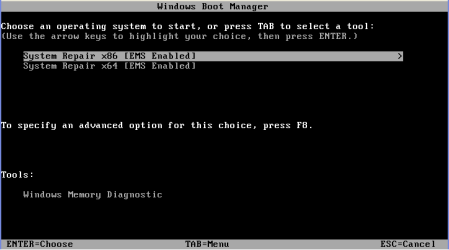
System_Repair_CD_86-64.PNG

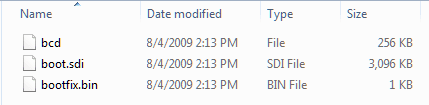
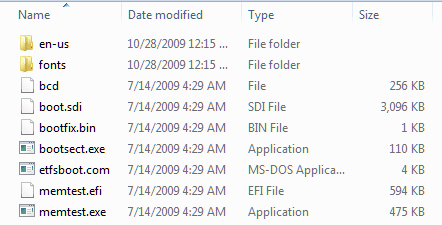
vlite was a dud. Had to use oscdimg to create my image. But now I have other questions: Where is the bootsect.exec I have been using on the x86 repair CD to repair my test system?

Sys_Repair_boot_01.png

Also missing is memtest, and memtest.efi for x64. Perhaps I should add the files to the boot folder of my next dual repair CD?

That still doesn't expalin how I can execute bootsect.exe from the Repair CD when it isn't there?
 

Attachments

  • Sys_Repair_boot_02.png
    Sys_Repair_boot_02.png
    5 KB · Views: 34

My Computer My Computer

OS
...
It's inside boot.wim ( or dart.wim for your x64 ) and loads into ram with the rest of winpe.

Extract the .wim and look at the contents. ( For no apparent reason - you seem to have named it dart.wim ? )
 

My Computers My Computers

System One System Two

  • Computer type
    PC/Desktop
    OS
    7 X64
    CPU
    i5 8400
    Motherboard
    gigabyte b365m ds3h
    Memory
    2x8gb 3200mhz
    Hard Drives
    various
    PSU
    pure power 11 400w cm
    Case
    Coolermaster
    Cooling
    cryorig m9i
  • Computer type
    PC/Desktop
    OS
    7x64
    CPU
    g5400
    Motherboard
    ga b365m ds3h
    Memory
    8gb ddr4 2400
    PSU
    xfx pro 450w
It's inside boot.wim ( or dart.wim for your x64 ) and loads into ram with the rest of winpe.

Extract the .wim and look at the contents. ( For no apparent reason - you seem to have named it dart.wim ? )
As suggested by Woebetide:
Create a folder and extract the content of the x86 iso in it. (let's say in k:\dart)
Rename the boot.wim from the x64 to something like dart64.wim.
Copy the dart64.wim to the k:\dart\sources folder.
http://www.sevenforums.com/installation-setup/55304-creating-2-os-thumb-drive-2.html#post519974

OK, that makes sense. Now when I tried to run the memory utility from the menu (as pictured in my post) I received an error message that it wasn't there? Not that I intend to rely on that memory utility, but for convenience if I add the memtest file to the boot folder would that make it available?
 

My Computer My Computer

OS
...
No idea - never tried. Give it a go - you could try running it from cmd prompt and cd to the boot directory.
 

My Computers My Computers

System One System Two

  • Computer type
    PC/Desktop
    OS
    7 X64
    CPU
    i5 8400
    Motherboard
    gigabyte b365m ds3h
    Memory
    2x8gb 3200mhz
    Hard Drives
    various
    PSU
    pure power 11 400w cm
    Case
    Coolermaster
    Cooling
    cryorig m9i
  • Computer type
    PC/Desktop
    OS
    7x64
    CPU
    g5400
    Motherboard
    ga b365m ds3h
    Memory
    8gb ddr4 2400
    PSU
    xfx pro 450w
In the iso I created, all the files are there (memtest.efi not), so just copy to the folder.
But I don't think you need it (only for EFI-based computers, whatever that may be:))

Diagnostic And Recovery Toolset, that's why I called it dart.wim:D
ERD commander in MSDart 6.5
 

My Computer My Computer

OS
WIN 7 x64
In the iso I created, all the files are there (memtest.efi not), so just copy to the folder.
But I don't think you need it (only for EFI-based computers, whatever that may be:))

Diagnostic And Recovery Toolset, that's why I called it dart.wim:D
ERD commander in MSDart 6.5
All I know is it worked really nice!! Once I figured out what I needed to do, that is ...

Thank both Woebetide and SWI2 for your input on this project!! I intend to experiment a little more, but all is good for now! (on one repair CD!)

Cheers!
Robert
 

My Computer My Computer

OS
...
Hi,

There is an easy way to run Partition Wizard from your multiboot.iso

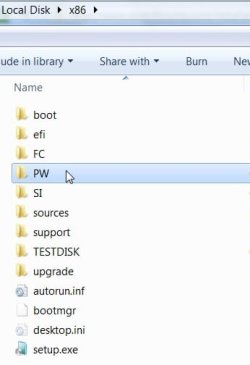
Copy the "C:\Program Files (x86)\Partition Wizard Home Edition 4.2" folder that you already have installed.

Renaming the folder "Partition Wizard Home Edition 4.2" to just PW, and renaming the "Partition Wizard.exe" to just PWIZ.exe makes it simpler.

Put the PW folder in the main x86 folder ( or whatever you called the folder you are going to make into the multiboot.iso ) and make a bootable .iso, as before.

Boot the dvd, select Windows Setup - when you get to the "Install Now" screen - press shift and F10 together to get to the 32bit recovery environment cmd.

Type diskpart, lis vol, get the dvd drive letter ( e.g. H:), exi from diskpart.

Then type:

H:\PW\PWIZ

PW takes a few secs to load from the dvd. That's it. Works great.

OR - as you have already made the multiboot.iso , use PowerIso, or similar to add PW folder to it.

Just pick the Multiboot.iso with PowerIso, click Add folder - add PW folder , click Save , or Save as.

Add other folders for other apps. that will run in 32 bit WinPe, as you like :

DD-PW-ETC2010-02-01_221821.jpg
 

My Computers My Computers

System One System Two

  • Computer type
    PC/Desktop
    OS
    7 X64
    CPU
    i5 8400
    Motherboard
    gigabyte b365m ds3h
    Memory
    2x8gb 3200mhz
    Hard Drives
    various
    PSU
    pure power 11 400w cm
    Case
    Coolermaster
    Cooling
    cryorig m9i
  • Computer type
    PC/Desktop
    OS
    7x64
    CPU
    g5400
    Motherboard
    ga b365m ds3h
    Memory
    8gb ddr4 2400
    PSU
    xfx pro 450w
Freecommander is very useful. It is tiny and loads fast.

Put the FC folder in the .iso /or on the flash drive.

Run it the same way.

Boot the dvd/flash to 32 bit recovery options cmd prompt. ( Select Windows Setup - when you get to the "Install Now" screen , press shift and F10 together to get straight to cmd prompt)

Type diskpart, then lis vol - get the dvd/flash drive letter. Exi to leave diskpart.

Type your letter ( e.g. H: ) and the folder and program name - press enter.

H:\FC\freecommander

FC will load into ram quickly - use it to navigate your drives, run apps. copy, delete, rename, change attributes, etc.

View attachment FC.zip

Downloads - FreeCommander - freeware file manager
 

My Computers My Computers

System One System Two

  • Computer type
    PC/Desktop
    OS
    7 X64
    CPU
    i5 8400
    Motherboard
    gigabyte b365m ds3h
    Memory
    2x8gb 3200mhz
    Hard Drives
    various
    PSU
    pure power 11 400w cm
    Case
    Coolermaster
    Cooling
    cryorig m9i
  • Computer type
    PC/Desktop
    OS
    7x64
    CPU
    g5400
    Motherboard
    ga b365m ds3h
    Memory
    8gb ddr4 2400
    PSU
    xfx pro 450w
Nice, thank you so much for helping me with this. Let's see, has it been long enough since I repped you?
 

My Computer My Computer

Computer Manufacturer/Model Number
Custom
OS
Windows 7 Professional x64
CPU
Intel i7 2600K OC'd @ 4620 MHz
Motherboard
Asus P8Z68-V Pro
Memory
16GB GSkill Sniper 2133 Mhz (4x4GB)
Graphics Card(s)
EVGA GeForce GTX 480 SuperClocked+
Sound Card
Realtek High Definition Audio
Monitor(s) Displays
2x Acer S273HLbmii 27"
Screen Resolution
2 x 1920x1080
Hard Drives
64GB Crucial M4 SSD

Storage: Hitachi 1TB 5400RPM, Samsung 1.5TB 5400RPM
PSU
Corsair HW Series 750w (modular)
Case
Cooler Master HAF 932 Advanced Blue Edition
Cooling
CM Hyper 212+ CPU cooler, 3x 230mm + 1x 140mm case fans
Keyboard
Logitech MK320 (wireless)
Mouse
Logitech MK320 (wireless)
Internet Speed
30 Mb/s : 2 Mb/s
Well, thank you SIW and Woebtide.

I have successfully created a bootable thumb drive with the Windows 7 setup and Partition Wizard. I also followed the instructions to copy the dart64.wim to the sources folder, and replaced the bcd with the file provided.

However, I don't think that worked. It never shows an option what to boot. It automatically boots in the Setup, and never lets me choose to boot dart64.

Could someone instruct me how to add that to the boot menu?
 

My Computer My Computer

Computer Manufacturer/Model Number
Custom
OS
Windows 7 Professional x64
CPU
Intel i7 2600K OC'd @ 4620 MHz
Motherboard
Asus P8Z68-V Pro
Memory
16GB GSkill Sniper 2133 Mhz (4x4GB)
Graphics Card(s)
EVGA GeForce GTX 480 SuperClocked+
Sound Card
Realtek High Definition Audio
Monitor(s) Displays
2x Acer S273HLbmii 27"
Screen Resolution
2 x 1920x1080
Hard Drives
64GB Crucial M4 SSD

Storage: Hitachi 1TB 5400RPM, Samsung 1.5TB 5400RPM
PSU
Corsair HW Series 750w (modular)
Case
Cooler Master HAF 932 Advanced Blue Edition
Cooling
CM Hyper 212+ CPU cooler, 3x 230mm + 1x 140mm case fans
Keyboard
Logitech MK320 (wireless)
Mouse
Logitech MK320 (wireless)
Internet Speed
30 Mb/s : 2 Mb/s
You need to check the entries in the bcd store.

I assume you still have the files on the HD.

Open an elevated cmd prompt on the boot folder, type:

bcdedit /store bcd /enum

Edit bcd entries as described earlier in the thread .
 

My Computers My Computers

System One System Two

  • Computer type
    PC/Desktop
    OS
    7 X64
    CPU
    i5 8400
    Motherboard
    gigabyte b365m ds3h
    Memory
    2x8gb 3200mhz
    Hard Drives
    various
    PSU
    pure power 11 400w cm
    Case
    Coolermaster
    Cooling
    cryorig m9i
  • Computer type
    PC/Desktop
    OS
    7x64
    CPU
    g5400
    Motherboard
    ga b365m ds3h
    Memory
    8gb ddr4 2400
    PSU
    xfx pro 450w
I guess I am stuck on adding the dart64.wim to the bcd. How can I do that?
 

My Computer My Computer

Computer Manufacturer/Model Number
Custom
OS
Windows 7 Professional x64
CPU
Intel i7 2600K OC'd @ 4620 MHz
Motherboard
Asus P8Z68-V Pro
Memory
16GB GSkill Sniper 2133 Mhz (4x4GB)
Graphics Card(s)
EVGA GeForce GTX 480 SuperClocked+
Sound Card
Realtek High Definition Audio
Monitor(s) Displays
2x Acer S273HLbmii 27"
Screen Resolution
2 x 1920x1080
Hard Drives
64GB Crucial M4 SSD

Storage: Hitachi 1TB 5400RPM, Samsung 1.5TB 5400RPM
PSU
Corsair HW Series 750w (modular)
Case
Cooler Master HAF 932 Advanced Blue Edition
Cooling
CM Hyper 212+ CPU cooler, 3x 230mm + 1x 140mm case fans
Keyboard
Logitech MK320 (wireless)
Mouse
Logitech MK320 (wireless)
Internet Speed
30 Mb/s : 2 Mb/s
bcdedit /store bcd /enum

shows the current entries

bcdedit /store bcd /copy {default} /d "MsDart x64"

Returns {YOUR NEW GUID}, so type:

bcdedit /store bcd /set {YOUR NEW GUID} DEVICE ramdisk=[boot]\sources\dart64.wim,{7619dcc8-fafe-11d9-b411-000476eba25f}

bcdedit /store bcd /set {YOUR NEW GUID} OSDEVICE ramdisk=[boot]\sources\dart64.wim,{7619dcc8-fafe-11d9-b411-000476eba25f}


MORE HERE
 
Last edited:

My Computers My Computers

System One System Two

  • Computer type
    PC/Desktop
    OS
    7 X64
    CPU
    i5 8400
    Motherboard
    gigabyte b365m ds3h
    Memory
    2x8gb 3200mhz
    Hard Drives
    various
    PSU
    pure power 11 400w cm
    Case
    Coolermaster
    Cooling
    cryorig m9i
  • Computer type
    PC/Desktop
    OS
    7x64
    CPU
    g5400
    Motherboard
    ga b365m ds3h
    Memory
    8gb ddr4 2400
    PSU
    xfx pro 450w
@Jonathan_King
Don't forget to start bcdedit in the folder where your BCD file is that you want to edit!
Follow the instruction from SIW2.
 

My Computer My Computer

OS
WIN 7 x64
Back
Top