Creating a wi fi hotspot for smart phone

nithig

New member
Member
VIP
Local time
5:38 AM
Messages
281
Would like to hear yr recommendations as to how I could best set up a wi fi hotspot with this laptop running on Win 7 Pro.
Haven't had a smart phone or other appliances so it's something new to me, have a friend visiting with a phone which needs wi fi access.
How would you go about this task?
 

My Computer My Computer

At a glance

Windows 7 Pro 64bit SP1Intel Core Duo CPU 2.20 GHz4 GB RAM
Computer type
PC/Desktop
Computer Manufacturer/Model Number
Toshiba Satellite L500
OS
Windows 7 Pro 64bit SP1
CPU
Intel Core Duo CPU 2.20 GHz
Motherboard
Model KSWAA (U2E1) Version PSLS3A-01301D
Memory
4 GB RAM
Sound Card
AMD High Definition Audio Device Realtek High Definition Aud
Monitor(s) Displays
Generic PnP Monitor on ATI Mobility Radeon HD 4600 Series

My Computer My Computer

At a glance

Win7 Home Premium x64 W10Pro&HomeA12 9720p 4+8 TurionII M5206GB 8GBR7
Computer type
Laptop
Computer Manufacturer/Model Number
HP 17-ak0xx, dv7 3173nr
OS
Win7 Home Premium x64 W10Pro&Home
CPU
A12 9720p 4+8 TurionII M520
Motherboard
HP 3839
Memory
6GB 8GB
Graphics Card(s)
R7
Monitor(s) Displays
24" sa550
Screen Resolution
1600x900 1920x1080
Mouse
Logitechx2
Internet Speed
120Mb/s down 12up
thanks DMHolt57 ... I d/loaded and installed it but don't u/stand this part:

"Note:

Before installing Maryfi to your computer it's very important to check your wireless card and turn
the switch ON, and check wireless settings in Windows Mobility Center in Control Panel. "

Not aware of a wireless card switch (search brings up nothing) and there is no mobility center in Control Panel ...

any suggestions?
 

My Computer My Computer

At a glance

Windows 7 Pro 64bit SP1Intel Core Duo CPU 2.20 GHz4 GB RAM
Computer type
PC/Desktop
Computer Manufacturer/Model Number
Toshiba Satellite L500
OS
Windows 7 Pro 64bit SP1
CPU
Intel Core Duo CPU 2.20 GHz
Motherboard
Model KSWAA (U2E1) Version PSLS3A-01301D
Memory
4 GB RAM
Sound Card
AMD High Definition Audio Device Realtek High Definition Aud
Monitor(s) Displays
Generic PnP Monitor on ATI Mobility Radeon HD 4600 Series
I wouldn't worry about that, does your laptop have a wifi adapter? As long as your wifi adapter is on and operational, that's all you need.

Another option for you to consider is this: Connectify. In reality, you don't need either of these software packages in order to create a hotspot but they provide a convenient gui. See this article: Turn Your Windows 7 PC Into a Wireless Hotspot
 

My Computer My Computer

At a glance

W10 Pro desktop, W11 laptop, W11 Pro tablet (...3.7Ghz 8700K i7, i7-11800H, i7-1065G716G desktop, 16G laptop, 4G tabletAMD Radeon RX580, RTX 3060, Intel Iris Plus
Computer type
PC/Desktop
Computer Manufacturer/Model Number
Home Built desktop, Dell G15 5511 Gaming laptop,MS Surface Pro 7 tablet
OS
W10 Pro desktop, W11 laptop, W11 Pro tablet (all 64-bit)
CPU
3.7Ghz 8700K i7, i7-11800H, i7-1065G7
Motherboard
ASUS TUF Z370-Pro Gaming in desktop
Memory
16G desktop, 16G laptop, 4G tablet
Graphics Card(s)
AMD Radeon RX580, RTX 3060, Intel Iris Plus
Sound Card
High Definition Audio (Built-in to mobo)
Monitor(s) Displays
Samsung U32J59 32" (2x), 15.6", 12"
Screen Resolution
3840x2160, 3840x2160, 1920x1080, 2160x1440
Hard Drives
500G SSD for OS; 2T, 10T & 15T HDDs for Data on Desktop, 1TB SSD laptop, 128G SSD tablet.
PSU
Corsair CX 750M
Case
Antec 100
Cooling
CM 212+
Keyboard
IBM Model M - used continuously since 1986
Mouse
Microsoft Pro IntelliMouse
Internet Speed
400M down 8M up
Antivirus
Windows Defender
Browser
FireFox
Other Info
Built my first computer (8Mhz 8088cpu, 640K RAM, 20MB HDD, 2 360K floppy drives) in 1985 and have been building them for myself, relatives and friends ever since.
thanks strollin,

i will read that article.

I'm sure it makes tech savvy people laugh but technical idiots like me stumble over words all the time ... eg you asked "does your laptop have a wifi adapter?"

well I put that term into search and nothing comes up so I don't know. The OS is Win 7 Pro ... would it come with that? or is it something I have to add? how do i find out?

it will take me a while to read the article but I will get back here later and report my progress ...

i do appreciate yr patience and willingness to help those (whatever the opposite of a geek is :)) like me.
 

My Computer My Computer

At a glance

Windows 7 Pro 64bit SP1Intel Core Duo CPU 2.20 GHz4 GB RAM
Computer type
PC/Desktop
Computer Manufacturer/Model Number
Toshiba Satellite L500
OS
Windows 7 Pro 64bit SP1
CPU
Intel Core Duo CPU 2.20 GHz
Motherboard
Model KSWAA (U2E1) Version PSLS3A-01301D
Memory
4 GB RAM
Sound Card
AMD High Definition Audio Device Realtek High Definition Aud
Monitor(s) Displays
Generic PnP Monitor on ATI Mobility Radeon HD 4600 Series
this via a later edit:

just had a suspicion ... this process may need Java RunTime in order to work ...
can anyone verify that?

________________________________
thanks again for yr help! appreciate that.

read the article and also found a tutorial on same topic but which-ever way I go the message ends up
"Windows could not set up ...(name given)"
 
Last edited:

My Computer My Computer

At a glance

Windows 7 Pro 64bit SP1Intel Core Duo CPU 2.20 GHz4 GB RAM
Computer type
PC/Desktop
Computer Manufacturer/Model Number
Toshiba Satellite L500
OS
Windows 7 Pro 64bit SP1
CPU
Intel Core Duo CPU 2.20 GHz
Motherboard
Model KSWAA (U2E1) Version PSLS3A-01301D
Memory
4 GB RAM
Sound Card
AMD High Definition Audio Device Realtek High Definition Aud
Monitor(s) Displays
Generic PnP Monitor on ATI Mobility Radeon HD 4600 Series

My Computer My Computer

At a glance

Windows 7 Ult, Windows 8.1 Pro,Q9650-4.275GHz, E8600 4.5GHz, E6750-3.8GHzG.Skill PC2 9600 1200Mhz 5 5 5 15 2TGTX480
Computer type
PC/Desktop
Computer Manufacturer/Model Number
Home built
OS
Windows 7 Ult, Windows 8.1 Pro,
CPU
Q9650-4.275GHz, E8600 4.5GHz, E6750-3.8GHz
Motherboard
Evga 780i FTW
Memory
G.Skill PC2 9600 1200Mhz 5 5 5 15 2T
Graphics Card(s)
GTX480
Sound Card
Asus Xonar D2
Monitor(s) Displays
HannsG
Screen Resolution
1680X1050
Hard Drives
GSkill Phoenix Pro 120GB SSD
PSU
ThermalTake Toughpower 1000Watt modular
Case
ThermalTake XaserV
Cooling
Xigmatek S1283
Keyboard
Logitech G15
Mouse
Logitech G9
Internet Speed
T1
I don't know if I would be so confident as to say that ALL laptops have a WiFi adapter but I think it's a pretty safe bet that your laptop has a WiFi adapter unless it's very old. :D
 

My Computer My Computer

At a glance

W10 Pro desktop, W11 laptop, W11 Pro tablet (...3.7Ghz 8700K i7, i7-11800H, i7-1065G716G desktop, 16G laptop, 4G tabletAMD Radeon RX580, RTX 3060, Intel Iris Plus
Computer type
PC/Desktop
Computer Manufacturer/Model Number
Home Built desktop, Dell G15 5511 Gaming laptop,MS Surface Pro 7 tablet
OS
W10 Pro desktop, W11 laptop, W11 Pro tablet (all 64-bit)
CPU
3.7Ghz 8700K i7, i7-11800H, i7-1065G7
Motherboard
ASUS TUF Z370-Pro Gaming in desktop
Memory
16G desktop, 16G laptop, 4G tablet
Graphics Card(s)
AMD Radeon RX580, RTX 3060, Intel Iris Plus
Sound Card
High Definition Audio (Built-in to mobo)
Monitor(s) Displays
Samsung U32J59 32" (2x), 15.6", 12"
Screen Resolution
3840x2160, 3840x2160, 1920x1080, 2160x1440
Hard Drives
500G SSD for OS; 2T, 10T & 15T HDDs for Data on Desktop, 1TB SSD laptop, 128G SSD tablet.
PSU
Corsair CX 750M
Case
Antec 100
Cooling
CM 212+
Keyboard
IBM Model M - used continuously since 1986
Mouse
Microsoft Pro IntelliMouse
Internet Speed
400M down 8M up
Antivirus
Windows Defender
Browser
FireFox
Other Info
Built my first computer (8Mhz 8088cpu, 640K RAM, 20MB HDD, 2 360K floppy drives) in 1985 and have been building them for myself, relatives and friends ever since.
ok the procedure seems pretty straight forward eg here:-
How to turn your PC into a wi-fi hotspot ? [HD] - YouTube

What happens is I get to the stage of filling in:
Network name: my hotspot
Security type: WPA-2 Personal
Security key: password entered

tick Save this network

then press Next and what comes up is:

Windows could not set up my hotspot.

So some fault somewhere ... or something not turned on .... don't know how to diagnose this ... any suggestions?
 

My Computer My Computer

At a glance

Windows 7 Pro 64bit SP1Intel Core Duo CPU 2.20 GHz4 GB RAM
Computer type
PC/Desktop
Computer Manufacturer/Model Number
Toshiba Satellite L500
OS
Windows 7 Pro 64bit SP1
CPU
Intel Core Duo CPU 2.20 GHz
Motherboard
Model KSWAA (U2E1) Version PSLS3A-01301D
Memory
4 GB RAM
Sound Card
AMD High Definition Audio Device Realtek High Definition Aud
Monitor(s) Displays
Generic PnP Monitor on ATI Mobility Radeon HD 4600 Series
Are you able to try it again and let us know specifically the error that comes up?

If it fails again can you put the following into notepad:

Code:
 Get-EventLog Application -After (Get-Date).AddHours(-1) | Format-List >> C:\output_hotspot.txt

And save it as hotspotevent.ps1, be sure to click the drop down menu under the input field and put it to any file.

Save it where you like and run it, once ran go to your C drive, open up "output_hotspot.txt" and let us know what it contains.
 

My Computer My Computer

At a glance

Windows 7 Ultimate x64, Windows 7 Professiona...i7-2630QM32.00 GBnVidia GTX 560M
Computer Manufacturer/Model Number
ASUS
OS
Windows 7 Ultimate x64, Windows 7 Professional x64, Windows XP x64 SP3
CPU
i7-2630QM
Memory
32.00 GB
Graphics Card(s)
nVidia GTX 560M
Monitor(s) Displays
Default 17`` & LG IPS234
Screen Resolution
1920 x 1080
Hard Drives
Internal:
120 SSD - OCZ Agility 3
750 HDD - Seagate Misc

External:
1000 HDD - Buffalo Ministation 3.0
2048 NHDD - Seagate Barracuda Green (Over 1GBPS Network)
Keyboard
tT eSports Challenger Ultimate
Mouse
Razer Deathadder Black Edition
Internet Speed
100 Mbps + 60 Mbps
ok ... it's saved as *all files* ... how do I 'run it' ?


I put that code into Run ... but got a Windows message
Win cannot find 'Get event log'. Make sure the name is spelled correctly etc '
 

My Computer My Computer

At a glance

Windows 7 Pro 64bit SP1Intel Core Duo CPU 2.20 GHz4 GB RAM
Computer type
PC/Desktop
Computer Manufacturer/Model Number
Toshiba Satellite L500
OS
Windows 7 Pro 64bit SP1
CPU
Intel Core Duo CPU 2.20 GHz
Motherboard
Model KSWAA (U2E1) Version PSLS3A-01301D
Memory
4 GB RAM
Sound Card
AMD High Definition Audio Device Realtek High Definition Aud
Monitor(s) Displays
Generic PnP Monitor on ATI Mobility Radeon HD 4600 Series
Looks like you missed a step buddy, I'll try to be clearer. Put that code into notepad, then go to File> Save as.

Put the filename as hotspotevent.ps1 and underneath it there is an option which currently says "Text Documents (*.txt)"

Click this and change it to All Files (*.*)

Once done, go to where you saved it and double click the file. It typically is a white paper with a blue styled icon upon it which looks like an arrow.
 

My Computer My Computer

At a glance

Windows 7 Ultimate x64, Windows 7 Professiona...i7-2630QM32.00 GBnVidia GTX 560M
Computer Manufacturer/Model Number
ASUS
OS
Windows 7 Ultimate x64, Windows 7 Professional x64, Windows XP x64 SP3
CPU
i7-2630QM
Memory
32.00 GB
Graphics Card(s)
nVidia GTX 560M
Monitor(s) Displays
Default 17`` & LG IPS234
Screen Resolution
1920 x 1080
Hard Drives
Internal:
120 SSD - OCZ Agility 3
750 HDD - Seagate Misc

External:
1000 HDD - Buffalo Ministation 3.0
2048 NHDD - Seagate Barracuda Green (Over 1GBPS Network)
Keyboard
tT eSports Challenger Ultimate
Mouse
Razer Deathadder Black Edition
Internet Speed
100 Mbps + 60 Mbps
yes that's exactly what i did ... white with blue ..yep ... dble clicked and the file just opens in wordpad

have gone to C:/ but no listing of this file name

(must be getting late there in London!)
 

My Computer My Computer

At a glance

Windows 7 Pro 64bit SP1Intel Core Duo CPU 2.20 GHz4 GB RAM
Computer type
PC/Desktop
Computer Manufacturer/Model Number
Toshiba Satellite L500
OS
Windows 7 Pro 64bit SP1
CPU
Intel Core Duo CPU 2.20 GHz
Motherboard
Model KSWAA (U2E1) Version PSLS3A-01301D
Memory
4 GB RAM
Sound Card
AMD High Definition Audio Device Realtek High Definition Aud
Monitor(s) Displays
Generic PnP Monitor on ATI Mobility Radeon HD 4600 Series
(Or early, depending how you look at it!)

Could you right click the file hotspotevent.ps1 and run as administrator?
 

My Computer My Computer

At a glance

Windows 7 Ultimate x64, Windows 7 Professiona...i7-2630QM32.00 GBnVidia GTX 560M
Computer Manufacturer/Model Number
ASUS
OS
Windows 7 Ultimate x64, Windows 7 Professional x64, Windows XP x64 SP3
CPU
i7-2630QM
Memory
32.00 GB
Graphics Card(s)
nVidia GTX 560M
Monitor(s) Displays
Default 17`` & LG IPS234
Screen Resolution
1920 x 1080
Hard Drives
Internal:
120 SSD - OCZ Agility 3
750 HDD - Seagate Misc

External:
1000 HDD - Buffalo Ministation 3.0
2048 NHDD - Seagate Barracuda Green (Over 1GBPS Network)
Keyboard
tT eSports Challenger Ultimate
Mouse
Razer Deathadder Black Edition
Internet Speed
100 Mbps + 60 Mbps
ha ha yeah! late/early.

ok ..option was Run with Power Shell
I got the black window ... briefly flashed some red code (far to quick to really see)

Still no sign of that filename in C:/
 

My Computer My Computer

At a glance

Windows 7 Pro 64bit SP1Intel Core Duo CPU 2.20 GHz4 GB RAM
Computer type
PC/Desktop
Computer Manufacturer/Model Number
Toshiba Satellite L500
OS
Windows 7 Pro 64bit SP1
CPU
Intel Core Duo CPU 2.20 GHz
Motherboard
Model KSWAA (U2E1) Version PSLS3A-01301D
Memory
4 GB RAM
Sound Card
AMD High Definition Audio Device Realtek High Definition Aud
Monitor(s) Displays
Generic PnP Monitor on ATI Mobility Radeon HD 4600 Series
My bad, I'm in server mode.

Looks like default settings block powershell scripts.

Can you instead go ahead and go to the startmenu, type powershell and open the first result. Paste that code in the sleek blue command prompt and press return. Check your C:\ afterward.

Apologies
 

My Computer My Computer

At a glance

Windows 7 Ultimate x64, Windows 7 Professiona...i7-2630QM32.00 GBnVidia GTX 560M
Computer Manufacturer/Model Number
ASUS
OS
Windows 7 Ultimate x64, Windows 7 Professional x64, Windows XP x64 SP3
CPU
i7-2630QM
Memory
32.00 GB
Graphics Card(s)
nVidia GTX 560M
Monitor(s) Displays
Default 17`` & LG IPS234
Screen Resolution
1920 x 1080
Hard Drives
Internal:
120 SSD - OCZ Agility 3
750 HDD - Seagate Misc

External:
1000 HDD - Buffalo Ministation 3.0
2048 NHDD - Seagate Barracuda Green (Over 1GBPS Network)
Keyboard
tT eSports Challenger Ultimate
Mouse
Razer Deathadder Black Edition
Internet Speed
100 Mbps + 60 Mbps
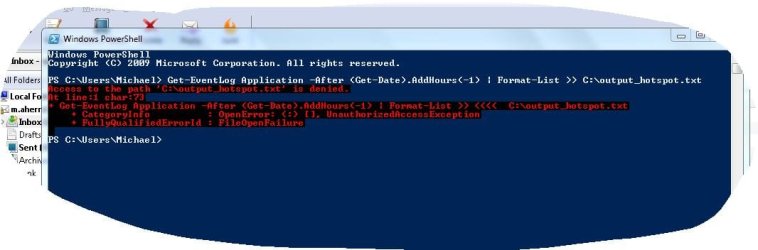
should be a capture when I post ...
Nothing showing in C:
 

Attachments

  • Capture.JPG
    Capture.JPG
    47.7 KB · Views: 4

My Computer My Computer

At a glance

Windows 7 Pro 64bit SP1Intel Core Duo CPU 2.20 GHz4 GB RAM
Computer type
PC/Desktop
Computer Manufacturer/Model Number
Toshiba Satellite L500
OS
Windows 7 Pro 64bit SP1
CPU
Intel Core Duo CPU 2.20 GHz
Motherboard
Model KSWAA (U2E1) Version PSLS3A-01301D
Memory
4 GB RAM
Sound Card
AMD High Definition Audio Device Realtek High Definition Aud
Monitor(s) Displays
Generic PnP Monitor on ATI Mobility Radeon HD 4600 Series
Okay, in hindsight guiding you through using eventlog would've been the better option but Im now determined to have this work :P

Thats saying you dont have access to the file - chances are you arent an Administrator of the machine by default, no matter. Change the code to the following:
Code:
 Get-EventLog Application -After (Get-Date).AddHours(-1) | Format-List >> C:\Users\Michael\Desktop\output_hotspot.txt
 

My Computer My Computer

At a glance

Windows 7 Ultimate x64, Windows 7 Professiona...i7-2630QM32.00 GBnVidia GTX 560M
Computer Manufacturer/Model Number
ASUS
OS
Windows 7 Ultimate x64, Windows 7 Professional x64, Windows XP x64 SP3
CPU
i7-2630QM
Memory
32.00 GB
Graphics Card(s)
nVidia GTX 560M
Monitor(s) Displays
Default 17`` & LG IPS234
Screen Resolution
1920 x 1080
Hard Drives
Internal:
120 SSD - OCZ Agility 3
750 HDD - Seagate Misc

External:
1000 HDD - Buffalo Ministation 3.0
2048 NHDD - Seagate Barracuda Green (Over 1GBPS Network)
Keyboard
tT eSports Challenger Ultimate
Mouse
Razer Deathadder Black Edition
Internet Speed
100 Mbps + 60 Mbps
i'm not only one who has ever used this laptop ... so have never had problem with Admin rights before ..

2nd capture will show result of new code
 

Attachments

  • Capture2.JPG
    Capture2.JPG
    126.5 KB · Views: 4

My Computer My Computer

At a glance

Windows 7 Pro 64bit SP1Intel Core Duo CPU 2.20 GHz4 GB RAM
Computer type
PC/Desktop
Computer Manufacturer/Model Number
Toshiba Satellite L500
OS
Windows 7 Pro 64bit SP1
CPU
Intel Core Duo CPU 2.20 GHz
Motherboard
Model KSWAA (U2E1) Version PSLS3A-01301D
Memory
4 GB RAM
Sound Card
AMD High Definition Audio Device Realtek High Definition Aud
Monitor(s) Displays
Generic PnP Monitor on ATI Mobility Radeon HD 4600 Series
You pasted the command a whole bunch of times there, only do it once

Plus I see it on your desktop, whats written in that file?
 

My Computer My Computer

At a glance

Windows 7 Ultimate x64, Windows 7 Professiona...i7-2630QM32.00 GBnVidia GTX 560M
Computer Manufacturer/Model Number
ASUS
OS
Windows 7 Ultimate x64, Windows 7 Professional x64, Windows XP x64 SP3
CPU
i7-2630QM
Memory
32.00 GB
Graphics Card(s)
nVidia GTX 560M
Monitor(s) Displays
Default 17`` & LG IPS234
Screen Resolution
1920 x 1080
Hard Drives
Internal:
120 SSD - OCZ Agility 3
750 HDD - Seagate Misc

External:
1000 HDD - Buffalo Ministation 3.0
2048 NHDD - Seagate Barracuda Green (Over 1GBPS Network)
Keyboard
tT eSports Challenger Ultimate
Mouse
Razer Deathadder Black Edition
Internet Speed
100 Mbps + 60 Mbps
Back
Top