Solved Creating an Installation disc

t-4-2

Banned
Local time
10:02 PM
Messages
997
Background :
Win 7 Home Premium 64-bit OEM version.
SP1 installed.
Already have :
4 Factory Default discs.
1 Repair disc.
Monthly file backup stored in external hard drive.
Periodical System Image backup.... approx. once every 2 weeks.

My goal :
To create a non-SP1 Installation DVD.

What has been done so far :
I have downloaded a Windows 7 Home Premium x64 (64-bit) English ISO
[LINK REMOVED]


I was told to use ImgBurn to burn the iso to DVD.
The Official ImgBurn Website

Thing is : I don't know which one to download from the link above.

Then I came across this tutorial from this forum :
http://www.sevenforums.com/tutorials/31541-windows-7-usb-dvd-download-tool.html

Now I am not sure which way to go.

Need someone to clear the fog for me.
Thank you.
 

My Computer

Computer Manufacturer/Model Number
Acer Aspire 7741Z
OS
Windows 7 Home Premium 64-bit, SP1
CPU
Intel Pentium P6200, Cores 2, 2.13 GHz
Memory
4 GB
Graphics Card(s)
Intel HD
Sound Card
unknown
Monitor(s) Displays
17.3 inches
Screen Resolution
1600 x 900
Hard Drives
640 GB, 5400 PRM
Are you confused by the multiple download mirrors at the IMGBURN download page? You can download from any one, if you're paranoid stick to the ones that say "provided by imgburn" or "provided by imgburn fast" or "provided by "majorgeeks".

Although, one would expect that since these links are provided by imgburn developers themselves, theres no need to doubt their integrity or cleanliness.
 

My Computer

Computer Manufacturer/Model Number
Too many to describe...
OS
Windows 7 x64 pro/ Windows 7 x86 Pro/ XP SP3 x86
Are you confused by the multiple download mirrors at the IMGBURN download page? You can download from any one, if you're paranoid stick to the ones that say "provided by imgburn" or "provided by imgburn fast" or "provided by "majorgeeks".

Although, one would expect that since these links are provided by imgburn developers themselves, theres no need to doubt their integrity or cleanliness.

Yes, that is what puzzles me.... which one.

I am also aware that I should burn in slow speed, 4x or 2x the speed.
Since I have never done that before, I am not sure if I am going to be given that speed choice or not.
 

My Computer

Computer Manufacturer/Model Number
Acer Aspire 7741Z
OS
Windows 7 Home Premium 64-bit, SP1
CPU
Intel Pentium P6200, Cores 2, 2.13 GHz
Memory
4 GB
Graphics Card(s)
Intel HD
Sound Card
unknown
Monitor(s) Displays
17.3 inches
Screen Resolution
1600 x 900
Hard Drives
640 GB, 5400 PRM
You can change the burn speed in imgburn though there is a lowest write speed for a given combo of drive/firmware/media. If you check in the disk info with a blank disk in the drive, imgburn will show the supported speeds. But again writing at low speeds is a precaution and not something mandatory. Just go ahead, set the lowest speed option and write away.
 

My Computer

Computer Manufacturer/Model Number
Too many to describe...
OS
Windows 7 x64 pro/ Windows 7 x86 Pro/ XP SP3 x86
You can change the burn speed in imgburn though there is a lowest write speed for a given combo of drive/firmware/media. If you check in the disk info with a blank disk in the drive, imgburn will show the supported speeds. But again writing at low speeds is a precaution and not something mandatory. Just go ahead, set the lowest speed option and write away.


Thank you.

t-4-2

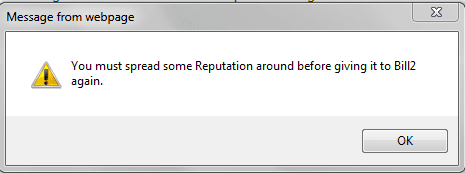
Hey, why is it that I can't give you the rep point ?

It says I had to spread the rep points .
I never gave you one, not that I can remember.
So, what gives ?

Image 4.png
 

My Computer

Computer Manufacturer/Model Number
Acer Aspire 7741Z
OS
Windows 7 Home Premium 64-bit, SP1
CPU
Intel Pentium P6200, Cores 2, 2.13 GHz
Memory
4 GB
Graphics Card(s)
Intel HD
Sound Card
unknown
Monitor(s) Displays
17.3 inches
Screen Resolution
1600 x 900
Hard Drives
640 GB, 5400 PRM
Theres a conspiracy...hmm...lemme ask John.
 

My Computer

Computer Manufacturer/Model Number
Too many to describe...
OS
Windows 7 x64 pro/ Windows 7 x86 Pro/ XP SP3 x86
Thank you.

t-4-2

Hey, why is it that I can't give you the rep point ?

It says I had to spread the rep points .
I never gave you one, not that I can remember.
So, what gives ?

View attachment 164976

To stop people keep repping the same members you must rep 16 others before repping the same person again.

You last repped bill on May 28 which was 14 reps ago.

BTW dont post live ISO links in the forums, it's against the rules.
 

My Computer

Computer type
PC/Desktop
OS
Windows 11

My Computer

Computer Manufacturer/Model Number
* BFK Customs *
OS
W 7 64-bit Ultimate
CPU
Intel Q9550 Yorkfield
Motherboard
ASUS P5Q Pro
Memory
8GB Dominator 8500C5D
Graphics Card(s)
ATI : XFX 5870
Sound Card
Realtek HD Audio 7-1
Monitor(s) Displays
1x 47" LCD HDMI & 3x 26" LCD HDMI
Screen Resolution
1920x1080P & 1920x1200
Hard Drives
1x 80GB Intel X25-M G2 SSD : 1x 500GB & 1x 640GB WD Caviar Black(s)
PSU
Corsair 620HX
Case
Cooler Master RC-690
Cooling
Tuniq Tower 120, 2x 140mm and 3x 120mm case fans
Keyboard
Microsoft 500
Mouse
Razer Diamondback 3G
Internet Speed
14 Mb/s
Other Info
1x Koutech 3Gb/s SATA HDD Hot Swap Rack
Update on my result of creating an Installation DVD for Win 7 Home Premium 64-bit

I created 2 Installation DVDs :

One by using Imgburn : How to create a Windows Vista / 7 installation disc (bootable) using ImgBurn - ImgBurn Support Forum

One by using Windows 7 USB/DVD Download Tool : http://www.sevenforums.com/tutorials/31541-windows-7-usb-dvd-download-tool.html

The latter is simple and straight forward. Even a novice can do it with ease.
The former takes more steps and could trip up a novice.

I have a stupid question : how do I know the DVD actually works ?
I won't use it until I have to, and xxxxx will hit the fan if it turns out to be a dud by that time.
 

My Computer

Computer Manufacturer/Model Number
Acer Aspire 7741Z
OS
Windows 7 Home Premium 64-bit, SP1
CPU
Intel Pentium P6200, Cores 2, 2.13 GHz
Memory
4 GB
Graphics Card(s)
Intel HD
Sound Card
unknown
Monitor(s) Displays
17.3 inches
Screen Resolution
1600 x 900
Hard Drives
640 GB, 5400 PRM
Let it auto-start in the DVD drive in Windows and X out before the install actually starts. ;)
 

My Computer

Computer Manufacturer/Model Number
* BFK Customs *
OS
W 7 64-bit Ultimate
CPU
Intel Q9550 Yorkfield
Motherboard
ASUS P5Q Pro
Memory
8GB Dominator 8500C5D
Graphics Card(s)
ATI : XFX 5870
Sound Card
Realtek HD Audio 7-1
Monitor(s) Displays
1x 47" LCD HDMI & 3x 26" LCD HDMI
Screen Resolution
1920x1080P & 1920x1200
Hard Drives
1x 80GB Intel X25-M G2 SSD : 1x 500GB & 1x 640GB WD Caviar Black(s)
PSU
Corsair 620HX
Case
Cooler Master RC-690
Cooling
Tuniq Tower 120, 2x 140mm and 3x 120mm case fans
Keyboard
Microsoft 500
Mouse
Razer Diamondback 3G
Internet Speed
14 Mb/s
Other Info
1x Koutech 3Gb/s SATA HDD Hot Swap Rack

My Computer

Computer Manufacturer/Model Number
Acer Aspire 7741Z
OS
Windows 7 Home Premium 64-bit, SP1
CPU
Intel Pentium P6200, Cores 2, 2.13 GHz
Memory
4 GB
Graphics Card(s)
Intel HD
Sound Card
unknown
Monitor(s) Displays
17.3 inches
Screen Resolution
1600 x 900
Hard Drives
640 GB, 5400 PRM
Thank you.

t-4-2

Hey, why is it that I can't give you the rep point ?

It says I had to spread the rep points .
I never gave you one, not that I can remember.
So, what gives ?

View attachment 164976

To stop people keep repping the same members you must rep 16 others before repping the same person again.

You last repped bill on May 28 which was 14 reps ago.

BTW dont post live ISO links in the forums, it's against the rules.


....BTW dont post live ISO links in the forums, it's against the rules

I did not know that, particulary when I saw tutorial in this forum on how to burn iso to dvd.

Sorry about that.
 

My Computer

Computer Manufacturer/Model Number
Acer Aspire 7741Z
OS
Windows 7 Home Premium 64-bit, SP1
CPU
Intel Pentium P6200, Cores 2, 2.13 GHz
Memory
4 GB
Graphics Card(s)
Intel HD
Sound Card
unknown
Monitor(s) Displays
17.3 inches
Screen Resolution
1600 x 900
Hard Drives
640 GB, 5400 PRM

My Computer

Computer Manufacturer/Model Number
Acer Aspire 7741Z
OS
Windows 7 Home Premium 64-bit, SP1
CPU
Intel Pentium P6200, Cores 2, 2.13 GHz
Memory
4 GB
Graphics Card(s)
Intel HD
Sound Card
unknown
Monitor(s) Displays
17.3 inches
Screen Resolution
1600 x 900
Hard Drives
640 GB, 5400 PRM
Back
Top