Creating own theme pack windows 7

If you edit the original aero you will still need to use universal theme patcher or UxStyle Core, UxStyle Core is a service and is not effected when you use SFC scan.
Here is a tutorial on how to use UxStyle Core make sure that you are not using universal theme patcher at the same time, run the SFC scan first and then follow the tutorial.
http://www.sevenforums.com/tutorials/34579-enabling-custom-themes-windows-7-a.html

Jerry

But why i will need universal theme patcher or UxStyle Core if i edit original Aero theme ? It is not a third party theme.

And what UxStyle Core does in pc ? does it modifies system files ?. Because :

1] I want to use my own designed theme.
2] I don't want my system files to be modified or patched.
 

My Computer

Computer type
PC/Desktop
OS
Microsoft Windows 7 Ultimate 32-bit 7601 Multiprocessor Free Service Pack 1
CPU
Intel(R) Pentium(R) Dual CPU E2160 @ 1.80GHz
Motherboard
Intel DL-G41MX3-LT
Memory
2.00 GB
Graphics Card(s)
Intel(R) G41 Express Chipset
Sound Card
Realtek High Definition Audio
Screen Resolution
1024 x 768 x 32 bits (4294967296 colors) @ 75 Hz
Hard Drives
ST500DM002-1BD142 ATA Device
But why i will need universal theme patcher or UxStyle Core if i edit original Aero theme ? It is not a third party theme.
As soon as you edit it it becomes a third-party theme and Windows will not recognize it as the original Aero theme.

And what UxStyle Core does in pc ? does it modifies system files ?. Because :

1] I want to use my own designed theme.
2] I don't want my system files to be modified or patched.
UxStyle Core does not modify or patch any of the system files it is only a service that runs in the background (it is the one I prefer to use) to allow unsigned themes.

Jerry
 

My Computer

Computer type
Laptop
Computer Manufacturer/Model Number
Sager NP9170
OS
Win 7 Pro x64 / Win 10 Pro
CPU
Intel(R) Core(TM) i7-3630QM CPU @ 2.40GHz
Motherboard
CLEVO P170EM
Memory
12 GB
Graphics Card(s)
(1) Intel(R) HD Graphics 4000 (2) NVIDIA GeForce GTX 675M
Sound Card
(1) Realtek High Definition Audio (2) Intel(R) Display Aud
Monitor(s) Displays
17.3
Screen Resolution
1920x1080
Hard Drives
(1) Samsung 860 EVO 500GB(OS) (1) Samsung 860 EVO 500GB(Data)
Keyboard
Backlite
Antivirus
MSE, Malwarebytes Pro
Browser
Firefox
Other Info
DESKTOP: Custom-built.
OS: Win 10 Pro x64.
CASE: Rosewill R5.
CPU: Intel I5 4670K CPU @ 3.40GHz.
CPU COOLER: Cool Master Hyper 212 EVO.
MOTHERBOARD: Asus Z87-A.
MEMORY: Kingston HyperX 2x4 GB.
GPU: Nvidia Geforce 650 TI.
PSU: Corsair TX750.
DRIVES: (1) Samsung 840 120 GB SSD (2) Western Digital blue 500 GB 7200 RPM.
UxStyle Core does not modify or patch any of the system files it is only a service that runs in the background (it is the one I prefer to use) to allow unsigned themes.

Jerry

You mean UxStyle Core is nothing to do with sfc?
And do i need to run program at each start up or it will autorun ?
 

My Computer

Computer type
PC/Desktop
OS
Microsoft Windows 7 Ultimate 32-bit 7601 Multiprocessor Free Service Pack 1
CPU
Intel(R) Pentium(R) Dual CPU E2160 @ 1.80GHz
Motherboard
Intel DL-G41MX3-LT
Memory
2.00 GB
Graphics Card(s)
Intel(R) G41 Express Chipset
Sound Card
Realtek High Definition Audio
Screen Resolution
1024 x 768 x 32 bits (4294967296 colors) @ 75 Hz
Hard Drives
ST500DM002-1BD142 ATA Device

My Computer

Computer type
Laptop
Computer Manufacturer/Model Number
Sager NP9170
OS
Win 7 Pro x64 / Win 10 Pro
CPU
Intel(R) Core(TM) i7-3630QM CPU @ 2.40GHz
Motherboard
CLEVO P170EM
Memory
12 GB
Graphics Card(s)
(1) Intel(R) HD Graphics 4000 (2) NVIDIA GeForce GTX 675M
Sound Card
(1) Realtek High Definition Audio (2) Intel(R) Display Aud
Monitor(s) Displays
17.3
Screen Resolution
1920x1080
Hard Drives
(1) Samsung 860 EVO 500GB(OS) (1) Samsung 860 EVO 500GB(Data)
Keyboard
Backlite
Antivirus
MSE, Malwarebytes Pro
Browser
Firefox
Other Info
DESKTOP: Custom-built.
OS: Win 10 Pro x64.
CASE: Rosewill R5.
CPU: Intel I5 4670K CPU @ 3.40GHz.
CPU COOLER: Cool Master Hyper 212 EVO.
MOTHERBOARD: Asus Z87-A.
MEMORY: Kingston HyperX 2x4 GB.
GPU: Nvidia Geforce 650 TI.
PSU: Corsair TX750.
DRIVES: (1) Samsung 840 120 GB SSD (2) Western Digital blue 500 GB 7200 RPM.
thanks
 

My Computer

Computer type
PC/Desktop
OS
Microsoft Windows 7 Ultimate 32-bit 7601 Multiprocessor Free Service Pack 1
CPU
Intel(R) Pentium(R) Dual CPU E2160 @ 1.80GHz
Motherboard
Intel DL-G41MX3-LT
Memory
2.00 GB
Graphics Card(s)
Intel(R) G41 Express Chipset
Sound Card
Realtek High Definition Audio
Screen Resolution
1024 x 768 x 32 bits (4294967296 colors) @ 75 Hz
Hard Drives
ST500DM002-1BD142 ATA Device
You're welcome
 

My Computer

Computer type
Laptop
Computer Manufacturer/Model Number
Sager NP9170
OS
Win 7 Pro x64 / Win 10 Pro
CPU
Intel(R) Core(TM) i7-3630QM CPU @ 2.40GHz
Motherboard
CLEVO P170EM
Memory
12 GB
Graphics Card(s)
(1) Intel(R) HD Graphics 4000 (2) NVIDIA GeForce GTX 675M
Sound Card
(1) Realtek High Definition Audio (2) Intel(R) Display Aud
Monitor(s) Displays
17.3
Screen Resolution
1920x1080
Hard Drives
(1) Samsung 860 EVO 500GB(OS) (1) Samsung 860 EVO 500GB(Data)
Keyboard
Backlite
Antivirus
MSE, Malwarebytes Pro
Browser
Firefox
Other Info
DESKTOP: Custom-built.
OS: Win 10 Pro x64.
CASE: Rosewill R5.
CPU: Intel I5 4670K CPU @ 3.40GHz.
CPU COOLER: Cool Master Hyper 212 EVO.
MOTHERBOARD: Asus Z87-A.
MEMORY: Kingston HyperX 2x4 GB.
GPU: Nvidia Geforce 650 TI.
PSU: Corsair TX750.
DRIVES: (1) Samsung 840 120 GB SSD (2) Western Digital blue 500 GB 7200 RPM.
Which one of this messes up with system files and relates with SFC ?

-Applying custom start orb.
-Changing navigation buttons (back, forward in the left corner of window screen)
-Control panel's left slide bar items background

If all of above messes up with system files then how can i apply them without messing up with system files.

Specially about Applying custom start orb.
 

My Computer

Computer type
PC/Desktop
OS
Microsoft Windows 7 Ultimate 32-bit 7601 Multiprocessor Free Service Pack 1
CPU
Intel(R) Pentium(R) Dual CPU E2160 @ 1.80GHz
Motherboard
Intel DL-G41MX3-LT
Memory
2.00 GB
Graphics Card(s)
Intel(R) G41 Express Chipset
Sound Card
Realtek High Definition Audio
Screen Resolution
1024 x 768 x 32 bits (4294967296 colors) @ 75 Hz
Hard Drives
ST500DM002-1BD142 ATA Device
It's the Universal Theme Patcher that modify system files and will be undone if you use SFC.

You can use Theme Resource Changer to change those items (start orb, navigation buttons, left side of the control panel) have a look at this How to use theme resource changer you will have to sign up and become a member before you can see the images and download the program from there.

Jerry
 

My Computer

Computer type
Laptop
Computer Manufacturer/Model Number
Sager NP9170
OS
Win 7 Pro x64 / Win 10 Pro
CPU
Intel(R) Core(TM) i7-3630QM CPU @ 2.40GHz
Motherboard
CLEVO P170EM
Memory
12 GB
Graphics Card(s)
(1) Intel(R) HD Graphics 4000 (2) NVIDIA GeForce GTX 675M
Sound Card
(1) Realtek High Definition Audio (2) Intel(R) Display Aud
Monitor(s) Displays
17.3
Screen Resolution
1920x1080
Hard Drives
(1) Samsung 860 EVO 500GB(OS) (1) Samsung 860 EVO 500GB(Data)
Keyboard
Backlite
Antivirus
MSE, Malwarebytes Pro
Browser
Firefox
Other Info
DESKTOP: Custom-built.
OS: Win 10 Pro x64.
CASE: Rosewill R5.
CPU: Intel I5 4670K CPU @ 3.40GHz.
CPU COOLER: Cool Master Hyper 212 EVO.
MOTHERBOARD: Asus Z87-A.
MEMORY: Kingston HyperX 2x4 GB.
GPU: Nvidia Geforce 650 TI.
PSU: Corsair TX750.
DRIVES: (1) Samsung 840 120 GB SSD (2) Western Digital blue 500 GB 7200 RPM.
It's the Universal Theme Patcher that modify system files and will be undone if you use SFC.

You can use Theme Resource Changer to change those items (start orb, navigation buttons, left side of the control panel) have a look at this How to use theme resource changer you will have to sign up and become a member before you can see the images and download the program from there.

Jerry

You mean as Ux style core, Theme Resource changer doesn't mess up with system files?
so can I apply own start orb using Theme Resource changer.
 

My Computer

Computer type
PC/Desktop
OS
Microsoft Windows 7 Ultimate 32-bit 7601 Multiprocessor Free Service Pack 1
CPU
Intel(R) Pentium(R) Dual CPU E2160 @ 1.80GHz
Motherboard
Intel DL-G41MX3-LT
Memory
2.00 GB
Graphics Card(s)
Intel(R) G41 Express Chipset
Sound Card
Realtek High Definition Audio
Screen Resolution
1024 x 768 x 32 bits (4294967296 colors) @ 75 Hz
Hard Drives
ST500DM002-1BD142 ATA Device
You mean as Ux style core, Theme Resource changer doesn't mess up with system files?
so can I apply own start orb using Theme Resource changer.

Yes.

Jerry
 

My Computer

Computer type
Laptop
Computer Manufacturer/Model Number
Sager NP9170
OS
Win 7 Pro x64 / Win 10 Pro
CPU
Intel(R) Core(TM) i7-3630QM CPU @ 2.40GHz
Motherboard
CLEVO P170EM
Memory
12 GB
Graphics Card(s)
(1) Intel(R) HD Graphics 4000 (2) NVIDIA GeForce GTX 675M
Sound Card
(1) Realtek High Definition Audio (2) Intel(R) Display Aud
Monitor(s) Displays
17.3
Screen Resolution
1920x1080
Hard Drives
(1) Samsung 860 EVO 500GB(OS) (1) Samsung 860 EVO 500GB(Data)
Keyboard
Backlite
Antivirus
MSE, Malwarebytes Pro
Browser
Firefox
Other Info
DESKTOP: Custom-built.
OS: Win 10 Pro x64.
CASE: Rosewill R5.
CPU: Intel I5 4670K CPU @ 3.40GHz.
CPU COOLER: Cool Master Hyper 212 EVO.
MOTHERBOARD: Asus Z87-A.
MEMORY: Kingston HyperX 2x4 GB.
GPU: Nvidia Geforce 650 TI.
PSU: Corsair TX750.
DRIVES: (1) Samsung 840 120 GB SSD (2) Western Digital blue 500 GB 7200 RPM.
You mean as Ux style core, Theme Resource changer doesn't mess up with system files?
so can I apply own start orb using Theme Resource changer.

Yes.

Jerry

You mean after applying theme resource changer if i do sfc scan, the applied theme will not be affected.
 

My Computer

Computer type
PC/Desktop
OS
Microsoft Windows 7 Ultimate 32-bit 7601 Multiprocessor Free Service Pack 1
CPU
Intel(R) Pentium(R) Dual CPU E2160 @ 1.80GHz
Motherboard
Intel DL-G41MX3-LT
Memory
2.00 GB
Graphics Card(s)
Intel(R) G41 Express Chipset
Sound Card
Realtek High Definition Audio
Screen Resolution
1024 x 768 x 32 bits (4294967296 colors) @ 75 Hz
Hard Drives
ST500DM002-1BD142 ATA Device
Bongo, 3rd party "window blend" theme stopped showing it's effect when I installed another attached "Metro" theme. I did just a copy paste Metro theme file in resource folder. And in personalization when i applied it, the classic old theme started looking and my blend theme is also not showing it's effect.

I tried sfc. It didn't find any integrity. I restarted pc. but it didn't work.
 
Last edited:

My Computer

Computer type
PC/Desktop
OS
Microsoft Windows 7 Ultimate 32-bit 7601 Multiprocessor Free Service Pack 1
CPU
Intel(R) Pentium(R) Dual CPU E2160 @ 1.80GHz
Motherboard
Intel DL-G41MX3-LT
Memory
2.00 GB
Graphics Card(s)
Intel(R) G41 Express Chipset
Sound Card
Realtek High Definition Audio
Screen Resolution
1024 x 768 x 32 bits (4294967296 colors) @ 75 Hz
Hard Drives
ST500DM002-1BD142 ATA Device

My Computer

Computer type
PC/Desktop
OS
Microsoft Windows 7 Ultimate 32-bit 7601 Multiprocessor Free Service Pack 1
CPU
Intel(R) Pentium(R) Dual CPU E2160 @ 1.80GHz
Motherboard
Intel DL-G41MX3-LT
Memory
2.00 GB
Graphics Card(s)
Intel(R) G41 Express Chipset
Sound Card
Realtek High Definition Audio
Screen Resolution
1024 x 768 x 32 bits (4294967296 colors) @ 75 Hz
Hard Drives
ST500DM002-1BD142 ATA Device
Ok. after re installing ux style, it worked again. But still i want to know why this problem occured?
 

My Computer

Computer type
PC/Desktop
OS
Microsoft Windows 7 Ultimate 32-bit 7601 Multiprocessor Free Service Pack 1
CPU
Intel(R) Pentium(R) Dual CPU E2160 @ 1.80GHz
Motherboard
Intel DL-G41MX3-LT
Memory
2.00 GB
Graphics Card(s)
Intel(R) G41 Express Chipset
Sound Card
Realtek High Definition Audio
Screen Resolution
1024 x 768 x 32 bits (4294967296 colors) @ 75 Hz
Hard Drives
ST500DM002-1BD142 ATA Device
You mean after applying theme resource changer if i do sfc scan, the applied theme will not be affected.
Yes.

Ok. after re installing ux style, it worked again. But still i want to know why this problem occured?

Sometime UxStyle Core service will stop and needs restarted.
If it happens again try this 1st.
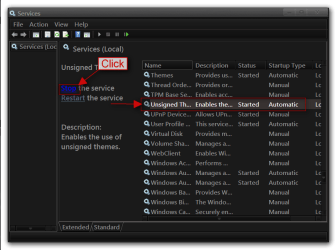
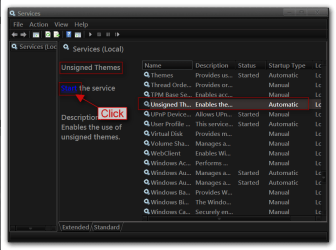
Click on the Start Button type in Services In the search box and then click on Services
1.png

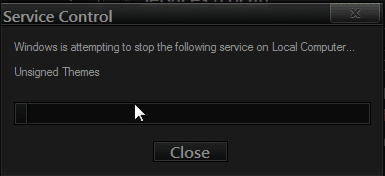
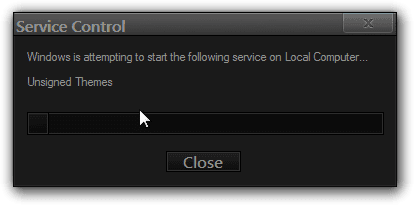
Scroll down until you see Unsigned themes it in click on the Stop text and let it stop after that click on Start text and see if that works. Your screen may blink when you do this.
4.pngstop.PNG
5.pngstart.png


Jerry
 

My Computer

Computer type
Laptop
Computer Manufacturer/Model Number
Sager NP9170
OS
Win 7 Pro x64 / Win 10 Pro
CPU
Intel(R) Core(TM) i7-3630QM CPU @ 2.40GHz
Motherboard
CLEVO P170EM
Memory
12 GB
Graphics Card(s)
(1) Intel(R) HD Graphics 4000 (2) NVIDIA GeForce GTX 675M
Sound Card
(1) Realtek High Definition Audio (2) Intel(R) Display Aud
Monitor(s) Displays
17.3
Screen Resolution
1920x1080
Hard Drives
(1) Samsung 860 EVO 500GB(OS) (1) Samsung 860 EVO 500GB(Data)
Keyboard
Backlite
Antivirus
MSE, Malwarebytes Pro
Browser
Firefox
Other Info
DESKTOP: Custom-built.
OS: Win 10 Pro x64.
CASE: Rosewill R5.
CPU: Intel I5 4670K CPU @ 3.40GHz.
CPU COOLER: Cool Master Hyper 212 EVO.
MOTHERBOARD: Asus Z87-A.
MEMORY: Kingston HyperX 2x4 GB.
GPU: Nvidia Geforce 650 TI.
PSU: Corsair TX750.
DRIVES: (1) Samsung 840 120 GB SSD (2) Western Digital blue 500 GB 7200 RPM.
Thanks.

1] My next query is can uxstyle and theme resource changer work together?

2] And if I want to use custom start orb, I will need to create explorer.exe folder in resources>theme, then,
I have to add custom start orb PNG (not BMP) image in resources>theme>explorer.exe. and then I have to install theme resource changer and restart. Am i right ?

But, adding just a single image in resources>theme>explorer.exe can work? Or

3] I do need to add all other bitmap images from win32>explorer.exe to resources>theme>explorer.exe folder (in png format) and then I have to add my own start orb (.png) in resources>theme>explorer.exe .
right ?

which one is right 2] or 3] ?

And if 3] is right then it will take too much time to convert all bmp images in png. So, is there any way to convert all of them at the same time?
 

My Computer

Computer type
PC/Desktop
OS
Microsoft Windows 7 Ultimate 32-bit 7601 Multiprocessor Free Service Pack 1
CPU
Intel(R) Pentium(R) Dual CPU E2160 @ 1.80GHz
Motherboard
Intel DL-G41MX3-LT
Memory
2.00 GB
Graphics Card(s)
Intel(R) G41 Express Chipset
Sound Card
Realtek High Definition Audio
Screen Resolution
1024 x 768 x 32 bits (4294967296 colors) @ 75 Hz
Hard Drives
ST500DM002-1BD142 ATA Device
And If I need to theme resource changer, i would need to create other folders too in resources>theme (i.e. shell and explorerframe) in which i need to add extracted bmp (in png format) from win32?

Adding just images can work ? what about other folders except BITMAP exist in those 3 system files?
 

My Computer

Computer type
PC/Desktop
OS
Microsoft Windows 7 Ultimate 32-bit 7601 Multiprocessor Free Service Pack 1
CPU
Intel(R) Pentium(R) Dual CPU E2160 @ 1.80GHz
Motherboard
Intel DL-G41MX3-LT
Memory
2.00 GB
Graphics Card(s)
Intel(R) G41 Express Chipset
Sound Card
Realtek High Definition Audio
Screen Resolution
1024 x 768 x 32 bits (4294967296 colors) @ 75 Hz
Hard Drives
ST500DM002-1BD142 ATA Device
1] My next query is can uxstyle and theme resource changer work together?
Yes

2] And if I want to use custom start orb, I will need to create explorer.exe folder in resources>theme, then,
I have to add custom start orb PNG (not BMP) image in resources>theme>explorer.exe. and then I have to install theme resource changer and restart. Am i right ?
But, adding just a single image in resources>theme>explorer.exe can work?
Yes

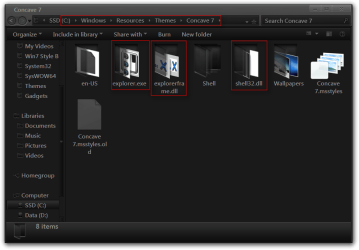
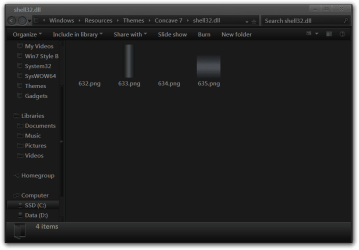
And If I need to theme resource changer, i would need to create other folders too in resources>theme (i.e. shell and explorerframe) in which i need to add extracted bmp (in png format) from win32?
Yes


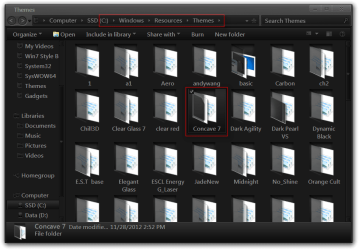
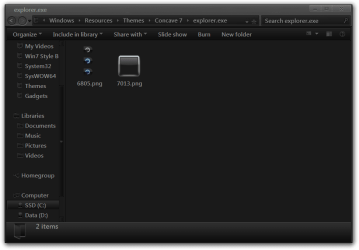
Here are some screenshots showing how it is set up.

Jerry
1.png

2.png

explorer.exe.png

explorerframe.dll.png

shell32.dll.png
 

My Computer

Computer type
Laptop
Computer Manufacturer/Model Number
Sager NP9170
OS
Win 7 Pro x64 / Win 10 Pro
CPU
Intel(R) Core(TM) i7-3630QM CPU @ 2.40GHz
Motherboard
CLEVO P170EM
Memory
12 GB
Graphics Card(s)
(1) Intel(R) HD Graphics 4000 (2) NVIDIA GeForce GTX 675M
Sound Card
(1) Realtek High Definition Audio (2) Intel(R) Display Aud
Monitor(s) Displays
17.3
Screen Resolution
1920x1080
Hard Drives
(1) Samsung 860 EVO 500GB(OS) (1) Samsung 860 EVO 500GB(Data)
Keyboard
Backlite
Antivirus
MSE, Malwarebytes Pro
Browser
Firefox
Other Info
DESKTOP: Custom-built.
OS: Win 10 Pro x64.
CASE: Rosewill R5.
CPU: Intel I5 4670K CPU @ 3.40GHz.
CPU COOLER: Cool Master Hyper 212 EVO.
MOTHERBOARD: Asus Z87-A.
MEMORY: Kingston HyperX 2x4 GB.
GPU: Nvidia Geforce 650 TI.
PSU: Corsair TX750.
DRIVES: (1) Samsung 840 120 GB SSD (2) Western Digital blue 500 GB 7200 RPM.
I installed theme resource changer
I added orb image (6805.png) in resources>themes>my theme name>explorer.exe
restarted pc.
Applied theme again.

But didn't work.
 
Last edited:

My Computer

Computer type
PC/Desktop
OS
Microsoft Windows 7 Ultimate 32-bit 7601 Multiprocessor Free Service Pack 1
CPU
Intel(R) Pentium(R) Dual CPU E2160 @ 1.80GHz
Motherboard
Intel DL-G41MX3-LT
Memory
2.00 GB
Graphics Card(s)
Intel(R) G41 Express Chipset
Sound Card
Realtek High Definition Audio
Screen Resolution
1024 x 768 x 32 bits (4294967296 colors) @ 75 Hz
Hard Drives
ST500DM002-1BD142 ATA Device
Did you install theme resource changer x86 or x64?

Zip up your theme folder and post it and I will look at it.

Jerry
 

My Computer

Computer type
Laptop
Computer Manufacturer/Model Number
Sager NP9170
OS
Win 7 Pro x64 / Win 10 Pro
CPU
Intel(R) Core(TM) i7-3630QM CPU @ 2.40GHz
Motherboard
CLEVO P170EM
Memory
12 GB
Graphics Card(s)
(1) Intel(R) HD Graphics 4000 (2) NVIDIA GeForce GTX 675M
Sound Card
(1) Realtek High Definition Audio (2) Intel(R) Display Aud
Monitor(s) Displays
17.3
Screen Resolution
1920x1080
Hard Drives
(1) Samsung 860 EVO 500GB(OS) (1) Samsung 860 EVO 500GB(Data)
Keyboard
Backlite
Antivirus
MSE, Malwarebytes Pro
Browser
Firefox
Other Info
DESKTOP: Custom-built.
OS: Win 10 Pro x64.
CASE: Rosewill R5.
CPU: Intel I5 4670K CPU @ 3.40GHz.
CPU COOLER: Cool Master Hyper 212 EVO.
MOTHERBOARD: Asus Z87-A.
MEMORY: Kingston HyperX 2x4 GB.
GPU: Nvidia Geforce 650 TI.
PSU: Corsair TX750.
DRIVES: (1) Samsung 840 120 GB SSD (2) Western Digital blue 500 GB 7200 RPM.
Back
Top