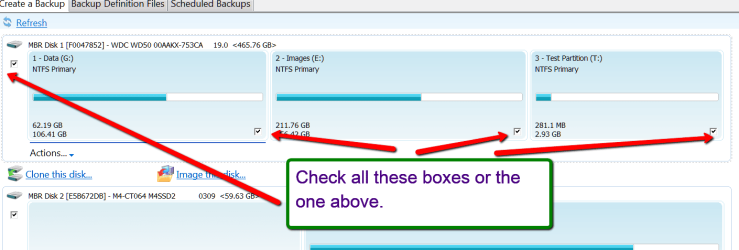
I'm running Windows 7 Pro 64 on a Lenovo T430u, and I would love to reinstall a clean copy of Windows without all the bloatware that came preinstalled (not to mention the ~15G of recovery partitions). But I do want to create an image of the OEM partitions in case I need to revert the drive to factory status at some point in the future.
I am running Windows "Create a system image" tool right now, and I did select all three partitions for it to back up (System_drv, Windows7_OS, and Lenovo_Recovery). I have never used Windows-made images before, so I want to be sure that this is essentially an image of the whole drive (including MBR, etc), so when the time comes if I need to restore to factory settings I can do so by restoring this image and the three partitions. Is this the case?
I'm also installing Macrium free at the moment if that would be a better tool for this job.
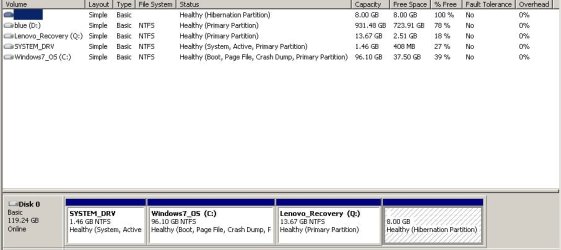
thanks. I attached a screenshot of Disk Management if that is needed. You can ignore the Blue ( D: ) drive as that's my external USB backup drive.
I am running Windows "Create a system image" tool right now, and I did select all three partitions for it to back up (System_drv, Windows7_OS, and Lenovo_Recovery). I have never used Windows-made images before, so I want to be sure that this is essentially an image of the whole drive (including MBR, etc), so when the time comes if I need to restore to factory settings I can do so by restoring this image and the three partitions. Is this the case?
I'm also installing Macrium free at the moment if that would be a better tool for this job.
thanks. I attached a screenshot of Disk Management if that is needed. You can ignore the Blue ( D: ) drive as that's my external USB backup drive.
Attachments
My Computer
At a glance
Win 7 Ultimate x64AMD Fx6200 Six CoreCorsair Vengeance 8 GB (2X4 GB) PC3-12800 160...Asus GTX 650 Ti Boost DirectCU II (2 GB)
- Computer type
- PC/Desktop
- Computer Manufacturer/Model Number
- Custom build
- OS
- Win 7 Ultimate x64
- CPU
- AMD Fx6200 Six Core
- Motherboard
- Asus M5A99x Evo
- Memory
- Corsair Vengeance 8 GB (2X4 GB) PC3-12800 1600mHz DDR3
- Graphics Card(s)
- Asus GTX 650 Ti Boost DirectCU II (2 GB)
- Hard Drives
- Crucial MX100 256G (boot)
Hitachi 1TB
WD Black 1TB
- Antivirus
- MSE
- Browser
- Chrome