Solved Creating additional partition makes all partitions non-bootable

Yup, an upgrade is something for the future, here I'm just after a slice of the HD for data because that's how I've always worked. A lot seems to hinge on what partitions my existing backup utilities are able to include, so I'll fire them up and find out tomorrow. Is the BIOS always completely independent of Windows 7, so that Windows could only affect the booting in the sense of making partitions non-bootable or deleting them etc? I'm pretty sure the BIOS was its own boss in XP, but I heard that these days it has to consult Win10, because of UEFI. Aomei Backup - I downloaded the .iso that contains it, remember trying it a year or so back on XP and not getting very far, but the problem was that it just seemed to be a Windows program with no way to make the bootable media, but the .iso will do that.
 

My Computer My Computer

Computer type
Laptop
Computer Manufacturer/Model Number
HP Probook
OS
Win 7 Pro 32-bit
I will probably do an updated version of that x86 iso soon.
 

My Computers My Computers

System One System Two

  • Computer type
    PC/Desktop
    OS
    7 X64
    CPU
    i5 8400
    Motherboard
    gigabyte b365m ds3h
    Memory
    2x8gb 3200mhz
    Hard Drives
    various
    PSU
    pure power 11 400w cm
    Case
    Coolermaster
    Cooling
    cryorig m9i
  • Computer type
    PC/Desktop
    OS
    7x64
    CPU
    g5400
    Motherboard
    ga b365m ds3h
    Memory
    8gb ddr4 2400
    PSU
    xfx pro 450w
Updated x86 boot media. Minor bug fixes, updated drivers, added drivers for Ryzen, new versions of Aomei Backupper, PartAssist,WinNtSetup, Recuva, Dism++,DiskGenius, added shadowcopyview.

32 bit
17514x86.iso


64 bit
17514x64-v9.iso
 
Last edited:

My Computers My Computers

System One System Two

  • Computer type
    PC/Desktop
    OS
    7 X64
    CPU
    i5 8400
    Motherboard
    gigabyte b365m ds3h
    Memory
    2x8gb 3200mhz
    Hard Drives
    various
    PSU
    pure power 11 400w cm
    Case
    Coolermaster
    Cooling
    cryorig m9i
  • Computer type
    PC/Desktop
    OS
    7x64
    CPU
    g5400
    Motherboard
    ga b365m ds3h
    Memory
    8gb ddr4 2400
    PSU
    xfx pro 450w
Been wrestling with the devil in the detail here. For some reason Win7's own "complete" drive imaging tool omits HP Tools from its images, and only seems to see the other 3, though it made all 4 volumes bootable again. Unexpectedly I found the contents of the Tools partition were gone after recovery. I was able to restore it from a Ghost backup (Ghost is proving unreliable for reversing the damage of repartitioning, though it works well on most other things). That showed the contents aren't important, though deleting a partition as opposed to just its data is a deeper change. Still thinking....... The new .iso looks fascinating, could well turn out to be useful along the road. Thanks!
 

My Computer My Computer

Computer type
Laptop
Computer Manufacturer/Model Number
HP Probook
OS
Win 7 Pro 32-bit
I decided to zap the HP Tools volume as it's a less involved procedure than with the 300mb one. So after restoring all to the original state, I deleted HP Tools and was easily able to shrink the C partition and create my data drive from the free space without having to render everything unbootable. Win7's disk manager did the whole job. Can't see any side effects yet. But I need to look carefully at my backup images. Knowing that partition changes can unexpectedly make them ineffective or destructive, they're hard to test, and if any side effects do turn up, it could be hard to recover. Naturally I'll make some new images - they'll almost certainly work fine - and mark the others as doomsday options.
 

My Computer My Computer

Computer type
Laptop
Computer Manufacturer/Model Number
HP Probook
OS
Win 7 Pro 32-bit
You shouldn't have any problems.

The HP partitions were just so you can reset to factory condition.

If you want to pass on or sell your machine in the future, you can do a format and clean reinstall with the regular MS win7 installation media. But you must have a valid license key.
 

My Computers My Computers

System One System Two

  • Computer type
    PC/Desktop
    OS
    7 X64
    CPU
    i5 8400
    Motherboard
    gigabyte b365m ds3h
    Memory
    2x8gb 3200mhz
    Hard Drives
    various
    PSU
    pure power 11 400w cm
    Case
    Coolermaster
    Cooling
    cryorig m9i
  • Computer type
    PC/Desktop
    OS
    7x64
    CPU
    g5400
    Motherboard
    ga b365m ds3h
    Memory
    8gb ddr4 2400
    PSU
    xfx pro 450w
A couple of years back a friend wanted to do a fresh Win7 install, but like my machine the product key was OEM and it didn't qualify to download the image. I'm unlikely to sell my machine, I just depend a lot on backups to keep the system clean and get it out of trouble quickly.
.
The HP Tools volume that I zapped is very likely just the home of HP Security Tools which is about theft-proofing rather than recovery. The other HP volume - HP Recovery, which I didn't zap, is very likely the factory settings volume, so I don't see any reason why it wouldn't still work, though of the 5 partition jobs I've ever done, all of them caused unexpected issues, and this is the second time a restore system was rendered useless, only this time it was 2 restore systems, and one of them was rendered harmful, though it seems to have all been put right now. I'm still pondering what final tests to do. As you say, there shouldn't be any problems.
 

My Computer My Computer

Computer type
Laptop
Computer Manufacturer/Model Number
HP Probook
OS
Win 7 Pro 32-bit

My Computers My Computers

System One System Two

  • Computer type
    PC/Desktop
    OS
    7 X64
    CPU
    i5 8400
    Motherboard
    gigabyte b365m ds3h
    Memory
    2x8gb 3200mhz
    Hard Drives
    various
    PSU
    pure power 11 400w cm
    Case
    Coolermaster
    Cooling
    cryorig m9i
  • Computer type
    PC/Desktop
    OS
    7x64
    CPU
    g5400
    Motherboard
    ga b365m ds3h
    Memory
    8gb ddr4 2400
    PSU
    xfx pro 450w
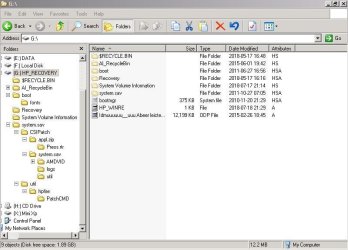
It's F10 here. Here's the contents of HP_RECOVERY. I also noticed a file called HPfactory.wim in system.sav\util, it's 10.5gb. Has to be the factory image, and it accounts for most of the used space. I'm hearing that HP_TOOLS is for HP's diagnostics, and possibly BIOS updates. I don't mind losing them, and I've got it in a Ghost image, so there's a good chance I could get it back, albeit at the expense of the data drive, if it ever became important.
.
Very likely the two partitions do their own separate jobs - factory reset and diagnostics utilities, and they don't need each other.
 

Attachments

  • HP_RECOVERY.jpg
    HP_RECOVERY.jpg
    55.7 KB · Views: 0

My Computer My Computer

Computer type
Laptop
Computer Manufacturer/Model Number
HP Probook
OS
Win 7 Pro 32-bit
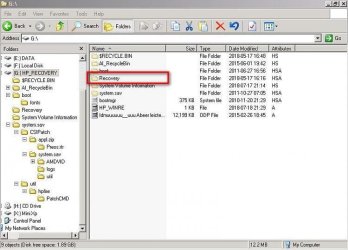
What is inside the folder called Recovery?

HP_RECOVERY1.jpg
 

My Computers My Computers

System One System Two

  • Computer type
    PC/Desktop
    OS
    7 X64
    CPU
    i5 8400
    Motherboard
    gigabyte b365m ds3h
    Memory
    2x8gb 3200mhz
    Hard Drives
    various
    PSU
    pure power 11 400w cm
    Case
    Coolermaster
    Cooling
    cryorig m9i
  • Computer type
    PC/Desktop
    OS
    7x64
    CPU
    g5400
    Motherboard
    ga b365m ds3h
    Memory
    8gb ddr4 2400
    PSU
    xfx pro 450w
We are looking for a bootable wim file. Probably called winre.wim ( or perhaps boot.wim).

If that is there, you can find a spare 16gb usb stick, plug it in, open disk management, rt click the usb stick and format as NTFS. Then rt click it again and mark it Active.

Next, copy the entire contents of the recovery partition to the usb stick.

Test if you can boot into recovery from that usb stick. If that works, you can delete the recovery partition from your hard drive and get the extra space. Keep the usb stick safe somewhere in case you need it in the future.
 

My Computers My Computers

System One System Two

  • Computer type
    PC/Desktop
    OS
    7 X64
    CPU
    i5 8400
    Motherboard
    gigabyte b365m ds3h
    Memory
    2x8gb 3200mhz
    Hard Drives
    various
    PSU
    pure power 11 400w cm
    Case
    Coolermaster
    Cooling
    cryorig m9i
  • Computer type
    PC/Desktop
    OS
    7x64
    CPU
    g5400
    Motherboard
    ga b365m ds3h
    Memory
    8gb ddr4 2400
    PSU
    xfx pro 450w
2 folders are inside - System32 and WindowsRrE. That's a smart way of keeping the recovery partition's functionality while getting its space back, but the problem isn't currently about needing more space for my data partition, it's about how to check whether everything's still working, particularly whether any of the backup systems or images made before the partitioning have been rendered useless or unsafe by the changes.
 
Last edited:

My Computer My Computer

Computer type
Laptop
Computer Manufacturer/Model Number
HP Probook
OS
Win 7 Pro 32-bit

My Computers My Computers

System One System Two

  • Computer type
    PC/Desktop
    Computer Manufacturer/Model Number
    custom build
    OS
    Windows 7 HP 64
    CPU
    i5 6600K - 800MHz to 4200MHz
    Motherboard
    GA-Z170-HD3P
    Memory
    4+4G GSkill DDR4 3000
    Graphics Card(s)
    IG - Intel 530
    Monitor(s) Displays
    Samsung 226BW
    Screen Resolution
    1680x1050
    Hard Drives
    (1) -1 SM951 – 128GB M.2 AHCI PCIe SSD drive for Windows 7 and Lubuntu
    (2) -1 WD SATA 3 - 1T for Data
    (3) -1 WD SATA 3 - 1T for backup
    PSU
    Thermaltake 450W TR2 gold
    Keyboard
    Old and good Chicony mechanical keyboard
    Mouse
    Logitech mX performance - 9 buttons (had to disable some)
    Internet Speed
    500Mb/s
    Browser
    Firefox 64
    Other Info
    TinyWall firewall
  • Computer type
    Laptop
    System Manufacturer/Model Number
    Asus Q550LF
    OS
    Windows 7 Pro
    CPU
    i7-4500U 800MHz to 3.0GHz
    Motherboard
    Asus Q550LF
    Memory
    (4+4)G DDR3 1600
    Graphics Card(s)
    IG intel 4400 + NVIDIA GeForce GT 745M
    Sound Card
    Realtek
    Monitor(s) Displays
    LG Display LP156WF4-SPH1
    Screen Resolution
    1920 x 1080
    Hard Drives
    BX500 120G SSD for Windows and programs +
    1T HDD for data
    Internet Speed
    500 Mb/s
    Browser
    Firefox
    Other Info
    TinyWall firewall
Thanks, though I've already been able to take it to the brink of a factory reset via f10. I'm just wary of starting the reload itself, because I don't know if any of my backups will work after the partition job.
.
Currently I'm making new backups, since those really ought to work with the new partitions. As win7's own image backup has been the most bullet-proof, I made a second image with that. I wish I'd put it on a different USB drive - Windows decided to delete the first backup! First it told me it would do that if the drive was too full for the new backup, so I continued, as the drive has tons of space. Luckily I'd first at least copied the folder onto a separate drive, though even that's slightly suspicious. I got a message asking me if I wanted to replace a few files (???). I clicked No and the copy ended up a few files too short, so I copied those individually to the right place, and at long last the 2 folders were of equal size, down to the last byte. So it looks very likely it'll work if I copy it back, assuming it really copied it completely.
.
New Ghost images of the C partition and of the entire drive have been created with no such nonsense. If all these images reload properly, I have to choose between:
.
1. Moving on with the slight worry of not knowing whether I messed up the Factory Reset and other restore methods, and
.
2. Finding a way of testing them without taking a bigger risk. And the only image restore method that's been completely bulletproof so far (WIn7) has just made its original image a little less likely to work.
 

My Computer My Computer

Computer type
Laptop
Computer Manufacturer/Model Number
HP Probook
OS
Win 7 Pro 32-bit
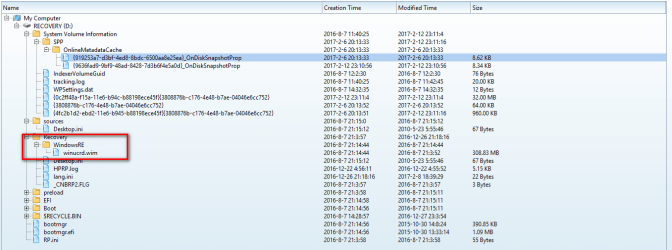
What is the name of the files inside the WindowsRE folder?

There is may be a file called boot.sdi

Is there a file called winre.wim or boot.wim or winUCrD.wim? What is the exact name?

This is very important because that is the target of the bcd entry.


2 folders are inside - System32 and WindowsRrE. That's a smart way of keeping the recovery partition's functionality while getting its space back, but the problem isn't currently about needing more space for my data partition, it's about how to check whether everything's still working, particularly whether any of the backup systems or images made before the partitioning have been rendered useless or unsafe by the changes.
 

My Computers My Computers

System One System Two

  • Computer type
    PC/Desktop
    OS
    7 X64
    CPU
    i5 8400
    Motherboard
    gigabyte b365m ds3h
    Memory
    2x8gb 3200mhz
    Hard Drives
    various
    PSU
    pure power 11 400w cm
    Case
    Coolermaster
    Cooling
    cryorig m9i
  • Computer type
    PC/Desktop
    OS
    7x64
    CPU
    g5400
    Motherboard
    ga b365m ds3h
    Memory
    8gb ddr4 2400
    PSU
    xfx pro 450w
On recent HP recov partitions, the bootable wim is named winreUCD.wim or winUCRD.wim

It might have a different name on your recovery partition.

winreucd.PNG


You could copy the boot folder from your recov partition to your desktop. Zip it up. then attach the zip file to a post.

That way we can see exactly exactly how your recovery sequence is activated.
 

My Computers My Computers

System One System Two

  • Computer type
    PC/Desktop
    OS
    7 X64
    CPU
    i5 8400
    Motherboard
    gigabyte b365m ds3h
    Memory
    2x8gb 3200mhz
    Hard Drives
    various
    PSU
    pure power 11 400w cm
    Case
    Coolermaster
    Cooling
    cryorig m9i
  • Computer type
    PC/Desktop
    OS
    7x64
    CPU
    g5400
    Motherboard
    ga b365m ds3h
    Memory
    8gb ddr4 2400
    PSU
    xfx pro 450w
The files in that folder are boot.sdi and winre.wim in that folder. I made the zip but it's 130mb and the upload limit is 8.95.

Attached is the boot.sdi file, though I had to add a dummy extension to get it through - it's NOT a .nfo file.
As you'll notice it's winre.win that's the biggie.
 

Attachments

My Computer My Computer

Computer type
Laptop
Computer Manufacturer/Model Number
HP Probook
OS
Win 7 Pro 32-bit
You could copy the boot folder from your recov partition to your desktop. Zip it up. then attach the zip file to a post.

We need the boot folder. Everybodys boot.sdi file is the same -though not necessarily in the same location - so the location is important.

The Boot folder contains the information we need.The information is in the bcd hive, which is inside the boot folder.

HP_RECOVERY-boot-folder.jpg
 

My Computers My Computers

System One System Two

  • Computer type
    PC/Desktop
    OS
    7 X64
    CPU
    i5 8400
    Motherboard
    gigabyte b365m ds3h
    Memory
    2x8gb 3200mhz
    Hard Drives
    various
    PSU
    pure power 11 400w cm
    Case
    Coolermaster
    Cooling
    cryorig m9i
  • Computer type
    PC/Desktop
    OS
    7x64
    CPU
    g5400
    Motherboard
    ga b365m ds3h
    Memory
    8gb ddr4 2400
    PSU
    xfx pro 450w
Now you have told us you have

G:\Recovery\WinRE\winre.wim

and

G:\Recovery\WinRE\boot.sdi

We can probably work it out, but easier if we have the boot folder
 

My Computers My Computers

System One System Two

  • Computer type
    PC/Desktop
    OS
    7 X64
    CPU
    i5 8400
    Motherboard
    gigabyte b365m ds3h
    Memory
    2x8gb 3200mhz
    Hard Drives
    various
    PSU
    pure power 11 400w cm
    Case
    Coolermaster
    Cooling
    cryorig m9i
  • Computer type
    PC/Desktop
    OS
    7x64
    CPU
    g5400
    Motherboard
    ga b365m ds3h
    Memory
    8gb ddr4 2400
    PSU
    xfx pro 450w
OK I'll hunt it down as soon as my current restore test has completed.
 

My Computer My Computer

Computer type
Laptop
Computer Manufacturer/Model Number
HP Probook
OS
Win 7 Pro 32-bit
Back
Top