Creative SB Audigy SE sound problem

dmy

New member
Local time
7:04 AM
Messages
6
Hi, I had a problem with my old sound card. It was not working at all. So i bought a new one Creative SB Audigy SE installed the drivers and everything that was given with the sound card and the sound is really weak. I have all the volume up to 100% everywhere and it''s playing music like it is 50% or less. When I put my headphones on my phone the sound is louder 2 times or more. What could be the problem?
 

My Computer My Computer

Computer type
PC/Desktop
OS
windows 7 ultimate 32bit
What was the old sound? Built in (on the motherboard)? or a separate sound card? If it was the built in sound, disable it in the BIOS so it does not potentially interfere.

Also did you move the front panel headphone/mic jacks to the new Audigy SE sound card? If not, you are hearing the old PC's sound card sound in the hadphones.
 

My Computer My Computer

Computer type
PC/Desktop
Computer Manufacturer/Model Number
My Own Build
OS
Windows 10 64 bit
CPU
Intel i7 6700K
Motherboard
ASUS ROG Maximus VIII Hero
Memory
16GB Corsair Dominator
Graphics Card(s)
Intel CPU Graphics
Sound Card
RealTek
Monitor(s) Displays
27" Dell S2719dgf
Screen Resolution
2560X1440
Hard Drives
1 TB Samsung 850 EVO SSD for Win 10 Pro
500GB Samsung 850 EVO SSD for Win 10 Insider
2 TB drive for backup
PSU
EVGA Supernova 750G2
Case
BeQuiet Silent Base 600
Cooling
Deepcool Captain 120EX
Keyboard
Microsoft Wireless 2000
Mouse
Microsoft wireless
Internet Speed
100 MB/sec (Cable)
Antivirus
Microsoft Defender and Malwarebytes
Browser
Edge/Firefox
Other Info
Cakewalk (Sonar) by BandLab and Studio One 4.1 Pro recording studio software. MOTU 896Mk3 Hybrid recording interface, Frontier Tranzport wireless control unit, Behringer X-Touch Control Surface.
Five USB connected optical drives for CD Audio production using Nero BurningROM
I think it was built in on the motherboard.
I plug in my headphones directly to the new sound card from the back of the computer.
I just disable the built-in sound card it is called "azalia codec". The sound is the same.
 

My Computer My Computer

Computer type
PC/Desktop
OS
windows 7 ultimate 32bit
Did you disable it in the BIOS or the Device Manager? Best to do it in the BIOS.

Since you are plugging into the rear jack and its apparently loud with the headset, there must be a problem with the speakers?

Plug the speakers back into the GREEN speaker jack. Then go to the Control Panel/Hardware and Sound and finally the Sound Panel. Your "Speakers" (the Audigy) should be set as the default playback device. Click on the Icon for the speakers to highlight it and then click the Configure button. Make sure you have the correct speaker type set and then you can test the speakers in the Configuration panel. See how that works out.

If its still low, power off the PC, open the case and reseat the SoundBlaster card (unplug then plug back in, making sure its fully and correctly seated). Then try again.
 

My Computer My Computer

Computer type
PC/Desktop
Computer Manufacturer/Model Number
My Own Build
OS
Windows 10 64 bit
CPU
Intel i7 6700K
Motherboard
ASUS ROG Maximus VIII Hero
Memory
16GB Corsair Dominator
Graphics Card(s)
Intel CPU Graphics
Sound Card
RealTek
Monitor(s) Displays
27" Dell S2719dgf
Screen Resolution
2560X1440
Hard Drives
1 TB Samsung 850 EVO SSD for Win 10 Pro
500GB Samsung 850 EVO SSD for Win 10 Insider
2 TB drive for backup
PSU
EVGA Supernova 750G2
Case
BeQuiet Silent Base 600
Cooling
Deepcool Captain 120EX
Keyboard
Microsoft Wireless 2000
Mouse
Microsoft wireless
Internet Speed
100 MB/sec (Cable)
Antivirus
Microsoft Defender and Malwarebytes
Browser
Edge/Firefox
Other Info
Cakewalk (Sonar) by BandLab and Studio One 4.1 Pro recording studio software. MOTU 896Mk3 Hybrid recording interface, Frontier Tranzport wireless control unit, Behringer X-Touch Control Surface.
Five USB connected optical drives for CD Audio production using Nero BurningROM
Yes i disable it from the BIOS.

You didin''t understand. When my headphones are plugged in the computer the sound is weak and when i plug the same headphones to my telephone the sound is like 2 or 3 times better.
I don''t have any speakers only headphones. But I did the thing you told me in the sound panel. Nothing helped.
The card is seated properly, I checked it 2 times.
 

My Computer My Computer

Computer type
PC/Desktop
OS
windows 7 ultimate 32bit
What headphones do you have? If you have iPhone headphones, some of these do not work or work properly on a PC.

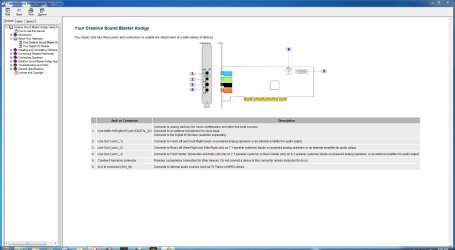
Here is the connection diagram of the SE. Make sure you are connecting to the GREEN (#2) jack.
 

Attachments

  • Capture.JPG
    Capture.JPG
    124.2 KB · Views: 7

My Computer My Computer

Computer type
PC/Desktop
Computer Manufacturer/Model Number
My Own Build
OS
Windows 10 64 bit
CPU
Intel i7 6700K
Motherboard
ASUS ROG Maximus VIII Hero
Memory
16GB Corsair Dominator
Graphics Card(s)
Intel CPU Graphics
Sound Card
RealTek
Monitor(s) Displays
27" Dell S2719dgf
Screen Resolution
2560X1440
Hard Drives
1 TB Samsung 850 EVO SSD for Win 10 Pro
500GB Samsung 850 EVO SSD for Win 10 Insider
2 TB drive for backup
PSU
EVGA Supernova 750G2
Case
BeQuiet Silent Base 600
Cooling
Deepcool Captain 120EX
Keyboard
Microsoft Wireless 2000
Mouse
Microsoft wireless
Internet Speed
100 MB/sec (Cable)
Antivirus
Microsoft Defender and Malwarebytes
Browser
Edge/Firefox
Other Info
Cakewalk (Sonar) by BandLab and Studio One 4.1 Pro recording studio software. MOTU 896Mk3 Hybrid recording interface, Frontier Tranzport wireless control unit, Behringer X-Touch Control Surface.
Five USB connected optical drives for CD Audio production using Nero BurningROM
Im using acme headphones. They were playing loud with my old sound card until it stopped working.
Yes my headhpones are connected to the green jack.
Could it just be that this is a lame sound card and it is giving maximum sound?
 

My Computer My Computer

Computer type
PC/Desktop
OS
windows 7 ultimate 32bit
Sadly it does sound like a defective card. Can you return it for replacement, either where you bought it or under warranty with Creative. I used an Audigy SE for a long time on an old Dell, first with XP and then with Vista 32 bit.
 

My Computer My Computer

Computer type
PC/Desktop
Computer Manufacturer/Model Number
My Own Build
OS
Windows 10 64 bit
CPU
Intel i7 6700K
Motherboard
ASUS ROG Maximus VIII Hero
Memory
16GB Corsair Dominator
Graphics Card(s)
Intel CPU Graphics
Sound Card
RealTek
Monitor(s) Displays
27" Dell S2719dgf
Screen Resolution
2560X1440
Hard Drives
1 TB Samsung 850 EVO SSD for Win 10 Pro
500GB Samsung 850 EVO SSD for Win 10 Insider
2 TB drive for backup
PSU
EVGA Supernova 750G2
Case
BeQuiet Silent Base 600
Cooling
Deepcool Captain 120EX
Keyboard
Microsoft Wireless 2000
Mouse
Microsoft wireless
Internet Speed
100 MB/sec (Cable)
Antivirus
Microsoft Defender and Malwarebytes
Browser
Edge/Firefox
Other Info
Cakewalk (Sonar) by BandLab and Studio One 4.1 Pro recording studio software. MOTU 896Mk3 Hybrid recording interface, Frontier Tranzport wireless control unit, Behringer X-Touch Control Surface.
Five USB connected optical drives for CD Audio production using Nero BurningROM
Ill try to return it. Thanks for your help.
 

My Computer My Computer

Computer type
PC/Desktop
OS
windows 7 ultimate 32bit
It may not be the problem, but its the prime suspect.
 

My Computer My Computer

Computer type
PC/Desktop
Computer Manufacturer/Model Number
My Own Build
OS
Windows 10 64 bit
CPU
Intel i7 6700K
Motherboard
ASUS ROG Maximus VIII Hero
Memory
16GB Corsair Dominator
Graphics Card(s)
Intel CPU Graphics
Sound Card
RealTek
Monitor(s) Displays
27" Dell S2719dgf
Screen Resolution
2560X1440
Hard Drives
1 TB Samsung 850 EVO SSD for Win 10 Pro
500GB Samsung 850 EVO SSD for Win 10 Insider
2 TB drive for backup
PSU
EVGA Supernova 750G2
Case
BeQuiet Silent Base 600
Cooling
Deepcool Captain 120EX
Keyboard
Microsoft Wireless 2000
Mouse
Microsoft wireless
Internet Speed
100 MB/sec (Cable)
Antivirus
Microsoft Defender and Malwarebytes
Browser
Edge/Firefox
Other Info
Cakewalk (Sonar) by BandLab and Studio One 4.1 Pro recording studio software. MOTU 896Mk3 Hybrid recording interface, Frontier Tranzport wireless control unit, Behringer X-Touch Control Surface.
Five USB connected optical drives for CD Audio production using Nero BurningROM
Yes, it could be something else, but I still got warranty for the sound card so it''s worth to try.
 

My Computer My Computer

Computer type
PC/Desktop
OS
windows 7 ultimate 32bit
Hi! I just wonder where can I connect the PC tower front jacks. Because I have to reach the back of the PC each time I have need to switch between headphones and stereo speakers. Please help! Cheers in advance, Miguel.
 

My Computer My Computer

Computer type
PC/Desktop
Computer Manufacturer/Model Number
CB
OS
Windows 10 X64
CPU
AMD
Motherboard
ASUS
Memory
DDR3
Graphics Card(s)
GForce
Browser
Chrome
Back
Top