

Hi alls, I have searched on forum for the issue of remote, but no luck.  so i start a new topic then.
I have this carte Creative SB X-Fi Platinum Fatal1ty Champion
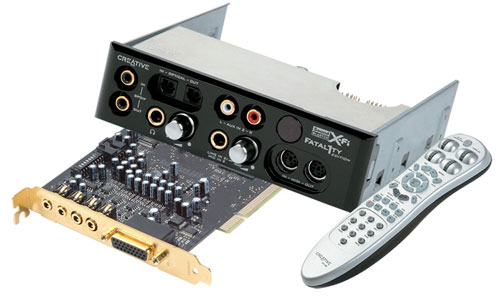
Since from the site of Creative, it has only driver avaiable for windows 7 x64, so i installed the driver. It works great, then the console can work too, but he can't starting automaticlly when windows boots. - i have to start the console by my-self and he can't be in traybar (notification area) either.
Then the second thing is ... the remote doesn't work. :shock:
PS: I have used the update tool from Creative and all seem that all driver or soft is updated.
Anybody has a solution to make the remote works again in windows 7 ?
thank you as much.
so i start a new topic then. I have this carte Creative SB X-Fi Platinum Fatal1ty Champion
Since from the site of Creative, it has only driver avaiable for windows 7 x64, so i installed the driver. It works great, then the console can work too, but he can't starting automaticlly when windows boots. - i have to start the console by my-self and he can't be in traybar (notification area) either.
Then the second thing is ... the remote doesn't work. :shock:
PS: I have used the update tool from Creative and all seem that all driver or soft is updated.
Anybody has a solution to make the remote works again in windows 7 ?
thank you as much.
My Computer
- Computer Manufacturer/Model Number
- Dell XPS - nomore, now i just have his case
- OS
- windows 7 Entreprise x64
- CPU
- Q9550
- Motherboard
- P5Q-E
- Memory
- 8Go DDR2 Corsair 6400 HMX
- Graphics Card(s)
- 4870HD
- Sound Card
- creative Fatality extreme
- Monitor(s) Displays
- Samsung 2x19w
- Screen Resolution
- 2x 1440*900
- Hard Drives
- Seagate 500G 32Mo SATA2 (OS)
WD 1T Green 32mo SATA2
Hitachi 500G 32Mo SATA2
- PSU
- Dell 700W From my XPS 630i - modded
- Case
- Dell XPS 630i
- Cooling
- Dell
- Keyboard
- Dell multimédia
- Mouse
- IE 3 Microsoft
- Internet Speed
- Cable connection - slow speed :(
- Other Info
- 6 Noctua in working condition ^^


