Creative X-Fi Xtreme Audio Driver Problems

SawedOn

New member
Local time
11:25 PM
Messages
21
I recently installed Windows 7 on my computer and downloaded the new .90 driver for my "Creative Sound Blaster X-Fi Xtreme Audio" PCI. I can't seem to switch between the recording device "Microphone"(front Jack) and "Line-In"(Back).

Also I tried downloading the driver package that includes the "Creative audio console" but the installer for that says that it cannot find the driver specified. I really would like the Console back, it made switching audio devices and sound setups much easier. Any help would be appreciated, Thanks.
 

My Computer

OS
Windows 7
Welcome to sevenforums SawedOn

Download this file again...reboot, and see if you still having problems.

File Name : XFXA_PCDRV_LB_1_04_0090.exe


  1. Download the file onto your local hard disk.
  2. Close all other Windows applications.
  3. Double-click the downloaded file.
  4. Follow the instructions on the screen.
I'm assuming you're running 32 bit.
 

My Computer

Computer Manufacturer/Model Number
custom of course...built by grimreaper
OS
Windows 7 Ultimate X64
CPU
Intel Core 2 Quad Q9650 3.0GHz (3.6GHz 24/7) maxed 4.05GHz
Motherboard
EVGA 790i Ultra SLi Model#132-CK-NF79-A1 BIOS P10
Memory
8GB OCZ DDR3 PC3-14400 @ 1800MHz NVIDIA SLi-Ready
Graphics Card(s)
2XBFG GeForce GTX 280 OC Edition SLi'd
Sound Card
SoundBlaster X-Fi Titanium Fatal1ty Pro Series
Monitor(s) Displays
Samsung 52" 1080P LCD HDTV (LN52B550)
Screen Resolution
1920X1080 @ 60Hz
Hard Drives
3xWestern Digital WD1001FALS Caviar Black 1TB Hard Drive(s) RAID 0 x2 encased in 3xMasscool KuFormula SHF1 HDD Cooler(s)
PSU
ThermalTake ToughPower 1200W P/N:W0133RU Modularized
Case
ThermalTake P/N: VH6000BWS Armor Full-Tower
Cooling
ThermalTake SpinQ P/N: P0466 CPU Cooler
Keyboard
Logitech cordless Y-RAJ56A piece of ****
Mouse
Logitech G7 Laser Cordless mouse black
Internet Speed
10 Mbps DL-1Mbps UL wirelessly DWA-552 extreme N
Other Info
1XSamsung DVD burner SH-S223Q/BEBN SATA
1XSamsung DVD burner SH-S223L/BEBN SATA
1XLG GGW-H20L Blu-Ray burner
4XCooler Master 120mm Blue LED SickleFlow 2000 RPM
1XBelkin UPS F6C1500TWRK) backup power supply
Ok I re downloaded, the installer and installed. It installed fine and I let it reboot my computer after it complete. After the reboot it asked me about the auto updater and I clicked cancel.

Unfortunatly the problem still persists. It still says

Line-In

SB X-Fi Xtreme Audio
Currently Unavailable

in the Recording devices menu.
 

My Computer

OS
Windows 7
I'm curious did you disable the onboard audio devices?
You should...by having both enabled it can cause conflicts.
Go to your motherboard bios and disable it if you haven't done so.
 

My Computer

Computer Manufacturer/Model Number
custom of course...built by grimreaper
OS
Windows 7 Ultimate X64
CPU
Intel Core 2 Quad Q9650 3.0GHz (3.6GHz 24/7) maxed 4.05GHz
Motherboard
EVGA 790i Ultra SLi Model#132-CK-NF79-A1 BIOS P10
Memory
8GB OCZ DDR3 PC3-14400 @ 1800MHz NVIDIA SLi-Ready
Graphics Card(s)
2XBFG GeForce GTX 280 OC Edition SLi'd
Sound Card
SoundBlaster X-Fi Titanium Fatal1ty Pro Series
Monitor(s) Displays
Samsung 52" 1080P LCD HDTV (LN52B550)
Screen Resolution
1920X1080 @ 60Hz
Hard Drives
3xWestern Digital WD1001FALS Caviar Black 1TB Hard Drive(s) RAID 0 x2 encased in 3xMasscool KuFormula SHF1 HDD Cooler(s)
PSU
ThermalTake ToughPower 1200W P/N:W0133RU Modularized
Case
ThermalTake P/N: VH6000BWS Armor Full-Tower
Cooling
ThermalTake SpinQ P/N: P0466 CPU Cooler
Keyboard
Logitech cordless Y-RAJ56A piece of ****
Mouse
Logitech G7 Laser Cordless mouse black
Internet Speed
10 Mbps DL-1Mbps UL wirelessly DWA-552 extreme N
Other Info
1XSamsung DVD burner SH-S223Q/BEBN SATA
1XSamsung DVD burner SH-S223L/BEBN SATA
1XLG GGW-H20L Blu-Ray burner
4XCooler Master 120mm Blue LED SickleFlow 2000 RPM
1XBelkin UPS F6C1500TWRK) backup power supply
The this integrated audio devices have always said "Not Plugged in"

I'll go disable them now...
 
Last edited:

My Computer

OS
Windows 7
OK done, I disabled the HD Audio from the bios and the other audio devices are no longer detected by W7

The problem still persists.
 

My Computer

OS
Windows 7
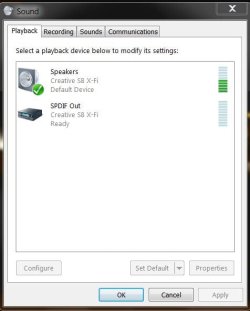
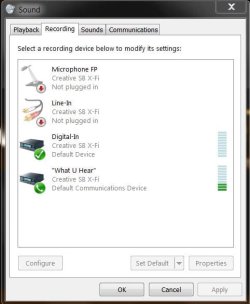
I have attached 2 screenshots here to give you an idea what it may look like as I am also using a Creative product but using an optical digital cable out, as you are using a different setup.

Did you checked and/or changed your default settings?
Did you check your connections in the back of your motherboard?
Try re- installing the console with the proper drivers.
I really hope you can get this to work:)
Let me know, ok?
 

Attachments

  • creative playback.JPG
    creative playback.JPG
    30.6 KB · Views: 276
  • creative recording.JPG
    creative recording.JPG
    37.1 KB · Views: 428

My Computer

Computer Manufacturer/Model Number
custom of course...built by grimreaper
OS
Windows 7 Ultimate X64
CPU
Intel Core 2 Quad Q9650 3.0GHz (3.6GHz 24/7) maxed 4.05GHz
Motherboard
EVGA 790i Ultra SLi Model#132-CK-NF79-A1 BIOS P10
Memory
8GB OCZ DDR3 PC3-14400 @ 1800MHz NVIDIA SLi-Ready
Graphics Card(s)
2XBFG GeForce GTX 280 OC Edition SLi'd
Sound Card
SoundBlaster X-Fi Titanium Fatal1ty Pro Series
Monitor(s) Displays
Samsung 52" 1080P LCD HDTV (LN52B550)
Screen Resolution
1920X1080 @ 60Hz
Hard Drives
3xWestern Digital WD1001FALS Caviar Black 1TB Hard Drive(s) RAID 0 x2 encased in 3xMasscool KuFormula SHF1 HDD Cooler(s)
PSU
ThermalTake ToughPower 1200W P/N:W0133RU Modularized
Case
ThermalTake P/N: VH6000BWS Armor Full-Tower
Cooling
ThermalTake SpinQ P/N: P0466 CPU Cooler
Keyboard
Logitech cordless Y-RAJ56A piece of ****
Mouse
Logitech G7 Laser Cordless mouse black
Internet Speed
10 Mbps DL-1Mbps UL wirelessly DWA-552 extreme N
Other Info
1XSamsung DVD burner SH-S223Q/BEBN SATA
1XSamsung DVD burner SH-S223L/BEBN SATA
1XLG GGW-H20L Blu-Ray burner
4XCooler Master 120mm Blue LED SickleFlow 2000 RPM
1XBelkin UPS F6C1500TWRK) backup power supply
YESS!! I finally got it working correctly thanks for all your help.

With the drivers installed I saw that Windows Update had an update for my creative sound device. After installing it and restarting my computer everything worked perfectly.

Thanks again! :party:
 

My Computer

OS
Windows 7
anytime SawedOn nothing makes me happier than helping a fellow member of SevenForums :D
Enjoy:)
 

My Computer

Computer Manufacturer/Model Number
custom of course...built by grimreaper
OS
Windows 7 Ultimate X64
CPU
Intel Core 2 Quad Q9650 3.0GHz (3.6GHz 24/7) maxed 4.05GHz
Motherboard
EVGA 790i Ultra SLi Model#132-CK-NF79-A1 BIOS P10
Memory
8GB OCZ DDR3 PC3-14400 @ 1800MHz NVIDIA SLi-Ready
Graphics Card(s)
2XBFG GeForce GTX 280 OC Edition SLi'd
Sound Card
SoundBlaster X-Fi Titanium Fatal1ty Pro Series
Monitor(s) Displays
Samsung 52" 1080P LCD HDTV (LN52B550)
Screen Resolution
1920X1080 @ 60Hz
Hard Drives
3xWestern Digital WD1001FALS Caviar Black 1TB Hard Drive(s) RAID 0 x2 encased in 3xMasscool KuFormula SHF1 HDD Cooler(s)
PSU
ThermalTake ToughPower 1200W P/N:W0133RU Modularized
Case
ThermalTake P/N: VH6000BWS Armor Full-Tower
Cooling
ThermalTake SpinQ P/N: P0466 CPU Cooler
Keyboard
Logitech cordless Y-RAJ56A piece of ****
Mouse
Logitech G7 Laser Cordless mouse black
Internet Speed
10 Mbps DL-1Mbps UL wirelessly DWA-552 extreme N
Other Info
1XSamsung DVD burner SH-S223Q/BEBN SATA
1XSamsung DVD burner SH-S223L/BEBN SATA
1XLG GGW-H20L Blu-Ray burner
4XCooler Master 120mm Blue LED SickleFlow 2000 RPM
1XBelkin UPS F6C1500TWRK) backup power supply
I got a similar problem and noticed the driver available via windows update.
But somehow I can't install it.
I select the driver as optional update, click on "install updates", wait while "preparing to install" and then I am back where I was before I clicked the button.
Tried to reboot serveral times too.
 

My Computer

OS
windows 7 prof
CPU
AMD X2 4800+
Motherboard
ASUS M2N-E SLI
Memory
6 GB DDR2
Graphics Card(s)
Asus GeForce 7600 GS silent
Sound Card
Creative Labs X-Fi Extreme Audio
Monitor(s) Displays
Dell 2209W
PSU
430W
I installed the Windows Update driver after I had installed the Driver from Creative.com (several times).
 

My Computer

OS
Windows 7
I have a problem with instal audio console application for x-fi xtreme audio ... I have 5.1 audio home theatre and it works, but I don´t know how to instal the console.I try to install oficial drivers from creative.com and it doesn´t work. I want it because now i can´t listen the mp3 in all speakers now, I only hear sound from 2 speakers. In console application it can be set up. I tried instal console application in Win xp and here it works, in win 7 doesn´t. thx for help
 

My Computer

OS
Windows 7
Back
Top