Creative X-Fi Xtremegamer

bob gunnis

New member
Local time
9:18 AM
Messages
8
hi

I have the above sound card installed and when I play music the music is nice and loud but when I talk on the mic then then the mic is very quiet and people can hardly here me. Is there a mic boost facilty on this card??

I have installed the most up to date drivers

I use this sound card on PalTalk Quiz rooms where I play music and let the roomies know who got the points etc

Many thanks
 

My Computer My Computer

At a glance

Windows 7 Home Premium 32 bit
OS
Windows 7 Home Premium 32 bit
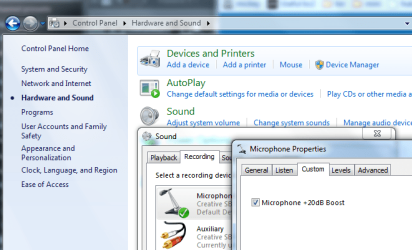
control panel >> hardware and sound >> sound >> recording >> click microphone >> properties >> custom >> +20dB boost
 

Attachments

  • cont.PNG
    cont.PNG
    42.7 KB · Views: 42

My Computer My Computer

At a glance

ultimate 64 sp1i5 2500K [email protected]8 gigs GSkill Ripjaws 1600amd hd6950
Computer Manufacturer/Model Number
mickey megabyte 1234
OS
ultimate 64 sp1
CPU
i5 2500K [email protected]
Motherboard
MSI P67A-GD53
Memory
8 gigs GSkill Ripjaws 1600
Graphics Card(s)
amd hd6950
Sound Card
creative x-fi gamer
Monitor(s) Displays
samsung 24"
Screen Resolution
1920x1080
Hard Drives
ocz vertex 2e 60 gig, samsung f3 1tb, buffalo 2tb ext
PSU
antec 550
Case
antec three hundred
Cooling
i'm a cooling fan
Keyboard
saitek eclipse ii
Mouse
logitech g3
Internet Speed
about 4 Mbps
Other Info
i love win7
Hi and thanks for the reply

I have followed your instructions but alas, Mic Boost is not showing anywhere

Any further advice please
 

My Computer My Computer

At a glance

Windows 7 Home Premium 32 bit
OS
Windows 7 Home Premium 32 bit
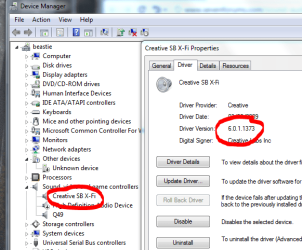
do you know which drivers you have installed?

check with device manager.
 

Attachments

  • cre.PNG
    cre.PNG
    32.6 KB · Views: 31

My Computer My Computer

At a glance

ultimate 64 sp1i5 2500K [email protected]8 gigs GSkill Ripjaws 1600amd hd6950
Computer Manufacturer/Model Number
mickey megabyte 1234
OS
ultimate 64 sp1
CPU
i5 2500K [email protected]
Motherboard
MSI P67A-GD53
Memory
8 gigs GSkill Ripjaws 1600
Graphics Card(s)
amd hd6950
Sound Card
creative x-fi gamer
Monitor(s) Displays
samsung 24"
Screen Resolution
1920x1080
Hard Drives
ocz vertex 2e 60 gig, samsung f3 1tb, buffalo 2tb ext
PSU
antec 550
Case
antec three hundred
Cooling
i'm a cooling fan
Keyboard
saitek eclipse ii
Mouse
logitech g3
Internet Speed
about 4 Mbps
Other Info
i love win7
Hi and once again, thanks for your message

The driver details installed for this card are as follows

Creative
Version 6.0.1.1375
Date 05/05/2010

Hope this helps you to help me resolve this problem
King Regards
 

My Computer My Computer

At a glance

Windows 7 Home Premium 32 bit
OS
Windows 7 Home Premium 32 bit
your driver seems more recent than mine.

have you also installed the creative audio control panel and the creative console launcher? you'll need to find them on the creative website, i can't give you a link unfortunately.

there is also a mic-boost option on the game mode view of the console.

it's a bit fiddly to get at though. select microphone in the recording drop-down menu, then a little + sign should appear above the slider.

click on the + and activate the boost.

let me know if this works. :)
 

Attachments

  • boost.jpg
    boost.jpg
    42.9 KB · Views: 77

My Computer My Computer

At a glance

ultimate 64 sp1i5 2500K [email protected]8 gigs GSkill Ripjaws 1600amd hd6950
Computer Manufacturer/Model Number
mickey megabyte 1234
OS
ultimate 64 sp1
CPU
i5 2500K [email protected]
Motherboard
MSI P67A-GD53
Memory
8 gigs GSkill Ripjaws 1600
Graphics Card(s)
amd hd6950
Sound Card
creative x-fi gamer
Monitor(s) Displays
samsung 24"
Screen Resolution
1920x1080
Hard Drives
ocz vertex 2e 60 gig, samsung f3 1tb, buffalo 2tb ext
PSU
antec 550
Case
antec three hundred
Cooling
i'm a cooling fan
Keyboard
saitek eclipse ii
Mouse
logitech g3
Internet Speed
about 4 Mbps
Other Info
i love win7
Hi

Once again thanks for your reply and advice

I have found the mic boost under the Audio player mode so now I have micropnone and what you hear but it seems I can only have one of the above working at any one time

I wonder if this is normal or just a quirk with my settngs

Once again ~~ thanks for your advice
 

My Computer My Computer

At a glance

Windows 7 Home Premium 32 bit
OS
Windows 7 Home Premium 32 bit
it's normal - you can only record from one source at a time.
 

My Computer My Computer

At a glance

ultimate 64 sp1i5 2500K [email protected]8 gigs GSkill Ripjaws 1600amd hd6950
Computer Manufacturer/Model Number
mickey megabyte 1234
OS
ultimate 64 sp1
CPU
i5 2500K [email protected]
Motherboard
MSI P67A-GD53
Memory
8 gigs GSkill Ripjaws 1600
Graphics Card(s)
amd hd6950
Sound Card
creative x-fi gamer
Monitor(s) Displays
samsung 24"
Screen Resolution
1920x1080
Hard Drives
ocz vertex 2e 60 gig, samsung f3 1tb, buffalo 2tb ext
PSU
antec 550
Case
antec three hundred
Cooling
i'm a cooling fan
Keyboard
saitek eclipse ii
Mouse
logitech g3
Internet Speed
about 4 Mbps
Other Info
i love win7
Back
Top