Crystal Disk Info WD Raptor

JRockZ

New member
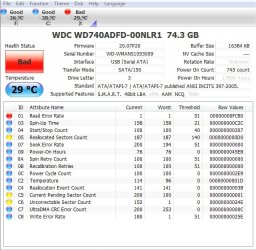
I posted about this drive last week,, probably explained to much so heres now an image of what i have,, can anyone tell me is there a way to fix this? im guessing its something mechanical and that no software will fix it but i figured i would ask. Any help would be much appreciated as always. mind you this is connected through USB right now not directly to the MB,, it was showing the same before it probably just not as fast connected via USB
Thanks
JRockZ
 

Attachments

  • raptor.jpg
    raptor.jpg
    255.8 KB · Views: 114

My Computer

Computer type
PC/Desktop
Computer Manufacturer/Model Number
JRockZ
OS
Win 7 64 Ultimate
CPU
AMD 8350 Bulldozer 4ghz
Motherboard
Asus M5a97 R2
Memory
6gb
Graphics Card(s)
ATI Radeon HD 5770 X 2
Sound Card
Board
Monitor(s) Displays
Dual Gateway 19" and 32" TV 3 displays at once :D
Screen Resolution
1440X900
Hard Drives
OCZ Agility SSD Patriot Blaze 120
PSU
750 Watt Thermaltake Tough Power
Case
Diablotek EVO Mid Tower Case CPA-6170 - 8X 120mm case fans
Cooling
Corsair Liquid Cooled
Antivirus
NAV
Browser
Always IE
I posted about this drive last week,, probably explained to much so heres now an image of what i have,, can anyone tell me is there a way to fix this? im guessing its something mechanical and that no software will fix it but i figured i would ask. Any help would be much appreciated as always. mind you this is connected through USB right now not directly to the MB,, it was showing the same before it probably just not as fast connected via USB
Thanks
JRockZ

SMART data can sometimes be misleading. There is no set standard for what the thresholds have to be. Each manufacturer treats and interprets SMART data differently and assigns their own thresholds based on what they think is right. Looking at what is reporting, you've had ONE read error and technically that's not good. The Relocated

What I suggest doing it offloading everything from that drive and doing a low-level format (while it's connected via USB) -- notice "quick format is unchecked"

Format_Dialog_Box.JPG


If this is successful, I'd take it easy with the drive (harder to do than it sounds, really). Your 05 re-allocated sectors are ok. That's only yellow because you've had more than 140. If you do some quick math (given your file system is NTFS and each sector is 4kb) you've only lost 748kb of storage space. Not much to worry about there. Same with C5 Current Pending Sector Count. Those are sectors that have been marked as not doing so hot but they won't be fixed (or attempted at fixing) until the drive tries to write to them. If all else fails with those, again, 4x200 is 800kb. Not a big deal.

The only part that worries me just a little is the uncorrectable. During the low-level format, if it runs across these sectors and finds it can't do anything with them, it might mark them out altogether if they have indeed been marked as bad, or it might try to fix them again.

The moral of my story is this: If your low-level format works, keep using your drive. If in a couple months you find that the bad sectors are rising again at a rather rapid pace (05, C5, C6) or Windows is reporting problems saving or writing/reading the disk, come back and we'll go from there.

Thanks!

 

My Computer

OS
Windows 7 Ultimate 64-bit
CPU
AMD Phenom II X6 1090T 3.2GHZ
Motherboard
MSI 890FXA-GD70
Memory
G.SKILL RipJaw 3x2GB DDR3-1066
Graphics Card(s)
2x HIS Radeon HD 6850 1 GB
Sound Card
VIA 8-channel
Monitor(s) Displays
2x 20 inch Acer LCDs, 1x 32" Sony LCD TV
Screen Resolution
4480x900
Hard Drives
1x Crucial 64GB SSD
3x 1TB HDDs (WD, Seagate, Hitatchi)
1x 500GB Seagate External
PSU
Kingwin 1000W Modular
Case
Coolermaster HAF 932
Cooling
1x 120mm, 3x 200mm, CoolerMaster Hyper 212+
Keyboard
Microsoft Wireless Keyboard 1000
Mouse
Microsoft Wiresless Mouse 5000
Internet Speed
20mbps
Other Info
Samsung BD-ROM/DVD-RW
Thanks Jelyman, i tried the low level before and im trying again right now but if i remeber right it just hangs, i tried to run checkdsk on it and repair and it ran for 30hrs and i finally had to cancle it out. I will see if the low level helps any IF it runs through,,, my guess is the drive is shot,,, its not a drive im using but i would like to IF its saveable since it is a 10,000rpm raptor drive. Ill be back
 

My Computer

Computer type
PC/Desktop
Computer Manufacturer/Model Number
JRockZ
OS
Win 7 64 Ultimate
CPU
AMD 8350 Bulldozer 4ghz
Motherboard
Asus M5a97 R2
Memory
6gb
Graphics Card(s)
ATI Radeon HD 5770 X 2
Sound Card
Board
Monitor(s) Displays
Dual Gateway 19" and 32" TV 3 displays at once :D
Screen Resolution
1440X900
Hard Drives
OCZ Agility SSD Patriot Blaze 120
PSU
750 Watt Thermaltake Tough Power
Case
Diablotek EVO Mid Tower Case CPA-6170 - 8X 120mm case fans
Cooling
Corsair Liquid Cooled
Antivirus
NAV
Browser
Always IE
The errors and the power on hours suggests your HDD may be at the end of it's (reliable) life.
Backup files/folders and image the drive (Not clone!). I gather it's just an auxiliary drive at the moment.
 

My Computer

Computer type
PC/Desktop
Computer Manufacturer/Model Number
Own build
OS
Windows 7x64 Home Premium SP1
CPU
Intel i7 2600k
Motherboard
ASUS P8Z68 Deluxe
Memory
G.Skill Ripjaws (DDR3-1600) 2x4GB
Graphics Card(s)
Nvidia GeForce GTS 450; Intel HD Graphics 3000(GT2+)
Monitor(s) Displays
Dell Ultrasharp IPS panel U2311H, Samsung SyncMaster P2350
Screen Resolution
1920x1080
Hard Drives
Samsung 850 Pro SSD 256GB, Samsung SSD 840 120GB, Seagates 1TB Barracuda ST31000528AS x2
PSU
Seasonic M12II 520W
Case
Lian Li Lancool PC-K60
Cooling
Case: 1x120mm, 3x140mm CPU: Hyper 212+
Keyboard
Logitech MK520 (wireless)
Mouse
Logitech MK520
Internet Speed
6-7 Mbps
Antivirus
Norton Security Premium, Malwarebytes on 2 (MSE on 3rd PC)
Browser
FireFox
Other Info
Audio: Logitech Z523 2.1
MJF no man its not being used i took it from a computer i got for dirt cheap,, it was set up in a raid 1 i believe and both drives were bad, i just put another drive in it and sold it,, the other raptor drive doesnt even do anything it sshot so my guess is it had a good jolt from a power surge or something like that. So far the low level is going still i'd say its about 12% done now in about 15-20 mins. Id just like to fix it and use it as a master drive on an older PC i have
JRockZ
 

My Computer

Computer type
PC/Desktop
Computer Manufacturer/Model Number
JRockZ
OS
Win 7 64 Ultimate
CPU
AMD 8350 Bulldozer 4ghz
Motherboard
Asus M5a97 R2
Memory
6gb
Graphics Card(s)
ATI Radeon HD 5770 X 2
Sound Card
Board
Monitor(s) Displays
Dual Gateway 19" and 32" TV 3 displays at once :D
Screen Resolution
1440X900
Hard Drives
OCZ Agility SSD Patriot Blaze 120
PSU
750 Watt Thermaltake Tough Power
Case
Diablotek EVO Mid Tower Case CPA-6170 - 8X 120mm case fans
Cooling
Corsair Liquid Cooled
Antivirus
NAV
Browser
Always IE
The errors and the power on hours suggests your HDD may be at the end of it's (reliable) life.
Backup files/folders and image the drive (Not clone!). I gather it's just an auxiliary drive at the moment.

almost 18000 power on hours is 750 days. Given 8 hours of use a day, that's 6.1 years.

I didn't notice the POH since it was in such a light grey.

In that case... Time to close up shop.
 

My Computer

OS
Windows 7 Ultimate 64-bit
CPU
AMD Phenom II X6 1090T 3.2GHZ
Motherboard
MSI 890FXA-GD70
Memory
G.SKILL RipJaw 3x2GB DDR3-1066
Graphics Card(s)
2x HIS Radeon HD 6850 1 GB
Sound Card
VIA 8-channel
Monitor(s) Displays
2x 20 inch Acer LCDs, 1x 32" Sony LCD TV
Screen Resolution
4480x900
Hard Drives
1x Crucial 64GB SSD
3x 1TB HDDs (WD, Seagate, Hitatchi)
1x 500GB Seagate External
PSU
Kingwin 1000W Modular
Case
Coolermaster HAF 932
Cooling
1x 120mm, 3x 200mm, CoolerMaster Hyper 212+
Keyboard
Microsoft Wireless Keyboard 1000
Mouse
Microsoft Wiresless Mouse 5000
Internet Speed
20mbps
Other Info
Samsung BD-ROM/DVD-RW
The errors and the power on hours suggests your HDD may be at the end of it's (reliable) life.
Backup files/folders and image the drive (Not clone!). I gather it's just an auxiliary drive at the moment.

almost 18000 power on hours is 750 days. Given 8 hours of use a day, that's 6.1 years.

I didn't notice the POH since it was in such a light grey.

In that case... Time to close up shop.

Yeah it ran the low level all the way to the end then just froze there,, My other drive i use that is 2 years old shows POH as 354314 hours and a power on count of 1624
And my master drive is POH 4551 and power on count of 937 it is about 1yr old maybe a little more. Im going to trash the raptor thanks for the help!!
 

My Computer

Computer type
PC/Desktop
Computer Manufacturer/Model Number
JRockZ
OS
Win 7 64 Ultimate
CPU
AMD 8350 Bulldozer 4ghz
Motherboard
Asus M5a97 R2
Memory
6gb
Graphics Card(s)
ATI Radeon HD 5770 X 2
Sound Card
Board
Monitor(s) Displays
Dual Gateway 19" and 32" TV 3 displays at once :D
Screen Resolution
1440X900
Hard Drives
OCZ Agility SSD Patriot Blaze 120
PSU
750 Watt Thermaltake Tough Power
Case
Diablotek EVO Mid Tower Case CPA-6170 - 8X 120mm case fans
Cooling
Corsair Liquid Cooled
Antivirus
NAV
Browser
Always IE
Back
Top