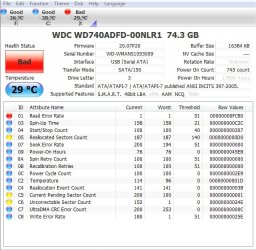
I posted about this drive last week,, probably explained to much so heres now an image of what i have,, can anyone tell me is there a way to fix this? im guessing its something mechanical and that no software will fix it but i figured i would ask. Any help would be much appreciated as always. mind you this is connected through USB right now not directly to the MB,, it was showing the same before it probably just not as fast connected via USB
Thanks
JRockZ
SMART data can sometimes be misleading. There is no set standard for what the thresholds have to be. Each manufacturer treats and interprets SMART data differently and assigns their own thresholds based on what they think is right. Looking at what is reporting, you've had ONE read error and technically that's not good. The Relocated
What I suggest doing it offloading everything from that drive and doing a low-level format (while it's connected via USB) -- notice "quick format is unchecked"
If this is successful, I'd take it easy with the drive (harder to do than it sounds, really). Your 05 re-allocated sectors are ok. That's only yellow because you've had more than 140. If you do some quick math (given your file system is NTFS and each sector is 4kb) you've only lost 748kb of storage space. Not much to worry about there. Same with C5 Current Pending Sector Count. Those are sectors that have been marked as not doing so hot but they won't be fixed (or attempted at fixing) until the drive tries to write to them. If all else fails with those, again, 4x200 is 800kb. Not a big deal.
The only part that worries me just a little is the uncorrectable. During the low-level format, if it runs across these sectors and finds it can't do anything with them, it might mark them out altogether if they have indeed been marked as bad, or it might try to fix them again.
The moral of my story is this: If your low-level format works, keep using your drive. If in a couple months you find that the bad sectors are rising again at a rather rapid pace (05, C5, C6) or Windows is reporting problems saving or writing/reading the disk, come back and we'll go from there.
Thanks!