Solved CSI Unable to Query Store Version Total count: 1

Tom,
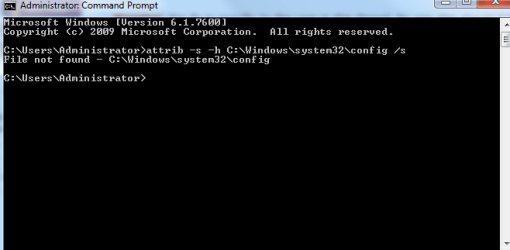
Now I know something is wrong, here's what happens - (pic enclosed)
 

Attachments

  • cc.png
    cc.png
    7.2 KB · Views: 31

My Computer My Computer

At a glance

Windows 7 64Bit?4.00gb?
Computer type
Laptop
Computer Manufacturer/Model Number
Dell
OS
Windows 7 64Bit
CPU
?
Motherboard
?
Memory
4.00gb
Graphics Card(s)
?
Hard Drives
?
Antivirus
MSE
Browser
Explorer 9
Hi Sheena,

You'll be glad to know that error was caused by an error in my script :) Sorry about that!

Command Prompt

Warning: this fix is specific to the user in this thread. No one else should follow these instructions as it may cause more harm than good. If you are after assistance, please start a thread of your own.
  1. Click on the Start
    Start%20Orb.jpg
    button and in the search box, type Command Prompt
  2. When you see Command Prompt on the list, right-click on it and select Run as administrator
  3. When command prompt opens, copy and paste the following commands into it, press enter after each

    attrib -s -h C:\Windows\system32\config\components
Tom
 

My Computer My Computer

At a glance

Windows 8.1 Pro x64Intel i7 3770K @4.5GHzCorsair Vengeance 2x4GB DDR3 1600MHz Low Prof...Gigabyte Radeon HD 7850 (2GB GDDR5)
Computer type
PC/Desktop
Computer Manufacturer/Model Number
Build #1
OS
Windows 8.1 Pro x64
CPU
Intel i7 3770K @4.5GHz
Motherboard
ASUS P8Z77-V PRO
Memory
Corsair Vengeance 2x4GB DDR3 1600MHz Low Profile (White)
Graphics Card(s)
Gigabyte Radeon HD 7850 (2GB GDDR5)
Sound Card
Integrated on motherboard
Monitor(s) Displays
23" LG LCD/LED IPS
Screen Resolution
1920*1080
Hard Drives
Samsung EVO 128GB SSD
Seagate Barracuda 2GB 7200rpm
2x Seagate FreeAgent [500gb]
PSU
Corsair TX650W V2 (80+ Bronze)
Case
NZXT Phantom 410 White
Cooling
Corsair H100 Water Cooler
Keyboard
Microsoft Desktop 2000 Wireless Keyboard
Mouse
Microsoft Desktop 2000 Wireless Mouse
Internet Speed
95 Mb/s Download 70 Mb/s Upload
Antivirus
MSE + MBAM Pro
Browser
Firefox

My Computer My Computer

At a glance

Windows 7 64Bit?4.00gb?
Computer type
Laptop
Computer Manufacturer/Model Number
Dell
OS
Windows 7 64Bit
CPU
?
Motherboard
?
Memory
4.00gb
Graphics Card(s)
?
Hard Drives
?
Antivirus
MSE
Browser
Explorer 9
Hi Sheena,

That's excellent, great job! You're most welcome for the help so far, it's been a pleasure working with you.

I'm sorry to be the bearer of bad news but your COMPONENTS hive has been irreversibly damaged. Usually the file size of a COMPONENTS hive is roughly 48MB, yours is 256KB so it is missing ~99.5% of the data it should contain!

As much as I hate to say it, the only way this will be fixed is to do a clean install: http://www.sevenforums.com/tutorials/1649-clean-install-windows-7-a.html

Strangely, the last two Windows Update threads I've replied to have been exactly the same problem - a 256KB COMPONENTS hive that is damaged beyond repair. I'm willing to put two threads down to coincidence but I'll keep an eye out for future threads in the off chance there could be patterns emerging. Out of curiosity, do you use registry cleaners at all? Also, how old is the computer? This may well be caused by a registry cleaner, or it could be faulty hardware, or it might actually be a bug at Microsoft's end (very unlikely with just two threads, but possible nonetheless).

Tom
 

My Computer My Computer

At a glance

Windows 8.1 Pro x64Intel i7 3770K @4.5GHzCorsair Vengeance 2x4GB DDR3 1600MHz Low Prof...Gigabyte Radeon HD 7850 (2GB GDDR5)
Computer type
PC/Desktop
Computer Manufacturer/Model Number
Build #1
OS
Windows 8.1 Pro x64
CPU
Intel i7 3770K @4.5GHz
Motherboard
ASUS P8Z77-V PRO
Memory
Corsair Vengeance 2x4GB DDR3 1600MHz Low Profile (White)
Graphics Card(s)
Gigabyte Radeon HD 7850 (2GB GDDR5)
Sound Card
Integrated on motherboard
Monitor(s) Displays
23" LG LCD/LED IPS
Screen Resolution
1920*1080
Hard Drives
Samsung EVO 128GB SSD
Seagate Barracuda 2GB 7200rpm
2x Seagate FreeAgent [500gb]
PSU
Corsair TX650W V2 (80+ Bronze)
Case
NZXT Phantom 410 White
Cooling
Corsair H100 Water Cooler
Keyboard
Microsoft Desktop 2000 Wireless Keyboard
Mouse
Microsoft Desktop 2000 Wireless Mouse
Internet Speed
95 Mb/s Download 70 Mb/s Upload
Antivirus
MSE + MBAM Pro
Browser
Firefox
:banghead: Ah Tom Tom Tom :)

Thanks so much for the reply !! I can't believe what happened. As I said this laptop is used by the whole family, children too !! So I have no idea what has gone on :cry:

I can't do a clean install asI purchased this laptop 2 years ago with 7 already installed on it. Have you any advice ? I appreciate it

Sheena :p:D
 

My Computer My Computer

At a glance

Windows 7 64Bit?4.00gb?
Computer type
Laptop
Computer Manufacturer/Model Number
Dell
OS
Windows 7 64Bit
CPU
?
Motherboard
?
Memory
4.00gb
Graphics Card(s)
?
Hard Drives
?
Antivirus
MSE
Browser
Explorer 9
Hi Sheena :)

What make/model is your computer? It might have a recovery partition which we could use. Unless it came with recovery discs?


It's possible to make our own Windows 7 DVD and use the product key on your case if my first plan doesn't work out. Is it still legible?


Tom
 

My Computer My Computer

At a glance

Windows 8.1 Pro x64Intel i7 3770K @4.5GHzCorsair Vengeance 2x4GB DDR3 1600MHz Low Prof...Gigabyte Radeon HD 7850 (2GB GDDR5)
Computer type
PC/Desktop
Computer Manufacturer/Model Number
Build #1
OS
Windows 8.1 Pro x64
CPU
Intel i7 3770K @4.5GHz
Motherboard
ASUS P8Z77-V PRO
Memory
Corsair Vengeance 2x4GB DDR3 1600MHz Low Profile (White)
Graphics Card(s)
Gigabyte Radeon HD 7850 (2GB GDDR5)
Sound Card
Integrated on motherboard
Monitor(s) Displays
23" LG LCD/LED IPS
Screen Resolution
1920*1080
Hard Drives
Samsung EVO 128GB SSD
Seagate Barracuda 2GB 7200rpm
2x Seagate FreeAgent [500gb]
PSU
Corsair TX650W V2 (80+ Bronze)
Case
NZXT Phantom 410 White
Cooling
Corsair H100 Water Cooler
Keyboard
Microsoft Desktop 2000 Wireless Keyboard
Mouse
Microsoft Desktop 2000 Wireless Mouse
Internet Speed
95 Mb/s Download 70 Mb/s Upload
Antivirus
MSE + MBAM Pro
Browser
Firefox
It's a Dell Inspiron N7010

I can see the product key too.

The only CD it came with is Drivers and Utilities that were pre installed ?
 

My Computer My Computer

At a glance

Windows 7 64Bit?4.00gb?
Computer type
Laptop
Computer Manufacturer/Model Number
Dell
OS
Windows 7 64Bit
CPU
?
Motherboard
?
Memory
4.00gb
Graphics Card(s)
?
Hard Drives
?
Antivirus
MSE
Browser
Explorer 9
Tom,
I got sorted. I did a full reinstall. Lost a few things even though I backed up but nothing major. Thanks for all your help and time.
Sheena.
 

My Computer My Computer

At a glance

Windows 7 64Bit?4.00gb?
Computer type
Laptop
Computer Manufacturer/Model Number
Dell
OS
Windows 7 64Bit
CPU
?
Motherboard
?
Memory
4.00gb
Graphics Card(s)
?
Hard Drives
?
Antivirus
MSE
Browser
Explorer 9
Hi Sheena,

It's a shame it had to come to that, but at least your family will be running on a stable computer now. Feel free to drop in at any time if you have any further problems!


You're most welcome for the help :)


Tom
 

My Computer My Computer

At a glance

Windows 8.1 Pro x64Intel i7 3770K @4.5GHzCorsair Vengeance 2x4GB DDR3 1600MHz Low Prof...Gigabyte Radeon HD 7850 (2GB GDDR5)
Computer type
PC/Desktop
Computer Manufacturer/Model Number
Build #1
OS
Windows 8.1 Pro x64
CPU
Intel i7 3770K @4.5GHz
Motherboard
ASUS P8Z77-V PRO
Memory
Corsair Vengeance 2x4GB DDR3 1600MHz Low Profile (White)
Graphics Card(s)
Gigabyte Radeon HD 7850 (2GB GDDR5)
Sound Card
Integrated on motherboard
Monitor(s) Displays
23" LG LCD/LED IPS
Screen Resolution
1920*1080
Hard Drives
Samsung EVO 128GB SSD
Seagate Barracuda 2GB 7200rpm
2x Seagate FreeAgent [500gb]
PSU
Corsair TX650W V2 (80+ Bronze)
Case
NZXT Phantom 410 White
Cooling
Corsair H100 Water Cooler
Keyboard
Microsoft Desktop 2000 Wireless Keyboard
Mouse
Microsoft Desktop 2000 Wireless Mouse
Internet Speed
95 Mb/s Download 70 Mb/s Upload
Antivirus
MSE + MBAM Pro
Browser
Firefox
FYI, I just encountered this same issue on my parents' computer: Windows Update fails to work, sfc /scannow errors out, a 256kb components file, etc. Judging by this thread looks like the only solution is a clean install -- bad news, but at least I can stop expending further effort trying to fix this. Thanks!

The main reason I registered here to post this though is to let you know a possible cause: this computer had been infected with the nasty "Win Internet Security 2013" malware/hostageware (see Remove Win Internet Security 2013 Virus - Fake Windows Internet Security 2013 Malware | Malware Removal - Software & Tutorials). I had successfully removed it, but apparently it left some things beyond repair and/or my healing efforts broke other things. Oh well.
 

My Computer My Computer

At a glance

Windows 7 Home Premium 32bit
Computer type
PC/Desktop
OS
Windows 7 Home Premium 32bit
windows 7 home premium 64bit (no sp)

windows update does not work
.net framework errors
sfc /scannow -> windows resource protection could not perform the requested operation
aaron stebners .net framework verification tool -> no errors until netfx test application error code -2146232576
window for optioan features on/off is blank

system update readiness tool -> csi unable to query store version.
cbs log files attached
 

Attachments

My Computer My Computer

At a glance

windows 7 home premium 64 bit
Computer type
PC/Desktop
Computer Manufacturer/Model Number
hp
OS
windows 7 home premium 64 bit
Antivirus
avg
Browser
ie, google chrome
greg sinc. Welcome to Windows Seven Forums.

Please start a new thread, as attaching to bottom of an old thread often gets missed this can delay replies.

Also attach your zip file as well.
 

My Computer My Computer

At a glance

Windows 7 Home Premium 64 bit sp1Intel i5 3570 3.4Ghz Ivy Bridge SKT 1155 quad...G-Skill Rip Jaws 16Gb (8x2) DDR3 -1600 PC3 12...Gigabyte NVIDIA GT610 1Gb DDR3 810/1200 PCI-E...
Computer type
PC/Desktop
Computer Manufacturer/Model Number
Self built using existing case
OS
Windows 7 Home Premium 64 bit sp1
CPU
Intel i5 3570 3.4Ghz Ivy Bridge SKT 1155 quad core
Motherboard
Gigabyte Z77-HD3 SKT 1155 2xSata 3, 4x USB 3.0
Memory
G-Skill Rip Jaws 16Gb (8x2) DDR3 -1600 PC3 12800 CL 10 red
Graphics Card(s)
Gigabyte NVIDIA GT610 1Gb DDR3 810/1200 PCI-E 2.0 Silent
Sound Card
NVIDIA High Definition & Realtech High Definition Audio
Monitor(s) Displays
2 x Philips 226V4L 16:9 aspect ratio
Screen Resolution
1920 x 1080 HD
Hard Drives
Samsung 840 Pro 256gb SSD, SATA 3.
Hitachi Touro Portable 1tb, USB 3.0 HDD used for image b/ups.
PSU
Corsair VS450
Case
Codeng
Cooling
PSU fan & CPU fan
Keyboard
Logitech
Mouse
Logitech Wireless trackball M570
Internet Speed
Wireless 3G. 3mg down & 550kb up.
Antivirus
Bitdefender Internet Security 2020
Browser
Opera (Current Version) & Firefox
Other Info
MS Office 2013 Pro. Davis weather station software. MGE Nova 600 avr UPS.
I think this is a common problem, I have similar issues:
Windows Update not working.
Windows Features on/off shows blank
HKLM\Components is empty (even though Window features on/off displayed, even running Regedit in elevated command prompt) (My components file is 28MB)
sfc /scannow: windows resource protection could not... (even though running in ECP)
cbs.log: ERROR_SXS_COMPONENT_STORE_CORRUPT
CheckSUR.log: CSI Unable to Query Store Version

Windows runs well otherwise, but unable to instal virtual system. I will look at the new threads...
 

My Computer My Computer

At a glance

Win7x64 Home Premiumi8 and i5
Computer type
Laptop
Computer Manufacturer/Model Number
Toshiba
OS
Win7x64 Home Premium
CPU
i8 and i5
Browser
Chrome-based
You think WHAT is a common problem??
HKLM\COMPONENTS is not normally loaded - so unless you attempted to load it and the load faild, there is no problem.

Please start a NEW thread of your own, and post the required data...

Please follow the Windows Update Posting Instructions and post the requested data
If the file is too large (8MB compressed), remove the older CBSPersist cab files until the final file is below the limit - you can always post them separately after zipping them. (the forum doesn't allow the upload of bare CAB files, for a number of reasons)
 

My Computer My Computer

At a glance

Win 7 x64 Home Premium (and x86 VirtualBox VM...i3 370M/i7 6500U8GB - finally :)/8GBit's an i3, dude!/dual Intel&nVidia
Computer type
Laptop
Computer Manufacturer/Model Number
Asus K52F or Lenovo B51-80
OS
Win 7 x64 Home Premium (and x86 VirtualBox VM)/Win10
CPU
i3 370M/i7 6500U
Motherboard
Asus/Lenovo
Memory
8GB - finally :)/8GB
Graphics Card(s)
it's an i3, dude!/dual Intel&nVidia
Sound Card
onboard
Monitor(s) Displays
15.6" built-in
Screen Resolution
1366x768/1920x1080
Hard Drives
750GB Seagate internal
Sundry external drives attached to other computers on the local network
1TB SSD on the Lenovo
PSU
n/a
Internet Speed
as much as I can get - usually on a dongle/phone, so <1MB/s
Antivirus
MSE/Defender
Browser
IE11/12/Edge/Chrome/FF(if I must)
sorry wrong, can be deleted! :)
 
Last edited:

My Computer My Computer

At a glance

Windows 7 Home Premium x64i54GBGTX460M
Computer type
Laptop
Computer Manufacturer/Model Number
DevilTech
OS
Windows 7 Home Premium x64
CPU
i5
Memory
4GB
Graphics Card(s)
GTX460M
Hard Drives
1TB
Antivirus
MSE
Browser
Chrome
I think this is a common problem, I have similar issues:
Windows Update not working.
Windows Features on/off shows blank
HKLM\Components is empty (even though Window features on/off displayed, even running Regedit in elevated command prompt) (My components file is 28MB)
sfc /scannow: windows resource protection could not... (even though running in ECP)
cbs.log: ERROR_SXS_COMPONENT_STORE_CORRUPT
CheckSUR.log: CSI Unable to Query Store Version

Windows runs well otherwise, but unable to instal virtual system. I will look at the new threads...
----------------------


I have this issue .
please help me to solve it
its very very important for me
 

My Computer My Computer

At a glance

windows 722512
Computer type
PC/Desktop
Computer Manufacturer/Model Number
del
OS
windows 7
CPU
2
Motherboard
asus
Memory
2
Graphics Card(s)
512
Hard Drives
2
Antivirus
kasper
Browser
ie
Back
Top
