CSR Bluetooth USB dongle v2.1 help - icon not appearing on taskbar

TemakiXai

New member
Local time
3:05 PM
Messages
6
I bought a USB dongle from Argos and actually went back to get it replaced in case it was the unit before posting here, but my issue persists.
The instillation instructions provided with the device, as well as those of multiple other sources, all say to do the following;
1. plug in the device and the computer will detect and install driver automatically ✓
2. click on bluetooth icon that appears in the bottom right on the taskbar. ✗

No icon appears on the taskbar and even though on Devices and Printers window it registers the device properly with no errors, when trying to go through the settings it does not think the device is plugged in.
in fact, at first nothing even happened when I'd right click on the bluetooth device and click "Bluetooth properties". it only started responding after I went to Services and stopped the bluetooth service and restarted it. before then, nothing would come up at all.
but still it doesn't realise it's plugged in and nothing is appearing on the taskbar. the driver SHOULD be installed okay but nothing is working.

Do I need to install anything or do anything? help would be very much appreciated. I just bought a bluetooth keyboard and would very much like to use it.
 

My Computer My Computer

At a glance

Windows 7 Home Premium 64bitIntel Core 2 Quad CPUNVIDIA GeForce GT 630
Computer type
PC/Desktop
Computer Manufacturer/Model Number
Packard Bell
OS
Windows 7 Home Premium 64bit
CPU
Intel Core 2 Quad CPU
Graphics Card(s)
NVIDIA GeForce GT 630
Hard Drives
Twin partitioned internal drive, 500gb each partition, 1TB external storage drive
Antivirus
Malwarebytes
Browser
Google Chrome
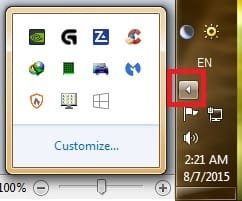
Did you click the little arrow in notification area and see if any icons there?

notification area.jpg
 

My Computer My Computer

At a glance

Windows 7 Ultimate x64 SP1AMD Phenom 2 1090T2x8GB Kingston HyperX Fury Black 1600Mhz Unga...MSI GTX 970 Gaming 4G
Computer type
PC/Desktop
Computer Manufacturer/Model Number
Custom Build
OS
Windows 7 Ultimate x64 SP1
CPU
AMD Phenom 2 1090T
Motherboard
Gigabyte GA-890FXA-UD5
Memory
2x8GB Kingston HyperX Fury Black 1600Mhz Unganged
Graphics Card(s)
MSI GTX 970 Gaming 4G
Sound Card
Realtek On-Board HD 7.1 Audio / Logitech G35
Monitor(s) Displays
3xAcer GD245HQ
Screen Resolution
1920x1080
Hard Drives
Samsung 850 Pro 512GB SSD - OS /
WD Caviar Black SATA 3 - 1 TBx2 - Dynamic RAID 0 /
WD Caviar Green SATA 2 - 640GBx2 - Dynamic RAID 0 /
WD Caviar Green SATA 2 - 640GB - Internal Backup /
Seagate Barracude SATA 3 - 3TB - External Backup/ Sync
PSU
HighPower 1000W
Case
Cooler Master HAF 932
Cooling
Noctua NH-D14
Keyboard
Logitech G19
Mouse
Logitech G500
Internet Speed
100/4 Mbit Cable (100GB quota)
Antivirus
ZoneAlarm Extreme Security / MBAM Pro / MBAE Free / SAS Free
Browser
IE 11 - Firefox - Chrome
Other Info
Logitech F710/ G27/ G940/ Z5500 // TrackIR 5 // Nvidia 3D Surround Vision
Did you click the little arrow in notification area and see if any icons there?

View attachment 368337

Yes that's one of the first things I did. and I did it lots of times, kept checking if the icon was there but it never appeared.
 

My Computer My Computer

At a glance

Windows 7 Home Premium 64bitIntel Core 2 Quad CPUNVIDIA GeForce GT 630
Computer type
PC/Desktop
Computer Manufacturer/Model Number
Packard Bell
OS
Windows 7 Home Premium 64bit
CPU
Intel Core 2 Quad CPU
Graphics Card(s)
NVIDIA GeForce GT 630
Hard Drives
Twin partitioned internal drive, 500gb each partition, 1TB external storage drive
Antivirus
Malwarebytes
Browser
Google Chrome

My Computer My Computer

At a glance

Windows 7 Ultimate x64 SP1AMD Phenom 2 1090T2x8GB Kingston HyperX Fury Black 1600Mhz Unga...MSI GTX 970 Gaming 4G
Computer type
PC/Desktop
Computer Manufacturer/Model Number
Custom Build
OS
Windows 7 Ultimate x64 SP1
CPU
AMD Phenom 2 1090T
Motherboard
Gigabyte GA-890FXA-UD5
Memory
2x8GB Kingston HyperX Fury Black 1600Mhz Unganged
Graphics Card(s)
MSI GTX 970 Gaming 4G
Sound Card
Realtek On-Board HD 7.1 Audio / Logitech G35
Monitor(s) Displays
3xAcer GD245HQ
Screen Resolution
1920x1080
Hard Drives
Samsung 850 Pro 512GB SSD - OS /
WD Caviar Black SATA 3 - 1 TBx2 - Dynamic RAID 0 /
WD Caviar Green SATA 2 - 640GBx2 - Dynamic RAID 0 /
WD Caviar Green SATA 2 - 640GB - Internal Backup /
Seagate Barracude SATA 3 - 3TB - External Backup/ Sync
PSU
HighPower 1000W
Case
Cooler Master HAF 932
Cooling
Noctua NH-D14
Keyboard
Logitech G19
Mouse
Logitech G500
Internet Speed
100/4 Mbit Cable (100GB quota)
Antivirus
ZoneAlarm Extreme Security / MBAM Pro / MBAE Free / SAS Free
Browser
IE 11 - Firefox - Chrome
Other Info
Logitech F710/ G27/ G940/ Z5500 // TrackIR 5 // Nvidia 3D Surround Vision

My Computer My Computer

At a glance

Windows 7 Home Premium 64bitIntel Core 2 Quad CPUNVIDIA GeForce GT 630
Computer type
PC/Desktop
Computer Manufacturer/Model Number
Packard Bell
OS
Windows 7 Home Premium 64bit
CPU
Intel Core 2 Quad CPU
Graphics Card(s)
NVIDIA GeForce GT 630
Hard Drives
Twin partitioned internal drive, 500gb each partition, 1TB external storage drive
Antivirus
Malwarebytes
Browser
Google Chrome
I have almost no experience with Bluetooth (my laptop has it built in but no devices for it). Can you try the dongle on another PC?
 

My Computer My Computer

At a glance

Windows 7 Ultimate x64 SP1AMD Phenom 2 1090T2x8GB Kingston HyperX Fury Black 1600Mhz Unga...MSI GTX 970 Gaming 4G
Computer type
PC/Desktop
Computer Manufacturer/Model Number
Custom Build
OS
Windows 7 Ultimate x64 SP1
CPU
AMD Phenom 2 1090T
Motherboard
Gigabyte GA-890FXA-UD5
Memory
2x8GB Kingston HyperX Fury Black 1600Mhz Unganged
Graphics Card(s)
MSI GTX 970 Gaming 4G
Sound Card
Realtek On-Board HD 7.1 Audio / Logitech G35
Monitor(s) Displays
3xAcer GD245HQ
Screen Resolution
1920x1080
Hard Drives
Samsung 850 Pro 512GB SSD - OS /
WD Caviar Black SATA 3 - 1 TBx2 - Dynamic RAID 0 /
WD Caviar Green SATA 2 - 640GBx2 - Dynamic RAID 0 /
WD Caviar Green SATA 2 - 640GB - Internal Backup /
Seagate Barracude SATA 3 - 3TB - External Backup/ Sync
PSU
HighPower 1000W
Case
Cooler Master HAF 932
Cooling
Noctua NH-D14
Keyboard
Logitech G19
Mouse
Logitech G500
Internet Speed
100/4 Mbit Cable (100GB quota)
Antivirus
ZoneAlarm Extreme Security / MBAM Pro / MBAE Free / SAS Free
Browser
IE 11 - Firefox - Chrome
Other Info
Logitech F710/ G27/ G940/ Z5500 // TrackIR 5 // Nvidia 3D Surround Vision
I have almost no experience with Bluetooth (my laptop has it built in but no devices for it). Can you try the dongle on another PC?

Just tried it. it works perfectly on my mother's windows 8 PC. i plugged it in and it installed some kind of bluetooth radio service or something. the dongle was flashing orange wand I was able to connect my phone to it. everything worked the way it was meant to but it still does not work on my windows 7 machine.

Thinking back, my machine has had problems with certain memory sticks for absolutely no reason. don't know if that helps. maybe some service or something is broken.

Also, I have had my machine clean install, there was a time about a year ago when my system died and I had to completely reinstall windows. the problems with the memory drives didn't change with that so I don't think a reformatting or clean install would change anything.
 

My Computer My Computer

At a glance

Windows 7 Home Premium 64bitIntel Core 2 Quad CPUNVIDIA GeForce GT 630
Computer type
PC/Desktop
Computer Manufacturer/Model Number
Packard Bell
OS
Windows 7 Home Premium 64bit
CPU
Intel Core 2 Quad CPU
Graphics Card(s)
NVIDIA GeForce GT 630
Hard Drives
Twin partitioned internal drive, 500gb each partition, 1TB external storage drive
Antivirus
Malwarebytes
Browser
Google Chrome
Go into BIOS settings and see if USB legacy support is enabled.
 

My Computer My Computer

At a glance

Windows 7 Ultimate x64 SP1AMD Phenom 2 1090T2x8GB Kingston HyperX Fury Black 1600Mhz Unga...MSI GTX 970 Gaming 4G
Computer type
PC/Desktop
Computer Manufacturer/Model Number
Custom Build
OS
Windows 7 Ultimate x64 SP1
CPU
AMD Phenom 2 1090T
Motherboard
Gigabyte GA-890FXA-UD5
Memory
2x8GB Kingston HyperX Fury Black 1600Mhz Unganged
Graphics Card(s)
MSI GTX 970 Gaming 4G
Sound Card
Realtek On-Board HD 7.1 Audio / Logitech G35
Monitor(s) Displays
3xAcer GD245HQ
Screen Resolution
1920x1080
Hard Drives
Samsung 850 Pro 512GB SSD - OS /
WD Caviar Black SATA 3 - 1 TBx2 - Dynamic RAID 0 /
WD Caviar Green SATA 2 - 640GBx2 - Dynamic RAID 0 /
WD Caviar Green SATA 2 - 640GB - Internal Backup /
Seagate Barracude SATA 3 - 3TB - External Backup/ Sync
PSU
HighPower 1000W
Case
Cooler Master HAF 932
Cooling
Noctua NH-D14
Keyboard
Logitech G19
Mouse
Logitech G500
Internet Speed
100/4 Mbit Cable (100GB quota)
Antivirus
ZoneAlarm Extreme Security / MBAM Pro / MBAE Free / SAS Free
Browser
IE 11 - Firefox - Chrome
Other Info
Logitech F710/ G27/ G940/ Z5500 // TrackIR 5 // Nvidia 3D Surround Vision
Go into BIOS settings and see if USB legacy support is enabled.

Hi. Sorry for slow reply, I got your message right away but when trying to get to the bios settings I broke the computer. Going to have it repaired but I think the motherboard might be broken
 

My Computer My Computer

At a glance

Windows 7 Home Premium 64bitIntel Core 2 Quad CPUNVIDIA GeForce GT 630
Computer type
PC/Desktop
Computer Manufacturer/Model Number
Packard Bell
OS
Windows 7 Home Premium 64bit
CPU
Intel Core 2 Quad CPU
Graphics Card(s)
NVIDIA GeForce GT 630
Hard Drives
Twin partitioned internal drive, 500gb each partition, 1TB external storage drive
Antivirus
Malwarebytes
Browser
Google Chrome
How did you break it? Going into BIOS is a push of a keyboard key :p
 

My Computer My Computer

At a glance

Windows 7 Ultimate x64 SP1AMD Phenom 2 1090T2x8GB Kingston HyperX Fury Black 1600Mhz Unga...MSI GTX 970 Gaming 4G
Computer type
PC/Desktop
Computer Manufacturer/Model Number
Custom Build
OS
Windows 7 Ultimate x64 SP1
CPU
AMD Phenom 2 1090T
Motherboard
Gigabyte GA-890FXA-UD5
Memory
2x8GB Kingston HyperX Fury Black 1600Mhz Unganged
Graphics Card(s)
MSI GTX 970 Gaming 4G
Sound Card
Realtek On-Board HD 7.1 Audio / Logitech G35
Monitor(s) Displays
3xAcer GD245HQ
Screen Resolution
1920x1080
Hard Drives
Samsung 850 Pro 512GB SSD - OS /
WD Caviar Black SATA 3 - 1 TBx2 - Dynamic RAID 0 /
WD Caviar Green SATA 2 - 640GBx2 - Dynamic RAID 0 /
WD Caviar Green SATA 2 - 640GB - Internal Backup /
Seagate Barracude SATA 3 - 3TB - External Backup/ Sync
PSU
HighPower 1000W
Case
Cooler Master HAF 932
Cooling
Noctua NH-D14
Keyboard
Logitech G19
Mouse
Logitech G500
Internet Speed
100/4 Mbit Cable (100GB quota)
Antivirus
ZoneAlarm Extreme Security / MBAM Pro / MBAE Free / SAS Free
Browser
IE 11 - Firefox - Chrome
Other Info
Logitech F710/ G27/ G940/ Z5500 // TrackIR 5 // Nvidia 3D Surround Vision
How did you break it? Going into BIOS is a push of a keyboard key :p

Haha it should have been. I pressed delete on startup to go into bios settings but the only one on the following list was advanced bios settings and it did not contain the USB legacy support option.
I remebered getting to the settings when my dad replaced the bios battery a couple of weeks before, but I looked up just to see if there was a better way of doing it but the responses I found also said to turn the comp off and remove the battery for 30 secs, but then it wouldn't come back on. He machine has power but nothing is appearing on the monitors and there are no bleeps from inside. So after trying lots of things I'm just going to have to get a new machine.

This also means that most likely my problem will become obsolete. Since It will probably work on the new machine. It would have really been good to solve the problem if only for the sake of anyone else experiencing the problem, but now I will likely not get to see what can fix it.
 

My Computer My Computer

At a glance

Windows 7 Home Premium 64bitIntel Core 2 Quad CPUNVIDIA GeForce GT 630
Computer type
PC/Desktop
Computer Manufacturer/Model Number
Packard Bell
OS
Windows 7 Home Premium 64bit
CPU
Intel Core 2 Quad CPU
Graphics Card(s)
NVIDIA GeForce GT 630
Hard Drives
Twin partitioned internal drive, 500gb each partition, 1TB external storage drive
Antivirus
Malwarebytes
Browser
Google Chrome
Back
Top