CSS bug in internet explorer?

DrToxic

New member
Local time
6:12 PM
Messages
105
Location
Network:\home\Suzanne\
EDIT: I know, the source code is messy....but im going to clean it up when im finished.

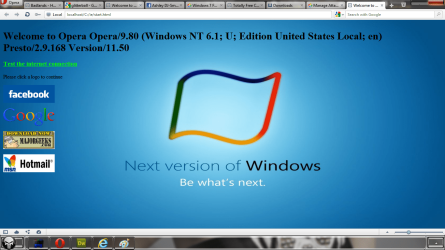
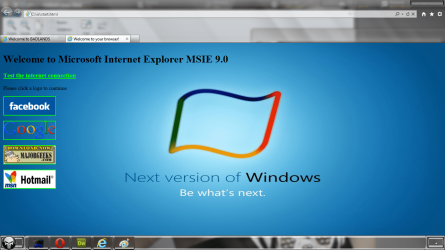
Okay, using the same piece of code for each of the four pictures attached, why am I getting one really odd result?

source files attached as zip

Top Left - Internet Explorer
bottom left - opera
top right - opera
bottom right - internet explorer

What I want, is everything to be compatible in internet explorer as well as Opera.
 

Attachments

  • untitled 0.1.png
    untitled 0.1.png
    122 KB · Views: 5
  • untitled 0.2.png
    untitled 0.2.png
    120.1 KB · Views: 3
  • Untitled1.1.png
    Untitled1.1.png
    230.1 KB · Views: 5
  • Untitled1.2.png
    Untitled1.2.png
    235.1 KB · Views: 4
  • Websites.zip
    Websites.zip
    1.9 MB · Views: 7
Last edited:

My Computer My Computer

At a glance

Micro$oft Windows 7 Ultimate x64Intel Core2Duo (2.66GHz autoclocked to 3.00GHz)4gb DDR2 (2+2gb)NVidia 8800gt + Generic Radeon
Computer Manufacturer/Model Number
HomeBuild (CodeNamed "Suzanne")
OS
Micro$oft Windows 7 Ultimate x64
CPU
Intel Core2Duo (2.66GHz autoclocked to 3.00GHz)
Motherboard
Gigabyte GA-X38-DS5
Memory
4gb DDR2 (2+2gb)
Graphics Card(s)
NVidia 8800gt + Generic Radeon
Sound Card
OnBoard (see Motherboard), Azalia codec enabled
Monitor(s) Displays
LG Flatron L197WH, Dell UltraSHARP 17", ACER V193W
Screen Resolution
1440x900x32 1440x900x32 1024x768x32
Hard Drives
500GB Sata (3.5")
500GB Sata (3.5")
160GB Sata (2.5")
PSU
NeoPower 550
Case
iCute
Cooling
Air (through Larger-than-needed heatsyncs)
Keyboard
Apple Aluminium Keyboard
Mouse
Standard Microsoft 3 button mouse with scroll wheel
Internet Speed
50mb/s Virgin Media
Other Info
got 4 PC's... need more space to list them.
The reason you've got issues with the first badlands page is because IE is rendering it in quirks rather than IE9 standards - give it a valid standards (not QUIRKS) doctype, and the page renders properly:

IE will render QUIRKS:
<!DOCTYPE HTML PUBLIC "-//W3C//DTD HTML 4.01 Transitional//EN" "http://www.w3.org/TR/html4/loose.dtd">

IE will render STANDARDS/STRICT:
<!DOCTYPE HTML PUBLIC "-//W3C//DTD HTML 4.01//EN" "http://www.w3.org/TR/html4/strict.dtd">

Looking into the second page, you've omitted the value 'border="0"' in your img src tag, hence IE draws a border around the images.

Note that neither of these pages validate, so you have some cleanup to do (which it seems you already know). IE8 and 9 are FAR less forgiving than, say, Opera, Firefox, Chrome, or Safari when you put in incorrect markup. Kind of ironic that this is the sort of thing that IE used to get flack for, but memories are short.
 
Last edited:

My Computer My Computer

At a glance

Windows 10 Pro x64Intel Core i7 4790K @ 4.5GHz32GB DDR3Nvidia GeForce GTX970
Computer type
PC/Desktop
Computer Manufacturer/Model Number
Custom
OS
Windows 10 Pro x64
CPU
Intel Core i7 4790K @ 4.5GHz
Motherboard
Asus Maximus Hero VII
Memory
32GB DDR3
Graphics Card(s)
Nvidia GeForce GTX970
Sound Card
Realtek HD Audio
Screen Resolution
1920x1200
Hard Drives
1x Samsung 250GB SSD
4x WD RE 2TB (RAIDZ)
PSU
Corsair AX760i
Case
Fractal Design Define R4
Cooling
Noctua NH-D15
The reason you've got issues with the first badlands page is because IE is rendering it in quirks rather than IE9 standards - give it a valid standards (not QUIRKS) doctype, and the page renders properly:

IE will render QUIRKS:
<!DOCTYPE HTML PUBLIC "-//W3C//DTD HTML 4.01 Transitional//EN" "http://www.w3.org/TR/html4/loose.dtd">

IE will render STANDARDS/STRICT:
<!DOCTYPE HTML PUBLIC "-//W3C//DTD HTML 4.01//EN" "http://www.w3.org/TR/html4/strict.dtd">

Looking into the second page, you've omitted the value 'border="0"' in your img src tag, hence IE draws a border around the images.

Note that neither of these pages validate, so you have some cleanup to do (which it seems you already know). IE8 and 9 are FAR less forgiving than, say, Opera, Firefox, Chrome, or Safari when you put in incorrect markup. Kind of ironic that this is the sort of thing that IE used to get flack for, but memories are short.

Useful information. Thank you. I will try this next time i'm on my laptop.

Yes, I have quite a bit of cleaning up to do.. I am surprised that you made sense of my mess... :P

Yes, it seems that IE in general just hate being alive and will pick at everything possible...

I Love opera for that.. (not advertising here), Opera just .. Works.
 

My Computer My Computer

At a glance

Micro$oft Windows 7 Ultimate x64Intel Core2Duo (2.66GHz autoclocked to 3.00GHz)4gb DDR2 (2+2gb)NVidia 8800gt + Generic Radeon
Computer Manufacturer/Model Number
HomeBuild (CodeNamed "Suzanne")
OS
Micro$oft Windows 7 Ultimate x64
CPU
Intel Core2Duo (2.66GHz autoclocked to 3.00GHz)
Motherboard
Gigabyte GA-X38-DS5
Memory
4gb DDR2 (2+2gb)
Graphics Card(s)
NVidia 8800gt + Generic Radeon
Sound Card
OnBoard (see Motherboard), Azalia codec enabled
Monitor(s) Displays
LG Flatron L197WH, Dell UltraSHARP 17", ACER V193W
Screen Resolution
1440x900x32 1440x900x32 1024x768x32
Hard Drives
500GB Sata (3.5")
500GB Sata (3.5")
160GB Sata (2.5")
PSU
NeoPower 550
Case
iCute
Cooling
Air (through Larger-than-needed heatsyncs)
Keyboard
Apple Aluminium Keyboard
Mouse
Standard Microsoft 3 button mouse with scroll wheel
Internet Speed
50mb/s Virgin Media
Other Info
got 4 PC's... need more space to list them.
Yes, but it encourages bad code. The kind of thing IE used to do and get lambasted for it, it now doesn't do - and gets crap for not doing it now ;).
 

My Computer My Computer

At a glance

Windows 10 Pro x64Intel Core i7 4790K @ 4.5GHz32GB DDR3Nvidia GeForce GTX970
Computer type
PC/Desktop
Computer Manufacturer/Model Number
Custom
OS
Windows 10 Pro x64
CPU
Intel Core i7 4790K @ 4.5GHz
Motherboard
Asus Maximus Hero VII
Memory
32GB DDR3
Graphics Card(s)
Nvidia GeForce GTX970
Sound Card
Realtek HD Audio
Screen Resolution
1920x1200
Hard Drives
1x Samsung 250GB SSD
4x WD RE 2TB (RAIDZ)
PSU
Corsair AX760i
Case
Fractal Design Define R4
Cooling
Noctua NH-D15
The reason you've got issues with the first badlands page is because IE is rendering it in quirks rather than IE9 standards - give it a valid standards (not QUIRKS) doctype, and the page renders properly:

IE will render QUIRKS:
<!DOCTYPE HTML PUBLIC "-//W3C//DTD HTML 4.01 Transitional//EN" "http://www.w3.org/TR/html4/loose.dtd">

IE will render STANDARDS/STRICT:
<!DOCTYPE HTML PUBLIC "-//W3C//DTD HTML 4.01//EN" "http://www.w3.org/TR/html4/strict.dtd">

Looking into the second page, you've omitted the value 'border="0"' in your img src tag, hence IE draws a border around the images.

Note that neither of these pages validate, so you have some cleanup to do (which it seems you already know). IE8 and 9 are FAR less forgiving than, say, Opera, Firefox, Chrome, or Safari when you put in incorrect markup. Kind of ironic that this is the sort of thing that IE used to get flack for, but memories are short.

Okay, I'm on the laptop, I've tried the method you described, didn't make any difference.
What I have done, and it has worked (partly), is un-commented some style sheet for IE6. (I knew it, they only change how IE looks!! :D ).

Code:
<!-- The above code doesn't work in Internet Explorer 6. To address this, we use a conditional comment to specify an alternative style sheet for IE 6 -->
<style type="text/css">
html {overflow-y:hidden;}
body {overflow-y:auto;}
#page-background {position:absolute; z-index:-1;}
#content {position:static;padding:10px;}
</style>

Now the picture is full-screen, but doesn't stay there. (when you scroll the page, the picture moves with the text, where as I want the background image to stay on the visible screen).
 

My Computer My Computer

At a glance

Micro$oft Windows 7 Ultimate x64Intel Core2Duo (2.66GHz autoclocked to 3.00GHz)4gb DDR2 (2+2gb)NVidia 8800gt + Generic Radeon
Computer Manufacturer/Model Number
HomeBuild (CodeNamed "Suzanne")
OS
Micro$oft Windows 7 Ultimate x64
CPU
Intel Core2Duo (2.66GHz autoclocked to 3.00GHz)
Motherboard
Gigabyte GA-X38-DS5
Memory
4gb DDR2 (2+2gb)
Graphics Card(s)
NVidia 8800gt + Generic Radeon
Sound Card
OnBoard (see Motherboard), Azalia codec enabled
Monitor(s) Displays
LG Flatron L197WH, Dell UltraSHARP 17", ACER V193W
Screen Resolution
1440x900x32 1440x900x32 1024x768x32
Hard Drives
500GB Sata (3.5")
500GB Sata (3.5")
160GB Sata (2.5")
PSU
NeoPower 550
Case
iCute
Cooling
Air (through Larger-than-needed heatsyncs)
Keyboard
Apple Aluminium Keyboard
Mouse
Standard Microsoft 3 button mouse with scroll wheel
Internet Speed
50mb/s Virgin Media
Other Info
got 4 PC's... need more space to list them.
Do you have links to the problem pages?
 

My Computer My Computer

At a glance

MS Windows 7 Professional 64-bit SP1AMD FX(tm)-6100 Six-Core Processor Socket AM3...8.00 GB Dual-Channel DDR3 @ 802MHz (11-11-11-...NVIDIA GeForce GTX 560 Ti
Computer type
PC/Desktop
Computer Manufacturer/Model Number
Self Build
OS
MS Windows 7 Professional 64-bit SP1
CPU
AMD FX(tm)-6100 Six-Core Processor Socket AM3+ (942)
Motherboard
ASUSTeK COMPUTER INC. SABERTOOTH 990FX (AM3r2)
Memory
8.00 GB Dual-Channel DDR3 @ 802MHz (11-11-11-36) 1.5Volts
Graphics Card(s)
NVIDIA GeForce GTX 560 Ti
Sound Card
Onboard Realtek HD
Monitor(s) Displays
shimian (1920x1080@60Hz)
Screen Resolution
1920*1080
Hard Drives
OCZ-AGIL ITY3 SATA Disk Device 120GB
PSU
Corsair TX 750
Case
Corsair
Cooling
WaterCooled
Keyboard
Microsoft Wired
Mouse
Logitech USB Optical TiltWheel Mouse
Internet Speed
Realtek PCIe GBE Family Controller 20MB*1MB
Antivirus
Avast
Browser
Firefox
Other Info
150GB Internal Hard Drive for Backing Up Important Files -
Hauppauge Nova-DT Dual DVB-T Tuner Device (+IR) -
USB PC Camera with Mic (SN9C105)
Do you have links to the problem pages?

download the ZIP file I uploaded in a previous post in this thread. they're the sites im having problems with.
 

My Computer My Computer

At a glance

Micro$oft Windows 7 Ultimate x64Intel Core2Duo (2.66GHz autoclocked to 3.00GHz)4gb DDR2 (2+2gb)NVidia 8800gt + Generic Radeon
Computer Manufacturer/Model Number
HomeBuild (CodeNamed "Suzanne")
OS
Micro$oft Windows 7 Ultimate x64
CPU
Intel Core2Duo (2.66GHz autoclocked to 3.00GHz)
Motherboard
Gigabyte GA-X38-DS5
Memory
4gb DDR2 (2+2gb)
Graphics Card(s)
NVidia 8800gt + Generic Radeon
Sound Card
OnBoard (see Motherboard), Azalia codec enabled
Monitor(s) Displays
LG Flatron L197WH, Dell UltraSHARP 17", ACER V193W
Screen Resolution
1440x900x32 1440x900x32 1024x768x32
Hard Drives
500GB Sata (3.5")
500GB Sata (3.5")
160GB Sata (2.5")
PSU
NeoPower 550
Case
iCute
Cooling
Air (through Larger-than-needed heatsyncs)
Keyboard
Apple Aluminium Keyboard
Mouse
Standard Microsoft 3 button mouse with scroll wheel
Internet Speed
50mb/s Virgin Media
Other Info
got 4 PC's... need more space to list them.
Back
Top