Ctrl+Alt+Del Annoyance

Rand Marks

Banned
Local time
2:18 PM
Messages
96
Hi,

I am a veteran XP user who has recently (and grudgingly) switched to 7. One of the myriad annoyances that I have encountered in this inflated version of Windows is the welcome screen that appears when I press Ctrl+Alt+Del, patronizingly presenting me with the option to lock my computer, switch user, log off, change my password, or run the Task Manager, rather than directly running the Task Manager like it’s supposed to do. I am aware of Ctrl+Shit+Esc and programs like AutoHotkey, but I don’t want to replace Ctrl+Alt+Del, and I shouldn’t have to. Is it possible to make this hotkey run the Task Manager directly without displaying that loathsome option screen?

Rand Marks
 

My Computer

OS
Windows 7 Ultimate SP1 64-bit
No. Learn to use CTRL + SHIFT + ESC to launch Task Manager, this is the real hot key for it, even in Windows XP. CTRL + ALT + DELETE is a special key command that is not capable of being captured except for Windows itself. What you go used to was a default configuration setting in consumer versions of Windows XP, that "loathsome option screen" is what is opened on Windows NT.
 

My Computer

Computer type
PC/Desktop
Computer Manufacturer/Model Number
Alienware Aurora ALX R4
OS
Windows 10 Pro (x64)
CPU
Intel Core i7-3930K (3.2GHz - 4.5GHz)
Motherboard
Alienware Aurora-R4 x79
Memory
4x Samsung 4GB PC3-12800 DDR3 (16GB 1600MHz)
Graphics Card(s)
Nvidia Geforce GTX 690
Sound Card
SteelSeries Siberia Elite
Monitor(s) Displays
Dell UltraSharp U3011
Screen Resolution
2560x1600
Hard Drives
Samsung 850 Pro 256 GB, Seagate 1TB Desktop Hybrid HDD, 2x Western Digital 4TB Green HDD
PSU
875W Some Dell PSU <.<
Case
Alienware Aurora ALX
Cooling
Custom Liquid Cooling (EK CPU & GPU blocks) dual EK 480RAD
Keyboard
Logitech G710+ Mechanical
Mouse
Logitech G700s
Internet Speed
Verizon Fios (50 mbps average)
Other Info
Server: Intel NUC D54250WYK: i5-4250U, 16GB, 256 GB mSATA, Windows Server 2012 R2
As Logiearth told you above, the correct keyboard shortcut both on XP and Seven to open Task Manager is CTRL + SHIFT + ESC, not CTRL + ALT + DEL as you mention.

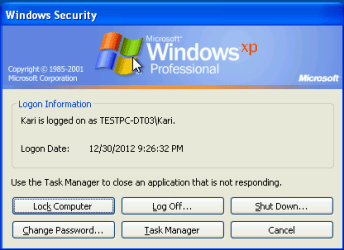
If you press CTRL + ALT + DEL on XP you get this:

WinSec_1.png

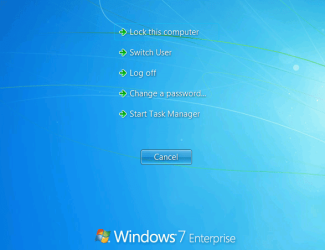
It's the same you get with that keyboard shortcut on Seven, only graphical layout is different:

WinSec_2.png

Kari
 

My Computer

Computer type
Laptop
Computer Manufacturer/Model Number
HP ENVY 17-1150eg
OS
Windows 10 Pro x64 EN-GB
CPU
1.6 GHz Intel Core i7-720QM Processor
Memory
6 GB
Graphics Card(s)
ATI Mobility Radeon HD 5850 Graphics
Sound Card
Beats sound system with integrated subwoofer
Monitor(s) Displays
17" laptop display, 22" LED and 32" Full HD TV through HDMI
Screen Resolution
1600*900 (1), 1920*1080 (2&3)
Hard Drives
Internal: 2 x 500 GB SATA Hard Disk Drive 7200 rpm
External: 2TB for backups, 3TB USB3 network drive for media
Cooling
As Envy runs a bit warm, I have it on a Cooler Master pad
Keyboard
Logitech diNovo Media Desktop Laser (bluetooth)
Mouse
Logitech Performance Mouse MX
Internet Speed
50/10 Mbps VDSL
Antivirus
Windows Defender 4.3.9431.0
Browser
Maxthon 3.5.2., IE11
Sorry, it's a typo from my side. I of course meant CTRL + ALT + DEL, not CTRL + SHIFT + DEL.

My typo fixed, post is now correct. You, however, are still wrong.

Kari
 

My Computer

Computer type
Laptop
Computer Manufacturer/Model Number
HP ENVY 17-1150eg
OS
Windows 10 Pro x64 EN-GB
CPU
1.6 GHz Intel Core i7-720QM Processor
Memory
6 GB
Graphics Card(s)
ATI Mobility Radeon HD 5850 Graphics
Sound Card
Beats sound system with integrated subwoofer
Monitor(s) Displays
17" laptop display, 22" LED and 32" Full HD TV through HDMI
Screen Resolution
1600*900 (1), 1920*1080 (2&3)
Hard Drives
Internal: 2 x 500 GB SATA Hard Disk Drive 7200 rpm
External: 2TB for backups, 3TB USB3 network drive for media
Cooling
As Envy runs a bit warm, I have it on a Cooler Master pad
Keyboard
Logitech diNovo Media Desktop Laser (bluetooth)
Mouse
Logitech Performance Mouse MX
Internet Speed
50/10 Mbps VDSL
Antivirus
Windows Defender 4.3.9431.0
Browser
Maxthon 3.5.2., IE11
You, however, are still wrong.
Hi,

In the 11 years that I have used Windows XP (Home, Professional, SP1-SP3, what have you), Ctrl+Alt+Del has always run the Task Manager directly without displaying any such screen as in your image. Please check your facts before posting ill-informed statements.
 

My Computer

OS
Windows 7 Ultimate SP1 64-bit
The default action for CTRL + ALT + DEL on Windows XP is as told in Logiearth's and my posts. The default action for CTRL + SHIFT + ESC is to open Task Manager.

It's true that on XP if the Fast User Switching is enabled also the shortcut CTRL + ALT + DEL opens Task Manager. However, this is not default action for said keyboard shortcut and must be separately enabled (Control-Alt-Delete - Wikipedia, the free encyclopedia).

So, as mentioned, the default shortcut to open Task Manager on all Windows versions since Windows 2000 is CTRL + SHIFT + ESC.

With your Windows experience it should not be too hard to learn to use the default shortcut, although different than on XP?

Kari
 

My Computer

Computer type
Laptop
Computer Manufacturer/Model Number
HP ENVY 17-1150eg
OS
Windows 10 Pro x64 EN-GB
CPU
1.6 GHz Intel Core i7-720QM Processor
Memory
6 GB
Graphics Card(s)
ATI Mobility Radeon HD 5850 Graphics
Sound Card
Beats sound system with integrated subwoofer
Monitor(s) Displays
17" laptop display, 22" LED and 32" Full HD TV through HDMI
Screen Resolution
1600*900 (1), 1920*1080 (2&3)
Hard Drives
Internal: 2 x 500 GB SATA Hard Disk Drive 7200 rpm
External: 2TB for backups, 3TB USB3 network drive for media
Cooling
As Envy runs a bit warm, I have it on a Cooler Master pad
Keyboard
Logitech diNovo Media Desktop Laser (bluetooth)
Mouse
Logitech Performance Mouse MX
Internet Speed
50/10 Mbps VDSL
Antivirus
Windows Defender 4.3.9431.0
Browser
Maxthon 3.5.2., IE11
And unfortunately for you, there is no known way of changing that behavior apart from Autohotkey.
 

My Computer

Computer type
PC/Desktop
Computer Manufacturer/Model Number
Custom Build
OS
Windows 7 Ultimate x64 Service Pack 1
CPU
AMD Athlon II x4 Propus 2.9 GHz
Motherboard
ASRock N68C-GS FX
Memory
2 x 4GB Corsair XMS 3 DDR3 -1600 CL9
Graphics Card(s)
AMD Radeon HD 5850 1GB GDDR5
Sound Card
On-board 6-Channel HD Audio
Monitor(s) Displays
18' LG Flatron E1942TC-BN on DVI, 18' Chimei 95ND on HDMI
Screen Resolution
1366 x 768 x 2
Hard Drives
1 x 500 GB Seagate
1 x 1 TB Western Digital Caviar Green
1 x 1 TB Hitachi Touro Mobile USB 3
PSU
Seasonic S12II 520W
Case
Generic with Cable Management
Cooling
Deep Cool Gammaxx 200
Keyboard
Dragonwar Desert Eagle
Mouse
Logitech B85
Internet Speed
5Mb/s DL, 0.9Mb/s UL
Antivirus
ESET Nod32
Browser
Google Chrome 64 Bit
Other Info
LG G4 H818P - Rooted with Xposed Framework
you could start task manager and whilst it is open, right click the task manager icon on the taskbar and select pin to taskbar. no need for shortcuts or hotkeys default or otherwise.
 

My Computer

Computer Manufacturer/Model Number
Hewlett packard/p6512uk
OS
Microsoft Windows 7 Home Premium 64-bit 7600
CPU
IIx4 amd athelon 635 processor
Motherboard
FOXCONN 2AA9
Memory
2x2gb
Graphics Card(s)
ati radeon HD 5450
Sound Card
(1) Realtek High Definition Audio (2) AMD High Definition
Monitor(s) Displays
samsung lcd tv 32"
Screen Resolution
1360x 768
Hard Drives
(1) WDC WD10 01FAES-60Z2A0 SATA Disk Device (2) Maxtor OneTouch USB Device (3) ST310003 33AS USB Device (4) WD My Book 1111 USB Device
PSU
?
Cooling
air!
Keyboard
wireless hp
Mouse
wireless Hp,optical
Internet Speed
1.10mb/s
Antivirus
MSE
Browser
Firefox
Boohbah's idea is a good one. I use two mouse clicks: right click Taskbar for context menu, left click Task Manager to open it.

Kari
 

My Computer

Computer type
Laptop
Computer Manufacturer/Model Number
HP ENVY 17-1150eg
OS
Windows 10 Pro x64 EN-GB
CPU
1.6 GHz Intel Core i7-720QM Processor
Memory
6 GB
Graphics Card(s)
ATI Mobility Radeon HD 5850 Graphics
Sound Card
Beats sound system with integrated subwoofer
Monitor(s) Displays
17" laptop display, 22" LED and 32" Full HD TV through HDMI
Screen Resolution
1600*900 (1), 1920*1080 (2&3)
Hard Drives
Internal: 2 x 500 GB SATA Hard Disk Drive 7200 rpm
External: 2TB for backups, 3TB USB3 network drive for media
Cooling
As Envy runs a bit warm, I have it on a Cooler Master pad
Keyboard
Logitech diNovo Media Desktop Laser (bluetooth)
Mouse
Logitech Performance Mouse MX
Internet Speed
50/10 Mbps VDSL
Antivirus
Windows Defender 4.3.9431.0
Browser
Maxthon 3.5.2., IE11
The default action for CTRL + ALT + DEL on Windows XP is as told in Logiearth's and my posts.

Hi,

This can’t be so. I have installed Windows XP more than 100 times, and after every fresh installation, before any personal configurations or customizations, Ctrl+Alt+Del simply ran the Task Manager, nothing else.

With your Windows experience it should not be too hard to learn to use the default shortcut, although different than on XP?

I’m too stubborn. I am a creature of habit, and I have grown permanently accustomed to Ctrl+Alt+Del and its true default function: running the Windows Task Manager.

you could start task manager and whilst it is open, right click the task manager icon on the taskbar and select pin to taskbar. no need for shortcuts or hotkeys default or otherwise.
Hi,

Yes, that is a good mouse shortcut. I have an AutoHotkey hotkey (or hotclick?) that runs the Task Manager by right and left clicking at the same time while the mouse is over TrayClockWClass1 (the clock on the taskbar). That is not sufficient, however, because when I am in "keyboard mode", it is too inconvenient to switch to "mouse mode" for one simple task. I guess I’ll just have to settle with my custom Ctrl+LWin+Del and Ctrl+Shift+Del hotkeys. Oh, how I will miss you, Ctrl+Alt+Del!
 
Last edited:

My Computer

OS
Windows 7 Ultimate SP1 64-bit
Learning CTRL + SHIFT + ESC instead of CTRL + ALT + DEL has its benefits anyways. If you attempt to get to the Task Manager via CTRL + ALT + DEL within a virtual Windows installation (such as on a Mac), nothing will happen at all since, as logicearth correctly stated, CTRL + ALT + DEL can only be captured by Windows itself.
 

My Computer

Computer Manufacturer/Model Number
Dell
OS
Windows 7 Home 32 bit
This can’t be so. I have installed Windows XP more than 100 times, and after every fresh installation, before any personal configurations or customizations, Ctrl+Alt+Del simply ran the Task Manager, nothing else.

You've only used the consumer version of Windows XP and the default configuration based on those consumer versions. Besides, CTRL + SHIFT + ESC can be done with a single hand so much easier. Comfortable using the shortcut, thumb presses both SHIFT and CTRL while a finger extends and presses ESC, fits well when you keep your hands at standard typing placements.
 

My Computer

Computer type
PC/Desktop
Computer Manufacturer/Model Number
Alienware Aurora ALX R4
OS
Windows 10 Pro (x64)
CPU
Intel Core i7-3930K (3.2GHz - 4.5GHz)
Motherboard
Alienware Aurora-R4 x79
Memory
4x Samsung 4GB PC3-12800 DDR3 (16GB 1600MHz)
Graphics Card(s)
Nvidia Geforce GTX 690
Sound Card
SteelSeries Siberia Elite
Monitor(s) Displays
Dell UltraSharp U3011
Screen Resolution
2560x1600
Hard Drives
Samsung 850 Pro 256 GB, Seagate 1TB Desktop Hybrid HDD, 2x Western Digital 4TB Green HDD
PSU
875W Some Dell PSU <.<
Case
Alienware Aurora ALX
Cooling
Custom Liquid Cooling (EK CPU & GPU blocks) dual EK 480RAD
Keyboard
Logitech G710+ Mechanical
Mouse
Logitech G700s
Internet Speed
Verizon Fios (50 mbps average)
Other Info
Server: Intel NUC D54250WYK: i5-4250U, 16GB, 256 GB mSATA, Windows Server 2012 R2
This can’t be so. I have installed Windows XP more than 100 times, and after every fresh installation, before any personal configurations or customizations, Ctrl+Alt+Del simply ran the Task Manager, nothing else.

You've only used the consumer version of Windows XP and the default configuration based on those consumer versions. Besides, CTRL + SHIFT + ESC can be done with a single hand so much easier. Comfortable using the shortcut, thumb presses both SHIFT and CTRL while a finger extends and presses ESC, fits well when you keep your hands at standard typing placements.
Hi, logicearth,

The hand technique works well, but I refuse to allow myself to get used to such an unfamiliar practice. I’ll just stick with Ctrl+LWin+Del. It’s close enough, I suppose.
 

My Computer

OS
Windows 7 Ultimate SP1 64-bit
...You should honestly get yourself used to it. Its the only keyboard shortcut in Windows NT that opens the Task Manager.
 

My Computer

Computer type
PC/Desktop
Computer Manufacturer/Model Number
Alienware Aurora ALX R4
OS
Windows 10 Pro (x64)
CPU
Intel Core i7-3930K (3.2GHz - 4.5GHz)
Motherboard
Alienware Aurora-R4 x79
Memory
4x Samsung 4GB PC3-12800 DDR3 (16GB 1600MHz)
Graphics Card(s)
Nvidia Geforce GTX 690
Sound Card
SteelSeries Siberia Elite
Monitor(s) Displays
Dell UltraSharp U3011
Screen Resolution
2560x1600
Hard Drives
Samsung 850 Pro 256 GB, Seagate 1TB Desktop Hybrid HDD, 2x Western Digital 4TB Green HDD
PSU
875W Some Dell PSU <.<
Case
Alienware Aurora ALX
Cooling
Custom Liquid Cooling (EK CPU & GPU blocks) dual EK 480RAD
Keyboard
Logitech G710+ Mechanical
Mouse
Logitech G700s
Internet Speed
Verizon Fios (50 mbps average)
Other Info
Server: Intel NUC D54250WYK: i5-4250U, 16GB, 256 GB mSATA, Windows Server 2012 R2
Seriously, I don't see the point for being stubborn for Task Manager shortcut when half of the Control Panel options are in different places and you have to learn them all as well or you'll be worthless as techsupport.
 

My Computer

Computer type
PC/Desktop
Computer Manufacturer/Model Number
custom built
OS
Win 7 Pro 64-bit 7601
CPU
AMD Phenom 9650 QuadCore, revision DR-B3
Motherboard
ASUS M4A78
Memory
5 GB yes I run 2x 2GB and 1x 1GB, different brand, spank me.
Graphics Card(s)
NVIDIA GeForce 9800 GT 512 Mb, unknown manufacturer.
Sound Card
Crappy Realtek Integrated Audio
Monitor(s) Displays
Fujitsu Siemens P19-3P
Screen Resolution
1280 x 1024 x 32 bits @ 60 Hz Oh yeah, 4:3 rocks!
Hard Drives
(1) MAXTOR S TM3320613AS SATA Disk Device (2) STM35004 18AS SATA Disk Device (3) TOSHIBA USB 2.5"-HDD
PSU
whatever, around 450w
Case
Scavenged from old company PC, 10+ years old
Cooling
CPU fan, GPU fan, case fan, nothing fancy
Keyboard
Microsoft, PS/2, white.
Mouse
Optical, logitec.
Internet Speed
effective max speeds: 70-ish kB/s down 30-ish kB/s up
Antivirus
Avira, free edition.
Browser
Firefox with FXChrome to make it look like Google Chrome :P
Other Info
Was discarded by previous owner due to "horrible performance".
Was running Win Xp from a IDE drive. Yeah. Was a pain.
SATA II drive and Win7 and it zips away! Yay!
Hi, guys,

I can’t say I understand the problem. Why should I use Ctrl+Shit+Esc if I am more comfortable with Ctrl+LWin+Del? :huh:
 

My Computer

OS
Windows 7 Ultimate SP1 64-bit
besides, what is the LWIN key you talk about? is the one between left ctrl and alt? Ctrl+that key+Del does not open task manager on my machine, ctrl+shift+esc does.
 

My Computer

Computer type
PC/Desktop
Computer Manufacturer/Model Number
custom built
OS
Win 7 Pro 64-bit 7601
CPU
AMD Phenom 9650 QuadCore, revision DR-B3
Motherboard
ASUS M4A78
Memory
5 GB yes I run 2x 2GB and 1x 1GB, different brand, spank me.
Graphics Card(s)
NVIDIA GeForce 9800 GT 512 Mb, unknown manufacturer.
Sound Card
Crappy Realtek Integrated Audio
Monitor(s) Displays
Fujitsu Siemens P19-3P
Screen Resolution
1280 x 1024 x 32 bits @ 60 Hz Oh yeah, 4:3 rocks!
Hard Drives
(1) MAXTOR S TM3320613AS SATA Disk Device (2) STM35004 18AS SATA Disk Device (3) TOSHIBA USB 2.5"-HDD
PSU
whatever, around 450w
Case
Scavenged from old company PC, 10+ years old
Cooling
CPU fan, GPU fan, case fan, nothing fancy
Keyboard
Microsoft, PS/2, white.
Mouse
Optical, logitec.
Internet Speed
effective max speeds: 70-ish kB/s down 30-ish kB/s up
Antivirus
Avira, free edition.
Browser
Firefox with FXChrome to make it look like Google Chrome :P
Other Info
Was discarded by previous owner due to "horrible performance".
Was running Win Xp from a IDE drive. Yeah. Was a pain.
SATA II drive and Win7 and it zips away! Yay!
besides, what is the LWIN key you talk about? is the one between left ctrl and alt? Ctrl+that key+Del does not open task manager on my machine, ctrl+shift+esc does.
LWin = left Windows key

It’s an AutoHotkey hotkey.
 

My Computer

OS
Windows 7 Ultimate SP1 64-bit
Back
Top