Custom OEM Information -- Beyond the Logo

LDV

New member
Local time
7:28 PM
Messages
2
Hello Sevenforums!

I am an IT professional at a start up IT company. We have both home and business users, with many businesses on a yearly service contract.

I am currently working on a registry file that will change the system properties to encourage the return of our clients -- on my test machine (my office desktop) I have the system properties displayed as so:

5n4v9k.png


It is almost complete (excuse the bad image quality -- that will be changed) I have not yet gotten the reg file to make active changes into the registry either, so I am not sure if my coding is correct, but I can fix that later.

My main questions here:

1) How can I change the "Manufacturer" key to be shown and displayed as something like "Service", "Support", etc. -- If I change the name of the Manufacturer key in the registry, it stops displaying, my guess is that there is another key / dependency in the reg I need to edit as well. If anyone knows how to edit that, it would be MUCH appreciated.

2) The website link takes the client to our website, but I cannot manage to add more information like phone number, hours, location, etc. (A good example of this is SONY's system properties)

I have looked all over the web for help on this and have yet to find any guides on changing the text for "Manufacturer"

After I have the system properties the way I like them, I would like to make a script that will change the correct registry keys, and deploy a bmp file to the corresponding location. If anyone has more advice on how to do this, or a link to a detailed guide on how to do it -- it would be much appreciated
 

My Computer My Computer

Computer type
PC/Desktop
Computer Manufacturer/Model Number
Custom
OS
Windows 7 Ultimate x64
CPU
i5
Motherboard
GA-z77x-UDTP
Memory
16gb
Graphics Card(s)
MSI Nvidia GTX 660
Hard Drives
Plenty
Antivirus
Myself

My Computer My Computer

Computer type
PC/Desktop
Computer Manufacturer/Model Number
Golden Mk. I.4
OS
Windows 10 Pro x64 ; Xubuntu x64
CPU
Intel i7 860 @ 2.80 GHz O/C'ed to 4.0GHz
Motherboard
Gigabyte P55A-UD3R Rev.1. Award BIOS F13
Memory
16GB Corsair Vengance DDR3 @ 661 MHz Dual Channel (9-9-9-24)
Graphics Card(s)
EVGA NVidia GTX 560 1024MB
Sound Card
Realtek Integrated
Monitor(s) Displays
Dual Samsung SyncMaster 2494HS
Screen Resolution
1920*1080 and 1920*1080
Hard Drives
1*Samsung 840 EVO 120GB SSD;
1*OCZ Vertex 2 60GB SSD;
2*Samsung F3 SpinPoint 1TB in RAID0;
1*Samsung F1 SpinPoint 1TB;
2*Western Digital 1TB External USB 3.0
1*Western Digital 500GB External USB 3.0
1*Seagate 500GB External USB 2.0
PSU
Thermaltake ToughPower QFan 750W
Case
Thermaltake Element S VK60001W2Z
Cooling
Corsair H60 Water Cooling, 2*230mm and 2*80mm case fans
Keyboard
Logitech G110
Mouse
Logitech MX518
That will definitely be helpful for phone numbers, however it still does not explain how to change the "Manufacturer" label. Thank you for the info though, I will update my reg tomorrow morning.
 

My Computer My Computer

Computer type
PC/Desktop
Computer Manufacturer/Model Number
Custom
OS
Windows 7 Ultimate x64
CPU
i5
Motherboard
GA-z77x-UDTP
Memory
16gb
Graphics Card(s)
MSI Nvidia GTX 660
Hard Drives
Plenty
Antivirus
Myself
Only specific registry value names, such as "Manufacturer", are supported and these are provided in the article linked to by Golden. The label name will match the value name. You cannot change this.
 

My Computer My Computer

Computer type
PC/Desktop
Computer Manufacturer/Model Number
HP
OS
Windows 7 Pro 64 bit
CPU
Xeon W3520
Memory
8 GB
Graphics Card(s)
Nvidia Geforce 210
This is a reg file I use on one of my desktops to set custom OEM info on the system screen.

Windows Registry Editor Version 5.00
[HKEY_LOCAL_MACHINE\SOFTWARE\Microsoft\Windows\CurrentVersion\OEMInformation]
"Manufacturer"="Asus"
"Model"="M2N68-AM SE2"
"Logo"="C:\\Windows\\System32\\oemlogo.bmp"
 

My Computer My Computer

Computer type
PC/Desktop
Computer Manufacturer/Model Number
Home Built
OS
Windows 10 Education 64 bit
CPU
AMD Phenom II X4 980 Black Edition Deneb 3.7GHz
Motherboard
Asus M4N68T-M V2 µATX Motherboard
Memory
8GB 4GBx2 Kingston PC10600 DDR3 1333 Memory
Graphics Card(s)
Zotac NVIDIA Geforce GT640 2 Gig DDR3 PCIe
Sound Card
VIA VT1708s High Definition Audio 8-channel Onboard
Monitor(s) Displays
22" LG E2242 1080p and 2 19" I-INC AG191D
Screen Resolution
1280x1024 - 1920x1080 - 1280x1024
Hard Drives
Crucial M100 256 GB SSD and 500 GB WD Blue SATA
PSU
Thermaltake TR 620
Case
Power Up Black ATX Mid-Tower Case
Cooling
Stock heatsink and fan
Keyboard
Logitech Wireless K350 Wave
Mouse
Logitech Wireless M570 Trackman Wheel
Internet Speed
80 Mbps Down 30 Mbps Up
Antivirus
Windows Defender
Browser
Internet Explorer 11
Other Info
HP DVD1040e Lightscribe - External USB2
Here's a more up to date one. OEMInformation.reg

Windows Registry Editor Version 5.00
[HKEY_LOCAL_MACHINE\Software\Microsoft\Windows\CurrentVersion\OEMInformation]
"Model"="M2N68-AM SE2"
"Logo"="C:\\windows\\ASUS\\ASUSLOGO.bmp"
"Manufacturer"="ASUSTeK Computer Inc."
"SupportURL"="http://www.asus.com"
"

The file resides in sources > $oem$ > $$ > setup > scripts
The Logo is in sources > $oem$ > $$ > ASUS
It's all done during the install. There's also an oobe.cmd file in scripts folder. I didn't write that myself.

@echo off
start /w regedit /s %systemroot%\setup\scripts\OEMInformation.reg
del /F /Q %systemroot%\setup\scripts\OEMInformation.reg

:Cleanup
del /F /Q %systemroot%\setup\scripts\oobe.cmd
 

My Computer My Computer

Computer type
PC/Desktop
Computer Manufacturer/Model Number
Home Built
OS
Windows 10 Education 64 bit
CPU
AMD Phenom II X4 980 Black Edition Deneb 3.7GHz
Motherboard
Asus M4N68T-M V2 µATX Motherboard
Memory
8GB 4GBx2 Kingston PC10600 DDR3 1333 Memory
Graphics Card(s)
Zotac NVIDIA Geforce GT640 2 Gig DDR3 PCIe
Sound Card
VIA VT1708s High Definition Audio 8-channel Onboard
Monitor(s) Displays
22" LG E2242 1080p and 2 19" I-INC AG191D
Screen Resolution
1280x1024 - 1920x1080 - 1280x1024
Hard Drives
Crucial M100 256 GB SSD and 500 GB WD Blue SATA
PSU
Thermaltake TR 620
Case
Power Up Black ATX Mid-Tower Case
Cooling
Stock heatsink and fan
Keyboard
Logitech Wireless K350 Wave
Mouse
Logitech Wireless M570 Trackman Wheel
Internet Speed
80 Mbps Down 30 Mbps Up
Antivirus
Windows Defender
Browser
Internet Explorer 11
Other Info
HP DVD1040e Lightscribe - External USB2
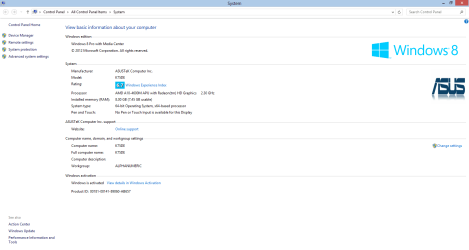
I just edited a new one for my Laptop and ran it manually, here's a screen shoot.
OEM Capture.PNG

Clicking the blue "online support" brings up the ASUS website page in IE.
 

My Computer My Computer

Computer type
PC/Desktop
Computer Manufacturer/Model Number
Home Built
OS
Windows 10 Education 64 bit
CPU
AMD Phenom II X4 980 Black Edition Deneb 3.7GHz
Motherboard
Asus M4N68T-M V2 µATX Motherboard
Memory
8GB 4GBx2 Kingston PC10600 DDR3 1333 Memory
Graphics Card(s)
Zotac NVIDIA Geforce GT640 2 Gig DDR3 PCIe
Sound Card
VIA VT1708s High Definition Audio 8-channel Onboard
Monitor(s) Displays
22" LG E2242 1080p and 2 19" I-INC AG191D
Screen Resolution
1280x1024 - 1920x1080 - 1280x1024
Hard Drives
Crucial M100 256 GB SSD and 500 GB WD Blue SATA
PSU
Thermaltake TR 620
Case
Power Up Black ATX Mid-Tower Case
Cooling
Stock heatsink and fan
Keyboard
Logitech Wireless K350 Wave
Mouse
Logitech Wireless M570 Trackman Wheel
Internet Speed
80 Mbps Down 30 Mbps Up
Antivirus
Windows Defender
Browser
Internet Explorer 11
Other Info
HP DVD1040e Lightscribe - External USB2
Back
Top