Custom 'Save as' destinations??

targnik

I Mod Mobile ^^
Member
Local time
5:02 AM
Messages
56
Location
Middle Earth


Anyone know a way to add 'custom' i.e. other save as locations?? :cry: (highlighted area)

I save most of my files in /user/user/downloads/****

unfortunately this isnt an option & I have to do several clicks to get to where I want :mad:

T.I.A
 

My Computer

Computer type
PC/Desktop
Computer Manufacturer/Model Number
Desktop: Prebuilt & Laptop: Toshiba Notebook
OS
Windows 7 - Home Premium - 64bit (x2)
CPU
Pentium (Dual) E6600 @ 3.06GHz & Intel i5-2410M @ 2.3GHz
Motherboard
ASUS P5G41C-M LX & Toshiba L750
Memory
4GB & 4GB
Graphics Card(s)
GeForce 210 & Intel HD Graphics Family
Sound Card
Integrated (x2)
Monitor(s) Displays
AOC 2051 & Generic PnP
Screen Resolution
1280 x 1024 & 1366 x 768
Hard Drives
ST3500418AS ATA - 500GB,

Toshiba MK6465GSXN - 600GB
PSU
520 WATT & 120 WATT
Case
Unknown (x2)
Cooling
Unknown (x2)
Keyboard
Standard PS/2 (x2)
Mouse
Microsoft USB Intellimouse & Touchpad
Internet Speed
11 Mbps (DL) 1 Mbps (UL)
Antivirus
F-Secure (ISP provided) & Kapersky
Browser
Google Chrome (x2)
Other Info
Modem: Dynalink RTA1025W
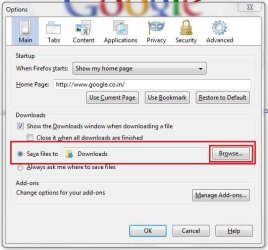
In Firefox :

Tools > Options > Main .
Capture.JPG

Now browse to your custom location ....

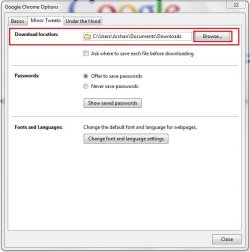
In Chrome :
Customize and Control Google Chrome > Options > Minor Tweaks
Capture1.JPG
Now browse to your custom location ..... permanently in both the cases .

Sorry I dont use IE , and so cannot tell the option for it specifically :o.... I guess somebody will help in that field .
 

My Computer

Computer type
PC/Desktop
Computer Manufacturer/Model Number
Self Assembled
OS
Microsoft Windows 10 Pro Insider Preview 64-bit
CPU
Intel(R) Core(TM) i3-4130 CPU @ 3.40GHz
Motherboard
Gigabyte Technology Co., Ltd. B85M-D3H
Memory
Corsair Vengence 4GB x2 (8.00GB Dual-Channel DDR3 @ 798MHz)
Graphics Card(s)
2047MB GeForce GTS 450 (ZOTAC International)
Sound Card
Onboard (Realtek High Definition Audio)
Monitor(s) Displays
LG Flatron E2040T
Screen Resolution
1600x900
Hard Drives
Western Digital 1 TB
Seagate 500 GB
PSU
Corsair VS550
Case
Cooler Master K380
Cooling
Cooler Master Seidon 120V Plus
Keyboard
Logitech MK260r
Mouse
Logitech MK260r
Internet Speed
PMPL Broadband
Antivirus
Windows Defender + MBAM
Browser
Firefox
Other Info
Dell Studio 15" Laptop
If you are talking about ie8, its very simple. When you get the prompt to choose a download location, then in the right pane, browse to that particular drive/folder, highlight it, then drag it to the left pane towards "Favorites" till you see the mouseover tip "Create a link....". Then let go and you'll see that folder under Favorites in the left pane.

Now whenever you want to download, just select that location from the left pane.
 

My Computer

Computer Manufacturer/Model Number
Too many to describe...
OS
Windows 7 x64 pro/ Windows 7 x86 Pro/ XP SP3 x86
doh

shuda mentioned using Opera ^^ :eek:

PS - Am aware you can configure destination via options... but isnt that just more clicking?? ;-)

I'd like other options in side panel... I assumed this was an OS based prob. rather than a Browser issue...

T.I.A [X2]
 

My Computer

Computer type
PC/Desktop
Computer Manufacturer/Model Number
Desktop: Prebuilt & Laptop: Toshiba Notebook
OS
Windows 7 - Home Premium - 64bit (x2)
CPU
Pentium (Dual) E6600 @ 3.06GHz & Intel i5-2410M @ 2.3GHz
Motherboard
ASUS P5G41C-M LX & Toshiba L750
Memory
4GB & 4GB
Graphics Card(s)
GeForce 210 & Intel HD Graphics Family
Sound Card
Integrated (x2)
Monitor(s) Displays
AOC 2051 & Generic PnP
Screen Resolution
1280 x 1024 & 1366 x 768
Hard Drives
ST3500418AS ATA - 500GB,

Toshiba MK6465GSXN - 600GB
PSU
520 WATT & 120 WATT
Case
Unknown (x2)
Cooling
Unknown (x2)
Keyboard
Standard PS/2 (x2)
Mouse
Microsoft USB Intellimouse & Touchpad
Internet Speed
11 Mbps (DL) 1 Mbps (UL)
Antivirus
F-Secure (ISP provided) & Kapersky
Browser
Google Chrome (x2)
Other Info
Modem: Dynalink RTA1025W

My Computer

Computer type
PC/Desktop
Computer Manufacturer/Model Number
696
OS
7 Ultimate x64 sp1
CPU
Intel i5-4690K
Motherboard
GA Z97X Gaming 5
Memory
16Gb HyperX fury
Graphics Card(s)
R9-270x 2Gb
Sound Card
On Board
Monitor(s) Displays
2443NW
Screen Resolution
1920x1200
Hard Drives
WD5000 -
WD5001 -
WD1002
PSU
Cft-650-14cs
Case
Very Big Case
Cooling
stock
Keyboard
G11
Mouse
Logitech
Internet Speed
Adsl
Browser
FF
Other Info
RWD

My Computer

Computer type
PC/Desktop
Computer Manufacturer/Model Number
Desktop: Prebuilt & Laptop: Toshiba Notebook
OS
Windows 7 - Home Premium - 64bit (x2)
CPU
Pentium (Dual) E6600 @ 3.06GHz & Intel i5-2410M @ 2.3GHz
Motherboard
ASUS P5G41C-M LX & Toshiba L750
Memory
4GB & 4GB
Graphics Card(s)
GeForce 210 & Intel HD Graphics Family
Sound Card
Integrated (x2)
Monitor(s) Displays
AOC 2051 & Generic PnP
Screen Resolution
1280 x 1024 & 1366 x 768
Hard Drives
ST3500418AS ATA - 500GB,

Toshiba MK6465GSXN - 600GB
PSU
520 WATT & 120 WATT
Case
Unknown (x2)
Cooling
Unknown (x2)
Keyboard
Standard PS/2 (x2)
Mouse
Microsoft USB Intellimouse & Touchpad
Internet Speed
11 Mbps (DL) 1 Mbps (UL)
Antivirus
F-Secure (ISP provided) & Kapersky
Browser
Google Chrome (x2)
Other Info
Modem: Dynalink RTA1025W
"Place0"="Desktop" -> Desktop
"Place1"="F:\\" -> F drive
"Place2"="G:\\Joe Files\\Download"
"Place3"="G:\\Joe Files\\Pictures"
"Place4"="G:\\Joe Files\\Document"

Replace red things with Ur own
edit in notepad
and rename Placesbar.txt to .Placesbar.reg
7 x64 ultimate
 

Attachments

My Computer

Computer type
PC/Desktop
Computer Manufacturer/Model Number
696
OS
7 Ultimate x64 sp1
CPU
Intel i5-4690K
Motherboard
GA Z97X Gaming 5
Memory
16Gb HyperX fury
Graphics Card(s)
R9-270x 2Gb
Sound Card
On Board
Monitor(s) Displays
2443NW
Screen Resolution
1920x1200
Hard Drives
WD5000 -
WD5001 -
WD1002
PSU
Cft-650-14cs
Case
Very Big Case
Cooling
stock
Keyboard
G11
Mouse
Logitech
Internet Speed
Adsl
Browser
FF
Other Info
RWD
"Place0"="Desktop" -> Desktop
"Place1"="F:\\" -> F drive
"Place2"="G:\\Joe Files\\Download"
"Place3"="G:\\Joe Files\\Pictures"
"Place4"="G:\\Joe Files\\Document"

Replace red things with Ur own
edit in notepad
and rename Placesbar.txt to .Placesbar.reg
7 x64 ultimate

M8!! uv obviously never done that urself ;-P

Added ok... but, also got rid of all other save as places!!

Even backed up my reg b4 hand & it wouldnt fix it!!

Had to do restore to system check point from earlier today...

This is exactly why I dont like fudging with registry 0.0
 

My Computer

Computer type
PC/Desktop
Computer Manufacturer/Model Number
Desktop: Prebuilt & Laptop: Toshiba Notebook
OS
Windows 7 - Home Premium - 64bit (x2)
CPU
Pentium (Dual) E6600 @ 3.06GHz & Intel i5-2410M @ 2.3GHz
Motherboard
ASUS P5G41C-M LX & Toshiba L750
Memory
4GB & 4GB
Graphics Card(s)
GeForce 210 & Intel HD Graphics Family
Sound Card
Integrated (x2)
Monitor(s) Displays
AOC 2051 & Generic PnP
Screen Resolution
1280 x 1024 & 1366 x 768
Hard Drives
ST3500418AS ATA - 500GB,

Toshiba MK6465GSXN - 600GB
PSU
520 WATT & 120 WATT
Case
Unknown (x2)
Cooling
Unknown (x2)
Keyboard
Standard PS/2 (x2)
Mouse
Microsoft USB Intellimouse & Touchpad
Internet Speed
11 Mbps (DL) 1 Mbps (UL)
Antivirus
F-Secure (ISP provided) & Kapersky
Browser
Google Chrome (x2)
Other Info
Modem: Dynalink RTA1025W
Question:

Does anyone know location of registry file that controls 'My Places' for save as??

I know I said I don't like messing with reg.... but!

If I can add the ones that I want to this file eg. "C:\\User\Users\Downloads"

Then I'm editing rather than overwriting as the suggested method ended up doing...

I know realise I could try to find out paths of default places and add these to this sort of 'patch' file...

But, editing the current one seems like the easiest way to go [to me anyhow]

T.I.A
 

My Computer

Computer type
PC/Desktop
Computer Manufacturer/Model Number
Desktop: Prebuilt & Laptop: Toshiba Notebook
OS
Windows 7 - Home Premium - 64bit (x2)
CPU
Pentium (Dual) E6600 @ 3.06GHz & Intel i5-2410M @ 2.3GHz
Motherboard
ASUS P5G41C-M LX & Toshiba L750
Memory
4GB & 4GB
Graphics Card(s)
GeForce 210 & Intel HD Graphics Family
Sound Card
Integrated (x2)
Monitor(s) Displays
AOC 2051 & Generic PnP
Screen Resolution
1280 x 1024 & 1366 x 768
Hard Drives
ST3500418AS ATA - 500GB,

Toshiba MK6465GSXN - 600GB
PSU
520 WATT & 120 WATT
Case
Unknown (x2)
Cooling
Unknown (x2)
Keyboard
Standard PS/2 (x2)
Mouse
Microsoft USB Intellimouse & Touchpad
Internet Speed
11 Mbps (DL) 1 Mbps (UL)
Antivirus
F-Secure (ISP provided) & Kapersky
Browser
Google Chrome (x2)
Other Info
Modem: Dynalink RTA1025W
Back
Top